---
description: 了解如何將您的 Salesforce 帳戶與 respond.io 連接以無縫存取和查看您的聯絡人欄位。
title: Salesforce
image: https://assets1-proxy.respond.io/api/v1/image/assets%2F11f7a662b80a4675973850b067c01fa5%2F3f43c48b21b24f4e8b02b100c0c8fab0
---
[新的我們剛完成了6,250萬美元的 B 輪融資! 🎉 這對您意味著什麼](https://respond.io/blog/respond-io-raises-62-million-series-b)
幫助我... ⌘
1. [All Collections >](/tw/help)
2. [ 集成 >](/tw/help/integrations)
3. Salesforce
# Salesforce
**Salesforce 整合** 讓您可以將您的 Salesforce 帳戶與您的 **respond.io** 工作區連接起來。
透過此集成,您可以:
* **在 respond.io 中直接查看 Salesforce 聯絡人欄位** 如電子郵件、電話號碼、潛在客戶來源等。
* **透過存取 收件匣 和 聯絡人 模組內的聯絡人資料來減少平台切換** 。
## 你需要什麼
* **管理員** 在 Salesforce 中存取。
* **所有者** 或 **管理員** 在 respond.io 中訪問。
* **API 存取** 到您的 Salesforce 帳號。
## 設定集成
### 安裝 Salesforce 集成
1. 在你的 **respond.io** 工作區中,前往 **工作區設定** \> **整合**。
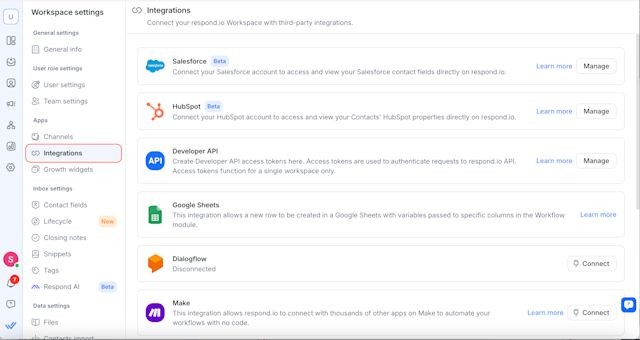
2\. 找到 Salesforce 並選擇 **管理**。
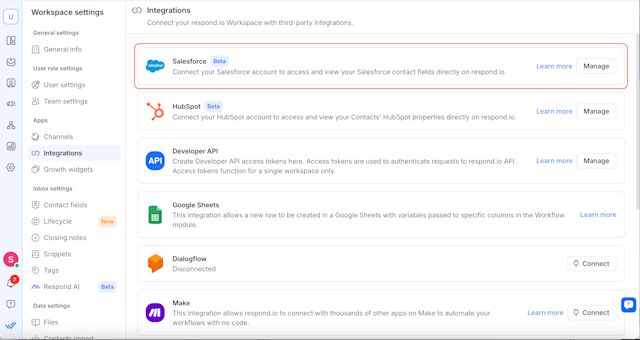
3\. 點選 **連接 Salesforce**。
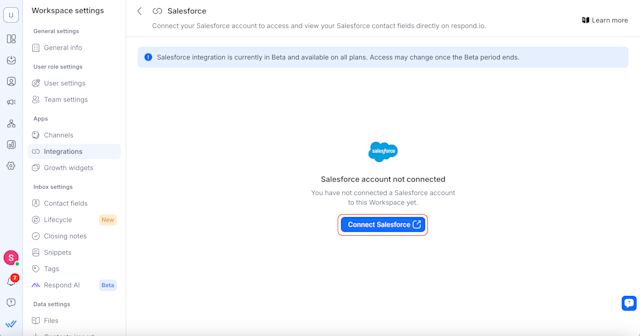
4\. 將開啟一個新分頁 - 登入您的 Salesforce 帳戶並授權 respond.io。
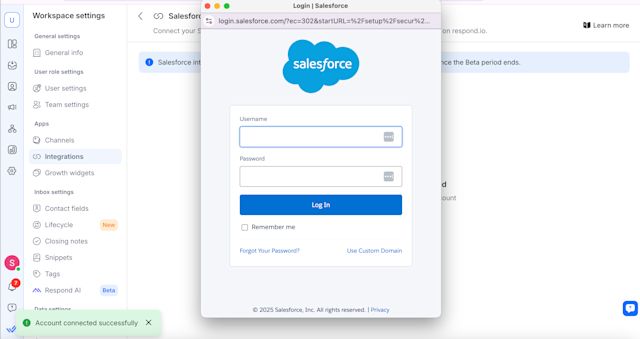
5\. 連線後,您將看到一條包含您的 Salesforce 帳戶詳細資訊的確認訊息。
> 注意:每個 respond.io 工作區只能連接到 **一個** Salesforce 帳戶。
## 在 respond.io 中查看 Salesforce 聯絡人字段
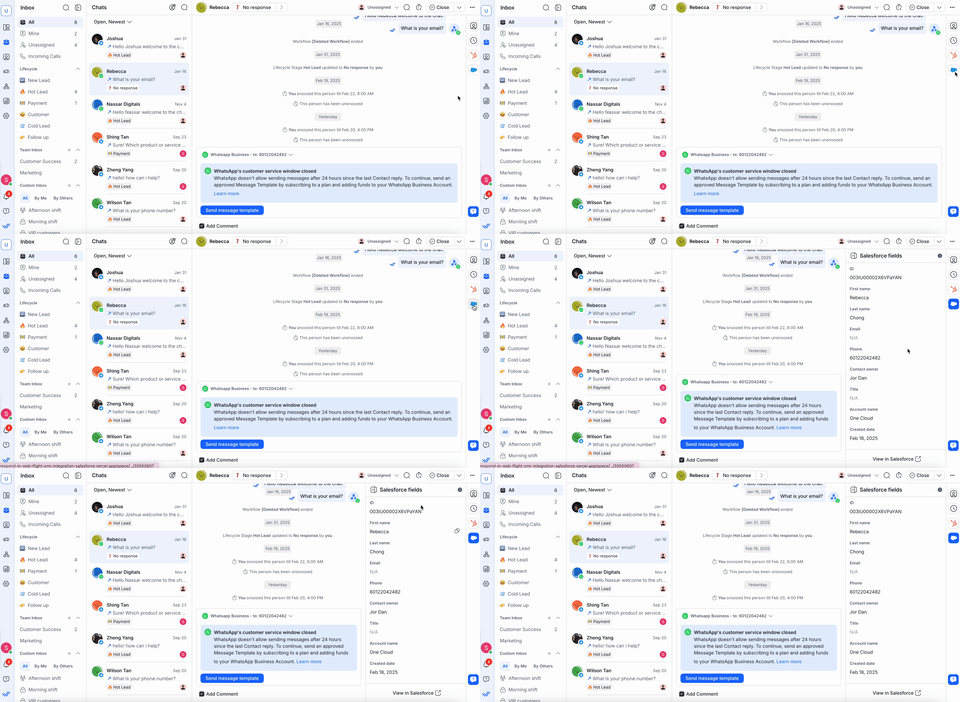
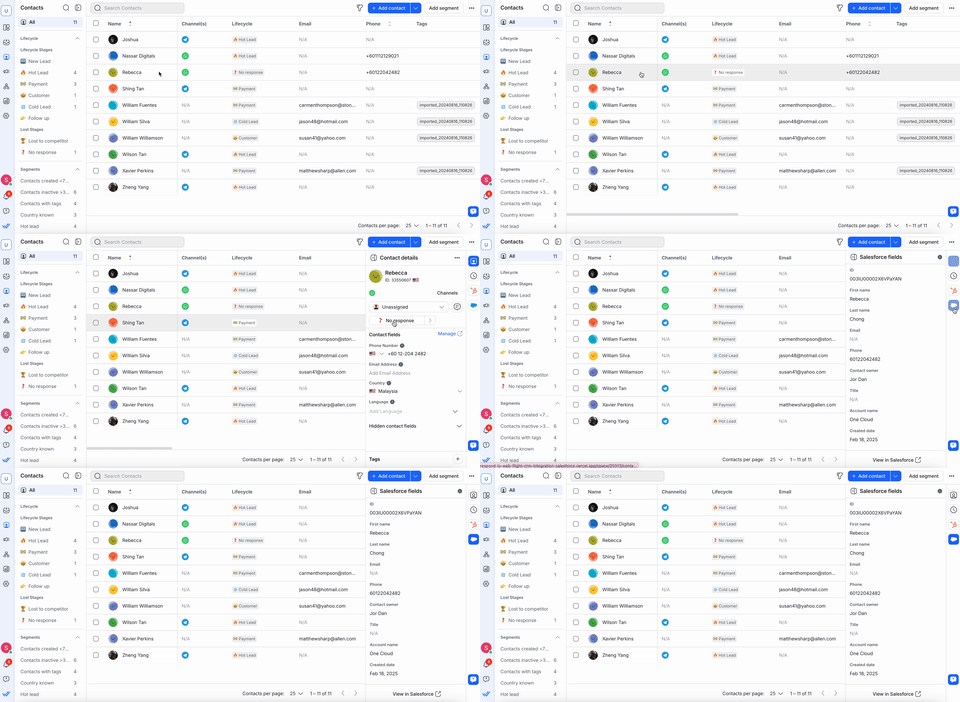
您可以在 **收件匣** 和 **聯絡人** 模組中查看 **Salesforce 欄位** 。
#### 收件匣模組
* 在 **收件匣**中開啟對話。
* 點擊聯絡人即可在右側邊欄中查看他們的 **Salesforce 欄位** 。
#### 聯絡人模組
* 導航至 **聯絡人**。
* 選擇一個聯絡人以在右側邊欄中查看他們的 **Salesforce 欄位** 。
對於 **收件匣** 和 **聯絡人** 模組:
* 如果發現 **符合**,Salesforce 欄位會自動出現。
* 如果 **沒有找到匹配項**,請驗證聯絡人的 **電子郵件或電話號碼** 在 respond.io 和 Salesforce 之間是否完全匹配。
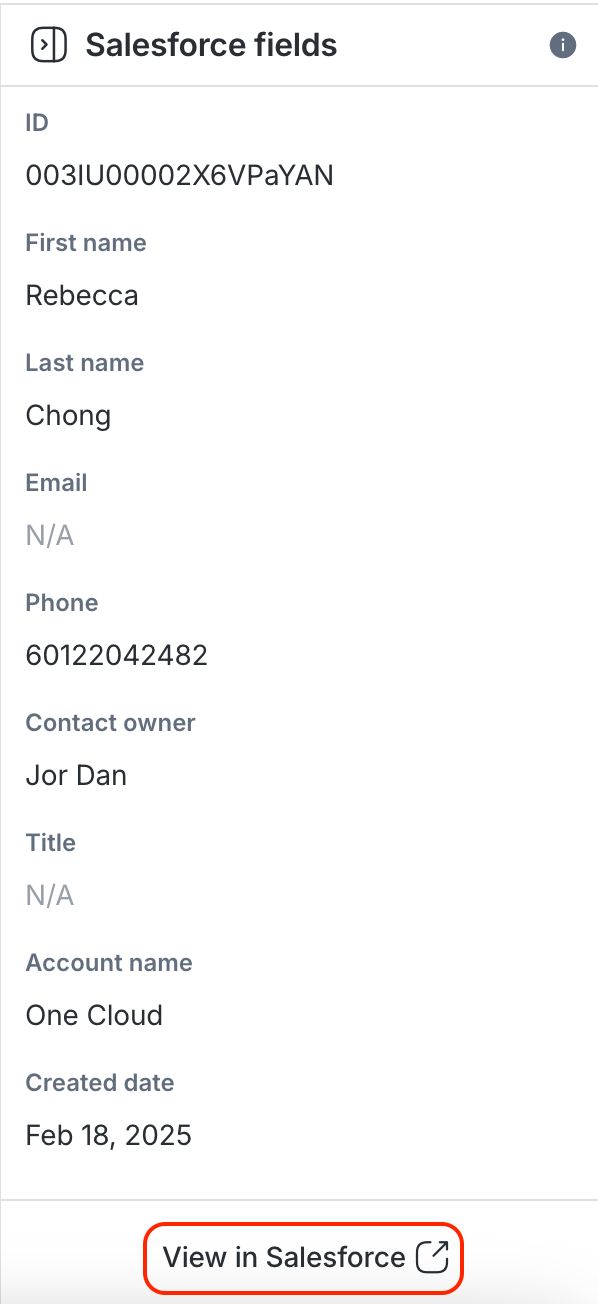
* 您可以點擊 **在 Salesforce 中查看** 以在 Salesforce 中開啟完整的設定檔。
> **注意**: respond.io 中的 Salesforce 欄位是 **唯讀的**。 若要編輯,請直接在 Salesforce 中更新它們。
## 在 respond.io 中選擇和編輯 Salesforce 聯絡人字段
現在您可以選擇特定的 Salesforce 聯絡人欄位顯示在您的 respond.io 工作區中,並直接在 respond.io 中編輯這些欄位。
如果您已經在 respond.io 中連接了 Salesforce 帳戶,則需要刷新權限才能啟用這些更新。
**方法如下:**
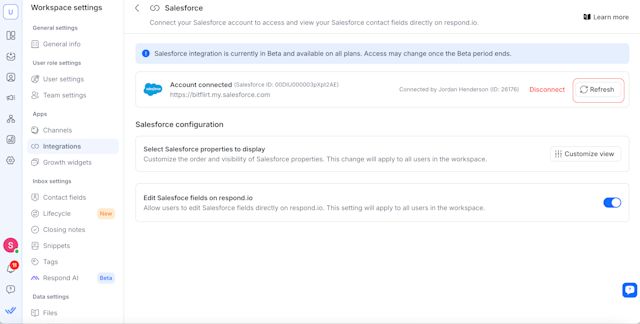
1. 前往 **工作區設定** \> **整合**
2. 選擇 **Salesforce**
3. **刷新** 您的存取令牌
### 選擇 Salesforce 聯絡人字段
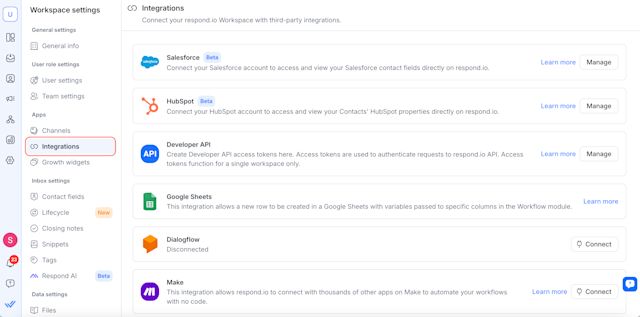
1. 導航至 **工作區設定 > 整合**。
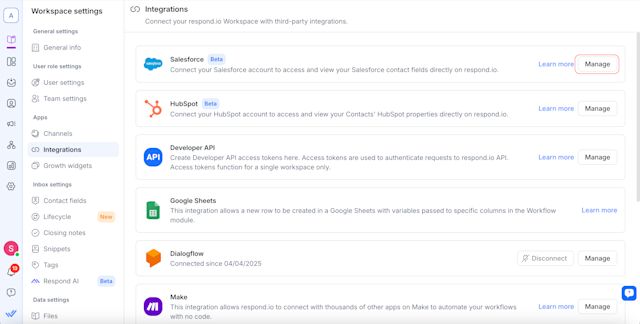
2. 點選 Salesforce 旁邊的 **管理** 。
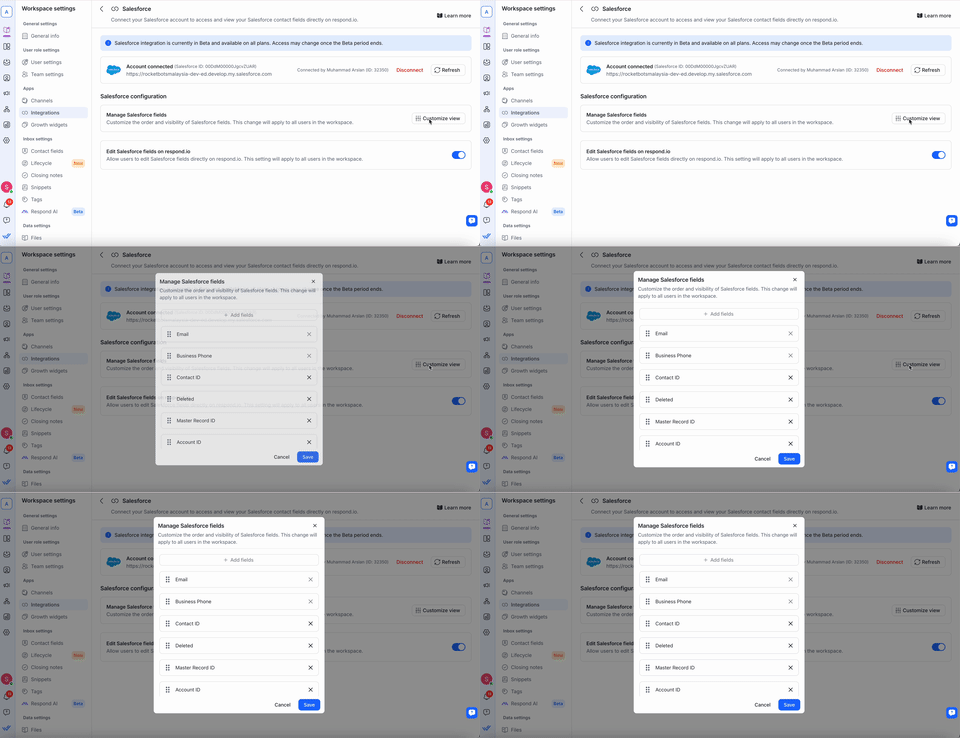
3. 在 **管理 Salesforce 欄位**下,按一下 **自訂檢視** 以選擇要在 respond.io 上的收件匣和聯絡人模組中顯示的聯絡人欄位。
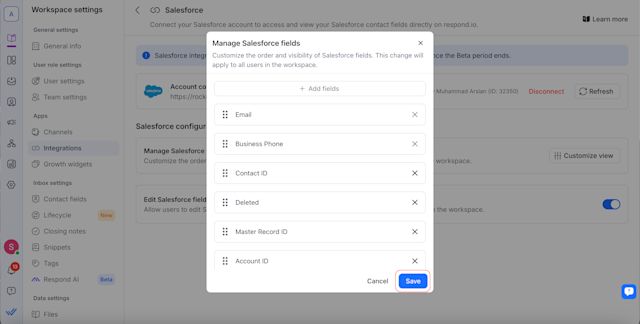
4. 點選 **儲存** 以套用您的偏好設定。
### 編輯 Salesforce 聯絡人字段
現在您可以直接在 respond.io 中編輯某些 Salesforce 聯絡人欄位。
若要啟用此功能,請前往 **管理 Salesforce 欄位** 並開啟切換開關。 一旦啟用,工作區中的所有使用者都將能夠從 respond.io 編輯選定的 Salesforce 欄位。
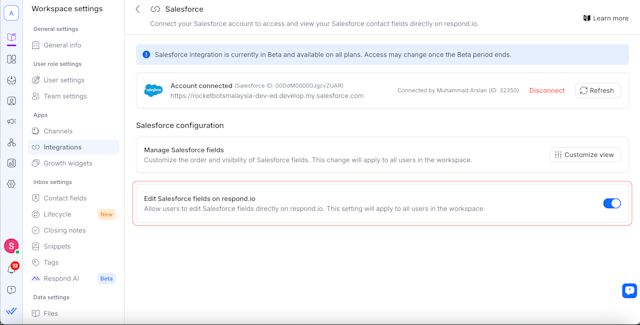
不可編輯的欄位保持唯讀狀態,必須直接在 Salesforce 中更新。
**重要提示:**
* 電子郵件和電話號碼欄位不可編輯。
* 確保在 respond.io 和 Salesforce 中具有適當的權限來編輯欄位。
* 如果變更沒有立即出現,由於 API 快取,請在 1 分鐘後重新整理頁面。
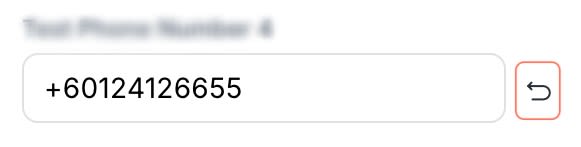
若要放棄更改,請選擇每個可編輯欄位旁的 **恢復** 圖示。 這可以在 **收件匣** 和 **聯絡人** 模組中存取。
#### 收件匣模組
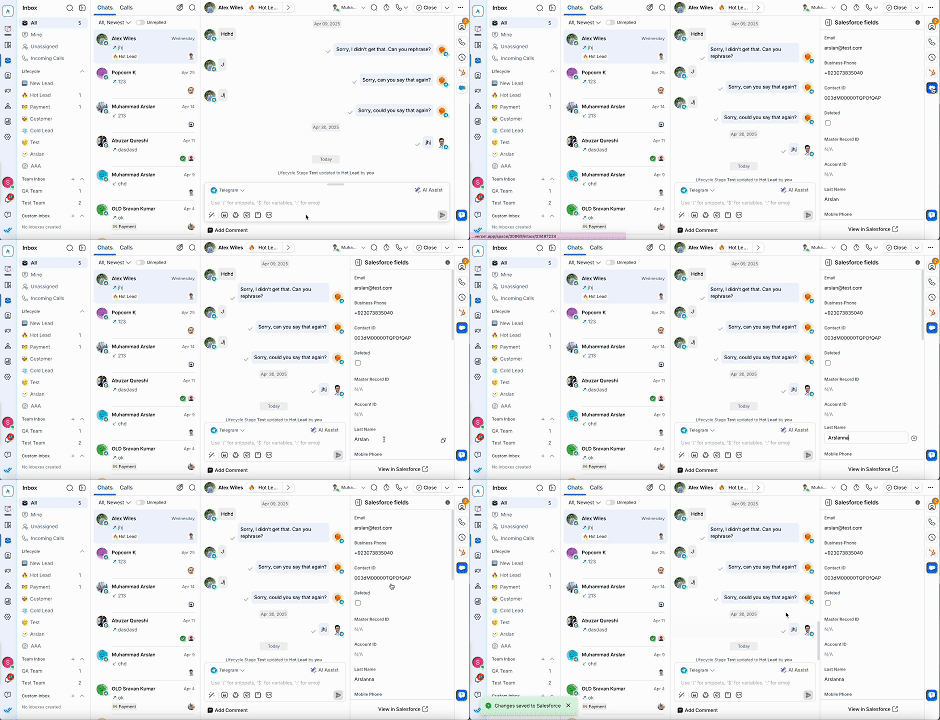
* 打開 **收件匣** 並選擇一個聯絡人。
* 選擇 Salesforce 圖示。
* 點擊您想要編輯的 Salesforce 屬性並更新資訊。 您的變更將立即同步到 Salesforce。
#### 聯絡人模組
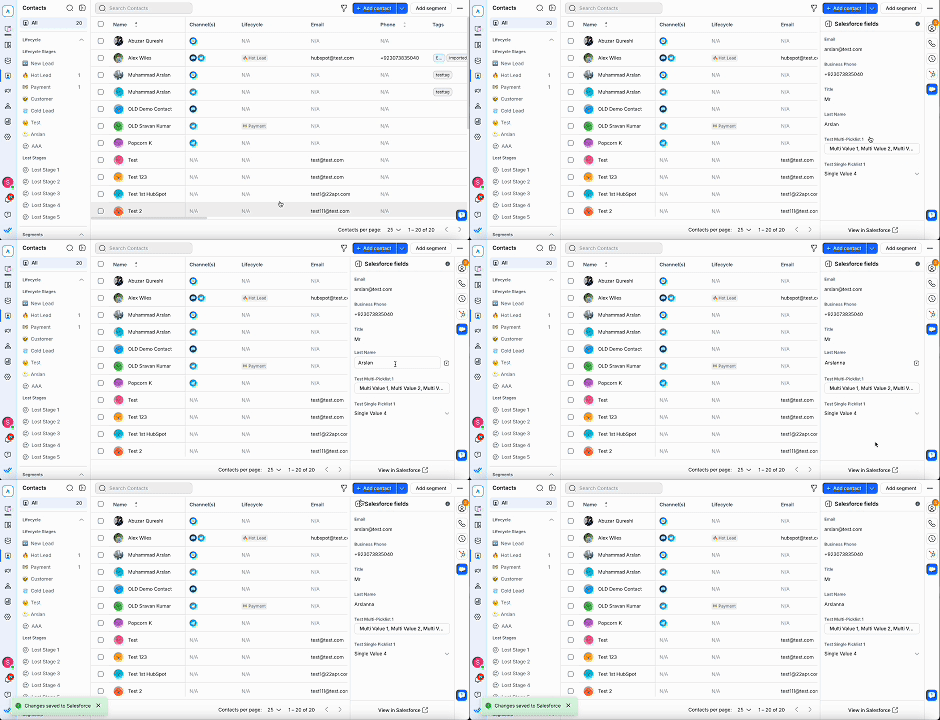
* 造訪 **聯絡人** 模組並選擇一個聯絡人。
* 選擇 Salesforce 圖示。
* 點擊您想要編輯的 Salesforce 屬性並更新資訊。 您的變更將立即同步到 Salesforce。
## 自動建立 Salesforce 聯絡人
Salesforce 中建立的任何新聯絡人也將自動在 respond.io 中建立,確保您的 CRM 和訊息傳遞平台始終保持同步。 這提高了工作流程效率並幫助您更快地回應新線索。
### 如何啟用
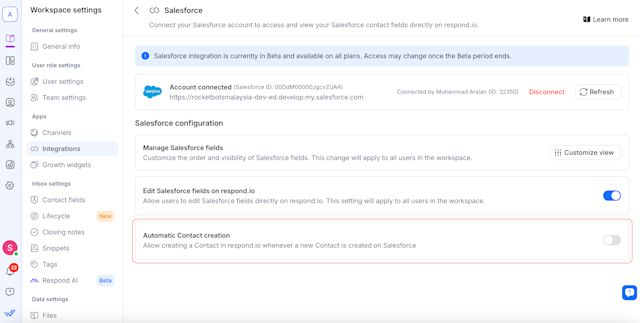
設定方法:
1. 前往 **工作區設定** \> **整合** \> **Salesforce**。
2. 開啟 **自動建立聯絡人** 切換。
### 可選設定
啟用主切換時會出現兩個可選複選框:
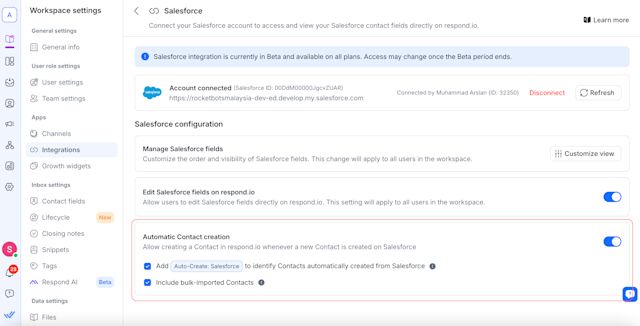
#### 新增「自動建立:Salesforce」標籤
* 自動向透過此整合建立的聯絡人新增標籤「自動建立:Salesforce」。
* 這有助於識別聯絡人的來源,但 **不會觸發 respond.io 上的工作流程** 。
* 此標籤列在 **標籤** 模組中,無法手動刪除或編輯。
#### 包括批量匯入的聯絡人
* 勾選後,透過 **大量匯入** 新增至 Salesforce 的聯絡人也會在 respond.io 上建立。
* 這些聯絡人 **不計入 MAC(每月活躍聯絡人)** 和 **不會觸發工作流程** 除非發起對話。
## 常見問題和疑難排解
###
我可以連接多個 Salesforce 帳號嗎?
不可以,每個工作區只能連接到 **一個** Salesforce 帳戶。
###
我可以在 respond.io 中編輯 Salesforce 資料嗎?
不,Salesforce 聯絡人欄位在 respond.io 中是 **只讀** 。 直接在 Salesforce 中編輯它們。
> 我們目前僅與 **Salesforce 聯絡物件**整合。 **引導物件** 不支援。
###
為什麼我在 respond.io 工作區中看不到來自 Salesforce 的最新編輯?
聯絡資訊 **快取 1 分鐘** ,以限制過多的 API 請求並減少達到 Salesforce 的 API 速率限制的機會。
在那一分鐘內,對 Salesforce 中的聯絡人的任何直接編輯都會立即顯示在 respond.io 中,而不是 **而不是** 。 1分鐘後,您可以重新整理頁面以顯示最新資訊。
###
為什麼我無法在 respond.io 中查看我的 Salesforce 聯絡人欄位?
如果您無法在我們的收件匣或聯絡人模組中查看您的 Salesforce 聯絡人字段,請檢查 **respond.io** 中的電子郵件或電話號碼是否與 Salesforce 中的電子郵件或電話號碼完全匹配。 **即使是諸如空格或特殊字元之類的細微差別,也可能導致欄位無法顯示。**
例如,如果電話號碼在 Salesforce 中儲存為 **“12 3”** 但在 respond.io 中儲存為 **“123”** ,則該聯絡人的信息將不會顯示在 respond.io 中。 若要解決此問題,請更新 Salesforce 中的聯絡人屬性以符合 respond.io 中使用的格式。
###
所有定價方案都支援 Salesforce 整合嗎?
是的,在測試期間,我們所有的定價計劃都可以進行整合。 一旦 Beta 測試結束,訪問可能會受到限制,僅限某些/更高級的計劃。
###
如果我在 Salesforce 中更新聯絡人的電子郵件或電話號碼會發生什麼事?
* 如果找到 **符合**,則會顯示聯絡人的屬性。
* 如果 **沒有找到匹配**,請確保 respond.io 中的電子郵件或電話號碼與 Salesforce 完全匹配。
###
如果 respond.io 中缺少聯絡人,會發生什麼事?
* 確保 **電子郵件或電話號碼** 存在於 Salesforce 中。
* 由於快取的原因,Salesforce 中的變更可能需要 **幾分鐘** 才能反映在 respond.io 中。
###
為什麼我會看到「需要 Salesforce API 存取」錯誤?
* 您的 Salesforce 帳戶 **必須具有 API 存取權限** 才能使用整合。
* 聯絡您的 **Salesforce 管理員** 以啟用 API 權限。
###
我可以將多個工作區連接到同一個 Salesforce 帳戶嗎?
是的,多個 **respond.io 工作區** 可以連接到同一個 Salesforce 帳戶。
###
如果我斷開 Salesforce 連線會發生什麼事?
* 您的 **工作區將無法存取** Salesforce 聯絡人欄位。
* 你可以隨時 **重新連接**,按照安裝步驟操作。
分享這篇文章
[](https://api.whatsapp.com/send?text=https://respond.io/help/integrations/salesforce)[](https://www.facebook.com/sharer/sharer.php?u=https://respond.io/help/integrations/salesforce)[](https://www.linkedin.com/sharing/share-offsite/?url=https://respond.io/help/integrations/salesforce)[](http://twitter.com/share?url=https://respond.io/help/integrations/salesforce)
##
相關文章
* [Cal.com瞭解如何連接 Cal.com,與聯絡人分享預約連結,並在 respond.io 查看會議。 ](/tw/help/integrations/cal-com)
* [Calendly瞭解如何將您的 Calendly 帳戶連接到 respond.io,以與聯絡人分享預約連結並查看其即將與過去的會議。 ](/tw/help/integrations/calendly)
* [開發者接口使用 respond.io 的開發人員 API 來利用許多核心功能,包括自動傳送訊息、同步 CRM 和觸發工作流程。 ](/tw/help/integrations/developer-api)
* [Google 日曆將 Google 日曆連接到 respond.io,以便在 Inbox 與聯絡人模組中檢視聯絡人的即將與過去會議,無需離開對話。 ](/tw/help/integrations/google-calendar)
* [HubSpot了解如何將您的 HubSpot 帳戶與 respond.io 連接以無縫存取聯絡人屬性。 ](/tw/help/integrations/hubspot)
找不到您想要的東西? 🔎
[聯繫支持](/tw/contact-us)
2026-09-22T07:57:30.209Z
help
```json
{"@context":"https://schema.org","@graph":[{"@context":"https://schema.org","@type":"TechArticle","articleBody":"了解如何將您的 Salesforce 帳戶與 respond.io 連接以無縫存取和查看您的聯絡人欄位。 ","author":{"@type":"Person","image":"https://assets2-proxy.respond.io/ph8r57dk1q9w/2Y6LIr15mC1nj8MgftMVT5/6ffeea71593277f0fc29dafd1c1de9b9/Serene_Avatar.svg","name":"Shing-Yi Tan","url":"https://respond.io/tw/author"},"dateCreated":"2026-09-21T00:00:00.000Z","dateModified":"2026-09-21T14:25:24.166Z","datePublished":"2026-09-21T00:00:00.000Z","headline":"Salesforce","image":"https://assets2-proxy.respond.io/ph8r57dk1q9w/7zyElfmXHs5t6TiqSOmOZk/5023e3296275fa6919ff16a9a1b46027/salesforce.png","mainEntityOfPage":"https://respond.io/tw/help/integrations","publisher":{"@id":"https://respond.io/#organization"},"thumbnailUrl":"https://assets2-proxy.respond.io/ph8r57dk1q9w/7zyElfmXHs5t6TiqSOmOZk/5023e3296275fa6919ff16a9a1b46027/salesforce.png","url":"https://respond.io/tw/help/integrations/salesforce"},{"@context":"https://schema.org","@id":"https://respond.io/tw/help/integrations/salesforce#breadcrumb","@type":"BreadcrumbList","itemListElement":[{"@type":"ListItem","position":1,"name":"Help","item":"https://respond.io/tw/help"},{"@type":"ListItem","position":2,"name":"集成 ","item":"https://respond.io/tw/help/integrations"},{"@type":"ListItem","position":3,"name":"Salesforce","item":"https://respond.io/tw/help/integrations/salesforce"}]},{"@type":"Organization","@id":"https://respond.io/#organization","name":"Respond.io","alternateName":"respond.io","url":"https://respond.io/","image":["https://assets1-proxy.respond.io/api/v1/image/assets%2F11f7a662b80a4675973850b067c01fa5%2F3f43c48b21b24f4e8b02b100c0c8fab0"],"logo":"https://assets1-proxy.respond.io/api/v1/image/assets%2F11f7a662b80a4675973850b067c01fa5%2F4045649d540241d398c39ab07b2b62bb","description":"Respond.io is an AI-powered customer conversation platform that helps businesses manage conversations, automate workflows and scale sales, marketing and support operations. Trusted by 10,000+ B2C brands, it unifies WhatsApp, TikTok, Instagram and Facebook in a single AI-powered team inbox for chats, calls and campaigns.","email":"success@respond.io","telephone":"+6011-54211197","foundingDate":"2017-02-17","address":{"@type":"PostalAddress","streetAddress":"Level 41, Permata Sapura Tower, Jalan Pinang","addressLocality":"Kuala Lumpur","addressRegion":"Federal Territory of Kuala Lumpur","postalCode":"50088","addressCountry":"MY"},"areaServed":"Worldwide","contactPoint":{"@type":"ContactPoint","contactType":"Customer Service","url":"https://respond.io/contact"},"sameAs":["https://respond.io/","https://www.facebook.com/getrespondio/","https://www.linkedin.com/company/respondio/","https://play.google.com/store/apps/details?id=com.respond.inbox.io","https://www.youtube.com/@respondio","https://twitter.com/respond_io","https://apps.apple.com/my/app/respond-io-inbox/id1667772955","https://www.g2.com/products/respond-io/reviews","https://www.producthunt.com/products/respond-io","https://zapier.com/apps/respondio/integrations","https://www.capterra.com/p/179311/Rocketbots/","https://www.crunchbase.com/organization/respondio","https://builtin.com/company/respondio","https://respond-io.en.softonic.com/web-apps","https://my.jobstreet.com/companies/respondio-168558101085004","https://brandfetch.com/respond.io","https://webcatalog.io/en/apps/respond-io"],"knowsAbout":["WhatsApp API","WhatsApp Business API","WhatsApp CRM","WhatsApp automation","omnichannel communication platform","WhatsApp Business Multiple Users","WhatsApp BSP","WhatsApp Business Solution Provider","WhatsApp automation tool","WhatsApp team inbox","WhatsApp AI agent","WhatsApp Business AI chatbot","WhatsApp marketing software","conversational sales platform","WhatsApp appointment booking"]},{"@type":"WebPage","@id":"https://respond.io/tw/help/integrations/salesforce#webpage","url":"https://respond.io/tw/help/integrations/salesforce","name":"Salesforce","description":"了解如何將您的 Salesforce 帳戶與 respond.io 連接以無縫存取和查看您的聯絡人欄位。 ","isPartOf":{"@id":"https://respond.io/#website"},"primaryImageOfPage":{"@type":"ImageObject","url":"https://assets1-proxy.respond.io/api/v1/image/assets%2F11f7a662b80a4675973850b067c01fa5%2F3f43c48b21b24f4e8b02b100c0c8fab0"},"breadcrumb":{"@id":"https://respond.io/tw/help/integrations/salesforce#breadcrumb"}},{"@type":"WebSite","@id":"https://respond.io/#website","name":"Respond.io","url":"https://respond.io/","potentialAction":{"@type":"SearchAction","query-input":"required name=search_term_string","target":"https://respond.io/search?query={search_term_string}"},"publisher":{"@id":"https://respond.io/#organization"}}]}
{
"@context": "http://schema.org",
"@type": "FAQPage",
"mainEntity": [
{
"@type": "Question",
"name": "Can I connect multiple Salesforce accounts?",
"acceptedAnswer": {
"@type": "Answer",
"text": "No, each workspace can only connect to one Salesforce account.
"
}
},
{
"@type": "Question",
"name": "Can I edit Salesforce data in respond.io?",
"acceptedAnswer": {
"@type": "Answer",
"text": "No, Salesforce contact fields are read-only in respond.io. Edit them directly in Salesforce.
We currently integrate only with the Salesforce Contact Object. The Lead Object is not supported.
"
}
},
{
"@type": "Question",
"name": "Why am I not seeing recent edits from Salesforce in my respond.io workspace?",
"acceptedAnswer": {
"@type": "Answer",
"text": "Contact information is cached for 1 minute to limit excessive API requests and reduce the chances of reaching Salesforce’s API rate limit.
During that minute, any direct edits to a Contact in Salesforce will not immediately appear in respond.io. After 1 minute, you can refresh the page to display the latest information.
"
}
},
{
"@type": "Question",
"name": "Why can’t I view my Salesforce contact fields in respond.io?",
"acceptedAnswer": {
"@type": "Answer",
"text": "If you can’t view your Salesforce contact fields in our Inbox or Contacts module, check that their email or phone number in respond.io exactly match those in Salesforce. Even minor differences, such as spaces or special characters, can prevent fields from being displayed.
For example, if a phone number is stored as “12 3” in Salesforce but as “123” in respond.io, that Contact’s information won’t be displayed in respond.io. To fix this, update the contact property in Salesforce to match the format used in respond.io.
"
}
},
{
"@type": "Question",
"name": "Is the Salesforce integration supported on all pricing plans?",
"acceptedAnswer": {
"@type": "Answer",
"text": "Yes, the integration is available for all our pricing plans during the Beta period. Access may be limited to certain/higher plans once Beta ends.
"
}
},
{
"@type": "Question",
"name": "What happens if I update a contact’s email or phone number in Salesforce?",
"acceptedAnswer": {
"@type": "Answer",
"text": "If a match is found, the contact’s properties will be displayed.
If no match is found, ensure that the email or phone number in respond.io exactly matches Salesforce.
"
}
},
{
"@type": "Question",
"name": "What happens if a contact is missing from respond.io?",
"acceptedAnswer": {
"@type": "Answer",
"text": ""
}
},
{
"@type": "Question",
"name": "Why am I seeing a ‘Salesforce API access required’ error?",
"acceptedAnswer": {
"@type": "Answer",
"text": ""
}
},
{
"@type": "Question",
"name": "Can I connect multiple workspaces to the same Salesforce account?",
"acceptedAnswer": {
"@type": "Answer",
"text": "Yes, multiple respond.io workspaces can connect to the same Salesforce account.
"
}
},
{
"@type": "Question",
"name": "What happens if I disconnect Salesforce?",
"acceptedAnswer": {
"@type": "Answer",
"text": ""
}
}
]
}
```