---
description: 学习如何将您的 Salesforce 帐户与 Respond.io 连接,以便无缝访问和查看您的联系人字段。
title: Salesforce
image: https://assets1-proxy.respond.io/api/v1/image/assets%2F11f7a662b80a4675973850b067c01fa5%2F3f43c48b21b24f4e8b02b100c0c8fab0
---
[新的我们刚完成了6250万美元的B轮融资! 🎉 这对您意味着什么](https://respond.io/blog/respond-io-raises-62-million-series-b)
帮助我... ⌘
1. [All Collections >](/zh/help)
2. [ 集成 >](/zh/help/integrations)
3. Salesforce
# Salesforce
**Salesforce 集成** 允许您将您的 Salesforce 帐户与您的 **respond.io** 工作区连接起来。
通过此集成,您可以:
* **在 respond.io 中直接查看 Salesforce 联系人字段** 如电子邮件、电话号码、潜在客户来源等。
* **通过访问 收件箱 和 联系人 模块内的联系人数据来减少平台切换** 。
## 你需要什么
* **管理员** 在 Salesforce 中访问。
* **所有者** 或 **管理员** 在 respond.io 中访问。
* **API 访问** 到您的 Salesforce 帐户。
## 设置集成
### 安装 Salesforce 集成
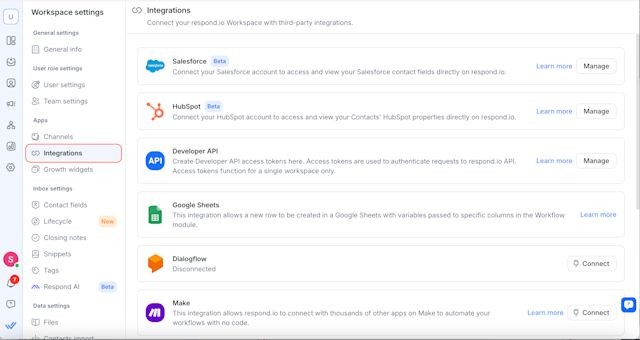
1. 在您的 **respond.io** 工作区中,转到 **工作区设置** \> **集成**。
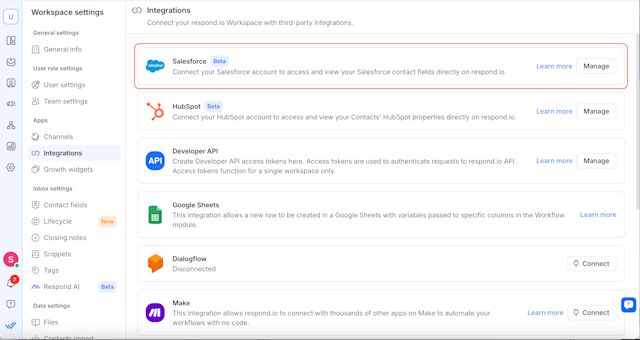
2\. 找到 Salesforce 并选择 **管理**。
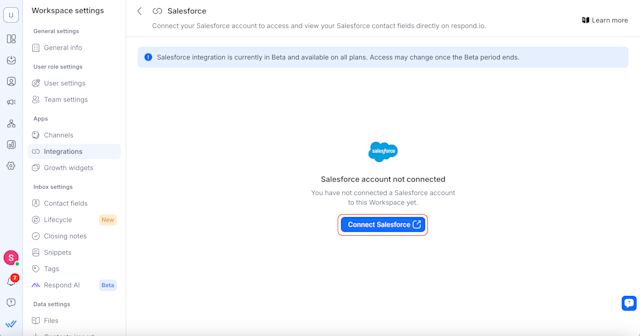
3\. 单击 **连接 Salesforce**。
4\. 将打开一个新选项卡 - 登录您的 Salesforce 帐户并授权 respond.io。
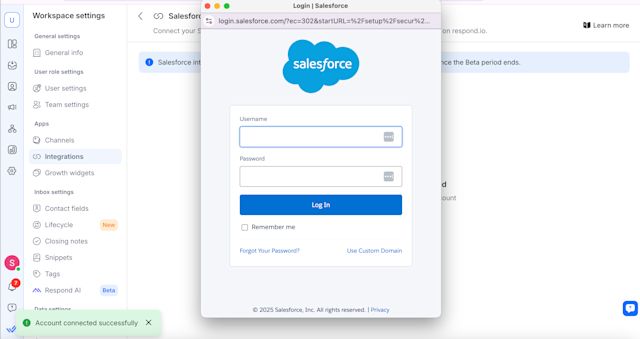
5\. 连接后,您将看到一条包含您的 Salesforce 帐户详细信息的确认消息。
> 注意:每个 respond.io 工作区只能连接到 **一个** Salesforce 帐户。
## 在 respond.io 中查看 Salesforce 联系人字段
您可以在 **收件箱** 和 **联系人** 模块中查看 **Salesforce 字段** 。
#### 收件箱模块
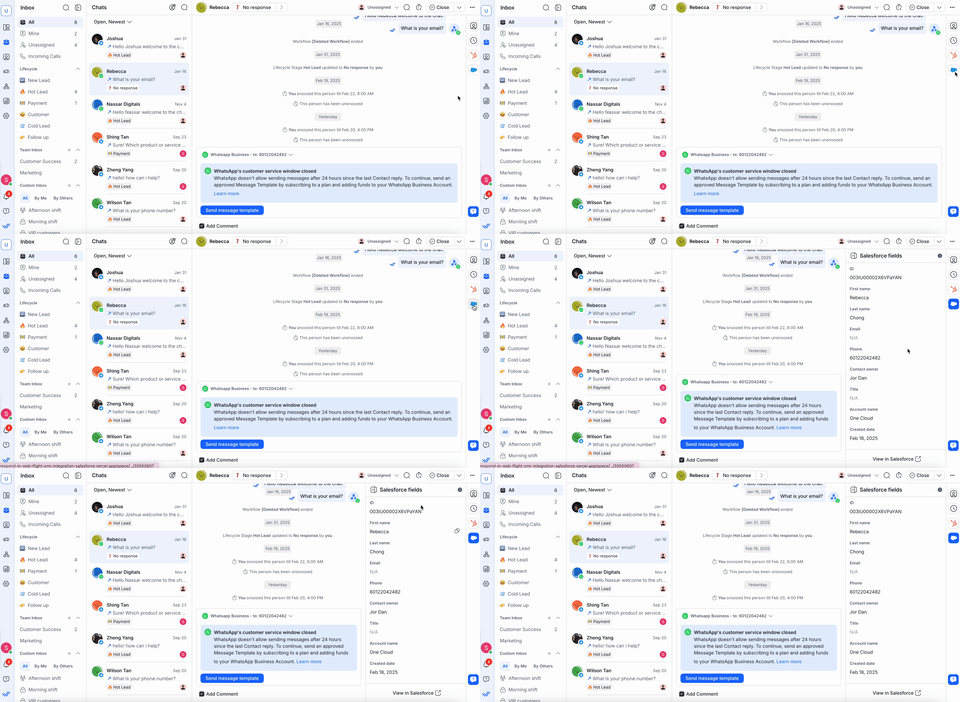
* 在 **收件箱**中打开对话。
* 单击联系人即可在右侧边栏中查看他们的 **Salesforce 字段** 。
#### 联系人模块
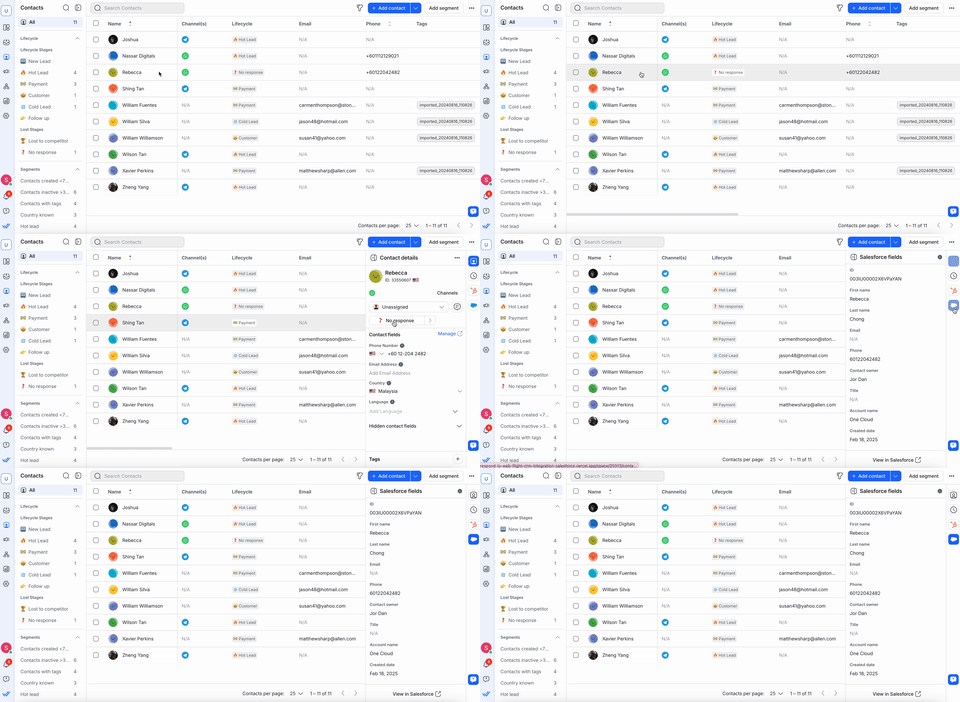
* 导航到 **联系人**。
* 选择一个联系人以在右侧边栏中查看他们的 **Salesforce 字段** 。
对于 **收件箱** 和 **联系人** 模块:
* 如果发现 **匹配**,Salesforce 字段将自动出现。
* 如果 **没有找到匹配项**,请验证联系人的 **电子邮件或电话号码** 在 respond.io 和 Salesforce 之间是否完全匹配。
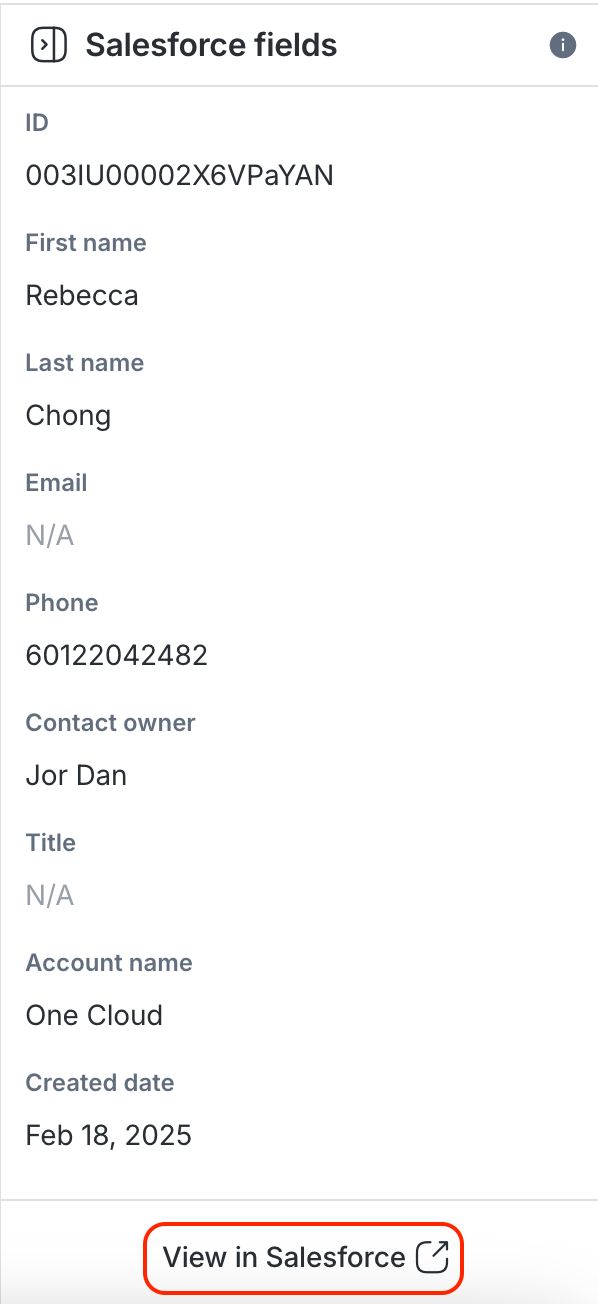
* 您可以单击 **在 Salesforce 中查看** 以在 Salesforce 中打开完整的配置文件。
> **注意**: respond.io 中的 Salesforce 字段是 **只读的**。 要编辑,请直接在 Salesforce 中更新它们。
## 在 respond.io 中选择和编辑 Salesforce 联系人字段
您现在可以选择特定的 Salesforce 联系人字段显示在您的 respond.io 工作区中,并直接在 respond.io 中编辑这些字段。
如果您已经在 respond.io 中连接了 Salesforce 帐户,则需要刷新权限才能启用这些更新。
**方法如下:**
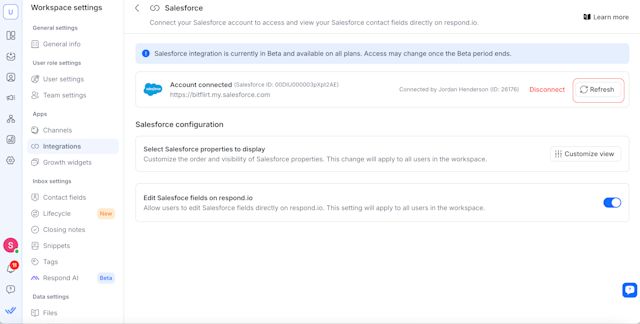
1. 转到 **工作区设置** \> **集成**
2. 选择 **Salesforce**
3. **刷新** 您的访问令牌
### 选择 Salesforce 联系人字段
1. 导航到 **工作区设置 > 集成**。
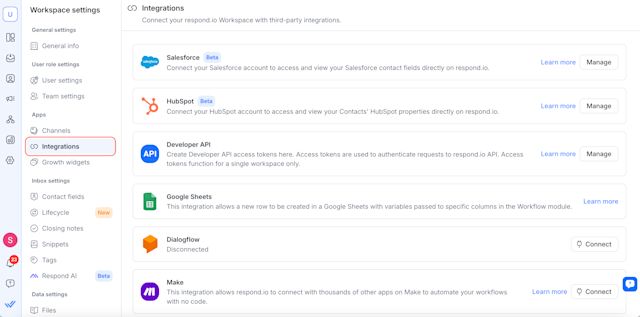
2. 单击 Salesforce 旁边的 **管理** 。
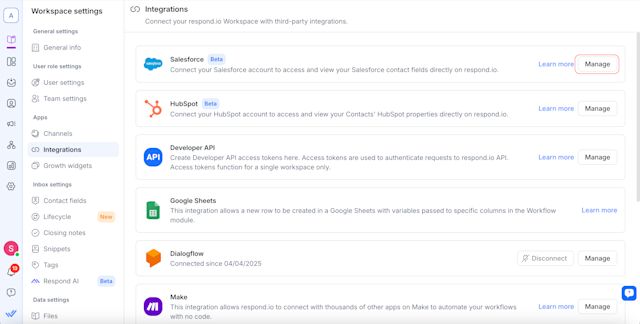
3. 在 **管理 Salesforce 字段**下,单击 **自定义视图** 以选择要在 respond.io 上的收件箱和联系人模块中显示的联系人字段。
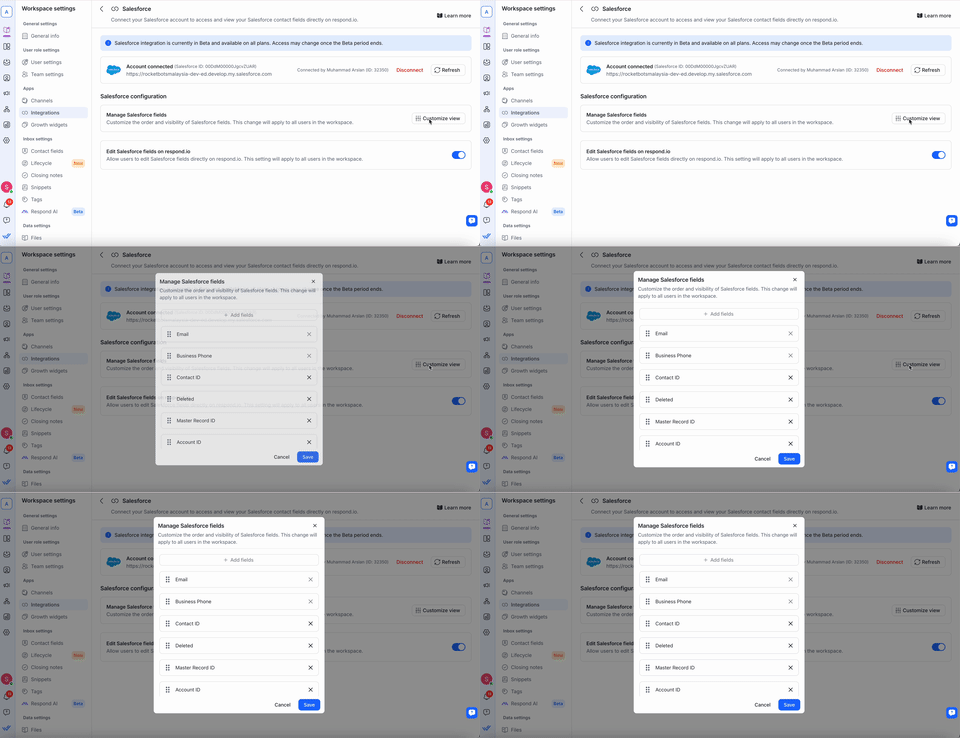
4. 单击 **保存** 以应用您的偏好设置。
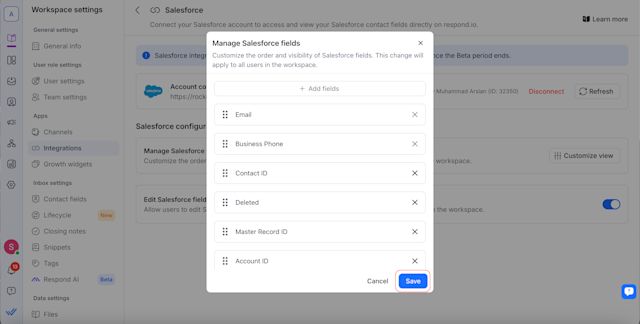
### 编辑 Salesforce 联系人字段
您现在可以直接在 respond.io 中编辑某些 Salesforce 联系人字段。
要启用此功能,请转到 **管理 Salesforce 字段** 并打开切换开关。 一旦启用,工作区中的所有用户都将能够从 respond.io 编辑选定的 Salesforce 字段。
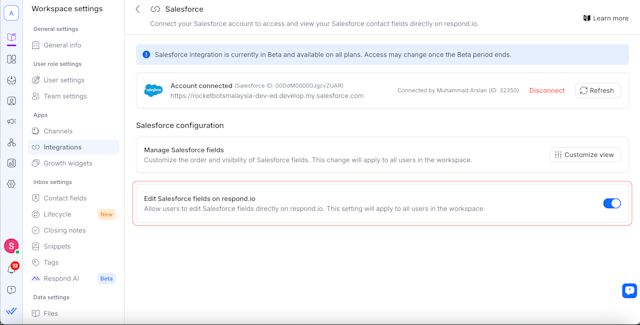
不可编辑的字段保持只读状态,必须直接在 Salesforce 中更新。
**重要提示:**
* 电子邮件和电话号码字段不可编辑。
* 确保在 respond.io 和 Salesforce 中具有适当的权限来编辑字段。
* 如果更改没有立即出现,由于 API 缓存,请在 1 分钟后刷新页面。
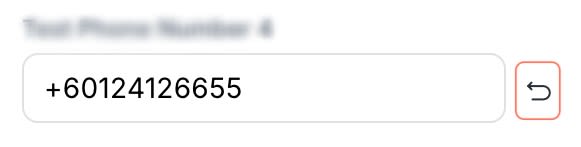
要放弃更改,请选择每个可编辑字段旁边的 **恢复** 图标。 这可以在 **收件箱** 和 **联系人** 模块中访问。
#### 收件箱模块
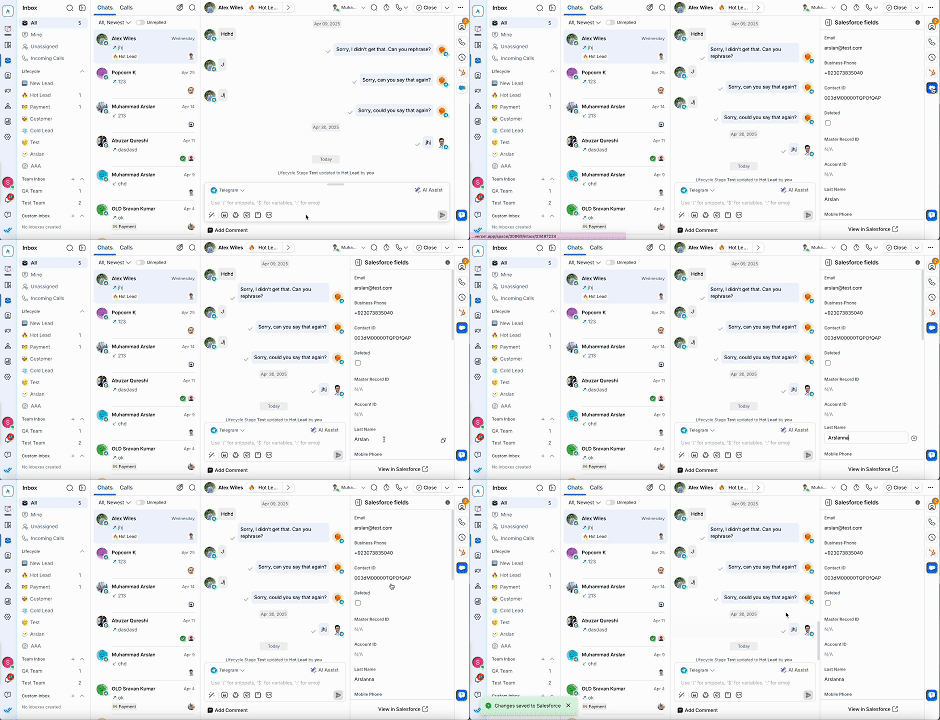
* 打开 **收件箱** 并选择一个联系人。
* 选择 Salesforce 图标。
* 单击您想要编辑的 Salesforce 属性并更新信息。 您的更改将立即同步到 Salesforce。
#### 联系人模块
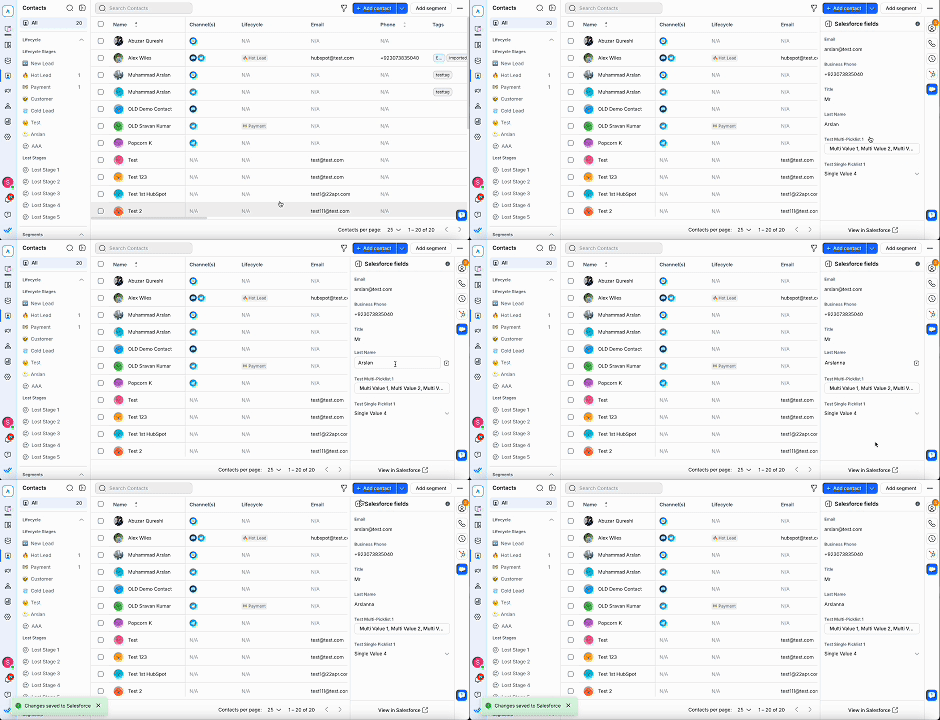
* 访问 **联系人** 模块并选择一个联系人。
* 选择 Salesforce 图标。
* 单击您想要编辑的 Salesforce 属性并更新信息。 您的更改将立即同步到 Salesforce。
## 自动创建 Salesforce 联系人
Salesforce 中创建的任何新联系人也将自动在 respond.io 中创建,确保您的 CRM 和消息传递平台始终保持同步。 这提高了工作流程效率并帮助您更快地响应新线索。
### 如何启用
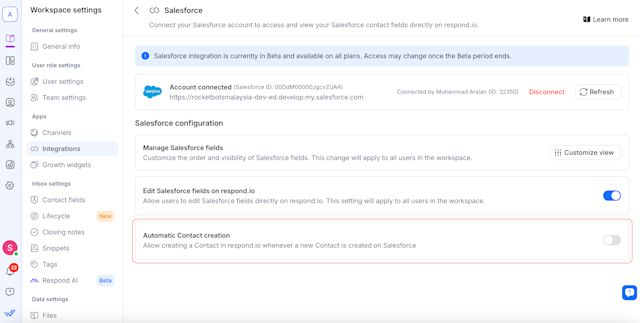
设置方法:
1. 转到 **工作区设置** \> **集成** \> **Salesforce**。
2. 打开 **自动创建联系人** 切换。
### 可选设置
启用主切换时会出现两个可选复选框:
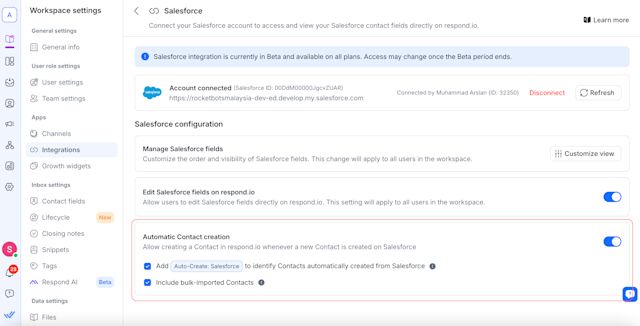
#### 添加“自动创建:Salesforce”标签
* 自动向通过此集成创建的联系人添加标签“自动创建:Salesforce”。
* 这有助于识别联系人的来源,但 **不会触发 respond.io 上的工作流** 。
* 该标签列在 **标签** 模块中,无法手动删除或编辑。
#### 包括批量导入的联系人
* 选中后,通过 **批量导入** 添加到 Salesforce 的联系人也将在 respond.io 上创建。
* 这些联系人 **不计入 MAC(每月活跃联系人)** 和 **不会触发工作流程** 除非发起对话。
## 常见问题和疑难解答
###
我可以连接多个 Salesforce 帐户吗?
不可以,每个工作区只能连接到 **一个** Salesforce 帐户。
###
我可以在 respond.io 中编辑 Salesforce 数据吗?
不,Salesforce 联系人字段在 respond.io 中是 **只读** 。 直接在 Salesforce 中编辑它们。
> 我们目前仅与 **Salesforce 联系对象**集成。 **引导对象** 不受支持。
###
为什么我在 respond.io 工作区中看不到来自 Salesforce 的最新编辑?
联系信息 **缓存 1 分钟** ,以限制过多的 API 请求并减少达到 Salesforce 的 API 速率限制的机会。
在那一分钟内,对 Salesforce 中的联系人的任何直接编辑将**不会**立即显示在 respond.io 中。 1分钟后,您可以刷新页面来显示最新信息。
###
为什么我无法在 respond.io 中查看我的 Salesforce 联系人字段?
如果您无法在我们的收件箱或联系人模块中查看您的 Salesforce 联系人字段,请检查 **respond.io** 中的电子邮件或电话号码是否与 Salesforce 中的完全匹配。 **即使是诸如空格或特殊字符之类的细微差别,也可能导致字段无法显示。**
例如,如果电话号码在 Salesforce 中存储为 **“12 3”** 但在 respond.io 中存储为 **“123”** ,则该联系人的信息将不会显示在 respond.io 中。 要解决此问题,请更新 Salesforce 中的联系人属性以匹配 respond.io 中使用的格式。
###
所有定价计划都支持 Salesforce 集成吗?
是的,在测试期间,我们所有的定价计划都可以进行集成。 一旦 Beta 测试结束,访问可能会受到限制,仅限某些/更高级的计划。
###
如果我在 Salesforce 中更新联系人的电子邮件或电话号码会发生什么?
* 如果找到 **匹配**,则会显示联系人的属性。
* 如果 **没有找到匹配项**,请确保 respond.io 中的电子邮件或电话号码与 Salesforce 完全匹配。
###
如果 respond.io 中缺少联系人,会发生什么情况?
* 确保 **电子邮件或电话号码** 存在于 Salesforce 中。
* 由于缓存的原因,Salesforce 中的更改可能需要 **几分钟** 才能反映在 respond.io 中。
###
为什么我会看到“需要 Salesforce API 访问”错误?
* 您的 Salesforce 帐户 **必须具有 API 访问权限** 才能使用集成。
* 联系您的 **Salesforce 管理员** 以启用 API 权限。
###
我可以将多个工作区连接到同一个 Salesforce 帐户吗?
是的,多个 **respond.io 工作区** 可以连接到同一个 Salesforce 帐户。
###
如果我断开 Salesforce 连接会发生什么情况?
* 您的 **工作区将无法访问** Salesforce 联系人字段。
* 您可以通过按照安装步骤 **随时重新连接**。
分享这篇文章
[](https://api.whatsapp.com/send?text=https://respond.io/help/integrations/salesforce)[](https://www.facebook.com/sharer/sharer.php?u=https://respond.io/help/integrations/salesforce)[](https://www.linkedin.com/sharing/share-offsite/?url=https://respond.io/help/integrations/salesforce)[](http://twitter.com/share?url=https://respond.io/help/integrations/salesforce)
##
相关文章 :woman\_technologist:
* [Cal.com了解如何连接 Cal.com,以便与联系人共享预订链接并在 respond.io 上查看会议。 ](/zh/help/integrations/cal-com)
* [Calendly了解如何将您的 Calendly 帐户连接到 respond.io,以便与联系人共享预约链接并查看他们的即将和过去的会议。 ](/zh/help/integrations/calendly)
* [开发者 API使用响应.io的开发者 API 来利用许多核心功能,包括自动消息、同步CRM和触发工作流。 ](/zh/help/integrations/developer-api)
* [Google 日历将 Google 日历连接到 respond.io,可在 Inbox 和联系人模块中查看联系人的即将和过去的会议,无需离开对话。 ](/zh/help/integrations/google-calendar)
* [HubSpot学习如何将您的 HubSpot 帐户与 respond.io 连接,以无缝访问联系人属性。 ](/zh/help/integrations/hubspot)
找不到您正在寻找的东西? 🔎
[联系客服支持](/zh/contact-us)
2026-09-22T07:58:36.790Z
help
```json
{"@context":"https://schema.org","@graph":[{"@context":"https://schema.org","@type":"TechArticle","articleBody":"学习如何将您的 Salesforce 帐户与 Respond.io 连接,以便无缝访问和查看您的联系人字段。 ","author":{"@type":"Person","image":"https://assets2-proxy.respond.io/ph8r57dk1q9w/2Y6LIr15mC1nj8MgftMVT5/6ffeea71593277f0fc29dafd1c1de9b9/Serene_Avatar.svg","name":"Shing-Yi Tan","url":"https://respond.io/zh/author"},"dateCreated":"2026-09-21T00:00:00.000Z","dateModified":"2026-09-21T14:25:24.166Z","datePublished":"2026-09-21T00:00:00.000Z","headline":"Salesforce","image":"https://assets2-proxy.respond.io/ph8r57dk1q9w/7zyElfmXHs5t6TiqSOmOZk/5023e3296275fa6919ff16a9a1b46027/salesforce.png","mainEntityOfPage":"https://respond.io/zh/help/integrations","publisher":{"@id":"https://respond.io/#organization"},"thumbnailUrl":"https://assets2-proxy.respond.io/ph8r57dk1q9w/7zyElfmXHs5t6TiqSOmOZk/5023e3296275fa6919ff16a9a1b46027/salesforce.png","url":"https://respond.io/zh/help/integrations/salesforce"},{"@context":"https://schema.org","@id":"https://respond.io/zh/help/integrations/salesforce#breadcrumb","@type":"BreadcrumbList","itemListElement":[{"@type":"ListItem","position":1,"name":"Help","item":"https://respond.io/zh/help"},{"@type":"ListItem","position":2,"name":"集成 ","item":"https://respond.io/zh/help/integrations"},{"@type":"ListItem","position":3,"name":"Salesforce","item":"https://respond.io/zh/help/integrations/salesforce"}]},{"@type":"Organization","@id":"https://respond.io/#organization","name":"Respond.io","alternateName":"respond.io","url":"https://respond.io/","image":["https://assets1-proxy.respond.io/api/v1/image/assets%2F11f7a662b80a4675973850b067c01fa5%2F3f43c48b21b24f4e8b02b100c0c8fab0"],"logo":"https://assets1-proxy.respond.io/api/v1/image/assets%2F11f7a662b80a4675973850b067c01fa5%2F4045649d540241d398c39ab07b2b62bb","description":"Respond.io is an AI-powered customer conversation platform that helps businesses manage conversations, automate workflows and scale sales, marketing and support operations. Trusted by 10,000+ B2C brands, it unifies WhatsApp, TikTok, Instagram and Facebook in a single AI-powered team inbox for chats, calls and campaigns.","email":"success@respond.io","telephone":"+6011-54211197","foundingDate":"2017-02-17","address":{"@type":"PostalAddress","streetAddress":"Level 41, Permata Sapura Tower, Jalan Pinang","addressLocality":"Kuala Lumpur","addressRegion":"Federal Territory of Kuala Lumpur","postalCode":"50088","addressCountry":"MY"},"areaServed":"Worldwide","contactPoint":{"@type":"ContactPoint","contactType":"Customer Service","url":"https://respond.io/contact"},"sameAs":["https://respond.io/","https://www.facebook.com/getrespondio/","https://www.linkedin.com/company/respondio/","https://play.google.com/store/apps/details?id=com.respond.inbox.io","https://www.youtube.com/@respondio","https://twitter.com/respond_io","https://apps.apple.com/my/app/respond-io-inbox/id1667772955","https://www.g2.com/products/respond-io/reviews","https://www.producthunt.com/products/respond-io","https://zapier.com/apps/respondio/integrations","https://www.capterra.com/p/179311/Rocketbots/","https://www.crunchbase.com/organization/respondio","https://builtin.com/company/respondio","https://respond-io.en.softonic.com/web-apps","https://my.jobstreet.com/companies/respondio-168558101085004","https://brandfetch.com/respond.io","https://webcatalog.io/en/apps/respond-io"],"knowsAbout":["WhatsApp API","WhatsApp Business API","WhatsApp CRM","WhatsApp automation","omnichannel communication platform","WhatsApp Business Multiple Users","WhatsApp BSP","WhatsApp Business Solution Provider","WhatsApp automation tool","WhatsApp team inbox","WhatsApp AI agent","WhatsApp Business AI chatbot","WhatsApp marketing software","conversational sales platform","WhatsApp appointment booking"]},{"@type":"WebPage","@id":"https://respond.io/zh/help/integrations/salesforce#webpage","url":"https://respond.io/zh/help/integrations/salesforce","name":"Salesforce","description":"学习如何将您的 Salesforce 帐户与 Respond.io 连接,以便无缝访问和查看您的联系人字段。 ","isPartOf":{"@id":"https://respond.io/#website"},"primaryImageOfPage":{"@type":"ImageObject","url":"https://assets1-proxy.respond.io/api/v1/image/assets%2F11f7a662b80a4675973850b067c01fa5%2F3f43c48b21b24f4e8b02b100c0c8fab0"},"breadcrumb":{"@id":"https://respond.io/zh/help/integrations/salesforce#breadcrumb"}},{"@type":"WebSite","@id":"https://respond.io/#website","name":"Respond.io","url":"https://respond.io/","potentialAction":{"@type":"SearchAction","query-input":"required name=search_term_string","target":"https://respond.io/search?query={search_term_string}"},"publisher":{"@id":"https://respond.io/#organization"}}]}
{
"@context": "http://schema.org",
"@type": "FAQPage",
"mainEntity": [
{
"@type": "Question",
"name": "Can I connect multiple Salesforce accounts?",
"acceptedAnswer": {
"@type": "Answer",
"text": "No, each workspace can only connect to one Salesforce account.
"
}
},
{
"@type": "Question",
"name": "Can I edit Salesforce data in respond.io?",
"acceptedAnswer": {
"@type": "Answer",
"text": "No, Salesforce contact fields are read-only in respond.io. Edit them directly in Salesforce.
We currently integrate only with the Salesforce Contact Object. The Lead Object is not supported.
"
}
},
{
"@type": "Question",
"name": "Why am I not seeing recent edits from Salesforce in my respond.io workspace?",
"acceptedAnswer": {
"@type": "Answer",
"text": "Contact information is cached for 1 minute to limit excessive API requests and reduce the chances of reaching Salesforce’s API rate limit.
During that minute, any direct edits to a Contact in Salesforce will not immediately appear in respond.io. After 1 minute, you can refresh the page to display the latest information.
"
}
},
{
"@type": "Question",
"name": "Why can’t I view my Salesforce contact fields in respond.io?",
"acceptedAnswer": {
"@type": "Answer",
"text": "If you can’t view your Salesforce contact fields in our Inbox or Contacts module, check that their email or phone number in respond.io exactly match those in Salesforce. Even minor differences, such as spaces or special characters, can prevent fields from being displayed.
For example, if a phone number is stored as “12 3” in Salesforce but as “123” in respond.io, that Contact’s information won’t be displayed in respond.io. To fix this, update the contact property in Salesforce to match the format used in respond.io.
"
}
},
{
"@type": "Question",
"name": "Is the Salesforce integration supported on all pricing plans?",
"acceptedAnswer": {
"@type": "Answer",
"text": "Yes, the integration is available for all our pricing plans during the Beta period. Access may be limited to certain/higher plans once Beta ends.
"
}
},
{
"@type": "Question",
"name": "What happens if I update a contact’s email or phone number in Salesforce?",
"acceptedAnswer": {
"@type": "Answer",
"text": "If a match is found, the contact’s properties will be displayed.
If no match is found, ensure that the email or phone number in respond.io exactly matches Salesforce.
"
}
},
{
"@type": "Question",
"name": "What happens if a contact is missing from respond.io?",
"acceptedAnswer": {
"@type": "Answer",
"text": ""
}
},
{
"@type": "Question",
"name": "Why am I seeing a ‘Salesforce API access required’ error?",
"acceptedAnswer": {
"@type": "Answer",
"text": ""
}
},
{
"@type": "Question",
"name": "Can I connect multiple workspaces to the same Salesforce account?",
"acceptedAnswer": {
"@type": "Answer",
"text": "Yes, multiple respond.io workspaces can connect to the same Salesforce account.
"
}
},
{
"@type": "Question",
"name": "What happens if I disconnect Salesforce?",
"acceptedAnswer": {
"@type": "Answer",
"text": ""
}
}
]
}
```