

Facebook Private Replies allows a private messages to be sent automatically from your Facebook page to any Facebook user who comments on one of your Facebook Page Posts.
If the Facebook user replies to this automated message, the reply will be shown on the Platform and if this is the first time the Facebook user has messaged you they will become a Contact.
Facebook users who comment on your post will only become a contact when they respond to the direct message.
Warning: Ads are not supported for Facebook Private Replies.
Configuring Private Replies
Navigate to Settings > Channels
Locate your Messenger Channel,click on Manage.
Select Private Replies

Configure settings to track comments under any post or a specific post.
If you choose to track comments under a specific post, you will need to specify the posts to be tracked.
Add an auto-reply message to send to Contacts who interacted with the post.
Click Save to save your configurations.
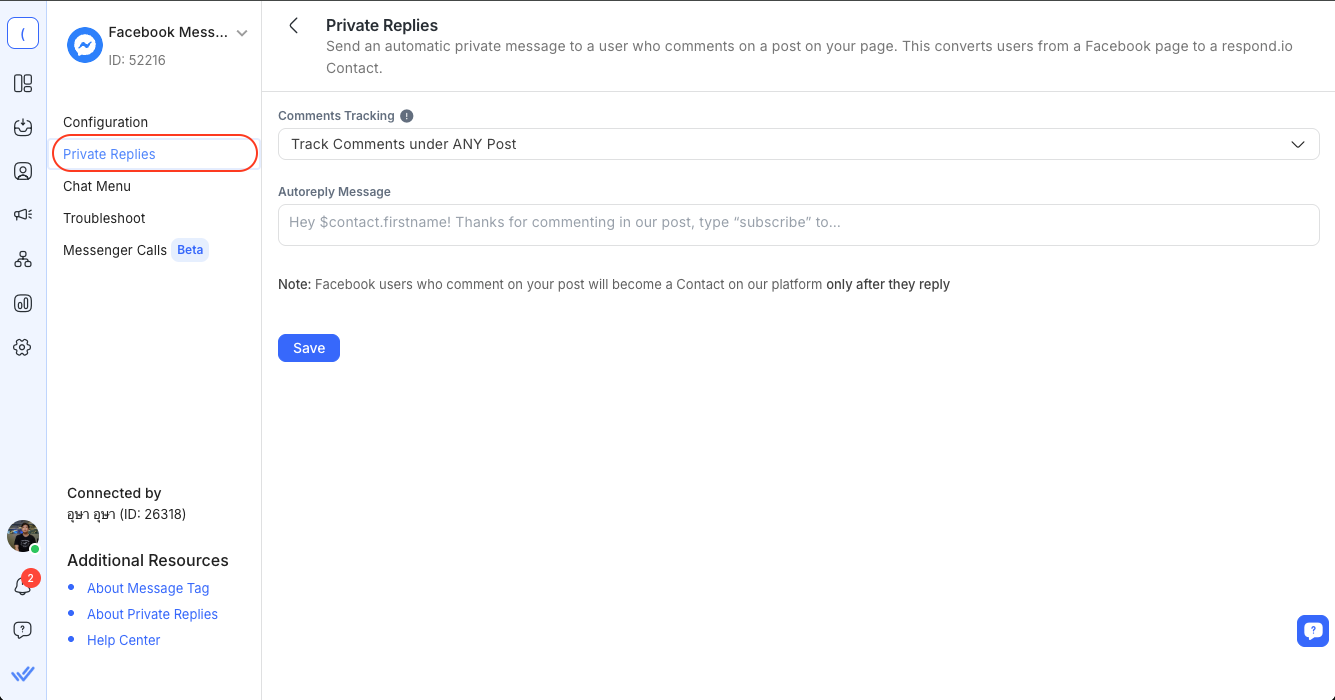
The platform will now track any new comments that are made and automatically send a message to new users.
Viewing the original post
When a Contact replies to a Private Reply, the Contact event in the Inbox shows a COMMENTS hyperlink. Click it to open the original Facebook post.

Note: The COMMENTS hyperlink only appears on Private Replies set up after this feature was released. Existing Private Replies won't show it.
Eligibility rules for Facebook Private Replies
Private replies are subject to Meta’s rules and will only be delivered if all of the following conditions are met:
Each post or comment can only receive one private reply.
The private reply must be sent within 7 days of the original post or comment.
The comment must be made by a user to the Page surface.
If the user has blocked messages from the Page, or if the Page has disabled messaging, private replies will not work.
For more details, see Meta’s official documentation.


