

Telnyx is a cloud communications platform that allows you to send and receive SMS messages through its carrier-grade network. With respond.io, you can manage both Telnyx SMS and Telnyx Calls in one place.
Before you begin
You'll need:
An active Telnyx account
A Telnyx phone number with SMS capability
How to set up Telnyx SMS
Sign in to your Telnyx account.
Purchase or use an existing Telnyx phone number that supports SMS.
In the Telnyx Portal, go to Real-Time Communications > Numbers > Buy Numbers.
Filter for numbers with SMS capability.
Complete the purchase.
How to connect Telnyx SMS to respond.io
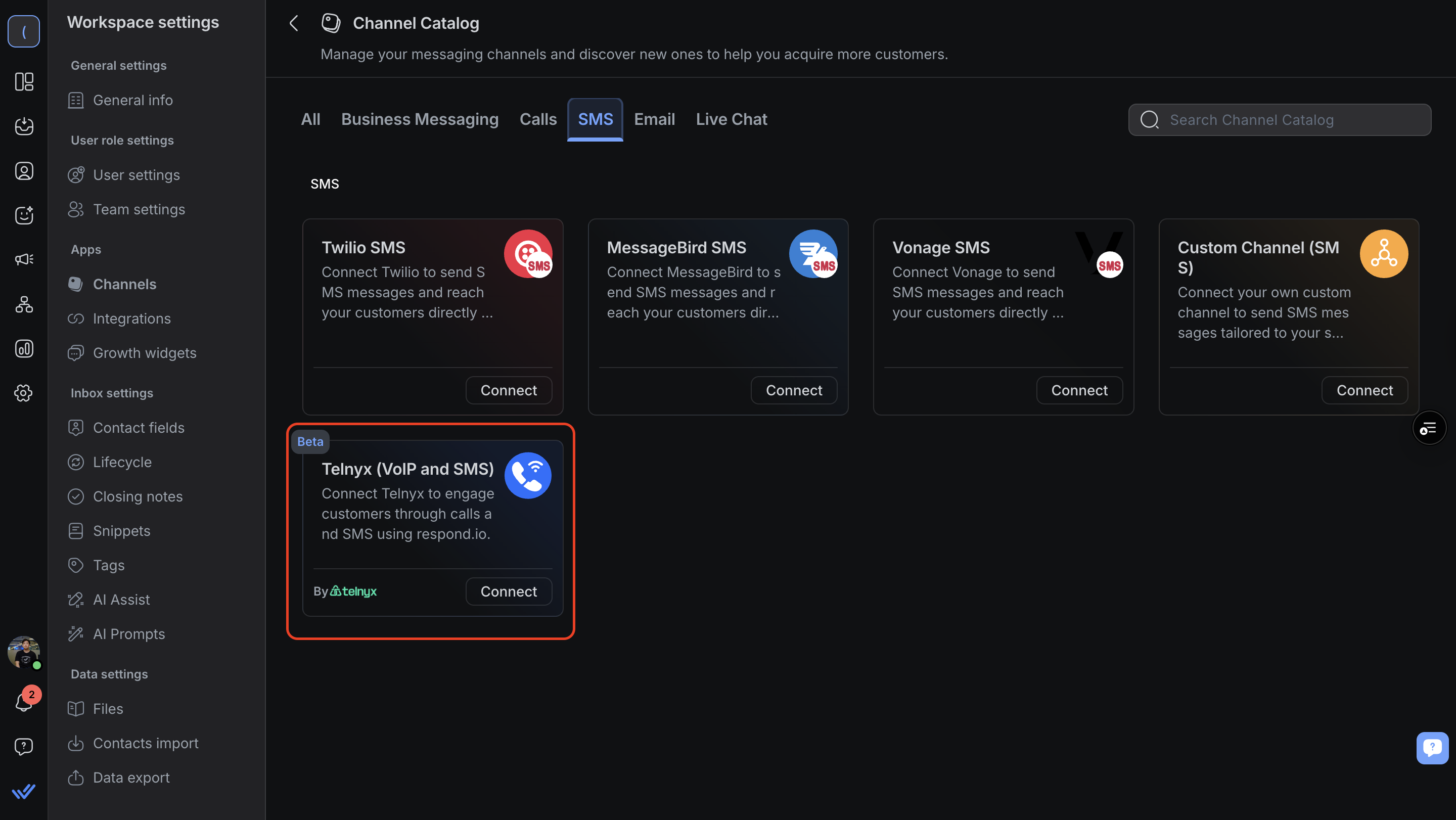
In respond.io, go to Workspace Settings > Add Channel.
Locate the Telnyx SMS Channel and click Connect.
Select the Telnyx phone number you want to use.
Click Save Changes to complete the setup.
Once connected, any SMS sent to your Telnyx number appears in your Workspace.
How to configure the Telnyx SMS Channel
The Telnyx SMS Channel uses a Channel name for internal reference.
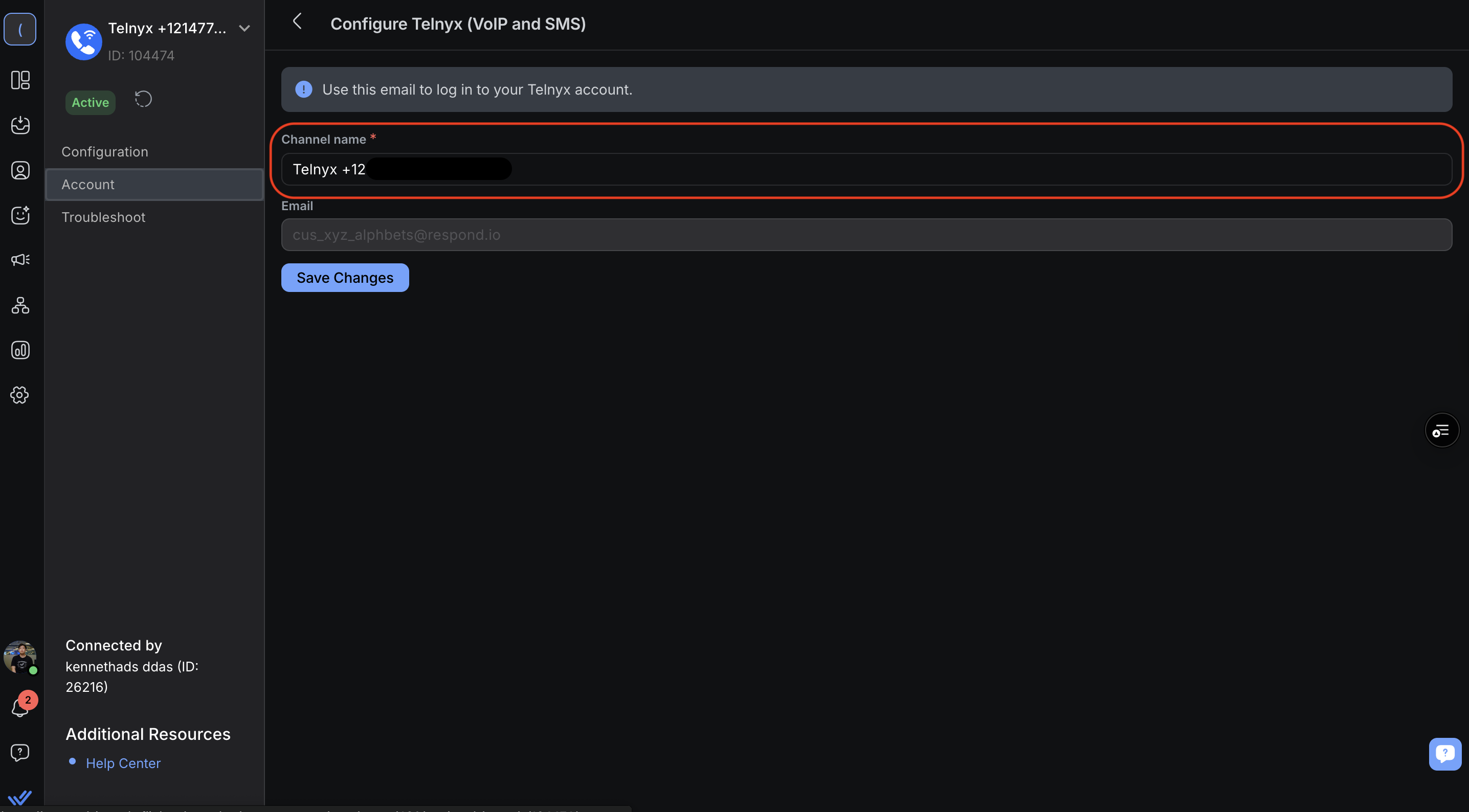
Go to Workspace Settings > Channels.
Locate the Telnyx SMS Channel> Click Manage > Account.
Enter your preferred Channel Name.
Save changes.
Notes and limitations
File size limits: Images, audio and video up to 1MB each.
Message status: Sent, Delivered and Failed are supported; Read status is not available.
Phone number masking is not available for Telnyx SMS.
Message character limit: respond.io detects the message's encoding and applies Telnyx's real character limit before sending — 1,530 characters for GSM-7 content, 670 characters for UTF-16 content (e.g. Arabic, emoji). Messages within the limit send as a single message; messages that exceed it are split into fewer, correctly ordered segments.
Broadcasts eligibility
Telnyx SMS broadcasts can only be sent to Contacts who have previously sent or received a message through the Telnyx SMS Channel.
Since broadcasts are limited to Contacts with prior Telnyx SMS interaction, you may notice the following:
Segments: Segments may include Contacts who have never messaged you via Telnyx SMS, but those Contacts will not receive broadcasts.
Reports: Sent and delivered metrics may be lower than the total number of Contacts in the selected Segment.
Contact filtering: Filtering by the Telnyx SMS Channel only shows Contacts with existing Telnyx SMS interaction history.
Note: Contacts activated through Telnyx calls may not be included in SMS broadcasts, since only Contacts with prior messaging interaction are eligible.
FAQ and troubleshooting
Why does my message split into multiple texts?
respond.io detects your message's encoding and applies Telnyx's real character limit before sending:
GSM-7 (standard text): up to 1,530 characters
UTF-16 (e.g. Arabic, emoji): up to 670 characters
Messages within the limit send as one text, in order.
Messages that exceed the limit are still split into segments. Segment order isn't guaranteed by the carrier, so very long messages may still arrive out of order — just far less often than before.
Why do messages show as "Sent" but the Contact never receives them?
This can happen when the Telnyx phone number's messaging profile is unassigned.
The number isn't routed for inbound/outbound SMS, and Telnyx won't send a delivery-failure webhook, so respond.io shows “Sent” with no further status update.
What you can do
Log in to the Telnyx portal and confirm a messaging profile is assigned to the affected phone number.
If you also see a “403 - Account inactive” error, your account might be out of funds — confirm with Telnyx support.
Why can't I select my Telnyx number during setup?
The platform doesn't support connecting Telnyx Hosted SMS numbers. It only detects numbers purchased directly through Telnyx, so Hosted SMS numbers — numbers that keep voice service with their original carrier and route only SMS through Telnyx — never appear in the number selection list, even when they're active, SMS-capable, and assigned to a messaging profile in Telnyx.
What you can do
Purchase a new SMS-capable number directly through Telnyx.
Fully port the existing number to Telnyx instead of hosting it.
Upvote the Hosted SMS support request to support this capability.


