

Telnyx VoIP is a cloud-based voice solution that enables businesses to make and receive traditional phone calls directly on respond.io. This integration allows teams to manage voice conversations alongside messaging channels in one unified workspace.
Learn how to create and connect your Telnyx VoIP account to respond.io here. Once connected, your team can handle inbound and outbound calls, access call logs, and manage phone numbers directly through the Telnyx portal.
Pricing
Telnyx VoIP operates on a pay-as-you-go model. Users are billed directly by Telnyx, with no additional charges from respond.io.
Outbound calls: From $0.007/min (depending on destination)
Inbound calls: From $0.0055/min
For accurate and up-to-date pricing, visit the Telnyx pricing page.
Call recordings (if enabled) are also billed to your Telnyx account and may appear as additional charges in your Telnyx billing.
Managing Calls
Telnyx VoIP enables traditional phone communication with your customers. Here’s how your team can get started:
Phone number purchase: After connecting a Telnyx sub-account, purchase local or international phone numbers in the Telnyx portal.
By default, Telnyx sub-accounts created under respond.io are registered in Singapore and start with Level 1 (L1) verification, which allows purchasing Singapore (SG) local numbers only.
To purchase international numbers or enable international outbound calling, you must complete Level 2 (L2) verification in the Telnyx portal (Account Settings → Verification). Additional documents may be required. See Telnyx documentation for details.
Voice interactions: Use the respond.io Inbox to make and receive calls using your Telnyx number.
Call logs: All call activity is automatically logged in respond.io for reference and reporting.
In addition to call logs, recordings (if enabled in Workspace Settings → Calls) will appear in the Contact drawer and in Reports: Calls.
Channel Capabilities
Once your Telnyx VoIP channel is connected, your workspace will support the following features:
Capability | Availability |
|---|---|
Outbound calling | ✅ |
Inbound calling | ✅ |
Call logging | ✅ |
Call status tracking | ✅ (e.g. missed, answered) |
Call control (mute, end) | ✅ |
Call transfer | ✅ |
Call transfers
Telnyx Calls now support call transfers, allowing agents to transfer active calls to other available teammates within the Workspace.
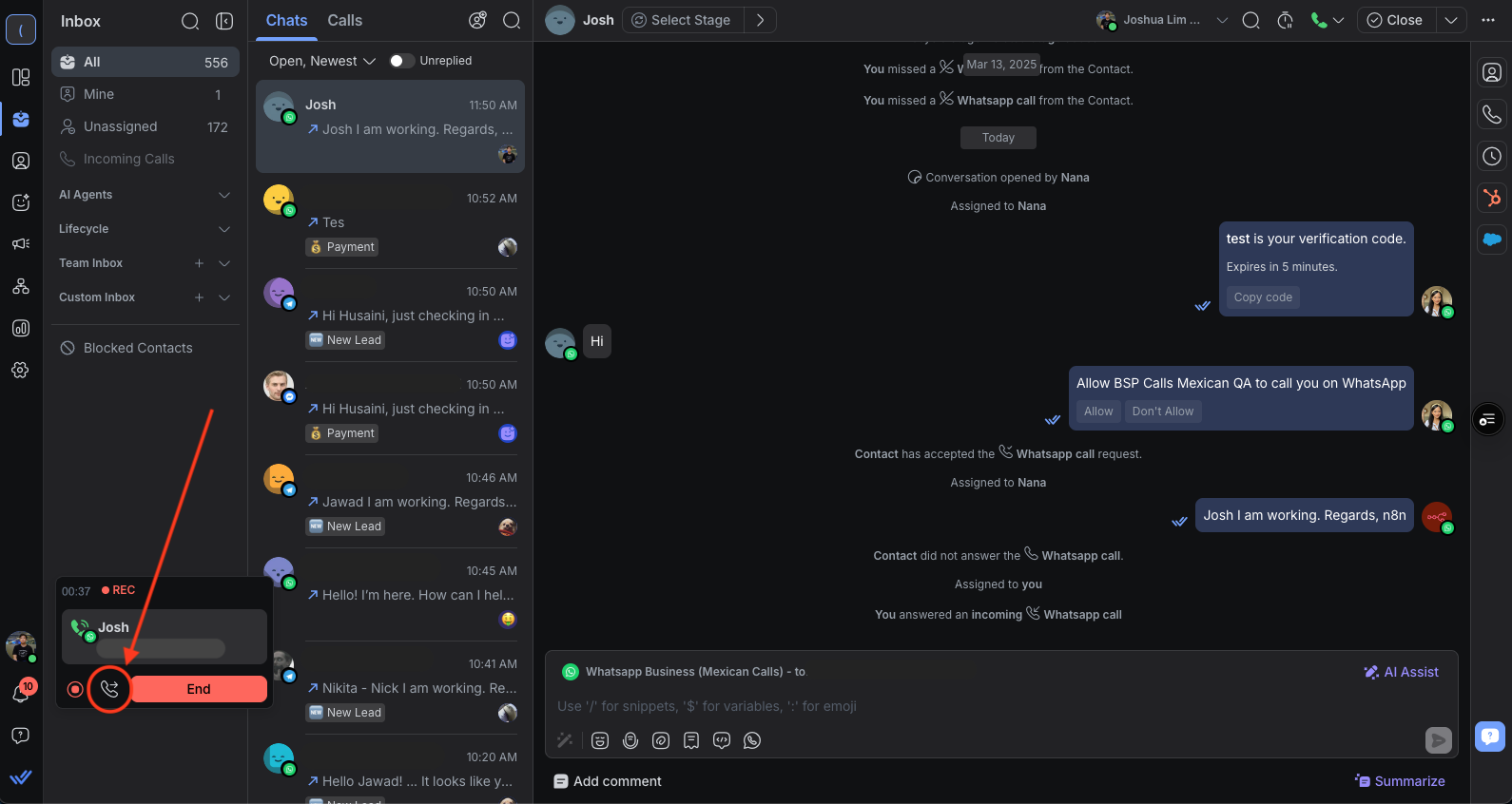
How to transfer calls
Click the Call Transfer icon on the call card.
Select the agent you want to transfer the call to.
(Optional)Add a note to provide context before transferring.
Notes:
Agents with restricted call capabilities won’t appear in the transfer list.
Agents who are already on a call cannot receive a transfer — the initiating agent will see a snackbar notification if the transfer fails.
If the receiving agent doesn’t answer within 30 seconds, the call automatically reverts to the initiating agent.
Call Coverage
Global inbound calling is supported.
Telnyx sub-accounts under respond.io begin with Level 1 verification, which limits:
Phone number purchases to Singapore (SG) local numbers
International outbound calling
To purchase international numbers or enable international outbound calls, Level 2 verification is required.
Limitations
Due to the nature of Telnyx and respond.io’s integration model, the following limitations apply:
Sub-Account Limits: A maximum of 3 Telnyx sub-accounts can be created per respond.io organization.
Trial Users: VoIP Channels are disabled for trial users.
Manual Number Purchase: Phone numbers must be purchased and managed within the Telnyx portal.
White-Labeling: Telnyx is not white-labeled. Users will interact directly with the Telnyx dashboard for account setup, verification, payments, and number management.
Automation & Workflows: Automation based on VoIP call events (e.g. missed calls) is currently out of scope.
FAQ and Troubleshooting
Why did I receive this error message “voip_telnyx: Your account is disabled. Please check your Telnyx portal to resolve this."?
This can happen due to:
Your Telnyx account has been disabled: Telnyx may disable accounts due to insufficient balance or suspicious activity. You should receive an email from Telnyx explaining the reason.
No countries selected under Allowed Destinations: If no countries are selected under Allowed Destinations in your Telnyx settings, outgoing calls cannot be made.
Incomplete L2 verification: If your sub-account has not completed Level 2 verification, you cannot purchase international phone numbers or make international outbound calls.
What you can do
For disabled Telnyx account: Check your email for the full details and resolve the issue in your Telnyx portal.
For Allowed Destinations: Ensure the required countries are selected under Allowed Destinations in your Telnyx settings to enable calling.
For incomplete L2 verification: Complete your L2 verification to enable international calling.
Can I connect my existing Telnyx account?
No, respond.io doesn’t currently support connecting an existing Telnyx account.
If you’d like to see this feature in the future, you can follow and upvote this feature request.
Can I use my existing phone number when using the Telnyx Channel on respond.io?
Yes. To keep your existing phone number, follow these steps:
Create a new Telnyx account under respond.io.
Port your existing number into the new Telnyx account.
Can I use my Telnyx number for WhatsApp?
Yes. Since Telnyx became a WhatsApp Business Solution Provider (BSP) in March 2026, Telnyx numbers can be registered with third-party BSPs, including respond.io.
If the number isn't yet registered on WhatsApp, connect it using the WhatsApp Business Platform (API) Quick Start.
If the number is already registered on WhatsApp under Telnyx's own BSP, migrate it to respond.io's WhatsApp Business Platform (API) instead.
Can I use the same Telnyx number for both VoIP calls and WhatsApp on respond.io?
Yes. A Telnyx number can be connected as a Telnyx VoIP Channel and a WhatsApp Channel on respond.io at the same time. Both Channels are independent and can coexist.
What happens to my WhatsApp Channel if I port my number to Telnyx for VoIP?
Your existing WhatsApp Business Account (WABA) connection on respond.io remains intact after porting. Messaging and calling are unaffected, as long as the number can still receive calls or SMS in case Meta requires re-verification.
Can I port my Telnyx number to another provider?
Number porting is available only for supported countries and number types. Some countries are not eligible for porting due to Telnyx limitations or local regulations.
Before starting a porting request:
1. Check Telnyx's Global Coverage page.
2. Search for the country of the number you want to port.
3. Review the Number Portability column to confirm whether porting is supported.
If number portability is supported, create an account with your new provider and coordinate the porting request with both Telnyx Support and your new provider.
If number portability is not supported for that country or number type, the number cannot be ported through Telnyx.
Why do I see the error "Daily OB profile limit exceeded D7. Daily outbound concurrent call limit has been reached."?
Your Telnyx Outbound Voice Profile has a daily spend limit. When outbound call spend reaches the limit, you will be unable to make outbound calls.
What you can do
Log in to the Telnyx portal.
Go to Voice > Outbound Profiles > respond_io > Daily Spend Limit
Increase your daily spend limit.
Save your changes.


