


WeChat is a messaging Channel on respond.io that lets businesses communicate with Contacts through their WeChat Official Account. This article covers WeChat's capabilities, messaging limits, regional restrictions and how to drive conversations from Contacts on the platform.
Before You Begin
A WeChat Official Account is required to connect WeChat to respond.io. If you don't have one, create a WeChat Official Account before proceeding.
WeChat Official Accounts must be verified. Unverified accounts are cancelled by WeChat after 30 days.
How to use WeChat with respond.io
respond.io integrates with WeChat through the WeChat Official Account Platform using an authorized third-party connection method. During setup, log in to the WeChat Official Account Platform and grant respond.io permission to manage messages.
To connect your WeChat Official Account, follow the WeChat Quick Start guide.
Pricing
WeChat Official Accounts are free to create. However, an annual fee is required to verify the account. Learn more about the verification process.
How to capture conversations
WeChat requires Contacts to follow your account and message first before a business can reply. This prevents brands from spamming users.
Two features help Contacts discover your account and start a conversation:
QR codes — Display QR codes in physical stores, on websites or in emails. Contacts scan the code in their WeChat mobile app to follow your account and start a conversation. Learn how to generate a QR code.
In-app searches — WeChat's search engine lets Contacts find your Official Account by display name or keywords in your description. Contacts follow your account directly from search results. Learn more about WeChat in-app search.
Channel capabilities
Supported file types
File type | Max size |
|---|---|
Image | 10 MB |
Audio | 2 MB |
Video | 10 MB |
Regional restrictions
Sending audio and video messages via API is only supported for WeChat Official Accounts registered in Mainland China. International WeChat Official Accounts are limited to sending image messages through the API.
Message status availability
Message Status | Availability |
|---|---|
Sent | Supported |
Delivered | Not supported |
Read | Not supported |
Failed | Supported |
Messaging limits
WeChat Official Accounts have a 48-hour messaging window to reply to a Contact after the Contact's last interaction.
The number of replies a business can send within the window depends on the Contact's last interaction type:
Text message from Contact — up to 5 replies within the 48-hour session
Contact event (following the Official Account, scanning a QR code, triggering a Chat Menu interaction) — up to 3 replies
The messaging window closes when 48 hours have passed since the last interaction or the message limit has been reached. If the Contact sends another message, both the 48-hour window and the message limit reset.
If the message limit is exceeded or the 48-hour session expires, a red exclamation mark appears next to the message in respond.io, indicating the message was not delivered. This limitation is enforced by WeChat's messaging API.
FAQ and Troubleshooting
Can I connect to a personal WeChat account?
To connect to a WeChat channel, a WeChat Official Account is required. You can create a WeChat Official Account here.
How much does a WeChat Official account cost?
WeChat Official Accounts are free to create. However, an annual fee needs to be paid to verify the account; please check the Verification process here.
Can I start a conversation with a WeChat Contact?
WeChat rules say Contacts must follow your account and message you first before you can message them back. Learn how to encourage users to start a chat here.
Can I send images to my Contacts through the WeChat channel?
Yes, but there are some restrictions for non-China WeChat Official accounts to send files over API.
Why don't I see the Contact's name when receiving messages on the WeChat channel?
This is because WeChat does not provide the contact's profile name as part of the metadata. Metadata refers to data that provides information about other data. In this case, WeChat’s metadata provides information such as the date and time of the messages, sender’s ID, etc. Learn more about WeChat’s API and metadata here.
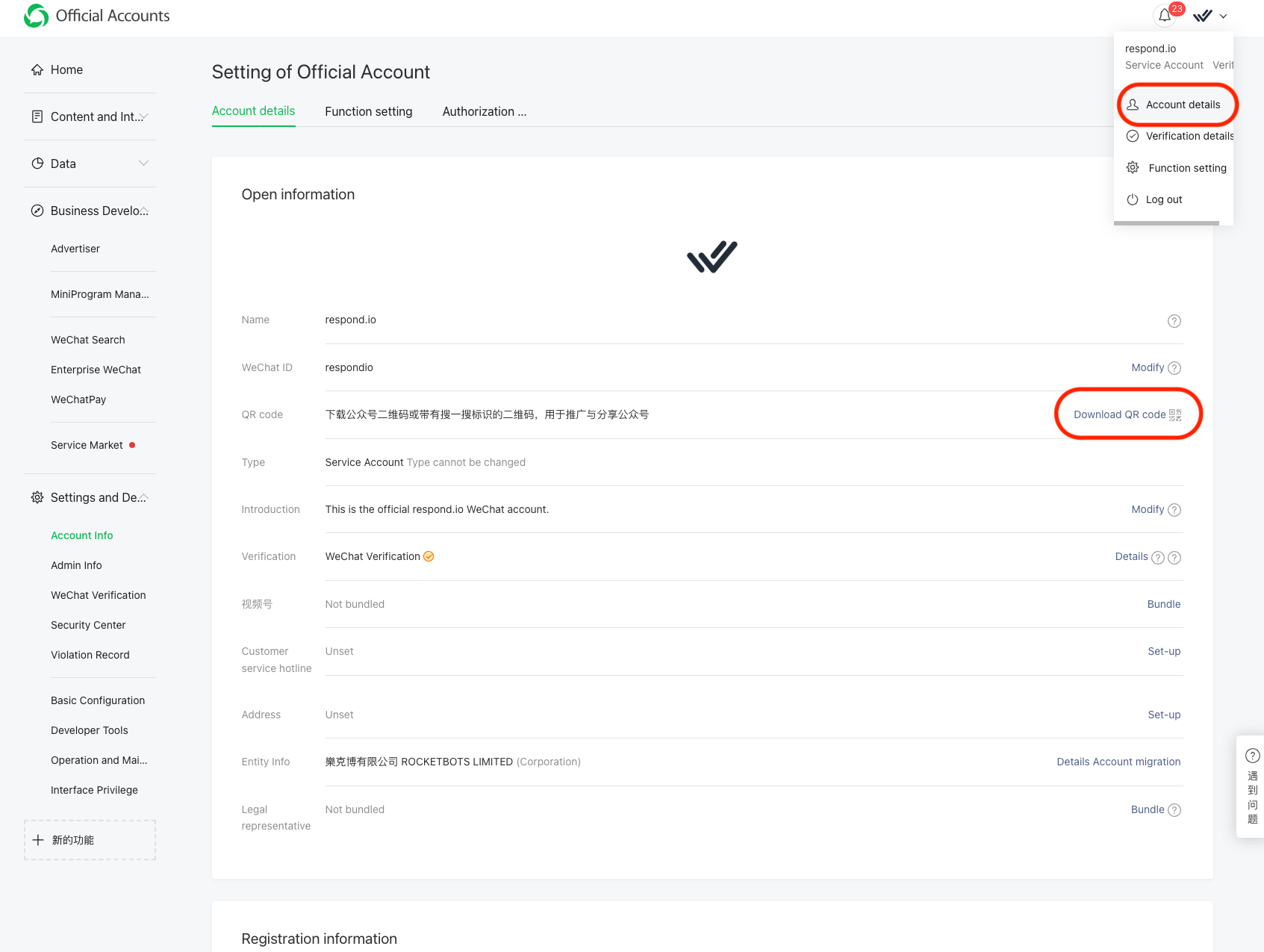
How can I create a QR Code for my WeChat account?
Go to your WeChat Official Account Manager > Account Details
Click Download QR Code
Can I send a Broadcast through WeChat using respond.io?
No, you cannot send a broadcast due to the channel’s limitation. Upvote the feature request if you’ll like to see this feature on our platform.
Why do I get the “out of response count limit rid” error?
This error code means you’ve exceeded WeChat’s 5 messages limit within the 48-hour session. Learn more about WeChat messaging limits here.


