

Promotional messaging on WhatsApp uses approved message templates to reach opted-in contacts at scale. This guide covers the prerequisites, sending process, messaging limits, and quality rating management for broadcast campaigns.
Before you begin
Prepare the following before sending promotional messages:
Sufficient balance in WhatsApp Fees
An approved message template
A phone number with a Medium or High quality rating (not Flagged or Restricted)
Contacts who have opted in to receive promotional messages
Ensure all Contacts have opted in before sending marketing messages. Sending without consent can cause message failures or restrictions. Learn more about WhatsApp Opt In in our blog post.
Sufficient balance in WhatsApp Fees
Promotional messages require WhatsApp message templates, which consume credits. Top up your credits in WhatsApp Fees on the platform.
Learn more about WhatsApp fees in respond.io.
Create and submit a message template
Create and submit message templates for approval before sending. Follow the template guidelines to avoid rejection.
Here are some template samples to use as a reference when creating and submitting your message template in the platform.
Ensure your phone number quality rating is not low or flagged
If your phone number quality rating is low or flagged, your phone number status changes to Flagged or Restricted and may prevent you from sending broadcast promotional messages.
Sending a promotional broadcast
Once your WhatsApp Fees balance is sufficient, your message template is approved, and your quality rating is not low or flagged, send your promotional message using the Broadcast feature in the platform. Import your Contacts to send broadcasts to specific groups.
Learn how to send a simple broadcast.
If your business is unverified, broadcasts are limited to up to 250 unique Contacts.
Increasing messaging limits
Increase daily messaging limits to send promotional messages to more customers:
Criteria to increase your messaging limits
Steps to increase your messaging limits
Check your current messaging limits in WhatsApp Accounts > Settings > WhatsApp Manager > Account Tools > Phone Numbers.
Criteria to increase your messaging limits
Your portfolio's messaging limit increases when both of the following conditions are met:
Message quality: All business phone numbers and templates maintain a Medium or High quality rating.
Usage threshold: In the last 7 days, your portfolio has initiated at least 50% of its current messaging limit (for example, 1,000 conversations if your limit is 2K).
How messaging limits scale
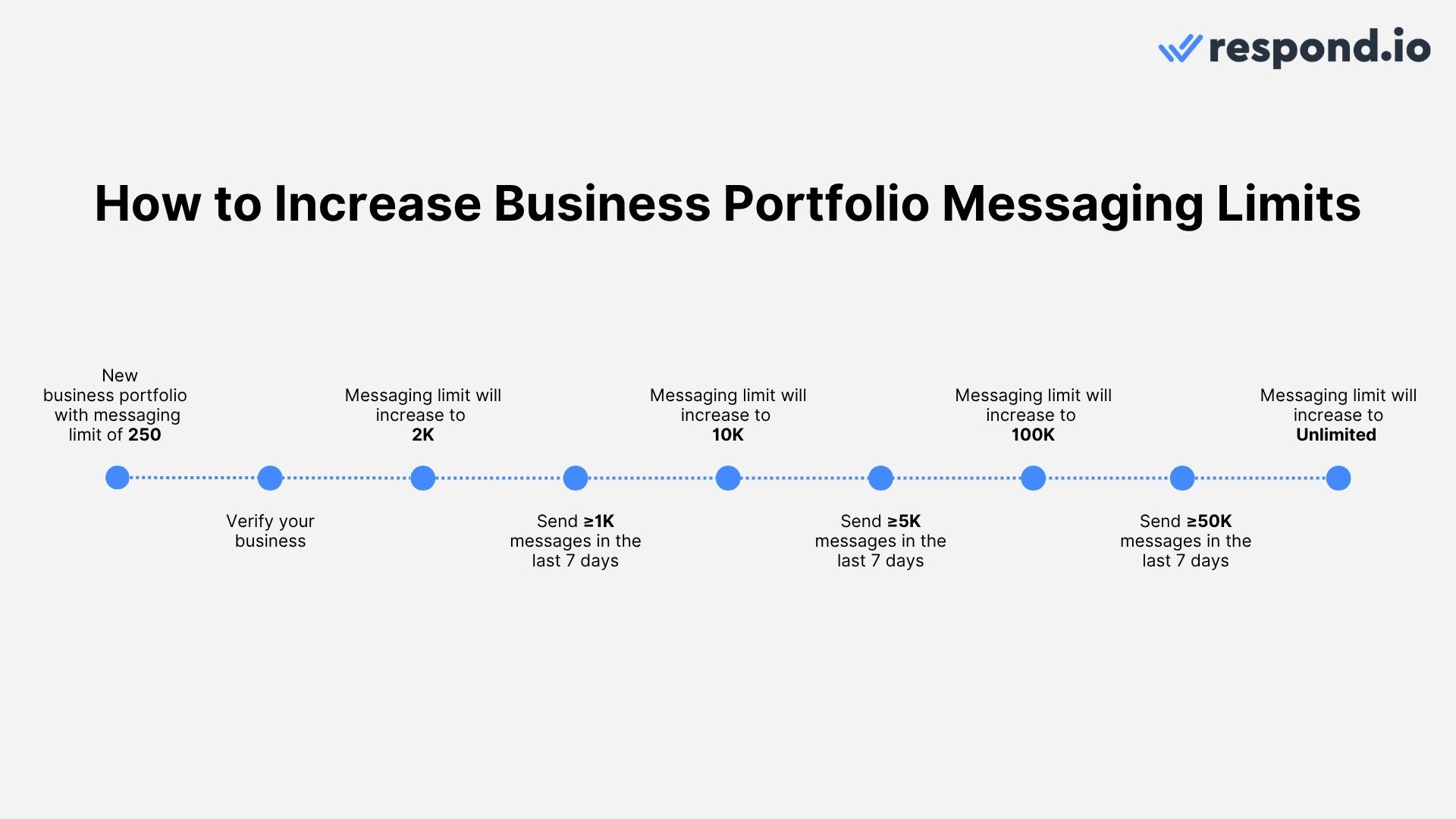
If your business consistently sends high-quality messages and meets usage thresholds at each tier, messaging limits can scale from 250 → 2K → 10K → 100K → Unlimited in as little as 4 days.
Learn more about increasing messaging limits beyond 2K.
Struggling to increase your WhatsApp messaging limits
The Alternate Path Program provides another way to scale messaging limits without completing full business verification. Consistently sending high-quality messages and meeting usage thresholds allows Meta to upgrade your limit based on performance.
From 1K → 10K
Day 1: Send at least 500 messages to unique contacts.
Your limit increases to 10K within 24 hours of the 500th message.
From 10K → 100K
Day 2: Send at least 5,000 messages to unique contacts.
Your limit increases to 100K within 24 hours of the 5,000th message.
From 100K → Unlimited
Day 3: Send at least 50,000 messages to unique contacts.
By Day 4 (24 hours after the 50,000th message), your limit increases to Unlimited.
By meeting the thresholds each day, move from 1K → Unlimited in just 4 days, provided messages maintain a Medium or High quality rating.
Phone number quality rating
The quality rating assigned to your phone number is based on customer feedback about the messages received in the past seven days.
High (Green): Customers respond positively to your messages.
Medium (Yellow): Some concerns have been raised. Address them promptly.
Low (Red): Significant issues or complaints — improve quality quickly.
Check your phone number quality rating in WhatsApp Manager > Phone Numbers > Quality Rating column.
Managing a low quality rating
If your quality rating drops:
Your messaging limit will not decrease, but scaling pauses until your rating improves.
You will receive email and Business Manager notifications as a warning.
Restricted status: This occurs when you reach your portfolio's messaging limit. During restriction, new business-initiated conversations are blocked until the 24-hour cap resets, but the customer service window remains open for replies.
Shared limit note: Messaging limits are shared at the portfolio level, so one phone number can consume the entire allowance for all numbers.
Improving your quality rating
To improve your quality rating:
Check templates: Identify whether any templates added in the last 7 days are causing negative feedback.
Policy compliance: Ensure notifications comply with WhatsApp's policies.
User opt-in: Only send messages to contacts who have explicitly agreed to receive them.
Best practices: Review WhatsApp's Best Practice Guide and optimize your messaging style.
Following these steps increases customer satisfaction and improves eligibility for higher messaging limits.
Why am I seeing the error "Rate limit hit"?
This happens when you send too many messages in a short period of time, causing the phone number to reach Meta's throughput limit. Meta only allows a phone number to send up to 80 messages per second. For details on Meta's throughput limit, see the WhatsApp throughput documentation.
This error affects outbound messages sent via:
Dev API
Broadcasts
Workflows
Integration tools like Zapier, Make.com, and n8n
What you can do
Split bulk messages into smaller batches.
Contact sales to set a customized send rate for broadcast messages.
Why did my WhatsApp broadcast fail with the error "The broadcast audience is greater than the message limit. Reduce the targeted audience"?
This error appears when the number of contacts in your broadcast exceeds your current messaging limit. WhatsApp sets daily messaging limits based on your business verification status and quality rating.
What you can do
Reduce the size of your broadcast audience to stay within your current limit.
Increase your messaging limit by completing Meta Business Verification.
Why am I seeing the error "Spam rate limit hit"?
This error occurs when too many contacts mark your messages as spam, triggering Meta's spam detection. A high spam rate negatively affects your phone number quality rating.
What you can do
Review your message templates to ensure they are relevant and not perceived as spam.
Only send messages to contacts who have opted in to receive communications.
Reduce broadcast frequency to avoid overwhelming your audience.


