

Éligibilité du plan : tous les utilisateurs peuvent tester le comportement des appels dans le panneau de l'Agent IA, mais seuls les espaces de travail abonnés au plan Advanced ou à un plan supérieur peuvent publier et utiliser la gestion des appels dans des conversations en direct.
L'action de gestion des appels permet à ton Agent IA de répondre et gérer automatiquement les appels entrants pour toi. Quand cette action est activée, l'Agent IA parle naturellement avec les appelants — les salue, répond à leurs questions, transfère les appels si nécessaire, et termine l'appel poliment une fois la conversation terminée.
Prise en charge des langues :
- L'agent vocal IA prend en charge 32 langues via le ElevenLabs Flash modèle v2.5.
- Par défaut, l'agent parle anglais.
- Lors d'un appel, l'Agent IA peut détecter automatiquement la langue parlée par l'appelant et s'y adapter, à condition que cette langue fasse partie des 32 prises en charge.
Comportement vocal :
- Toutes les voix sont techniquement multilingues.
- Les langues listées pour une voix indiquent une optimisation de l'accent, de la prononciation et du caractère naturel, et non des limites linguistiques strictes.
- L'utilisation d'une voix en dehors de ses langues optimisées est prise en charge, mais peut entraîner des différences de prononciation, des variations d'accent et une perte de naturel.
Canaux pris en charge
L'agent vocal IA peut répondre et gérer les appels entrants sur tout canal de respond.io qui prend en charge les appels.
Actuellement, l'agent vocal IA est disponible pour les canaux suivants :
WhatsApp
Facebook Messenger
Telnyx VoIP
Quand l'utiliser
Utilise cette action lorsque tu veux que ton Agent IA gère les appels entrants — par exemple saluer les clients, répondre à des questions simples, recueillir des informations clés ou transférer l'appel au bon agent humain si une escalade est nécessaire.
Ceci est particulièrement utile en dehors des heures d'ouverture ou en période de surcharge quand des agents humains ne sont pas disponibles.
Paramètres avancés
Premier message d'accueil : Rédige un message d'accueil personnalisé, ou ajoute une mention de consentement si tu enregistres les appels. Si tu laisses ce champ vide, le système utilisera un message d'accueil par défaut.
Choisis la voix de l'Agent IA : Sélectionne une voix naturelle parmi celles proposées (p. ex. anglais, espagnol, arabe).
Autoriser les Agents IA à enregistrer les appels : Enregistre les appels en fonction du paramètre d'enregistrement d'appels de ton espace de travail.
Clique sur Test AI Agent et utilise l'icône du téléphone pour simuler un appel avant de publier.
Accents disponibles
Gérer les appels prend en charge un ensemble prédéfini de voix, chacune avec un genre et un accent spécifiques.
Tu peux choisir parmi les options suivantes :
Afifah : Femme, accent malaisien
Alex : Homme, accent britannique
Andrew : Homme, accent américain
Danielle : Femme, accent canadien
Farah : Femme, accent jordanien
Haytham : Homme, accent égyptien
Mark : Homme, accent américain
Mauricio : Homme, accent latino-américain
Nathan : Homme, accent britannique
Choisir la voix de ton Agent IA
Tu peux sélectionner la voix que ton Agent IA utilisera pour s'adresser à tes contacts.
Pour choisir la voix de ton Agent IA :
Rends-toi sur la page Configuration de ton Agent IA > Actions > Gérer les appels
Active l'option Gérer les appels.
Clique sur Paramètres avancés.
Ouvre le menu déroulant Choisir la voix de l'Agent IA.
Sélectionne la voix souhaitée dans la liste.
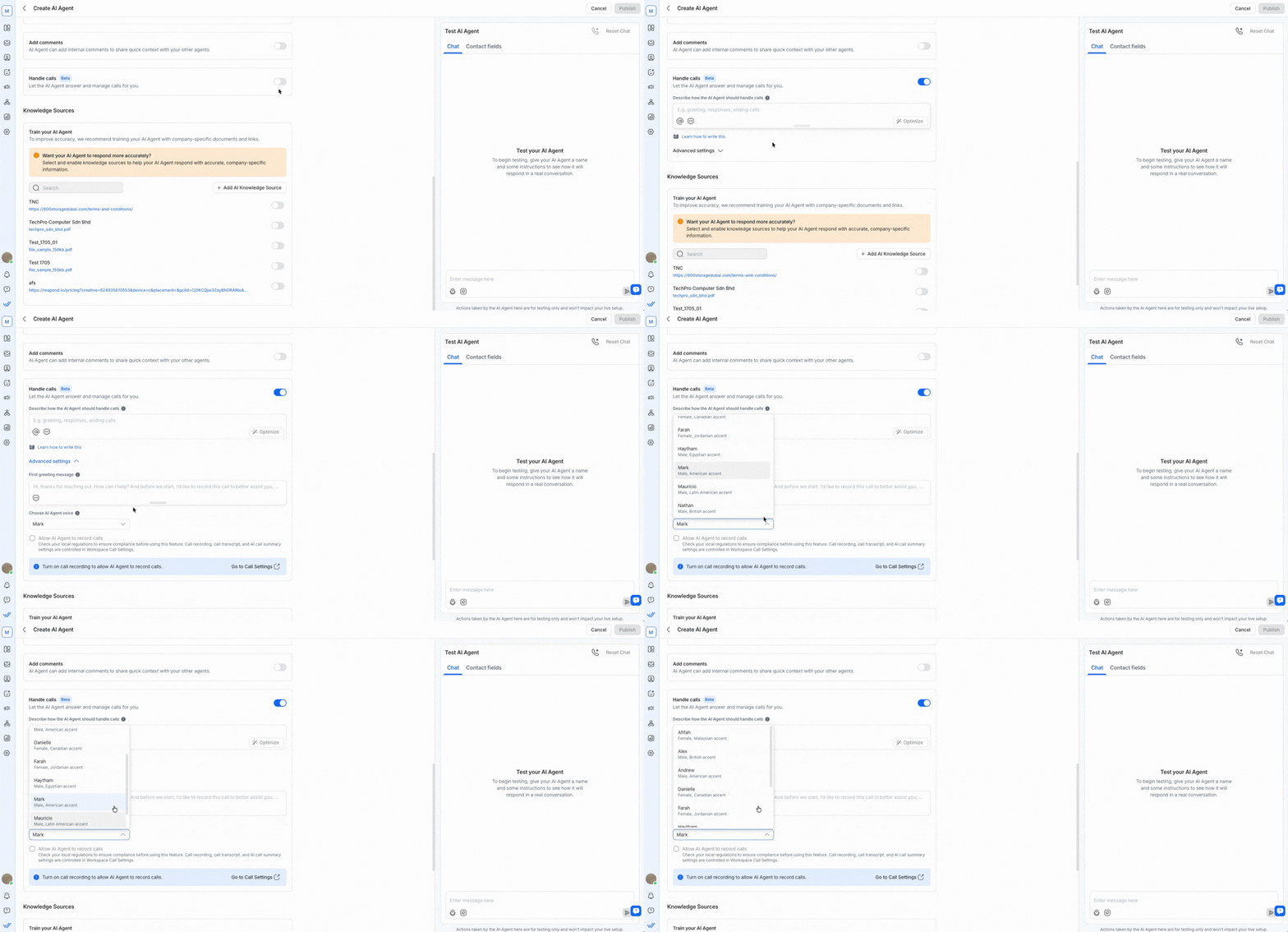
Après avoir sélectionné une voix, tu peux aussi tester l'Agent IA avec des appels pour vérifier comment ton Agent IA salue tes contacts, répond et termine les appels avant de publier.
Transfert d'appels vers un agent humain
Ton Agent IA peut transférer un appel en cours à un agent humain lorsque l'escalade est nécessaire. Pour activer cela, tes instructions d'appel doivent définir deux éléments :
Quand transférer — la condition ou le déclencheur (p. ex., l'appelant demande de l'aide pour la facturation)
Vers qui transférer — l'agent ou l'équipe cible
La façon dont tu configures cela dépend de si l'agent cible a des restrictions sur les contacts.
Scénario A : l'agent cible n'a pas de restrictions sur les contacts
Tu peux définir à la fois quand et qui directement dans le champ d'instructions Gérer les appels.
Exemple :
Gérer les appels : "Si le client demande de l'aide pour la facturation, transfère l'appel vers John Doe."
Scénario B : l'agent cible a des restrictions sur les contacts
Définis qui utilise l'action Assigner à un agent ou une équipe, et définis quand dans le champ d'instructions Gérer les appels. Les deux sont requis.
Exemple :
Assigner à un agent ou une équipe : "Assigne la conversation à John Doe lorsque le transfert est déclenché."
Gérer les appels : "Si le client demande de l'aide pour la facturation, transfère l'appel."
Si seul « quand » est défini
Si tes instructions précisent quand transférer mais ne nomment pas d'agent cible, l'Agent IA initiera tout de même le transfert. L'appel sonnera pour tous les agents disponibles sur la plateforme.
Que se passe-t-il si le transfert est manqué ou refusé
Si un agent humain ne décroche pas ou refuse l'appel transféré, l'appel ne se termine pas. Le système renvoie automatiquement l'appel à l'Agent IA.
Après un transfert raté, l'Agent IA reprend l'appel sans conserver le contexte de la conversation antérieure à la tentative de transfert.
Meilleures pratiques
Garde les instructions courtes et claires — les réponses de ton Agent IA doivent avoir un ton naturel et conversationnel.
Inclue un texte de consentement dans ton message d'accueil si tu prévois d'enregistrer les appels. Par exemple :
- Salut, merci d'avoir appelé. J'aimerais enregistrer cet appel pour mieux t'aider — ça te va ?Teste avant de publier pour t'assurer que la voix et le message d'accueil choisis sonnent naturels.
Pour la cohérence de la marque, fais correspondre le ton de voix de ton Agent IA à la façon dont ton entreprise interagit par chat.
Garde les interactions d'appel simples — évite de poser plusieurs questions à la suite ou des scripts longs.
Suis la structure d'instructions recommandée
Pour de meilleurs résultats, rédige tes instructions d'appel en utilisant la même structure que le bouton Optimize applique. Cela garantit que ton Agent IA comprend clairement l'objet de l'appel, reste dans les capacités prises en charge et répond de manière cohérente lors de conversations vocales en direct.
Utilise le modèle ci-dessous comme référence et adapte le contenu à ton cas d'utilisation.
# CONTEXTE D'APPEL
Tu gères un appel vocal entrant.
Cet appel est uniquement informatif et ne permet pas les réservations ni les confirmations.

# RÔLE DE L'AGENT
Tu aides à répondre aux questions générales sur les voitures, les modèles et les caractéristiques.
Tu ne gères pas la planification, les réservations ni les confirmations.

# STYLE DE COMMUNICATION
- Parle sur un ton amical et serviable.
- Réponds naturellement et de façon conversationnelle.
- Garde la conversation axée sur l'information, pas sur les actions.

# CE QUE TU DOIS FAIRE
- Réponds aux questions générales sur les modèles, les spécifications, l'état de disponibilité et les fonctionnalités.
- Réagis aux préférences que le contact partage naturellement, comme le budget, la couleur ou le style.
- Explique le processus pour effectuer une réservation, par exemple via le site web, sans effectuer toi‑même aucune tâche de réservation.
- Poursuis la conversation de manière utile et informative.

# CE QUE TU NE DOIS PAS FAIRE
- Ne demande pas de numéros de téléphone pour la réservation ou la confirmation.
- Ne demande pas de dates ni d'heures pour des visites ou des rendez‑vous.
- Ne collecte pas de détails pour la planification, les réservations ou les confirmations.
- Ne suggère pas de créneaux disponibles, prochaines disponibilités ou horaires de visite.
- Ne dis pas et n'insinue pas qu'une réservation est confirmée ou réservée.
- Ne promets pas que quelqu'un contactera l'appelant ou fera un suivi.
- Ne fais pas passer le contact par des étapes de réservation.

# COMMENT GÉRER LES DEMANDES COURANTES
Si le contact demande à réserver, confirmer ou vérifier des dates ou horaires de visite :
Dis : « Je ne peux pas effectuer ni confirmer de réservations lors de cet appel, mais je peux répondre à toutes les questions concernant nos voitures. »
Limitations
Le transfert d'appel n'est pris en charge que de l'Agent IA vers un agent humain. Les types de transfert suivants ne sont pas pris en charge :
Agent IA vers Agent IA
Agent humain vers Agent IA
Appels entrants uniquement. Les appels sortants ne sont pas pris en charge, et l'Agent IA ne peut répondre qu'aux appels entrants.
Pas de prise en charge humaine pendant un appel. Les agents humains ne peuvent pas rejoindre, interrompre ou reprendre un appel pendant que l'Agent IA le gère.
L'Agent IA doit être assigné avant le début de l'appel. Si l'Agent IA est assigné après que l'appel entrant commence à sonner, il ne prendra pas l'appel.
Les actions s'appliquent uniquement après la fin de l'appel. L'Agent IA peut mettre à jour les champs de contact, les cycles de vie ou déclencher d'autres actions uniquement après la fin de l'appel. Les actions ne peuvent pas s'exécuter pendant un appel actif.
La durée des appels est limitée. Chaque appel est limité à un maximum de 3 minutes.
Les tests diffèrent de l'utilisation en direct. Tous les utilisateurs peuvent tester le comportement d'appel dans le panneau Test AI Agent, mais publier et gérer des appels en direct nécessite un plan Advanced ou supérieur. Passe à une offre supérieure.
Besoin d'aide avec ton Agent IA ?
Notre équipe Support est là pour toi à tout moment.


