

Migrating a phone number to WhatsApp Business API from WhatsApp Personal or the WhatsApp Business App requires deleting the WhatsApp account tied to that number, because a single number cannot be active on both at once. This guide explains when deletion is needed and how to delete your account safely.
Before you begin
Important: You do not need to delete your WhatsApp account to connect your WhatsApp Business App number to respond.io. With WhatsApp Coexistence, the same phone number works on both the app and respond.io via the WhatsApp API — no account deletion required. Learn how to connect your WhatsApp Business App to respond.io and access API features with some limitations.
A phone number for WhatsApp Business API cannot be used in any WhatsApp Personal or Business App. To register for WhatsApp Business API using a number already registered for WhatsApp Personal or Business App, first delete the WhatsApp account associated with that number.
Note: Back up your chats and media files before deleting your account, if required.
How to delete your WhatsApp account
1. Open WhatsApp and navigate to Settings.
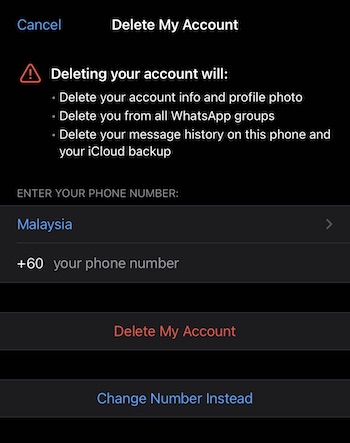
2. Tap Account > Delete My Account.
3. Enter your phone number in full international format then tap Delete My Account.
4. Tap the drop-down list to select a reason.
5. Tap Delete My Account.
Once the WhatsApp account is deleted, the phone number is available to register for a WhatsApp Business API. Learn how to sign up for a WhatsApp Business API account here.
FAQ and Troubleshooting
What should I do before deleting my WhatsApp account to avoid data loss?
Before deleting your WhatsApp account, back up your chat history in the WhatsApp Business App to avoid losing your messages.
Note: If you're switching your WhatsApp Coexistence connection from another Business Solution Provider (BSP) to respond.io, do not delete your WhatsApp Business account. See how to back up and restore your chat history before switching WhatsApp Coexistence providers in the WhatsApp Business App Quick Start guide.
For instructions on backing up your chat history, refer to:
• iPhone:How to Back Up WhatsApp on iPhone
• Android:How to Back Up WhatsApp on Android
Can I import my chat history from the WhatsApp app to respond.io's WhatsApp Business Platform (API)?
No, you cannot import your chat history from the WhatsApp app to respond.io's WhatsApp Business Platform (API). WhatsApp's backup options are only useful for restoring history on another phone, not for migrating to the WhatsApp API. The backup stored in your Google Drive cannot be used for migration to the WhatsApp API.
Can I save and import my Contacts to respond.io?
Yes. Save and import your Contacts to respond.io as follows:
• Use Google Contacts to download your phone address book into a CSV file.
• Import the CSV file into respond.io.
Why do some Contacts see "This person no longer uses WhatsApp" when messaging your number?
This error appears after a phone number switches surfaces. A WhatsApp Personal or Business App account was deleted, then the same number was registered for WhatsApp Business API. Meta closes the original registration permanently once this happens.
Contacts who messaged the number before the switch still have that closed registration saved in their chat. Their app shows this error until the saved registration refreshes. Contacts who message the number for the first time after the switch are not affected.
This does not happen with WhatsApp Coexistence. The original account is never deleted, so existing chat threads stay valid.
To refresh affected Contacts at scale:
Send an approved message template through WhatsApp Business API. Receiving a message prompts the Contact's app to re-check the registration.
Share a click-to-chat link (
wa.me/<your number>) through other means, such as email or SMS, so Contacts start a fresh conversation.Run Click-to-WhatsApp Ads through Meta to generate new inbound conversations.
A Contact can also delete and re-save the number to force a refresh. Alternatively, they can message through WhatsApp Web or WhatsApp Desktop, which re-checks the registration on every chat open.
To avoid this issue, register a new phone number for WhatsApp Business API. Do not reuse a number tied to a deleted account.


