
















 Electronics
 Fashion & Apparel
 Furniture
 Jewelry and Watches
 Afterschool Activities
 Sport & Fitness
 Beauty Center
 Dental Clinic
 Medical Clinic
 Home Cleaning & Maid Services
 Photography & Videography
 Car Dealership
 Travel Agency & Tour Operator

TL;DR: Which is better for mid-market B2C businesses — Kommo, Manychat or respond.io?
For mid-market B2C businesses where customer conversations drive revenue, respond.io is the better fit because Kommo and Manychat both hit ceilings that cost deals.
Kommo was built as a CRM first — its automation handles pipeline management, not revenue conversation workflows. There's no support for WhatsApp Business Calling API, and its VoIP doesn't have a Voice AI Agent.
Manychat was built for social-first automation, not live agent and AI hybrid workflows. It lacks the channel breadth and workflow depth that mid-market B2C revenue operations need at scale.
Respond.io closes these gaps. Built for mid-market B2C businesses where conversations drive revenue — AI Agents that qualify leads, book appointments and update lifecycle stages autonomously, a Voice AI Agent that handles inbound calls via WhatsApp Business Calling API and VoIP without a human in the loop, and every channel managed in one customer conversation platform from first contact to closed deal.
Choosing between Kommo, Manychat and respond.io is straightforward when your team is small and conversation volume is low. It gets harder when customer conversations become your primary revenue channel — when leads come in through WhatsApp campaigns, get qualified by AI and close through a mix of chat and voice.
At that point, Kommo's CRM-first architecture limits what your team can do with conversations — its automation was built for pipeline management, not revenue conversation workflows. Manychat handles social-first funnels well but lacks the live agent tools, deep workflow automation and channel breadth that mid-market B2C businesses need at scale.
Respond.io is a customer conversation platform built for mid-market B2C businesses where customer conversations drive revenue. This comparison breaks down where each platform hits its ceiling and whether respond.io is the right fit for where your business is going.
Quick comparison: Kommo vs Manychat vs Respond.io
All three platforms might seem similar on the surface, but have different specialties. Kommo (formerly known as amoCRM) is a customer relationship manager (CRM) with messaging capabilities. Manychat focuses on social media automation, with a strong emphasis on Instagram and TikTok. Respond.io is a customer conversation platform that combines CRM-like features with a full omnichannel inbox built for revenue workflows — designed for mid-market B2C businesses where customer conversations drive revenue.
Here’s a quick TL;DR for those of you needing a quick answer:
Kommo: Best for businesses seeking a CRM-first solution with messaging capabilities. CRM users will find its leads-focused experience familiar, but the interface feels outdated next to modern chat platforms.
Manychat: Ideal for small businesses focused on conversational marketing over social media. It’s easy to set up, specializes in Instagram and TikTok and offers a free plan suited for solo entrepreneurs and small online businesses. Best for those prioritizing full chat automation, as it lacks features to assist agents with live customer interactions.
Respond.io: The go-to customer conversation management software for mid-market B2C businesses where customer conversations drive revenue. With WhatsApp Business Calling API and VoIP, Voice AI Agents, AI Agents, click-to-chat ads, Lifecycle tracking and a true omnichannel inbox, it's built to capture leads, convert customers and retain them at scale.
Kommo vs Manychat vs Respond.io: Table of comparison
Kommo | Manychat | Respond.io | |
|---|---|---|---|
Channels Supported | WhatsApp, Instagram, Apple Messages, Facebook Messenger, Viber, Skype, Telegram, WeChat | WhatsApp, Instagram, Facebook Messenger, Telegram, TikTok, SMS, Email | WhatsApp, Instagram, Facebook Messenger, TikTok, Telegram, Viber, WeChat, SMS, Email, LINE, Webchat, VoIP, Custom |
Automation & AI | No-code automation, automatic responses, AI suggestions and assistance, AI training | No-code automation, automatic responses, helpful AI tools | Advanced no-code automation, advanced automatic responses, AI agents and AI-assisted features |
Integrations | Ecommerce platforms, live chat and other messengers, online forms, VoIP, online automation tools, payment gateways, | Third-party platforms including ActiveCampaign, HubSpot, and Google Sheets | CRMs (Salesforce, HubSpot), online automation tools (Zapier, Make), Google Sheets, webhooks, Custom APIs |
Multichannel Broadcast | WhatsApp, Instagram, Apple Messages, Facebook Messenger, Viber, Skype, Telegram, WeChat | WhatsApp, Facebook Messenger, Instagram, Telegram, SMS, Email | WhatsApp, Facebook Messenger, LINE, Viber, Telegram, SMS |
Reporting | Win-Loss analysis, consolidated lead reports, activity log, call, goal reports | Basic analytics for automations, customer interactions, limited agent performance metrics | In-depth analytics for conversation resolutions, broadcast performance, agent performance |
Platform Stability | No public data | No public data | |
Customer Support | Only during office hours over webchat, WhatsApp, Facebook, SMS, contact form, email and phone | Only during office hours, ticketing system and forums. Email support for higher tiers | 24/7 human and AI support available, including scheduled success calls |
Free Plan | 14-day free trial | Available with limited features | 7-day free trial |
Starting Price | $15/month | $17/month | $99/month |
While the table provides a quick overview, choosing the right platform requires careful consideration. Let’s dive into a detailed comparison.
Turn customer conversations into business growth with respond.io. ✨
Manage calls, chats and emails in one place!
A detailed comparison: Kommo vs Manychat vs Respond.io for marketing and sales
Every business has different needs when it comes to managing marketing and sales conversations. The right platform depends on your workflows, existing tech stack and whether you prioritize simplicity or advanced features.
In this section, we’ll compare how each platform supports these areas to help you find the best fit.
Omnichannel messaging
When choosing a platform, it’s important to ensure it supports the messaging channels your business relies on –whether that's WhatsApp, Facebook Messenger, Email, LINE, or others. The ideal channels will vary based on your business and where your customers are.
Managing conversations across multiple platforms can quickly become messy. With chats and contacts spread out, it’s easy to lose track of conversations, create inefficiencies, or worse – send the wrong information to the wrong person.
A unified platform brings all your chats together, giving agents full context and conversation history across channels. It also helps teams collaborate in real time by assigning conversations to the right owner, preserving context during handovers and using AI-generated summaries so the next agent can act quickly. Agents can also open the Command palette with Cmd+K or Ctrl+K to search conversations by contact name, email, phone or any custom field and jump straight to the matching conversation with full context. This reduces response delays, protects conversion continuity and creates a smoother, more consistent experience for customers.
When WhatsApp is a major revenue channel, buyers should treat it as an operating workflow, not a checkbox. The real test is whether the platform supports official WhatsApp Business API use with template messaging, broadcasts, click-to-chat ad follow-up, calling, number migration and a clean handoff from AI Agents to human teams once a lead is ready to buy.
LLeaders should also budget for Meta WhatsApp fees on top of the software subscription and confirm what happens during switching. Group messaging is another check: Meta's Groups API supports invite-only groups of up to 8 participants for Official Business Accounts, so teams that rely on large WhatsApp groups should plan around that limit. Those details shape campaign execution, follow-up speed and migration risk far more than a simple 'WhatsApp supported' label.
In this comparison, the CRM-first option (Kommo) supports WhatsApp inside a broader pipeline workflow, while the social-first option (Manychat) is better suited to lighter campaign entry points. Respond.io goes deeper on day-to-day execution with template messaging, broadcasts, click-to-chat ad follow-up, WhatsApp Business Calling, VoIP, number migration support and AI Agent-to-human handoff in one customer conversation platform. When those pieces are weaker, teams rely on more workarounds, follow-up slows and conversion risk rises.
Here’s how the different platforms compare:
Kommo | Manychat | Respond.io | |
|---|---|---|---|
Channels | WhatsApp, Instagram, Apple Messages, Facebook Messenger, Viber, Skype, Telegram, WeChat | WhatsApp, Instagram, Facebook Messenger, Telegram, TikTok, SMS, Email | WhatsApp, Instagram, Facebook Messenger, TikTok, Telegram, Viber, WeChat, SMS, Email, LINE, Webchat, VoIP, Custom |
Custom Channels | ❌ | ❌ | ✅ |
Contact Merge | ✅ | ✅ | ✅ |
Kommo supports popular channels like WhatsApp, Telegram, Messenger, Instagram, and more. It also offers contact merge to combine conversations and remove duplicates. However, it keeps email separate from instant messaging chats, creating a clear distinction between the two channels.
Manychat supports Instagram, TikTok, Messenger, WhatsApp, SMS and email. However, it lacks support for less common channels like LINE or Viber. It's a good fit for businesses focused on these core channels but may feel limiting if you plan to expand your reach.
Respond.io offers true omnichannel messaging, supporting WhatsApp, Messenger, Telegram, LINE, Viber, SMS, TikTok, email and more. With Contact Merge, it consolidates customer profiles and conversations across channels to provide full context in every interaction.
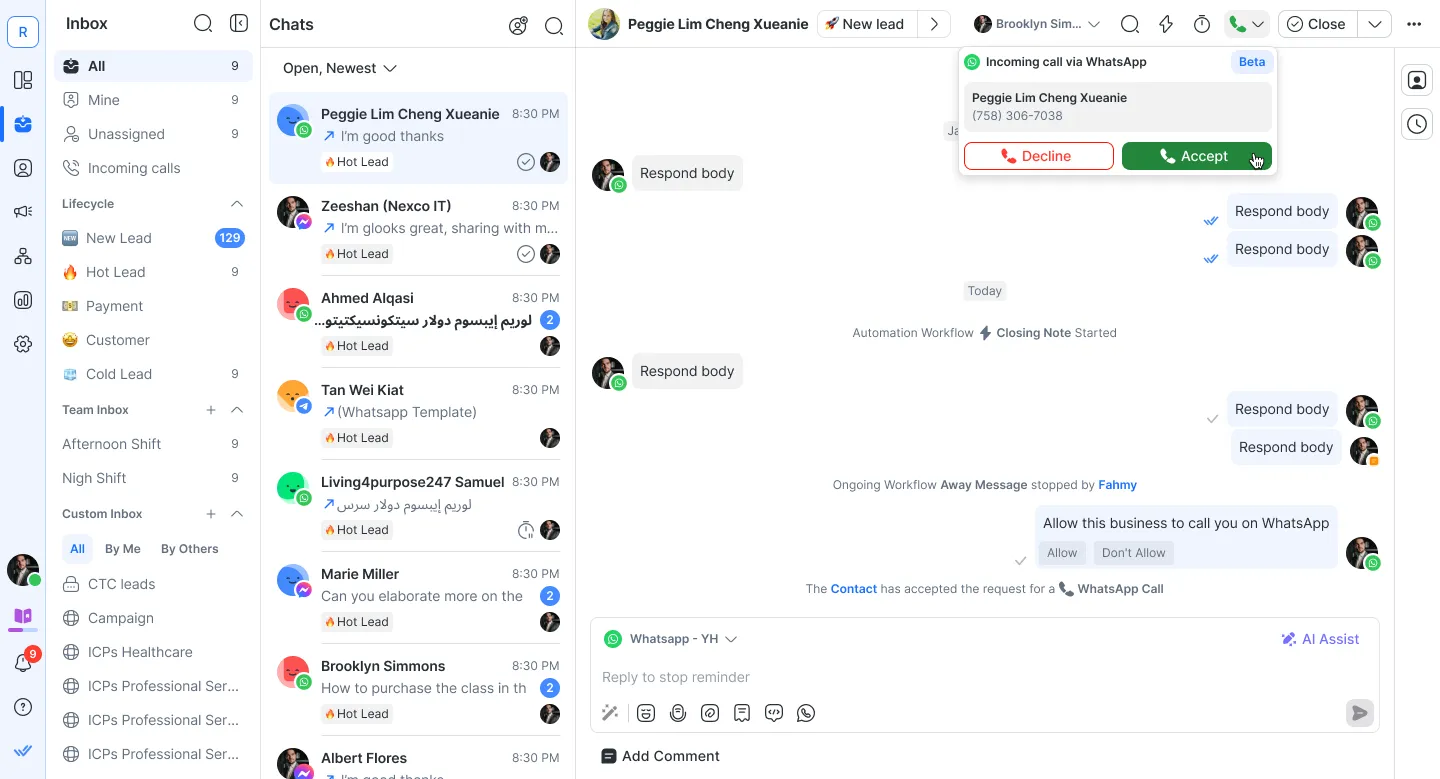
Respond.io also gets early access to revolutionary features like VoIP-CRM integrations for Telnyx, WhatsApp calls and Messenger calls. Calls can be transcribed so your business has a full view of customer conversations over voice as well as chat. With omnichannel support covered, let’s see how these platforms help your business grow.
Capturing leads
Before you can chat with customers, you need effective ways to capture their information. Whether through offline methods, click-to-chat ads, or website chat widgets, each platform offers different tools to help. Here’s how they compare:
Kommo | Manychat | Respond.io | |
|---|---|---|---|
Click to Chat Ads | ✅ | ✅ | ✅ |
QR Codes | ✅ | ✅ | ✅ |
Website Widgets | ✅ | ✅ | ✅ |
Fully Customizable Widgets | ✅ | ❌ | ✅ |
Omnichannel Widgets | ✅ | ❌ | ✅ |
Lead Tracking | ✅ | ❌ | ✅ |
Kommo supports Meta click-to-chat ads to bring new leads into your pipeline, but its outreach features lean more traditional, relying on forms, SMS and phone calls.
Manychat offers click-to-chat ads and QR codes to spark conversations and capture leads. It also provides website widgets, though customization options are limited, which may be restrictive if you need more control over the user experience.
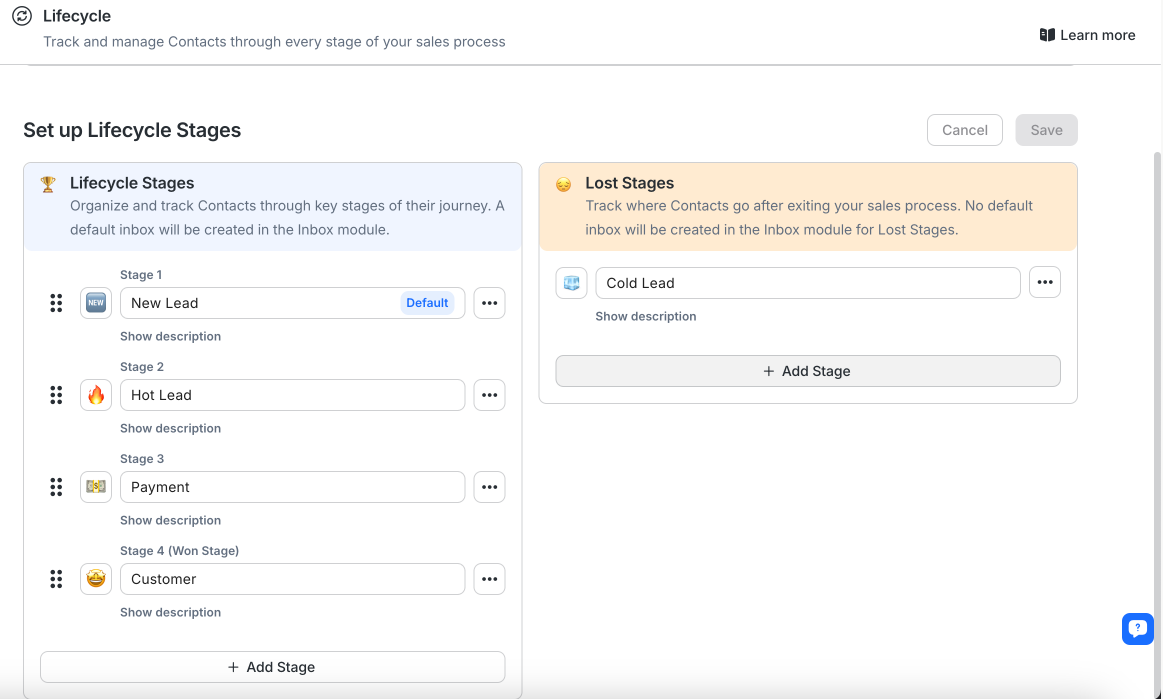
Respond.io stands out with fully customizable omnichannel website widgets, allowing you to capture and engage leads directly from your website, regardless of the channel they come from. Combined with click-to-chat ads, QR codes and broad multichannel support, respond.io offers a powerful solution for lead capture across every touchpoint. Plus, its Lifecycle feature ensures every lead is properly tracked and nurtured with the right messages at the right time.
Instagram-led growth usually splits into two decisions. The first is whether marketing needs Instagram-native campaign mechanics like comment-to-direct-message triggers, story-reply automation, keyword flows and timed follow-up inside direct messages. The second is what needs to happen after that first reply.
Manychat is the stronger fit when those Instagram mechanics are the growth engine, because it is built for turning social engagement into direct-message conversations quickly. Kommo can push those leads into a customer relationship management (CRM) flow, but it is less specialized for Instagram campaign execution. Respond.io becomes the stronger fit once leads need qualification, routing and follow-up across WhatsApp and other key messaging, social, voice and email channels without losing lifecycle context.
Now, let’s look at how the three platforms automate and utilize AI.
Converting leads with automation, AI and chatbot solutions
Automation and Artificial Intelligence is all the rage right now and for a very good reason. These tools enable all businesses to improve their customer experience in ways that weren’t possible many years ago.
From automatically answering FAQs to workload delegation and offering round-the-clock customer support (with a smaller workforce), they have changed the face of businesses forever.
Let’s have a look at each platform’s automation and AI capabilities.
Kommo | Manychat | Respond.io | |
|---|---|---|---|
No-Code Automation | ✅ | ✅ | ✅ |
AI Agent | ✅ | ✅ | ✅ |
AI Assisted Messaging | ✅ | ✅ | ✅ |
Knowledge Training | ✅ | ❌ | ✅ |
Automated Smart Triggers | ✅ | ✅ | ✅ |
Kommo offers a straightforward no-code automation builder powered by its Salesbot, along with AI-assisted tools like auto-replies and custom knowledge training. Its workflow builder is basic, making it sufficient for simple processes, but businesses with more complex automation needs may find it limiting.
Manychat provides a no-code automation builder for simple workflows, complemented by AI tools like AI Text Improver for message tweaking and translation. The AI Flow Builder Assistant simplifies automation setup with guided questions, while triggers enable actions based on user events like appointment reminders.
Manychat’s AI lacks custom knowledge training, meaning you’ll need to rely on third-party chatbots to provide more relevant responses to your customers.
Respond.io’s AI Agent handles customer conversations automatically, replying instantly by both chat and voice 24/7, routing chats to the right team and even triggering your existing Workflows. It also updates contact fields and lifecycle stages on its own, while pulling accurate answers from your knowledge sources.
You can create agents for multiple roles like receptionist, sales or support from templates. The AI Agents can handle these specialized tasks, leave internal comments and assign conversations to a human agent or another AI Agent as needed.
AI Assist generates editable responses based on chat history, while AI Prompts help translate messages, adjust tone, fix typos and simplify text. At the same time, your sales AI Agent automatically handle routine inquiries and provide instant replies. Respond.io’s knowledge training feature further enhances accuracy by incorporating FAQs, PDFs, and other documents.
Kommo and Manychat both support automation and AI assistance, but the AI value is still closely tied to the specific flow being built. That is workable for simple inbound replies, yet revenue teams may still need separate logic for qualification, routing and follow-up as channel mix grows.
Respond.io leads with AI Agents that do more than answer. They can qualify leads, update lifecycle stages, trigger workflows, route by intent, escalate high-value opportunities and generate handover summaries across WhatsApp, Instagram, Facebook Messenger, TikTok, Telegram, LINE, Viber, WeChat, voice calls and email from one setup. That matters commercially because AI stays consistent as the team expands instead of becoming a new project on every channel.
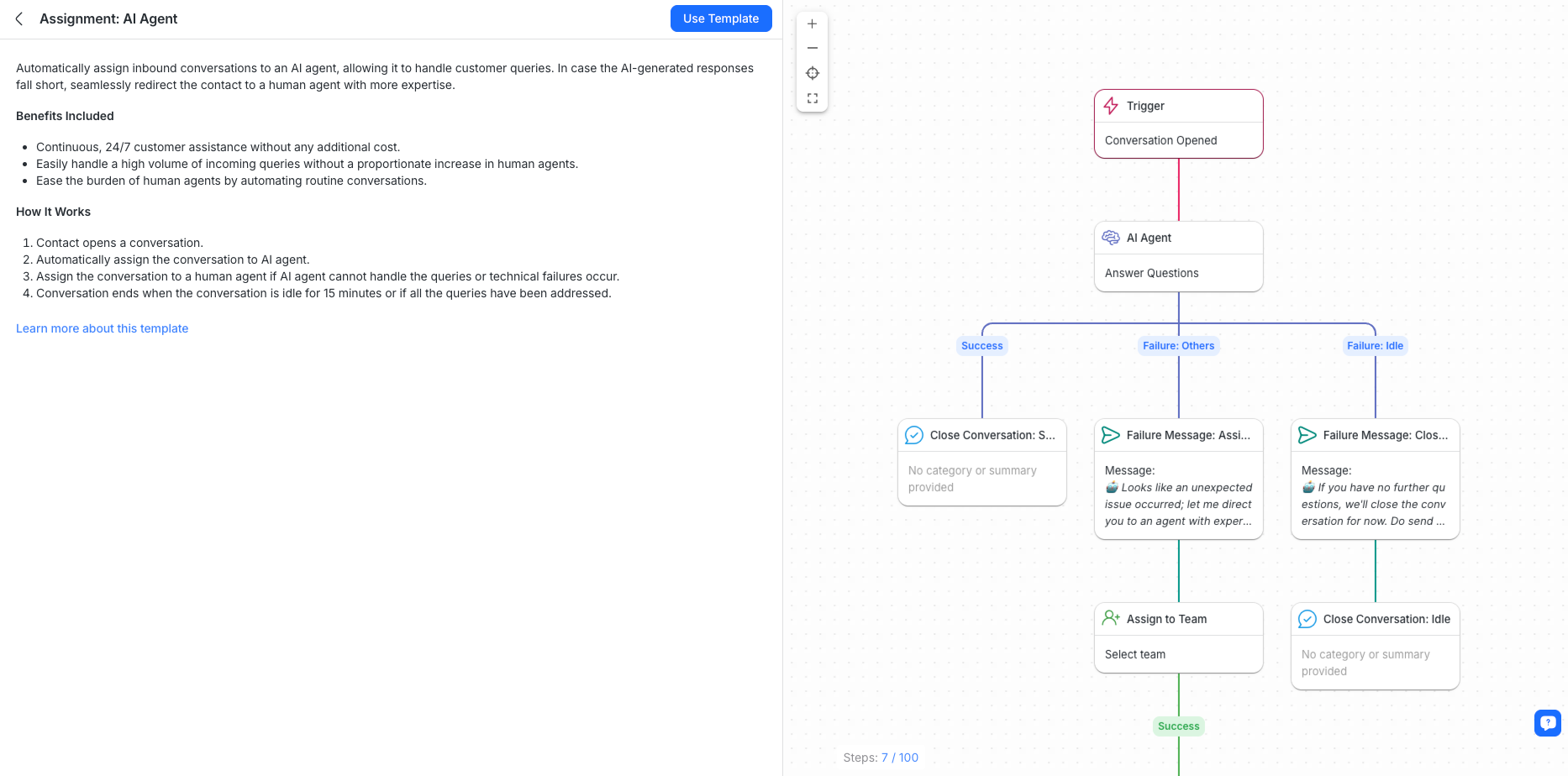
Respond.io takes automation to the next level with a no-code drag-and-drop builder built for complex workflows across multiple channels. It easily manages advanced tasks like chat routing, case escalations, and shift management. Its Workflows also enable personalized messaging triggered by customer actions on platforms like Shopify and WooCommerce, powered through integrations with Zapier, Make, or webhooks.
Respond.io also supports Voice AI Agents that handle inbound calls via WhatsApp Business Calling API and VoIP — transcribing, qualifying and routing without a human in the loop. Calls are automatically summarised so your team has a full record of every voice conversation alongside chat.
AI should be evaluated as an operating model, not a feature checkbox. Buyers should confirm whether AI Agents are included in-plan or metered separately, because teams may rely on them every day to qualify leads, update lifecycle stages, trigger workflows, route by intent, escalate high-value opportunities and generate summaries for handovers.
When AI costs are harder to predict, active campaigns become harder to budget and teams may hesitate to automate follow-up at the exact moment conversation volume spikes. For mid-market B2C teams, predictable AI packaging matters because qualification and routing are part of daily revenue execution, not occasional experimentation.
Integrations and CRM system compatibility
Integrations matter because messaging rarely lives alone, but buyers should also check where daily work actually happens. If reps need to manage a visual deal pipeline inside the same system, a customer relationship management (CRM)-first tool is usually the better fit because stage movement, forecasting and record updates all happen in one place.
If revenue depends on handling high volumes of customer conversations across channels, a customer conversation platform is usually the stronger model because the conversation stays at the center while deeper record keeping can sync to systems like Salesforce or HubSpot. That is why Kommo fits teams that sell through a visual pipeline, while respond.io fits mid-market B2C teams that qualify, route and follow up through large volumes of conversations without forcing agents to work around a pipeline screen first.
While third-party tools like Zapier and Make can bridge gaps, native integrations with your most-used tools offer better stability, faster performance, stronger security, cost savings, easier setup and deeper functionality.
Kommo | Manychat | Respond.io | |
|---|---|---|---|
CRMs | Zendesk, Pyrus | HubSpot | HubSpot, Salesforce |
Webhooks | ✅ | ❌ | ✅ |
Google Sheets | ✅ | ✅ | ✅ |
Online Automation Tools | ✅ | ✅ | ✅ |
Kommo doesn’t offer many native integrations with other CRMs – understandably, since it functions as a CRM itself. However, this limitation can be overcome with automation tools like Make, Zapier, and Pabbly. Beyond that, Kommo provides a wide range of native integrations with other apps, including payment services, ecommerce platforms and more.
Manychat offers a limited selection of native integrations, complemented by its integration marketplace for connecting with popular third-party tools. When additional functionality is needed, automation platforms like Zapier and Make can help bridge the gaps. While sufficient for basic needs, businesses with more complex workflows may find the options somewhat restrictive.
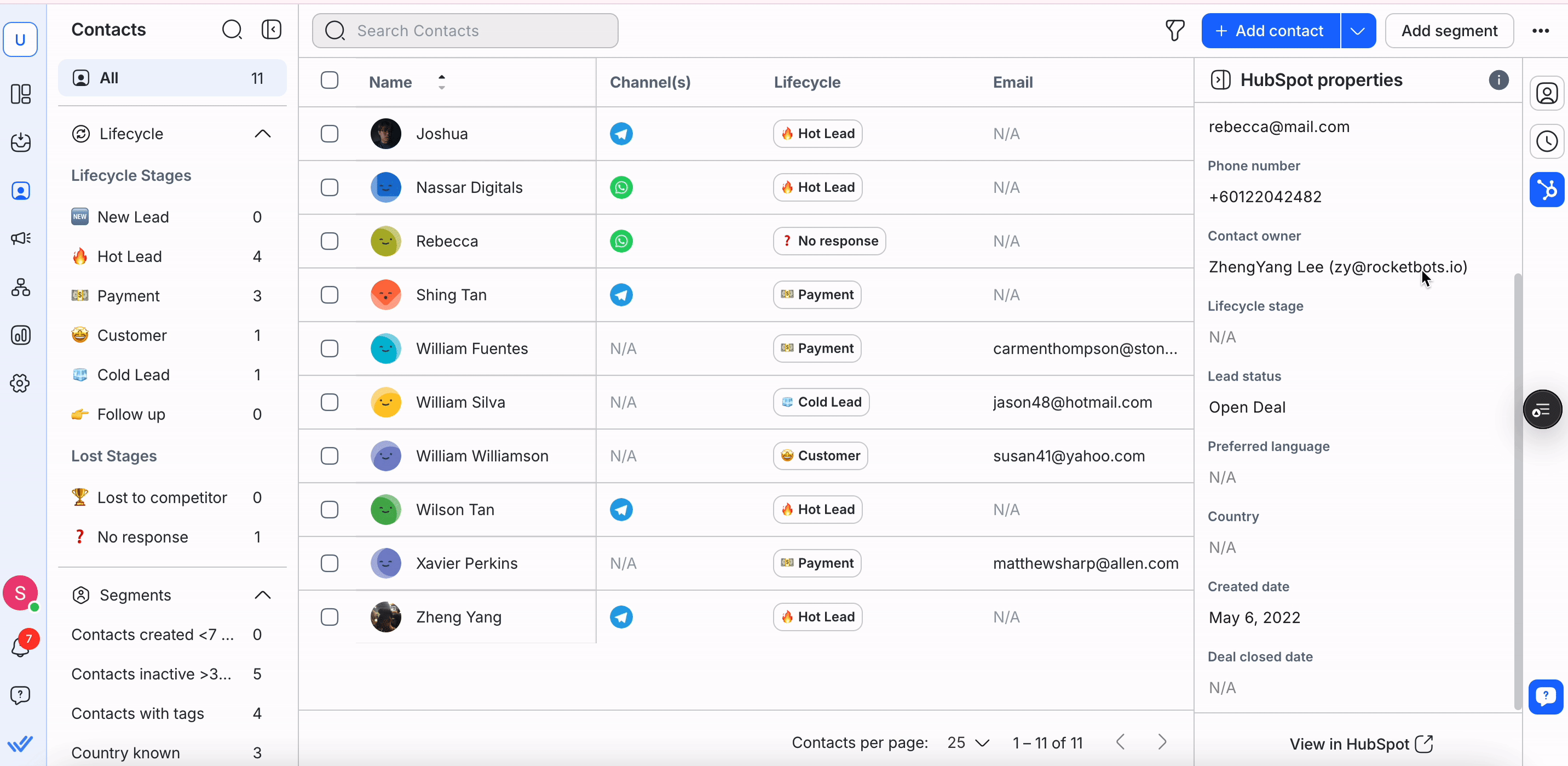
Respond.io integrates natively with Salesforce and HubSpot, so teams using those systems can keep WhatsApp conversations, contact records and lifecycle updates aligned without adding another middleware layer. Respond.io also runs a hosted MCP (Model Context Protocol) server, so teams can connect Claude or ChatGPT straight to their workspace through OAuth login and manage contacts, messages and AI Agent settings from inside their own AI client, a layer neither Kommo nor Manychat offers natively.
A native Google Calendar integration also lets agents view a contact's upcoming and past meetings directly in the Inbox sidebar, matched by email across a 12-month window.
That means faster follow-up, cleaner handovers and fewer missed updates, while other CRM connections can still be handled through Zapier, Make or webhooks when a native integration is not available.
Buyers should also check whether email lives inside the same operating workflow as chat and voice or gets pushed into a separate tool. When email follow-up sits in another dashboard, teams lose lifecycle context, reporting splits across systems and handovers become slower because conversation history is no longer visible in one place.
Respond.io helps reduce that fragmentation by letting teams manage WhatsApp and other key messaging, social, voice and email channels inside the same customer conversation platform, while keeping contact records and lifecycle updates aligned with connected systems
With integrations covered, let’s dive into how these platforms deal with broadcasts.
Retain customers with broadcast
It’s well known that retaining existing customers is more cost-effective than acquiring new ones. Retention messaging is not just about sending one campaign to a full list. Revenue teams also need drip-style follow-up that re-engages leads after inbound chats, nurtures contacts who clicked an ad but did not buy, promotes time-sensitive offers and brings inactive demand back into active conversations. The right platform should make those follow-ups easy to segment, schedule and measure across the channels the team already uses.
That matters because broadcast depth affects revenue, not just reach. If follow-up logic is too basic or key campaign features sit behind higher tiers, teams often fall back on one-off blasts instead of building repeatable journeys that move customers toward another purchase or sales conversation.
Keeping your audience engaged with timely, relevant promotional messages is key to maintaining strong customer relationships and driving repeat business.
With features like multichannel support, triggered broadcasts, and detailed analytics, these platforms help ensure your messages reach the right audience at the right time, building loyalty and long-term engagement.
Kommo | Manychat | Respond.io | |
|---|---|---|---|
Broadcast Channels | WhatsApp, Instagram, Apple Messages, Facebook Messenger, Viber, Skype, Telegram, WeChat | WhatsApp, Facebook Messenger, Instagram, Telegram, SMS, Email | WhatsApp, Facebook Messenger, LINE, Viber, Telegram, SMS |
Broadcast Analytics | ✅ | ✅ | ✅ |
Triggered Broadcast | ✅ | ✅ | ✅ |
Kommo supports broadcasting across popular channels, with the option to automate messages based on specific triggers. However, its broadcast analytics are fairly basic and may not provide the full insights needed to evaluate campaign performance. Marketing Managers should also verify whether broadcasts, reminders and follow-ups can be scheduled in advance, not just sent manually or triggered by a single event. This matters for launches, promotions and retention campaigns — it lets teams plan execution ahead instead of relying on someone to hit send at the exact right moment.
Manychat supports broadcasts across WhatsApp, Messenger, Telegram, SMS and email, offering broad channel coverage for businesses. However, its analytics are limited to basic metrics like Sent, Delivered, and Clicked. While this may be sufficient for smaller campaigns, it could be restrictive for businesses that need deeper insights into audience behavior.
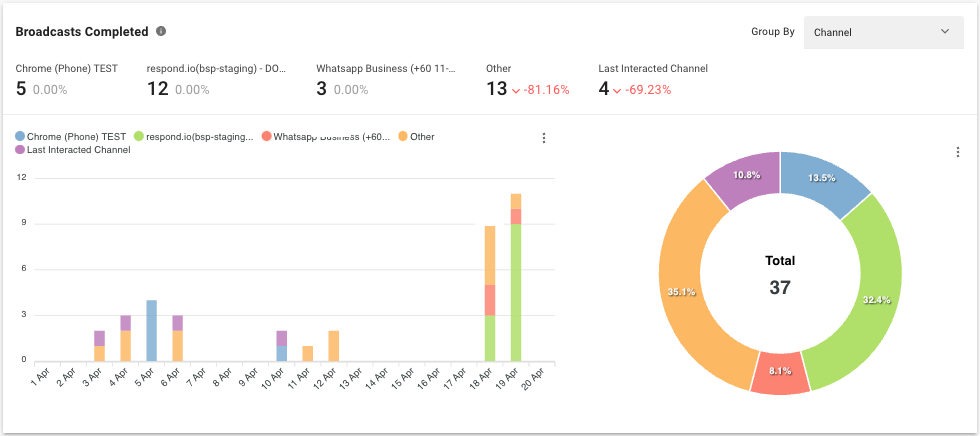
Respond.io steps things up by enabling businesses to broadcast across a wide range of channels, including WhatsApp, Messenger, Viber, LINE and SMS thanks to its Broadcast Module. You can also segment audiences to deliver targeted messages, ensuring each broadcast reaches the right group.
To complement this, the Reports Module provides detailed analytics, allowing you to track message delivery, reads, and failures across all channels, with filters for date ranges and channel-specific performance to identify what’s working and what isn’t.
Next, let’s take a look at the analytics behind the conversations.
Reports & analytics
Making data-driven decisions is essential – without clear insights, it’s impossible to know whether to scale your efforts or change direction. That’s why access to reliable analytics is crucial. Let’s see how each platform helps you track performance.
Kommo | Manychat | Respond.io | |
|---|---|---|---|
Conversion Tracking | ✅ | ✅ | ✅ |
Agent Performance Analytics | ✅ | ✅ | ✅ |
Custom Reports and Dashboards | ✅ | ❌ | ✅ |
Data Export | ✅ | ✅ | ✅ |
Kommo offers a comprehensive suite of reports, including win-loss analysis, consolidated lead reports, activity logs and call and goal tracking to give you a clearer view of your operations. It also has a handy dashboard that’s fully customizable to show you the widgets you need.
Manychat provides four key analytics tools: workflow performance tracking, conversion monitoring, agent activity analysis, and an insights dashboard. It also tracks message delivery, opens, and clicks, with the option to set up custom conversion events to measure chatbot performance.
To enhance marketing analytics, Manychat Pixel (similar to Facebook Pixel tracks conversions from chatbot interactions on your website. However, agent analytics are only available with the Inbox Pro plan, which may limit insights for some businesses.
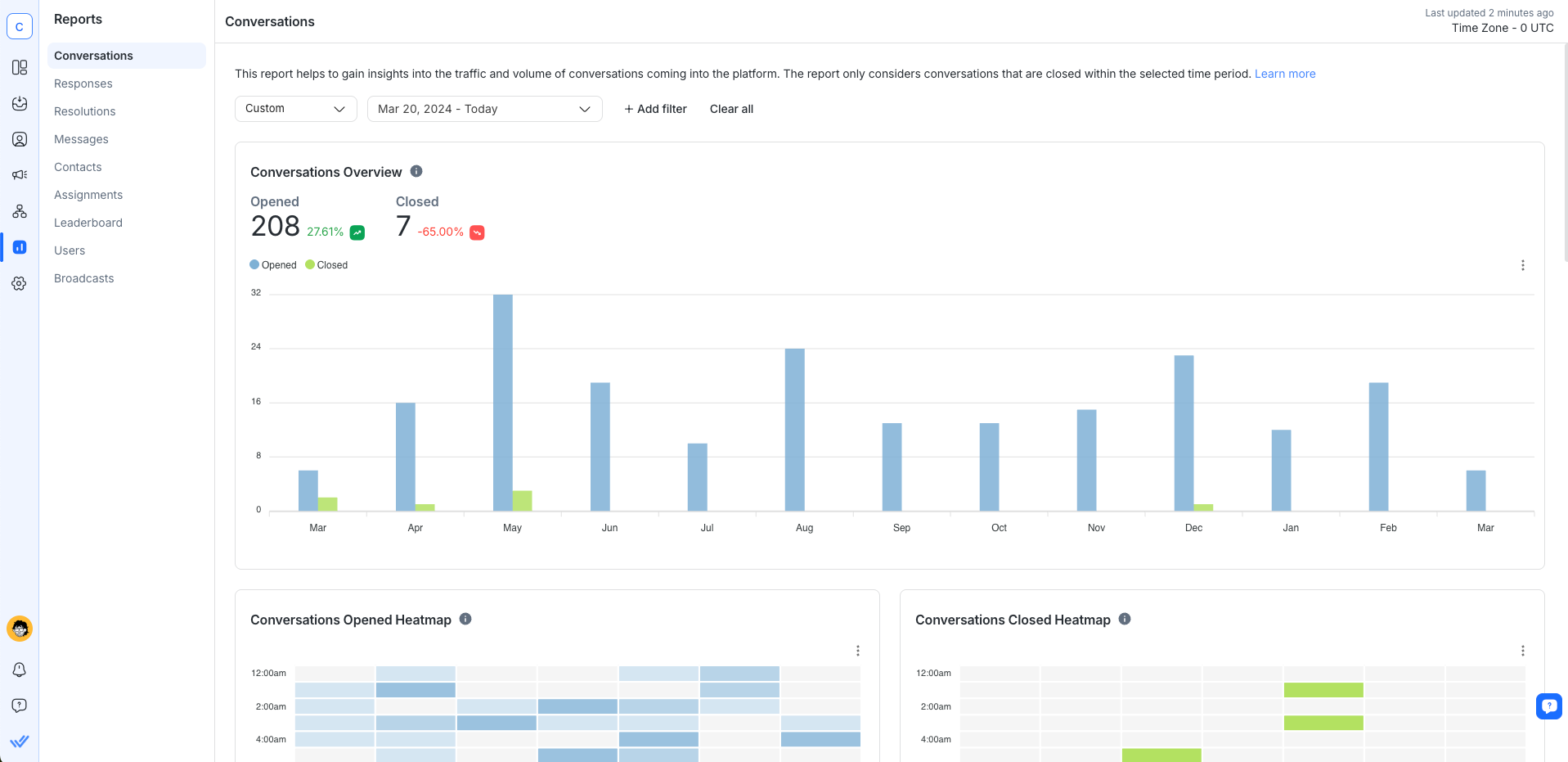
Respond.io’sReports Module gives managers visibility into more than workload and response times. It shows which channels are creating qualified leads, which broadcasts and campaigns are moving contacts from one lifecycle stage to the next and where follow-up is slowing down before a deal closes.
That makes reporting useful for commercial decisions, not just operational review. Leaders can use it to decide where budget should go, where staffing needs to improve and which conversation flows are turning demand into revenue conversations most effectively. Alongside reports on Conversations, Resolutions, Agent Leaderboards and Lifecycle, the Dashboard gives a live view of activity, conversion leakage and performance over time so teams can act before pipeline slows down.
Now that we’ve covered the features, how do these platforms compare when it comes to user experience?
Kommo vs Manychat vs Respond.io: Ease of use
Ease of use covers more than interface design. For revenue teams, time-to-value means how quickly the platform can connect channels, train AI Agents, set routing rules, launch workflows and give managers visibility before live campaigns start. When setup drags on, follow-up slows, campaign launches slip and leadership loses reporting clarity while demand is already coming in.
Kommo's CRM-first architecture often requires more configuration around pipelines, permissions and process design before conversations run smoothly — teams coming from a chat-first background typically need more time to navigate that structure. Manychat is faster to start for social-first flows, but teams that need routing logic, AI Agents and multi-channel workflows will hit setup limits quickly. Respond.io shortens the path to full operational readiness because AI Agents, workflows, routing and reporting sit inside one customer conversation platform, helping mid-market B2C teams move from channel connection to lead qualification with less implementation overhead.
Kommo | Manychat | Respond.io | |
|---|---|---|---|
Help Center & Support | ✅ | ✅ | ✅ |
Onboarding Process | Easy to get started, but some tools are hidden in menus, CRM-focused experience | Easy sign-up, intuitive and modern chat-first interface | Easy sign-up, intuitive and modern chat-first interface |
Quickstart Guide | Checklist to connect channels, set up templates, workflows, pipelines and invite teammates | No on-platform welcome sequence, but there are many tutorial videos and resources available | Onboarding tutorial for messaging, channel connection, workflows, broadcasts and team setup |
Mobile App | ✅ | ✅ | ✅ |
Mobile Functionality | Allows users to manage CRM, messages and sales pipeline | Manage conversations, contact data, tags, sequences and custom field values | Full chat management, message and call handling, and workflow execution |
Kommo is simple enough to sign up and get started, but its UI/UX feels outdated and unintuitive. Many features are buried in menus and its traditional CRM feel may be a drawback for users who prefer a modern, chat-centric experience.
Manychat is easy to sign up for with an Instagram or Facebook account, but setting up with Telegram and email requires a few extra steps. There’s no built-in quickstart or welcome guide, though plenty of third-party tutorials are available online. Its user-friendly interface makes it easy to navigate and explore, even without formal onboarding.
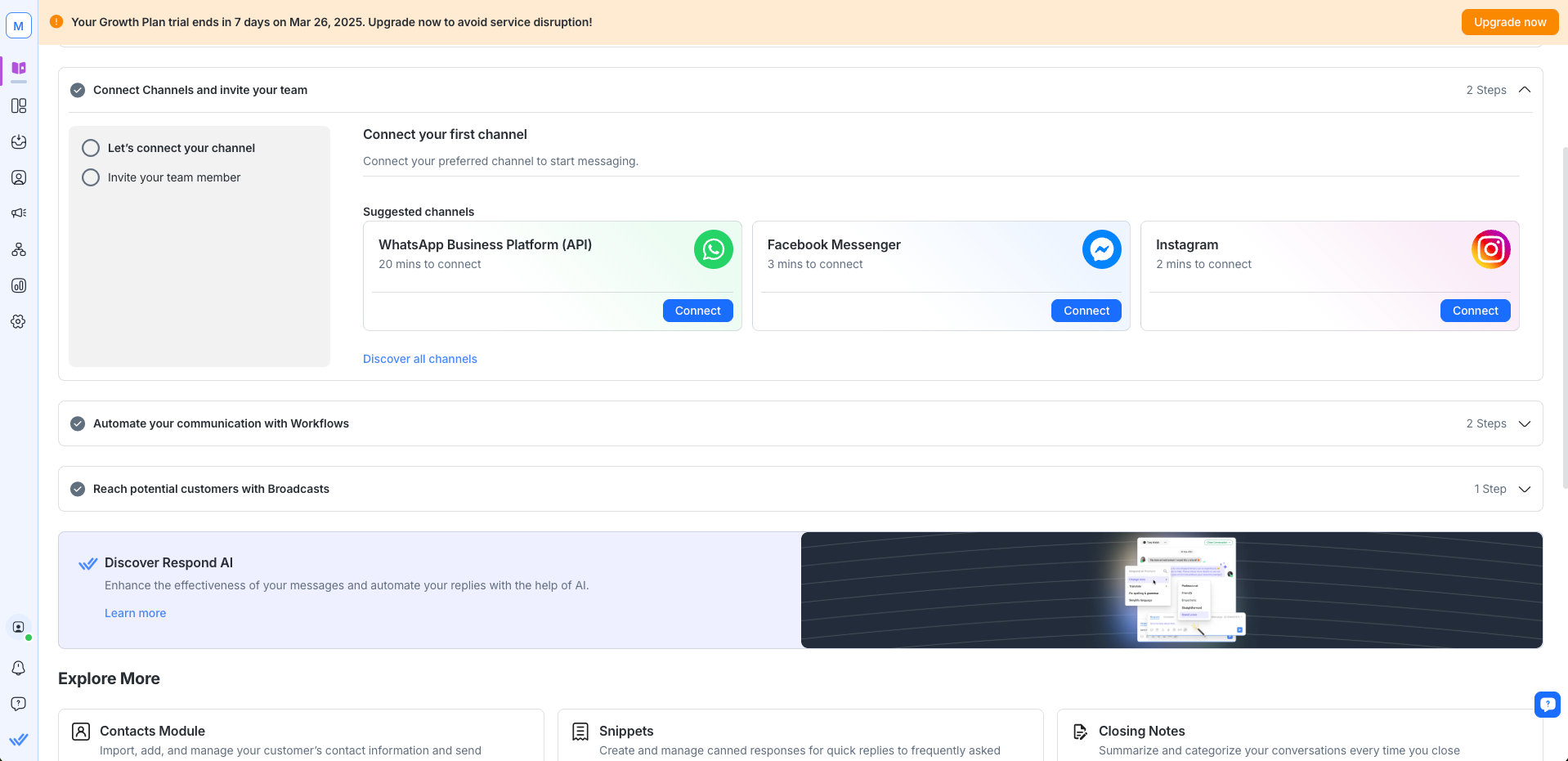
Respond.io offers a straightforward sign-up process with a modern, intuitive design. Its helpful onboarding guides you through setup quickly, while the extensive help center provides answers to any questions that come up along the way.
Of course, a great user experience only matters if the platform is reliable and help is available when you need it. Let’s see how Kommo, Manychat, and respond.io compare in terms of stability and customer support.
Kommo vs Manychat vs Respond.io: Platform stability and customer support
No matter how strong a platform looks in a feature table, outages and slow support create immediate revenue risk. When follow-up stalls, broadcasts go out late or agents lose context during peak demand, the result is missed conversations, weaker conversion and slower recovery while campaigns are still live.
For teams reconsidering Kommo, the issue is usually not one missing feature. It is the combined impact of longer commitment risk, support that can feel slow or templated during urgent issues and the operational cost of reworking automations when WhatsApp setups change or numbers need to move. For CEOs and Sales Managers, those are not minor annoyances - they affect follow-up speed, forecasting confidence and campaign execution when revenue is already on the line.
Kommo vs Manychat vs Respond.io: Platform stability
When customer conversations are nonstop, your platform needs to perform reliably – even during peak traffic and high-demand moments, without slowing down or crashing.
Kommo | Manychat | Respond.io | |
|---|---|---|---|
Performance During High Traffic | ⚠️ | ⚠️ | ✅ |
Uptime Guarantee | ❌ | ❌ |
Kommo does not offer an official uptime guarantee, and its status page frequently reports issues, raising concerns about long-term reliability. While users report bugs and slow customer support, stability is rarely mentioned as a major issue in reviews. Buyers should test WhatsApp-level reliability directly, not accept a broad uptime claim. If messages don't sync cleanly, agents miss follow-up windows, lose context, and leave active demand unanswered mid-campaign — a revenue risk for chat-led sales teams before it's ever a support ticket.
Manychat performs well for day-to-day use and is a reliable option for small-sized businesses. It handles regular traffic without issue, but it has no formal uptime guarantee or publicly available performance data. Additionally, online reports suggest that users occasionally encounter bugs and platform instability.
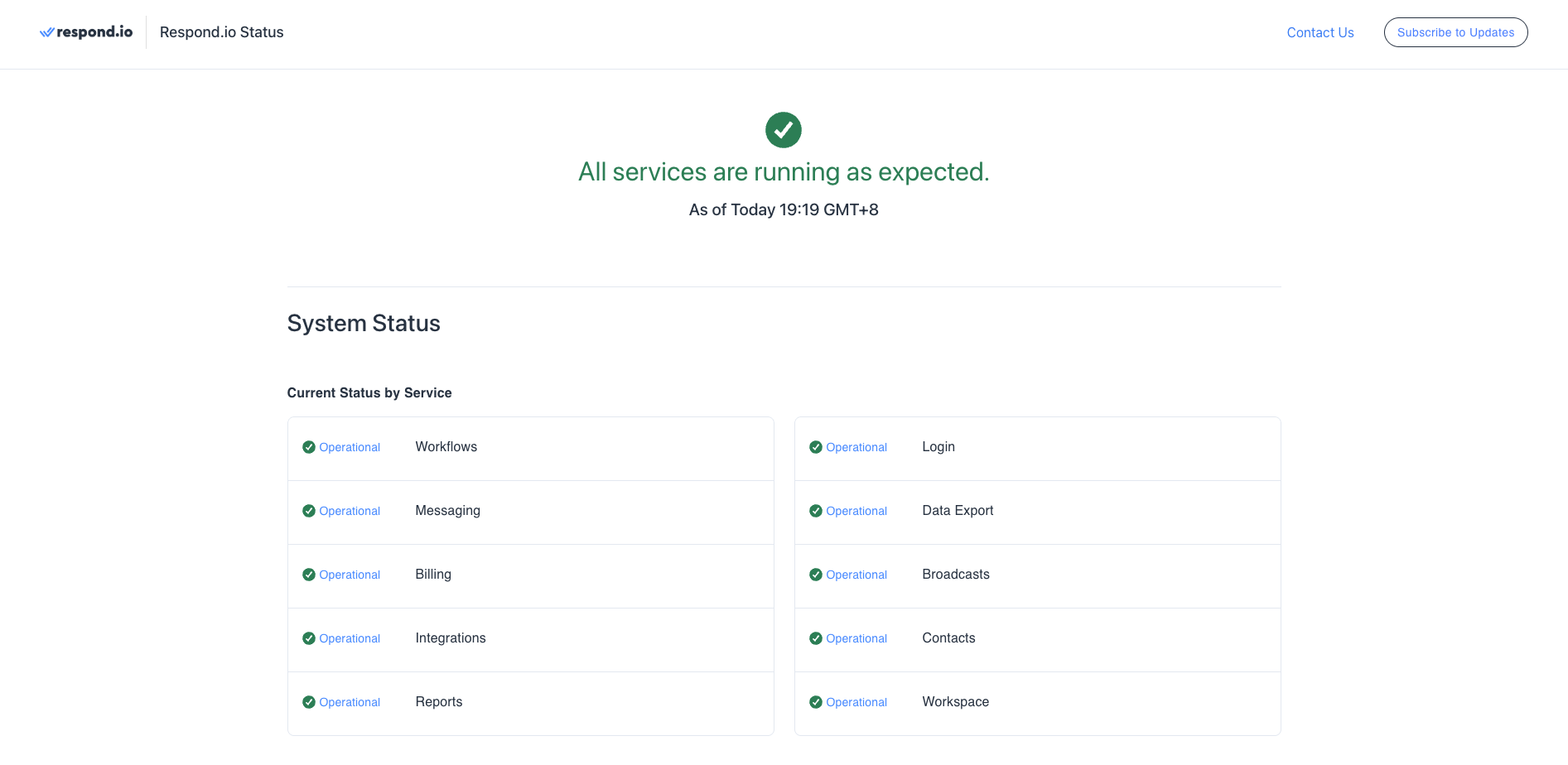
Respond.io stands out with its impressive 99.9996% uptime, delivering reliable performance whether you're managing daily conversations or running high-traffic campaigns. With this level of stability, you can focus on growing customer relationships and your business—without worrying about technical disruptions.
With stability checked off, the next question is whether help is available when you need it. Let’s compare their customer support.
Kommo vs Manychat vs Respond.io: Customer support
Strong customer support is essential to keeping your business running smoothly. When problems arise, having fast, reliable assistance can make all the difference - keeping your team productive and your customers satisfied.
Kommo | Manychat | Respond.io | |
|---|---|---|---|
Priority Support | ✅ | ⚠️ | ✅ |
Customer Success Managers | ❌ | ✅ | ✅ |
Multilingual Support | ✅ | ❌ | ✅ |
Live Chat Support | ⚠️ | ⚠️ | ✅ |
Kommo offers live chat support during office hours, which may be inconvenient if you're in a different time zone. However, all users receive equal support regardless of their plan. Additional assistance is available through email, contact forms, and instant messaging for asynchronous communication. For revenue teams running time-sensitive campaigns or dealing with urgent platform issues, office-hours-only support can mean delayed resolutions at exactly the moment they matter most.
Manychat offers 24/7 ticket support with priority for higher plans, though response times aren’t guaranteed. This may work for small businesses, but the email system can feel slow and impersonal for urgent issues. Support quality has been reported as mixed, but higher-tier plans include Customer Success Managers for more personalized assistance.
Respond.io provides 24/7 live chat and scheduled call support to all plans in multiple languages (English, Arabic, Chinese, and Spanish), with AI support available around the clock, too. For businesses seeking more hands-on guidance, higher-tier plans include dedicated Customer Success Managers to resolve issues and help teams succeed.
Third-party sentiment broadly supports the pattern in this comparison. Kommo is often described as capable but dated, with recurring comments about bugs and slower support. Manychat is usually praised for ease of use in social automation, but feedback becomes more mixed once teams need deeper live-agent workflows or faster help on urgent issues. Respond.io is more consistently associated with multichannel operations, strong day-to-day usability and support that fits active revenue teams.
That outside signal matters because it shows whether a platform will hold up after launch, not just whether it demos well. Pricing is the next critical factor, so the section below shows how each platform scales with the business and whether the cost matches the value provided.
Kommo vs Manychat vs Respond.io: Pricing
Cost is not just a headline plan price decision. Before comparing plan names, leaders should model four cost drivers: team size, expected Monthly Active Contacts (MAC), whether the needed AI capabilities are included in-plan and the Meta WhatsApp fees that sit on top of the software subscription. That shows whether the cheapest entry point stays affordable once more agents need access or campaigns raise conversation volume.
A per-user model usually gets harder to manage as more teammates need visibility, approvals or reporting access. An active-contact or MAC model can be more efficient when many teammates need access, but buyers should still model contact spikes during campaigns so budget stays predictable. In this comparison, Kommo becomes more sensitive to headcount, Manychat becomes more sensitive to contact growth and feature gates, and respond.io's Growth and Advanced plans tie pricing to Monthly Active Contacts with 10 users included, rather than charging for every teammate who needs to work the conversation. For mid-market B2C teams, that makes forecasting simpler and helps leadership scale customer conversations without letting seat count shape hiring decisions.
Meta WhatsApp fees sit outside the software subscription on every platform, so forecast both a normal month and a campaign month, and ask each vendor for a sample invoice that shows subscription and WhatsApp charges separately.
Kommo vs Manychat vsRespond.io: Entry-level plans
For small businesses or teams of fewer than 10, an affordable, feature-rich plan is essential. Entry-level pricing should cover the core tools needed to manage messaging operations without added complexity or hidden costs. While each platform offers different features, flexibility, and channel support at the base level, which one delivers the best value?
Kommo (Base Plan) | Manychat (Essential Plan) | Respond.io (Starter Plan) | |
|---|---|---|---|
Free Plan | Comprehensive 14-day trial | Yes | Comprehensive 7-day trial |
Starting Price | $25/user/month (6-month minimum) | $17/month | $9/month |
Channels Supported | WhatsApp, Instagram, Apple Messages, Facebook Messenger, Viber, Skype, Telegram, WeChat (1 WhatsApp number and 1 Instagram account included; each additional user unlocks 1 more channel) | Up to 2 channels (Instagram, TikTok, Facebook Messenger, WhatsApp, Telegram) | WhatsApp, Instagram, Facebook Messenger, TikTok, Telegram, Viber, WeChat, SMS, Email, LINE, Webchat, VoIP |
Seats Included | 1 Seat | 2 Seats | 5 Seats |
Kommo offers a 14-day trial to explore its full range of features. After that, pricing starts at $15/month per user. While this is manageable for small teams, costs can add up quickly as your team grows. However, Kommo does allow you to add free users with limited functionality, which can help manage fees.
Manychat offers a free plan limited to 25 contacts, 1 user and 2 channels — useful for testing but not enough for active business use. The Essential plan at $17/month gives you 250 active contacts, 2 users and 2 channels with unlimited automations. To unlock WhatsApp, AI features and a third channel, you'll need the Pro plan at $39/month.
Respond.io starts at $99/month with its Starter plan, which includes 5 user seats and unlimited monthly active contacts. It’s a solid choice for businesses that don’t require advanced tools like Workflows and AI Agents from the start. While there’s no free plan, the 7-day trial provides full access to its core features, so you can test the platform before committing.
Kommo vs Manychat vsRespond.io: Higher-tier plans
Once you’re ready to scale, the right pricing plan should grow with your business without overcomplicating things. These plans come packed with features and tools designed for larger operations.
Kommo (Advanced Plan) | Kommo (Pro Plan) | Manychat (Advanced Plan) | Respond.io (Growth Plan) | Respond.io (Advanced Plan) | |
|---|---|---|---|---|---|
Pricing | $35/month per user (6-month minimum) | $45/month per user (6-month minimum) | $199/month | $199/month | $349/month |
Advanced Automation | Automation tools, pipeline automation, no-code bots, up to 3 AI agents | Everything in Advanced, plus up to 50 AI agents, AI appointment booking and voice message handling | Advanced automations and AI-powered conversations | Advanced workflows, AI-driven automation | Advanced workflows, AI-driven automation |
Broadcast Channels | WhatsApp, Instagram, Apple Messages, Facebook Messenger, Viber, Skype, Telegram, WeChat | WhatsApp, Instagram, Apple Messages, Facebook Messenger, Viber, Skype, Telegram, WeChat | WhatsApp, Facebook Messenger, Instagram, Telegram, SMS, Email | WhatsApp, Facebook Messenger, LINE, Viber, Telegram, SMS | WhatsApp, Facebook Messenger, LINE, Viber, Telegram, SMS |
Customer Support | Multilingual live chat support only during business hours | Multilingual live chat support only during business hours | Only during business hours and for higher plans | 24/7 human and AI support | 24/7 human and AI support |
Seats Included | 1 Seat | 1 Seat | 10 Seats | 10 Seats | 10 Seats |
Additional Seats | $35/month per user | $35/month per user | N/A | Additional users at $20/month | Additional users at $24/month |
Kommo's Advanced and Pro plans are designed for teams needing advanced workflows and AI capabilities. However, its per-user pricing of $35 or $45/month adds up quickly: $350 or $450/month for a 10-user team, billed up front as $2,100 or $2,700 for the six-month minimum, compared to respond.io's Growth plan at $199/month with 10 users and 1,000 Monthly Active Contacts included. If budget is a concern, consider whether your team can operate efficiently with a mix of paid and free users.
Manychat's Advanced plan at $199/month includes 10 users and 25,000 active contacts, with unlimited channels and AI features. Pricing scales with your contact list, so costs rise as your audience grows — worth factoring in if you run high-volume campaigns.
Respond.io's Growth and Advanced plans offer straightforward, transparent pricing. The Growth plan comes in at $199/month, while the Advanced plan sits at $349/month, both at 1,000 Monthly Active Contacts on monthly billing. Both include advanced workflows and AI Agents, while Advanced adds multiple workspaces, single sign-on (SSO), incoming and outgoing webhooks, HTTP requests in workflows and custom channels. You also get 10 seats included, with the option to add more users, making it ideal for teams looking for a scalable, feature-rich solution.
Kommo vs Manychat vs Respond.io: Which one is for you?
Choose Kommo for a CRM-first pipeline workflow, Manychat for low-cost Instagram, TikTok or Messenger automation and respond.io if you're a mid-market B2C business where customer conversations drive revenue. The right fit depends on how central customer conversations are to your revenue model and how much you need your platform to act, not just assist.
Choose Kommo if:
Your team uses a CRM-first workflow and wants messaging as an add-on
You need pipeline management with traditional sales stages
Your primary channels are email and phone, with messaging as a secondary touchpoint
You're comfortable with per-user pricing and a six-month minimum subscription, and can mix paid and free seats
Choose Manychat if:
You're a small business or solo entrepreneur focused on Instagram, TikTok or Messenger automation
Social media marketing is your primary growth lever
You want a free or low-cost entry point to test chat automation
You don't need live agent support features — full automation is your goal
Choose respond.io if:
You're a mid-market B2C business where customer conversations drive revenue
You need a true omnichannel inbox across WhatsApp, Messenger, TikTok, LINE and more
Your team needs live agents working alongside AI Agents — not just full automation
You need Voice AI Agents handling inbound calls via WhatsApp Business Calling API and VoIP without a human in the loop
You need Lifecycle tracking across the full funnel — from first contact to closed deal
You're integrating with Salesforce, HubSpot or e-commerce platforms like Shopify
Turn customer conversations into business growth with respond.io. ✨
Manage calls, chats and emails in one place!
FAQs about Kommo vs Manychat vs respond.io
Can Kommo be bought on month-to-month terms?
No. Kommo requires a minimum six-month subscription, so buyers pay for at least six months per user up front rather than month to month. That makes the first invoice much larger than the advertised per-user monthly rate suggests. Buyers should confirm current billing cycles and renewal terms directly with Kommo before signing, because plan packaging can change. The safer comparison is to check whether billing stays monthly, whether any longer commitment is required and how total cost changes once more users or active contacts are added.
Respond.io publishes monthly plans and uses Monthly Active Contacts pricing, which gives mid-market B2C teams a clearer way to forecast spend as customer conversations scale.
How should I compare per-user pricing, active-contact pricing and Monthly Active Contacts before choosing a messaging platform?
Start with the operating model, not the entry plan. Leaders should model how cost changes when more teammates need access, when campaign volume raises the number of active contacts and when important AI or channel features only unlock on higher tiers.
Per-user pricing usually rises with headcount. Active-contact pricing and Monthly Active Contacts pricing can be more efficient when many teammates need access, but buyers should still model contact spikes and Meta WhatsApp fees on top of the subscription so budget stays predictable during live campaigns.
Do all alternatives in this comparison offer native WhatsApp support?
No. Buyers should not treat a WhatsApp logo in a feature list as proof of equal depth. The real test is whether the platform supports template messaging, broadcasts, click-to-chat ad follow-up, calling, number migration and a clean handoff from AI Agents to human teams.
Respond.io is the strongest fit when WhatsApp drives revenue conversations because those capabilities sit inside the same customer conversation platform, which reduces workarounds and makes follow-up easier to manage at scale.
How should buyers compare WhatsApp setup and cost transparency across platforms?
Start by separating three checks: the software subscription, the platform pricing model and the Meta WhatsApp fees billed on top. Then confirm whether the setup supports the WhatsApp operations the team actually relies on, such as template messaging, broadcasts, click-to-chat ad follow-up, calling, number migration and clean handoff from AI Agents to human teams.
Because respond.io uses Monthly Active Contacts pricing, buyers should model the monthly platform plan separately from Meta WhatsApp fees instead of relying on headline price alone. They should also verify official provider status, ask how fees are billed and confirm whether any wallet, processing or support charges sit between the platform subscription and Meta billing.
Can official WhatsApp Business API tools access WhatsApp groups?
No. Official WhatsApp Business API tools cannot access WhatsApp groups because that restriction comes from Meta, not from an individual platform.
For buyers, this matters because WhatsApp support should be evaluated around business use cases like templates, broadcasts, click-to-chat ad follow-up, calling and number migration, not around group messaging. If a sales or support process depends on WhatsApp groups, the team should plan around that limitation before switching platforms.
How do I migrate to respond.io from Kommo or Manychat?
To migrate to respond.io from Kommo or Manychat, connect your existing WhatsApp Business API number, import exported contacts and rebuild workflows, routing rules and knowledge sources in respond.io. If the business is already using WhatsApp Business API, the existing number can be connected so customer outreach and follow-up continue without changing numbers.
Contacts can be exported and imported, but historical conversations usually stay on the original platform, so teams should plan reporting and agent handover before switching live traffic. Workflow logic, routing rules and knowledge sources also need to be rebuilt in respond.io, which is usually the right moment to simplify old automations and align lifecycle stages with how the business actually sells.
Switching does not always need to be a full replacement project. Teams that still want Kommo for CRM records can keep it in place while moving customer conversations to respond.io, using native integrations or automation tools to keep contact data and lifecycle updates aligned.
For active sales and marketing operations, a parallel rollout often reduces risk. The customer-facing number can move, the team can test new AI Agents and workflows in respond.io and leadership can shift channel by channel without interrupting revenue continuity.
Further Reading
If you found this post helpful, you might also enjoy these related articles:


