
















 Electronics
 Fashion & Apparel
 Furniture
 Jewelry and Watches
 Afterschool Activities
 Sport & Fitness
 Beauty Center
 Dental Clinic
 Medical Clinic
 Home Cleaning & Maid Services
 Photography & Videography
 Car Dealership
 Travel Agency & Tour Operator

Curious about what omnichannel communication is or what an omnichannel communication platform does? Then this blog is for you! We'll explain everything you need to know about omnichannel communication and how a platform like respond.io can help your business.
What is omnichannel communication?
Omnichannel communication is a strategy where a business uses different channels to connect with customers while offering a consistent customer experience across every touchpoint. This strategy can be executed across offline channels like physical stores and online channels like messaging, social, voice and email.
An omnichannel communication platform is the technology layer that makes this possible. It brings channels like WhatsApp, Instagram, Facebook Messenger, TikTok, Telegram, LINE, Viber, WeChat, voice calls and email into one workspace, keeps customer context intact when conversations move between channels and helps teams convert and retain customers without forcing them to repeat information.
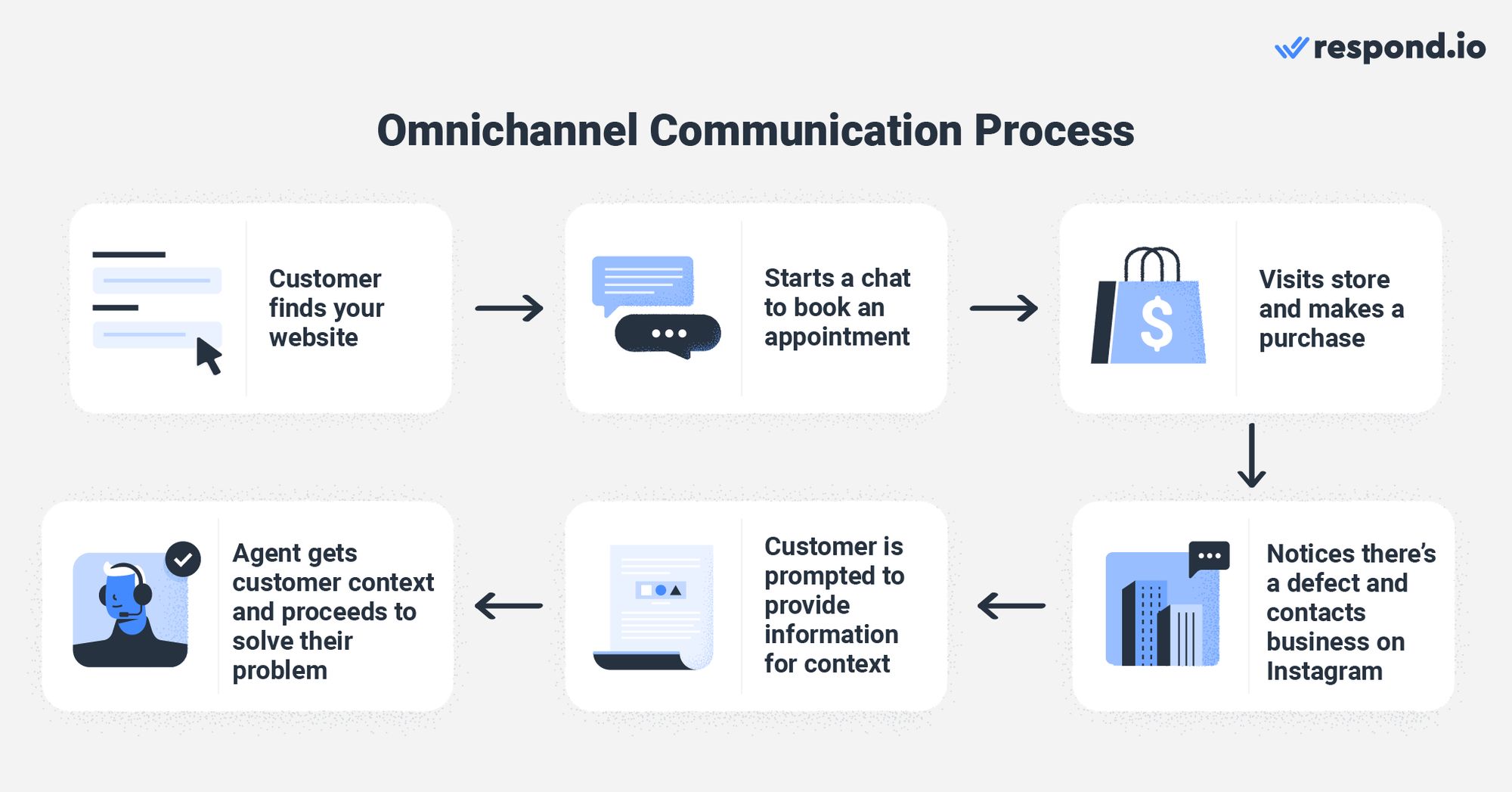
Here's an example of what omnichannel communication might look like. A customer looking for a Wonder Woman costume finds your website via Google search. They chat with an agent to book a fitting appointment and then purchase the costume in-store, where they are asked to follow your Instagram page for a discount. When they realize there is a costume defect, they message the business on Instagram. The agent sees the earlier context and helps them without asking the same questions again.
From this example, it is clear that the customer moves naturally between online and offline touchpoints. While the omnichannel communication concept is still confused with multichannel communication, the difference becomes easier to see when both approaches are compared side by side.
Differences between omnichannel communication and multichannel communication
Omnichannel communication and multichannel communication have different goals and benefits in mind. A multichannel communication strategy simply means that a business is using multiple communication channels.
Its primary focus is to have a presence wherever customers are. The channels involved function individually and are disconnected. For that reason, customers cannot continue a conversation or move from one channel to the next easily.
Omnichannel Communication | Multichannel Communication | |
|---|---|---|
Objective | To deliver a consistent customer experience across channels (Customer-centric) | To have a presence wherever customers are (Channel-centric) |
Strategy | Focuses on customer experience | Focuses on channel engagement |
Characteristics | • Involves multiple channels that customers use | • Involves multiple channels that customers use |
Channel connection | Channels are unified in one platform | Channels operate independently |
Conversation continuity | Customers continue conversations across channels | Customers restart conversations on each channel |
Customer context | Agents see full history from all channels | Agents see only current channel history |
Handoffs between teams | Context follows the customer automatically | Require manual context transfer |
Revenue impact | Higher conversion and retention from seamless experience | Higher drop-off when customers switch channels |
An omnichannel communication strategy, on the other hand, means that you have multiple communication channels that are connected. This approach is more customer-centric as it focuses on delivering a consistent customer experience at every touchpoint.
A successful omnichannel communication strategy involves a profound understanding of customers' needs paired with a platform to help businesses access customers' contexts and more. We'll discuss more on this later.
To summarize, both strategies provide multiple touchpoints to customers. But the omnichannel communication strategy connects all the channels and eliminates communication gaps that come with a multichannel strategy.
Example: How Omnichannel Prevents Lost Sales
A lead messages your business on Instagram asking about product availability. They don't get a fast reply, so they switch to WhatsApp. In a multichannel setup, the WhatsApp agent has no idea the customer already reached out on Instagram—so they ask the same qualifying questions again. The customer gets frustrated and goes to a competitor.
In an omnichannel setup, the WhatsApp agent sees the Instagram conversation, picks up where it left off, and closes the sale in one interaction. That is the difference between losing a lead and converting one.
Turn customer conversations into business growth with respond.io. ✨
Manage calls, chats and emails in one place!
Why is omnichannel communication important for businesses?
Today’s consumers use multiple channels throughout their lifecycles. They might browse your products on Facebook Shop, follow you on Instagram for updates and prefer to chat or calls over WhatsApp.
While it’s easy to be available on multiple channels, 90% of customers want an omnichannel service.
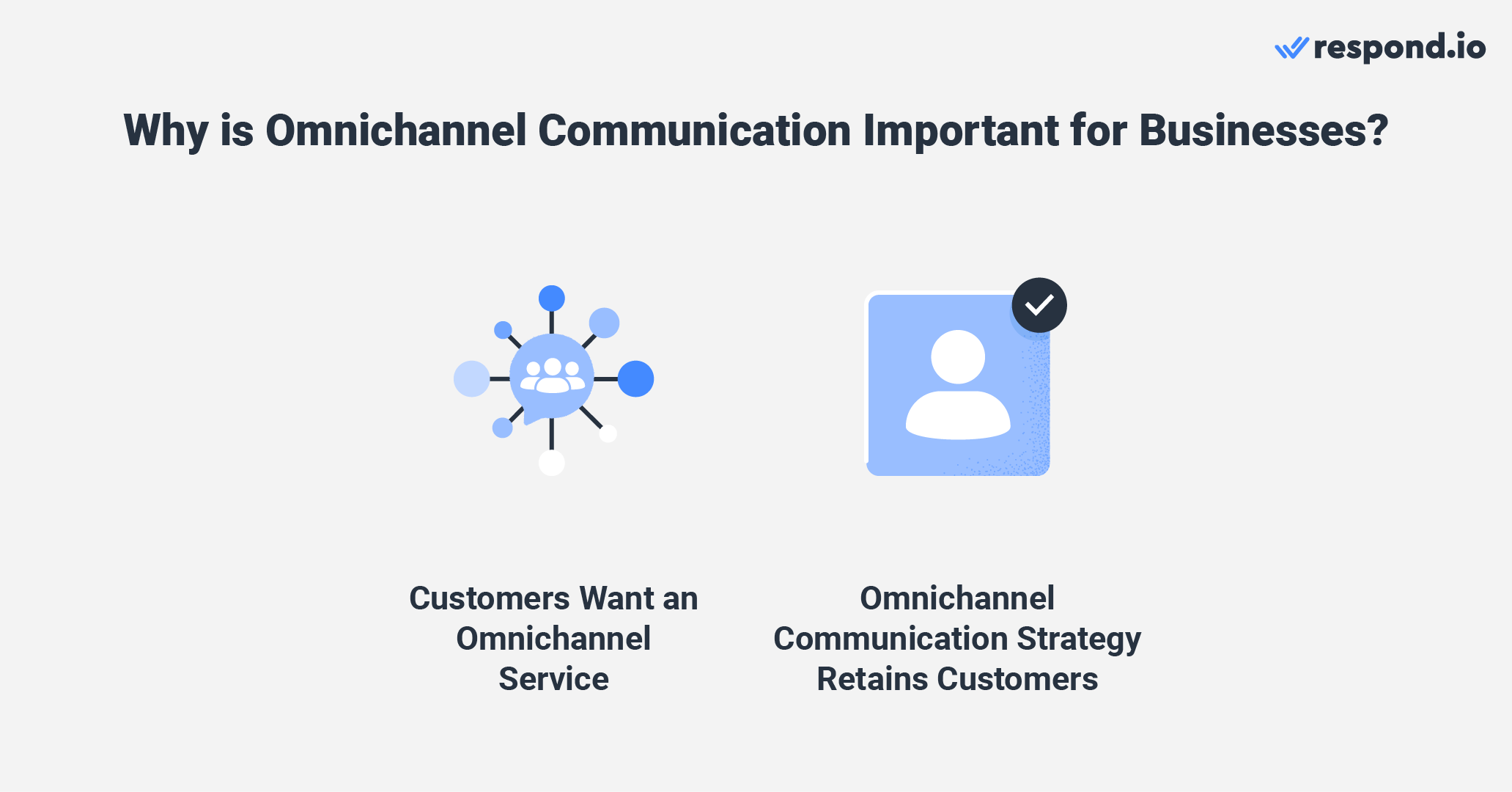
It is also proven that companies with effective omnichannel strategies retain 89% of their customers compared to the 33% retention rate for companies with weak omnichannel customer engagement.
Understanding this, the number of companies investing in the omnichannel experience has grown by 60% from 2012 to 2020. Now let’s look at how omnichannel communication benefits businesses that use multiple channels.
Faster lead response drives higher conversion
When all your channels feed into one inbox, agents can respond to leads in minutes instead of hours. Research from the Lead Response Management Study and Harvard Business Review shows that responding within five minutes makes you 21 times more likely to qualify a lead compared to waiting 30 minutes. Omnichannel eliminates the delays caused by checking multiple apps or missing messages on less-monitored channels.
More touchpoints mean more revenue
Marketers using three or more channels in a campaign achieve a 287% higher purchase rate than those using a single channel. Omnichannel communication makes it easy to meet customers wherever they prefer—WhatsApp, Instagram, email, or web chat—without losing context between interactions.
Consistent experience increases retention
Companies with strong omnichannel strategies retain 89% of their customers, compared to just 33% for companies with weak omnichannel engagement. When customers do not have to repeat themselves and receive personalized responses, they are more likely to return and recommend your business.
A single source of truth for customer information
Customers want a united front of company representatives that are equipped with the same context and information. In fact, 65% of customers expect all company representatives to have the same information about them.
This is especially true because customers dislike re-identifying themselves and repeating their concerns on each channel. Hence, businesses need a complete view of their customer’s journey to have a successful omnichannel communication strategy.
B2C use cases by business type
Omnichannel communication works differently depending on your business model. Here’s how it drives revenue in common B2C scenarios.
Ecommerce and Retail. A shopper browses products on your website, asks a sizing question via web chat, then abandons their cart. With omnichannel, your team can follow up on WhatsApp with a personalized message and a discount code—recovering sales that would otherwise be lost. Post-purchase, order updates and return requests flow through the same conversation thread, increasing repeat purchase rates.
Travel and Hospitality. A guest books a hotel room through your website, then messages on Instagram to request a late checkout. The front desk sees the full booking context and confirms instantly. After checkout, a WhatsApp message invites them to book their next stay with a loyalty offer. Unified conversations reduce booking friction and increase direct rebookings.
Education and Events. A prospective student inquires about a course via Facebook Messenger, then calls to ask about payment plans. The admissions team sees the full conversation history and closes the enrollment without asking the student to repeat themselves. Post-enrollment, reminders and support flow through the student’s preferred channel, reducing drop-off.
Service-Based Consumer Brands. A customer schedules an appointment via web chat, receives a confirmation on WhatsApp, and later messages on Instagram to reschedule. The service team handles all interactions in one thread, reducing no-shows and increasing upsell opportunities during follow-up conversations.
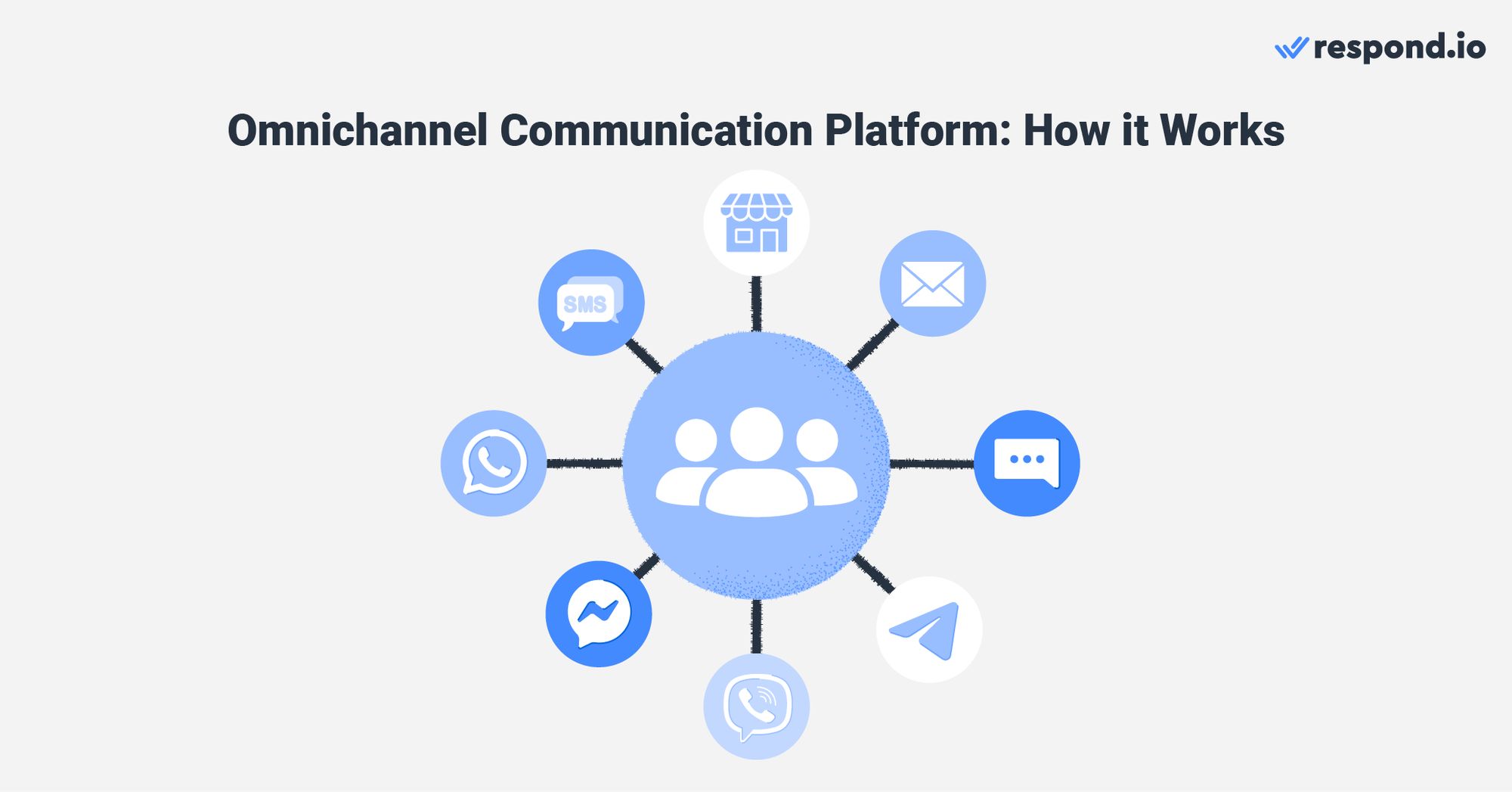
You need to consolidate customers’ information like personal data and conversation history into a single platform to provide a smooth, consistent experience. This is where an omnichannel communication platform comes in.
An omnichannel communication platform provides businesses with a single source of truth for customer information by streamlining various channels into a single platform. This provides valuable insights into your customer journey for a consistent experience.
Provide consistent customer experience with ease
To maintain a consistent customer experience, all customer-facing teams must communicate according to their brand’s values and tone. While businesses can create messaging guides and templates to reflect these, personalizing them manually can be tiresome.
Fortunately, with the help of an omnichannel communication platform, you can standardize your messages across channels using canned responses that are accessible with one click. These responses are automatically personalized.
Not just that, but because all the channels are connected to one platform, you can execute your strategy simultaneously on each channel. As a result, you can provide a consistent customer experience while helping agents work more efficiently to provide high-quality assistance.
What results businesses see from omnichannel communication
The impact of omnichannel communication is easiest to evaluate when each example is tied to a clear business problem, the workflow change made and the commercial result..
Colour My Plate had a conversion problem: slow cross-channel replies and weak handoffs were costing sales. After unifying conversations on respond.io, the team improved collaboration across channels, achieved 45% more conversions, cut first response times by 40% and resolved conversations 91% faster. This matters most to B2C teams trying to protect speed-to-lead and close more opportunities without losing context between channels.
Kleta had a scale problem: conversation volume was rising, but service quality could not fall with it. By combining automated and human support across messaging channels, it doubled its subscriber base in just two months while keeping workflows more consistent. This is most relevant for teams that need to grow demand without fragmenting customer conversations across separate tools.
Praga Medica had a visibility problem: disconnected conversations were limiting lead capture and slowing follow-up. After consolidating conversations into one workspace, it captured 70% more lead contact data and cut first response times by 50%. This is the clearest proof point for teams that need stronger lead tracking, faster follow-up and better visibility from the first message.
Across all three examples, the buying lesson is the same: better omnichannel results come from faster replies, clearer ownership and one continuous customer record from first contact to resolution.
How to implement omnichannel communication without disrupting sales
Rolling out omnichannel does not have to slow down your team. Follow this step-by-step approach to launch quickly and protect revenue during the transition.
Step 1: start with your highest-value channels
Do not try to connect every channel at once. Begin with the one or two channels where most of your leads and customers already engage—typically WhatsApp, Instagram, or web chat for B2C businesses. Get those working smoothly before expanding.
Step 2: centralize contact history before going live
Import existing customer data and conversation history into your new platform. If contacts are scattered across spreadsheets, CRMs, and individual inboxes, consolidate them first. Agents need context from day one to avoid asking customers to repeat themselves.
Step 3: set routing and automation rules
Define how incoming conversations get assigned. Route by channel, inquiry type, or customer segment. Set up basic automations—welcome messages, lead qualification questions, and FAQ responses—so agents focus on conversations that need human judgment.
Step 4: train the team on the unified inbox
Block time for hands-on training before launch. Walk agents through the new workflow: how to view merged contact profiles, use canned responses, and hand off conversations between teams. A 30-minute session prevents most first-week friction.
Step 5: track performance and adjust
Monitor response time, resolution time, and conversion rate by channel once you’re live. Identify bottlenecks—slow routing, missing automations, or channels with low engagement—and adjust before scaling further. Rollouts usually fail because execution breaks before channel coverage does. The most common risks are:
Launching too many channels at once, which spreads agents thin and slows first response on the channels that drive most revenue.
Going live before customer history is centralized, which forces customers to repeat themselves and weakens conversion during handoffs.
Leaving ownership unclear across sales, marketing and support, which creates duplicated follow-up, inconsistent messaging and missed opportunities.
Using weak routing and quality assurance rules, which leaves high-intent or urgent conversations waiting too long and hurts retention.
Teams that avoid these four issues usually protect revenue faster during rollout because each conversation has clear ownership, full context and a defined next step.
At its most basic, an omnichannel communication system should allow you to:
Integrate multiple channels while supporting all of the channels’ features
Respond to customers regardless of the channel from a single platform
Automate simple tasks like quick replies that work across channels
But if you are evaluating platforms seriously, look for these additional capabilities:
Unified Inbox. All conversations from every channel appear in one place. Agents should not have to switch between tabs or apps to respond. Plus, the option to let agents search conversations by contact name, email, phone, or any custom field and jump directly to the matching thread without building filters.
Persistent Customer History. The platform should store and display the full conversation history for each contact, regardless of which channel they used. This prevents customers from repeating themselves and helps agents personalize responses.
CRM Sync. Two-way integration with your CRM ensures that contact data, deal stages, and conversation notes stay updated in both systems. Without this, sales teams lose visibility into customer interactions.
Routing and Assignment. Incoming conversations should be automatically routed to the right team or agent based on channel, inquiry type, customer segment, or agent availability. Manual assignment slows down response time.
Automation and AI. Beyond quick replies, look for workflow builders, lead qualification bots, and AI-assisted responses that can handle routine inquiries and hand off complex cases to humans.
Reporting by Channel and Agent. You need dashboards that show response time, resolution time, and conversion rate broken down by channel and by agent. Without this data, you cannot identify bottlenecks or prove ROI.
Scalability. The platform should support adding new channels, agents, and automations without losing unified customer context or hitting plan limits that force expensive upgrades.
If you’re looking for an omnichannel communication platform that supports all the features above and more, we suggest you give respond.io a shot.
Top omnichannel communication platforms compared
Before committing to a platform, compare the options that fit your team size, channel mix, and revenue goals.
Platform | Best For | Key Channels | Automation & AI | Starting Price | Key Limitation |
|---|---|---|---|---|---|
respond.io | Mid-market B2C teams needing unified messaging | WhatsApp, Messenger, Instagram, Telegram, Viber, LINE, Email, Web Chat | Workflow builder, AI-assisted replies, lead qualification bots | Custom pricing based on contacts | Not suited for small businesses |
Trengo | SMBs wanting simple shared inbox | WhatsApp, Email, Instagram, Messenger, Voice | Basic automation rules | ~$19/user/month | Limited AI capabilities |
Sleekflow | Ecommerce brands focused on WhatsApp sales | WhatsApp, Instagram, Messenger, LINE | Flow builder, AI chatbots | Pro AI starts at ~$199/month (3 users) | Weaker analytics |
Freshdesk Omni | Support-heavy teams needing ticketing | Email, Chat, Phone, WhatsApp, Social | AI-powered ticket routing | ~$29/agent/month | Less suited for proactive sales |
Intercom | SaaS and tech companies | Web Chat, Email, WhatsApp, SMS | AI chatbot (Fin), workflows | ~$39/seat/month | Expensive at scale |
Zendesk Suite | Enterprise support operations | Email, Chat, Voice, Social, WhatsApp | Answer Bot, routing automation | ~$55/agent/month | Complex setup, higher cost |
"Prices are indicative and vary by plan and region, so buyers should verify current pricing with vendors before they shortlist."
Use the table above to build a shortlist, then pressure-test each option on the same five points: Best for, Pros, Cons, Pricing and Customer sentiment. That format helps buyers spot trade-offs faster before they spend time on demos.
Respond.io
Best for: Mid-market and growing B2C teams that need one place to manage sales and support conversations across WhatsApp, Instagram, Facebook Messenger, TikTok, Telegram, LINE, Viber, WeChat, voice calls and email.
Pros: Unified customer history across channels, AI Agents that qualify leads and route conversations, flexible automation for handoffs and follow-up.
Cons: Works best when teams already know which channels and workflows drive revenue, so setup should follow a clear sales and support process.
Pricing: Monthly Active Contacts (MAC) pricing. Starter starts at $99/month, Growth at $199/month, Advanced at $349/month and Enterprise is custom. A 7-day free trial is available.
Customer sentiment: Buyers typically value the ability to keep context intact across channels and reduce manual work in qualification, routing and handovers.
Trengo
Best for: Teams that want a simple starting point for handling conversations across a few channels.
Pros: Easy to understand, quick to trial and lower friction for basic workflows.
Cons: Simpler automation and lighter artificial intelligence can become limiting once lead qualification, routing and handovers need more control.
Pricing: User-based pricing can look affordable early on, but cost usually rises as more agents need access.
Customer sentiment: Buyers often like the easy onboarding, but growing teams tend to look for more depth in automation and reporting.
Sleekflow
Best for: B2C brands that prioritize social and messaging-led selling.
Pros: Strong fit for conversational selling on messaging apps and a straightforward setup for sales-first use cases.
Cons: Analytics and broader cross-team visibility may be less mature when support, management reporting and deeper operational control become more important.
Pricing: Tiered monthly plans can work early on, but buyers should confirm what happens as contact volume and user count grow.
Customer sentiment: Buyers often value the sales focus, but want more clarity on long-term reporting and scale.
Freshdesk Omni
Best for: Teams with heavier service operations that want structured case handling.
Pros: Familiar support workflows, organized case management and a strong fit for service teams.
Cons: Sales follow-up and proactive conversation workflows may feel secondary, which creates friction for teams that manage revenue and support in the same platform.
Pricing: Agent-based pricing can become expensive as service coverage expands across shifts, regions or brands.
Customer sentiment: Buyers typically value the structure, but some find the setup less flexible for conversation-led sales motions.
Intercom
Best for: Digital-first teams that center customer conversations around website chat and email.
Pros: Strong website engagement experience and mature conversation tools for inbound support and sales.
Cons: Pricing often climbs with seat count and add-ons, which can make scale harder for growing B2C teams that need many agents across channels.
Pricing: Seat-based pricing should be pressure-tested against expected team growth, channel expansion and artificial intelligence usage.
Customer sentiment: Buyers often like the interface and chat experience, but are cautious about total cost as volume grows.
Zendesk Suite
Best for: Large support environments that prioritize structured service operations across many agents.
Pros: Broad support capabilities, strong governance and familiar workflows for service-heavy teams.
Cons: Setup can be heavier, and the platform may be more than a mid-market B2C team needs if the goal is faster lead response, sales conversion and context-rich messaging.
Pricing: Agent-based plans and add-ons can increase total cost quickly when teams need voice, social channels and advanced reporting.
Customer sentiment: Buyers often trust the maturity of the support stack, but weigh that against complexity, rollout effort and ongoing cost.
How to choose the right omnichannel platform
1. Map the channels that actually drive revenue
Start with the channels that already influence lead capture, qualification, conversion and retention. Buyers should prioritize platforms that support those channels natively and preserve one customer history when a contact moves between them.
Questions to ask:
Which channels are native, and which rely on limited connectors?
Can the platform keep one contact record when a buyer moves from TikTok or Instagram to WhatsApp, email or voice?
Red flag: If a vendor calls itself omnichannel but each channel still behaves like a separate inbox, customer context will fragment and follow-up speed will drop.
2. Verify CRM and sales tool integration
A platform should do more than push contact data one way. Mid-market B2C teams need conversation history, lifecycle stages, notes and deal activity to stay aligned between the platform and the CRM.
Questions to ask:
Can the team update lifecycle stages, create deals or support tickets and sync notes without leaving the conversation?
What data is two-way, and what still needs manual work?
Red flag: If integration depends on exports, manual copy and paste or one-way sync, sales and support teams will lose visibility fast.
3. Test automation and artificial intelligence capabilities in a demo
Test automation and artificial intelligence capabilities in a demo. Automation should remove manual work that slows lead response and limits team capacity. Buyers should ask vendors to show AI Agents handling the jobs that matter most to revenue: qualifying leads, updating lifecycle stages, triggering workflows, routing by intent, escalating high-value opportunities and generating summaries for handovers.
The real test is whether those actions still work when conversations move across key messaging, social, voice and email channels. If artificial intelligence can only suggest replies, agents still carry the manual work that slows speed-to-lead, breaks continuity and limits how far the business can scale high-volume conversations.
Questions to ask:
Can AI Agents take action, not just draft text, when a lead or customer reaches out?
Can the platform preserve context while carrying out routing, lifecycle updates and handover summaries across channels?
How much qualification, tagging, assignment and follow-up still depends on agents doing it manually?
Red flag: If the artificial intelligence only answers simple questions or drafts replies, the team will still carry the manual burden of qualification, routing and handoffs.
4. Evaluate agent productivity and manager visibility
A platform should help each rep handle more conversations without losing speed or context. Buyers should test whether all conversations stay in one workspace, whether full customer history appears instantly and whether managers can see workload, stalled conversations and assignment bottlenecks in real time.
Questions to ask:
Can agents work across channels without switching tabs or rebuilding customer context?
Can the platform assign conversations automatically based on intent, team or availability?
Can managers see who is overloaded, which conversations are stuck and where handoffs are slowing down?
Red flag: Every manual handoff, app switch or delayed assignment reduces speed-to-lead and limits how far the team can scale without adding headcount.
5. Confirm scalability without fragmenting context
Scale is not only about adding more users. It is about adding channels, teams, automations and customer volume without breaking the customer record or creating separate systems for sales and support. Buyers should also test whether the platform is built for the way B2C communication is shifting.
A future-ready platform should support mobile-first channels, offer native voice escalation and let AI Agents qualify leads, route by intent, update lifecycle stages and hand over high-value conversations with full context. If every new channel forces the team to rebuild workflows or split customer history, conversion will drop as buyer behavior changes.
Questions to ask:
What happens when the business adds new agents, brands, channels or workflows?
Does the platform keep one conversation thread, or does scale require separate workspaces and extra admin work?
Can the team move a customer from TikTok or Instagram to WhatsApp, email or voice without losing the record or rebuilding the process?
Red flag: If pricing or product limits force the business to split teams, channels or automation into disconnected setups, or if new channels require workarounds that break customer history, the customer experience will stop feeling unified.
6. Understand total cost, not just subscription price
Subscription price is only one part of the buying decision. Buyers should compare how pricing behaves as contact volume, headcount, channels and automation needs grow.
Questions to ask:
Is pricing tied to seats, agents, channels, automation limits or Monthly Active Contacts?
What happens to cost when the team adds more agents across sales and support?
Are voice, advanced reporting or AI charged separately?
Red flag: If the headline price looks low but each new agent, channel or add-on increases cost sharply, growth will be penalized. This is where pricing structure matters — per-seat or per-agent models can get expensive as the team expands, while respond.io uses Monthly Active Contacts (MAC) pricing, which aligns cost more closely with active customer demand than with headcount alone.
7. Verify security, compliance and access control
Senior buyers do not need deep technical detail, but they do need proof that customer data can be protected across messaging, social, voice and email without slowing daily operations. Ask vendors for documented security standards, clear data handling policies and audit trails that show who accessed or changed customer information.
Questions to ask:
Are security practices and compliance commitments documented and easy for the buyer team to review?
Can access be controlled by team, role or function so sales and support only see what they need?
Is there a clear record of conversation activity, customer data changes and admin actions?
Red flag: If security answers are vague, access controls are limited or data handling depends on manual workarounds, rollout risk goes up and customer trust can drop.
8. Assess vendor partnership and rollout support
The right platform should help the team go live quickly, not leave operations to figure everything out after the contract is signed. Buyers should test who owns onboarding, what migration work is required and how the vendor supports new channel requests or process changes after launch.
Questions to ask:
Who leads onboarding and migration, and what internal technical resources are required?
How quickly can core sales and support workflows go live on the channels that matter most?
How does the vendor handle new channel requests, routing changes or reporting needs after rollout?
Red flag: If onboarding is vague, migration depends on heavy internal development or post-sale support is slow to adapt the setup, time-to-value will slip and revenue gains will take longer to show.
A pricing model changes how fast cost rises when a team adds people, channels and automation. Per-seat and per-agent pricing can punish growth because every new sales rep, support agent or shift adds cost even when customer demand stays flat. Tiered plans can look simple early on, but buyers should check what happens when usage crosses a limit, especially for channels, artificial intelligence, reporting or automation. Usage-based pricing can align better to demand, but it still needs pressure-testing if voice, onboarding, CRM sync or implementation support are billed separately.
Respond.io uses Monthly Active Contacts (MAC) pricing, so cost scales with active customer demand rather than headcount alone. Over 12 months, CEOs, Marketing Managers and Sales Managers should compare the full cost of channel add-ons, voice, artificial intelligence, reporting, onboarding and CRM sync before they judge any subscription price.
Omnichannel platform cost factors to evaluate
Cost Factor | What to Check | Revenue Impact |
|---|---|---|
Per-seat fees | Monthly cost per agent or user | Affects team scaling—high per-seat costs limit how fast you can add sales reps |
Messaging volume charges | Fees per WhatsApp conversation, SMS, or message sent | Can spike costs during campaigns or peak seasons if not capped |
Channel add-ons | Extra fees for voice, email, or specific messaging apps | May force you to leave high-converting channels disconnected |
Automation limits | Caps on workflows, bots, or triggers per plan | Restricts lead qualification and routing at scale |
Onboarding and setup | One-time implementation or migration fees | Delays time-to-value if setup is complex or expensive |
Integration charges | Fees for CRM sync, API access, or custom connectors | Broken integrations mean lost sales context and manual workarounds |
Analytics add-ons | Extra cost for advanced reporting or dashboards | Without attribution data, you cannot prove ROI or optimize |
When comparing vendors, request a total cost of ownership estimate for your expected team size, message volume, and channel mix over 12 months. The cheapest subscription often is not the cheapest solution.
Using respond.io omnichannel communication platform: quick wins
Now that you know everything about omnichannel communication, let’s look at how respond.io can help with your omnichannel communication strategy.
Connect any channel to respond.io
Respond.io is a customer conversation platform built for mid-market and growing B2C businesses. It supports WhatsApp, Instagram, Facebook Messenger, TikTok, Telegram, LINE, Viber, WeChat, voice calls and email so teams can capture leads, follow up faster, close sales and retain customers from one place.
It supports all popular messaging apps, including WhatsApp, Facebook Messenger, LINE and Viber, and has an omnichannel chat widget for them all. It also has a QR code generator to bring customers and leads from physical stores into your messaging inbox.
When to use each channel
Channel | Best Use Case | Revenue Goal Supported | When Not to Rely on It Alone |
|---|---|---|---|
High-intent sales conversations, order updates, support | Lead conversion, repeat purchases, fast resolution | Regions where WhatsApp adoption is low | |
TikTok | Engaging younger audiences, responding to viral product interest and campaign interactions | Top-of-funnel lead capture, brand engagement, social commerce | Older audiences or in regions where TikTok is not popular |
Instagram DM | Engaging social followers, responding to story replies and comments | Lead capture from social, brand engagement | Complex support cases requiring long threads |
Facebook Messenger | Responding to ad clicks, page inquiries, and comments | Lead qualification from paid campaigns | Audiences that prefer other messaging apps |
Telegram | Tech-savvy audiences, community updates, broadcast messages | Engagement in markets with high Telegram adoption | Regions where Telegram is less common |
Viber | Sales and support in Eastern Europe, Southeast Asia, and Middle East | Localized customer engagement | Markets where Viber is not widely used |
LINE | Japan, Taiwan, Thailand, and Indonesia markets | Regional lead conversion and support | Outside LINE’s core markets |
Formal communication, documentation, longer-form updates | Nurturing, transactional confirmations | Time-sensitive conversations requiring instant replies | |
Web Chat | Capturing website visitors, answering pre-purchase questions | Lead capture, reducing bounce rate | Visitors who leave before chat loads |
Voice | Complex issues, high-value sales, escalations | Closing high-ticket deals, resolving sensitive issues | Routine inquiries better handled via messaging |
The right channel mix depends on what each channel is best at:
WhatsApp is usually the strongest channel for high-intent conversations, lead qualification, follow-up and post-purchase updates.
Instagram and TikTok are strong for discovery-driven conversations that start from content, ads or comments and need a fast move into direct messages.
Facebook Messenger works well for inquiries from pages and paid campaigns.
Telegram, LINE, Viber and WeChat matter most when customer adoption is high in the markets a business serves — treat them as regional revenue channels rather than optional extras.
Email is best for formal confirmations, documents and longer updates that customers may need to reference later.
Voice calls are the right escalation when a conversation is urgent, emotionally sensitive or high value — a sales team may move a complex purchase from WhatsApp to voice, or a support team may escalate a frustrated customer from Instagram or Messenger to resolve the issue faster.
The main requirement is continuity. When channels are connected in respond.io, teams can move a customer from TikTok to WhatsApp, from email to voice or from Instagram to Facebook Messenger without losing context. Businesses can also connect custom channels and sync data with their CRM so lifecycle stages, deal updates and support activity stay aligned across every conversation.
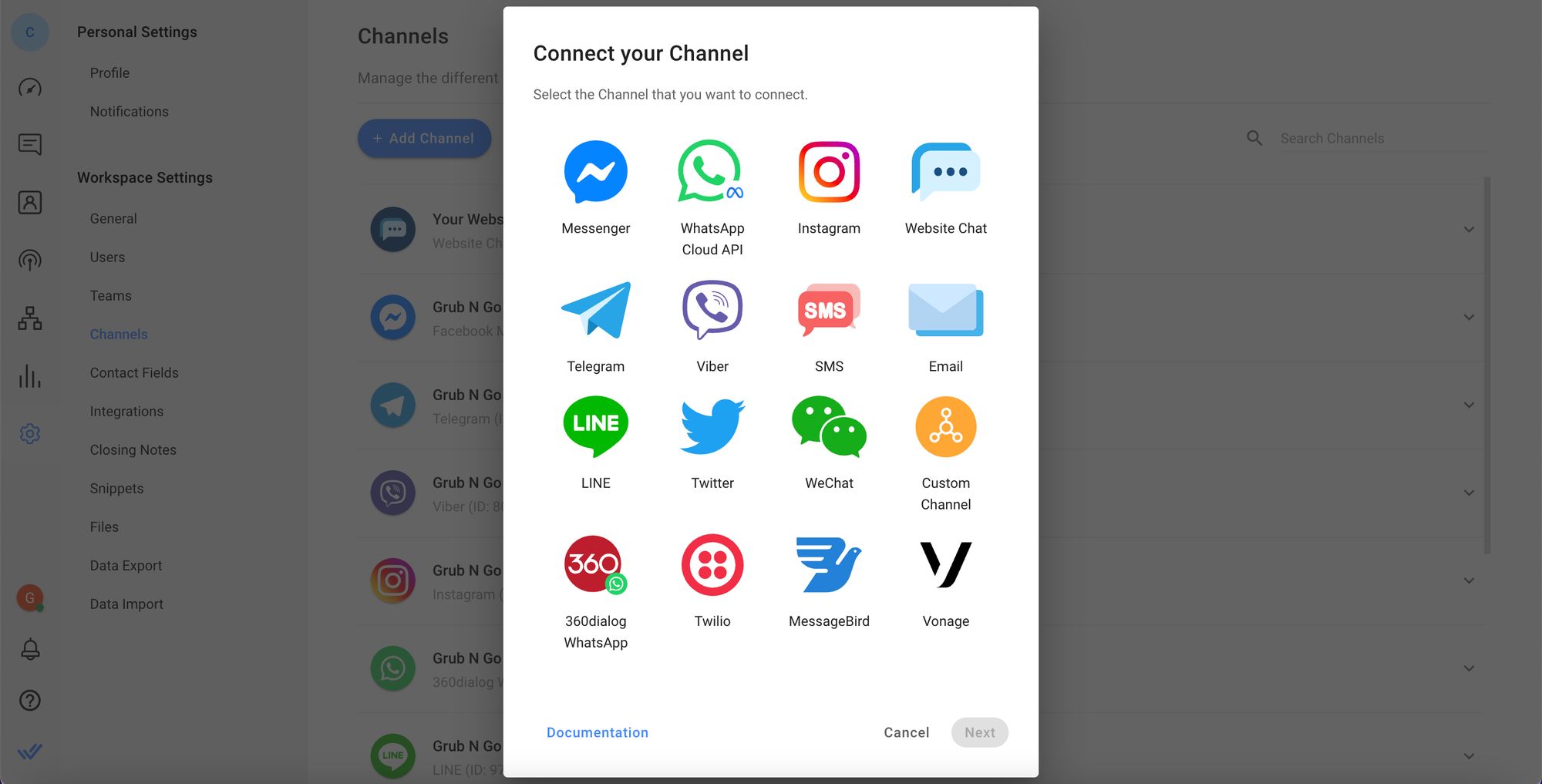
Businesses can even connect custom channels and their CRMs with respond.io. This will allow them to exchange information between any messaging channels with their CRMs or custom channels.
For instance, you can update customer data in CRMs and on respond.io simultaneously, and create deals or support tickets while chatting with customers to record these events on both platforms as part of a consistent customer story.
One conversation thread for one contact
As mentioned earlier, customers will try to contact businesses over multiple channels, and they expect businesses to know their previous conversation history no matter which channels their past chats took place on.
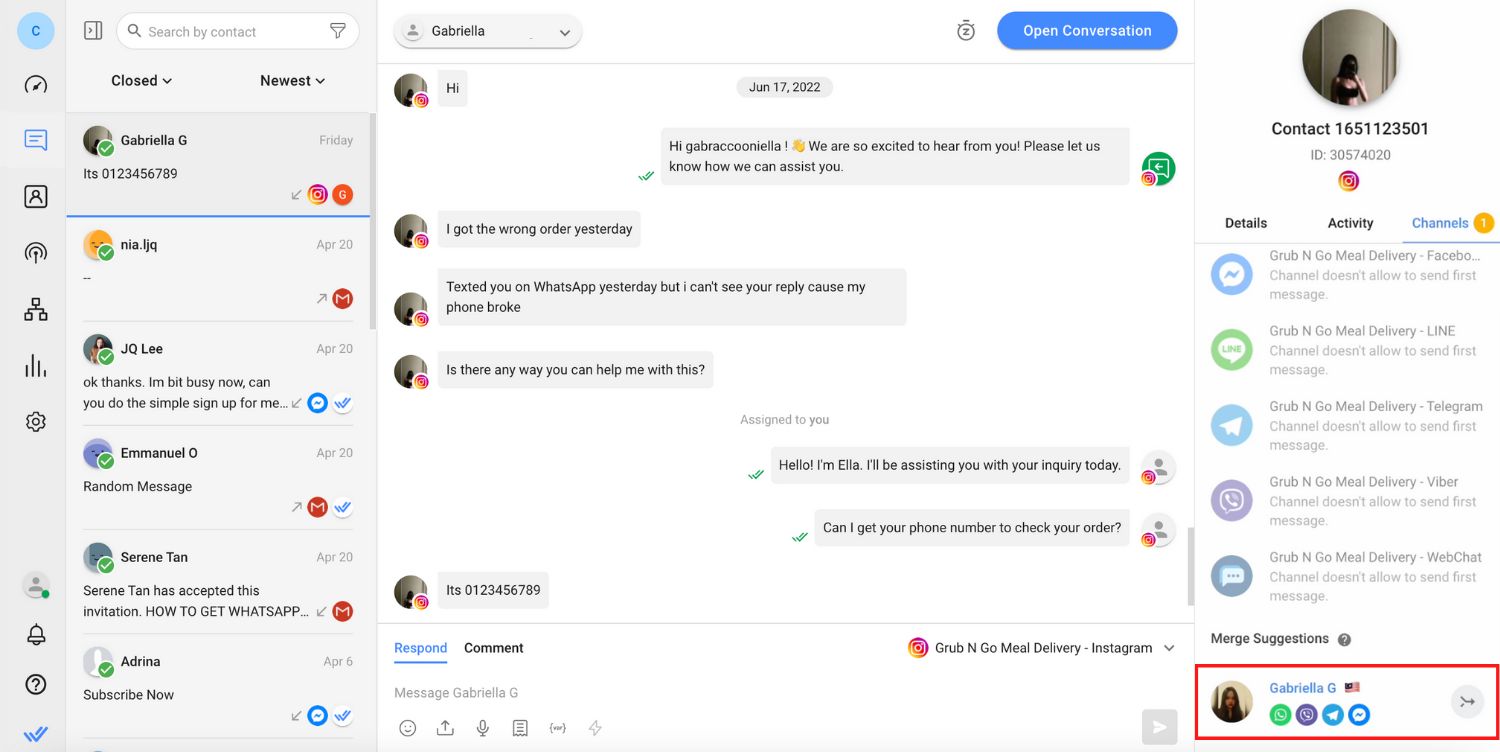
To help you get a comprehensive view of a customer, respond.io allows you to merge all Contact details and conversation history across channels into a unified profile. This way, a customer’s conversation will be in one thread, preventing siloed conversations.
It also allows customers to continue a conversation from one channel to another without having to repeat background information. This will help agents understand customers’ contexts immediately and select the most effective way to help them.
Supports multiple use cases
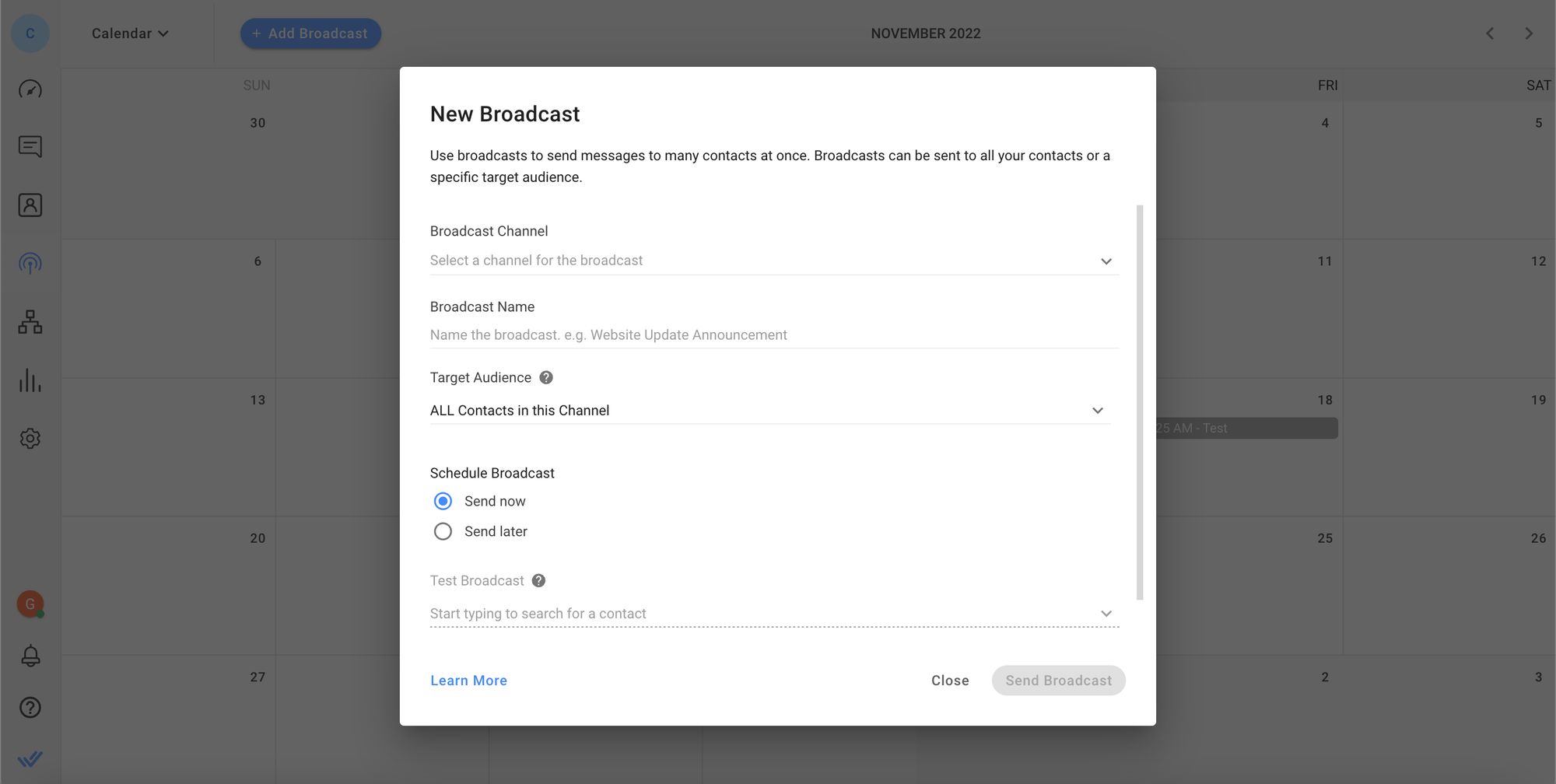
Respond.io has all the tools you need to conduct conversational marketing, sales and support on various channels. For marketing, businesses can use the respond.io broadcast tool which allows you to segment Contacts into different audiences to send targeted broadcast messages.
You can send broadcasts on channels like WhatsApp, Facebook Messenger and Viber with different types of content like images, videos and more. Respond.io also enables you to standardize 1:1 messaging across all channels with canned responses.
Besides that, businesses can automate repetitive sales and support tasks with Workflow Templates or build Workflows from scratch. This includes automation for lead qualifying,answering FAQs, routing and assigning customers and more.
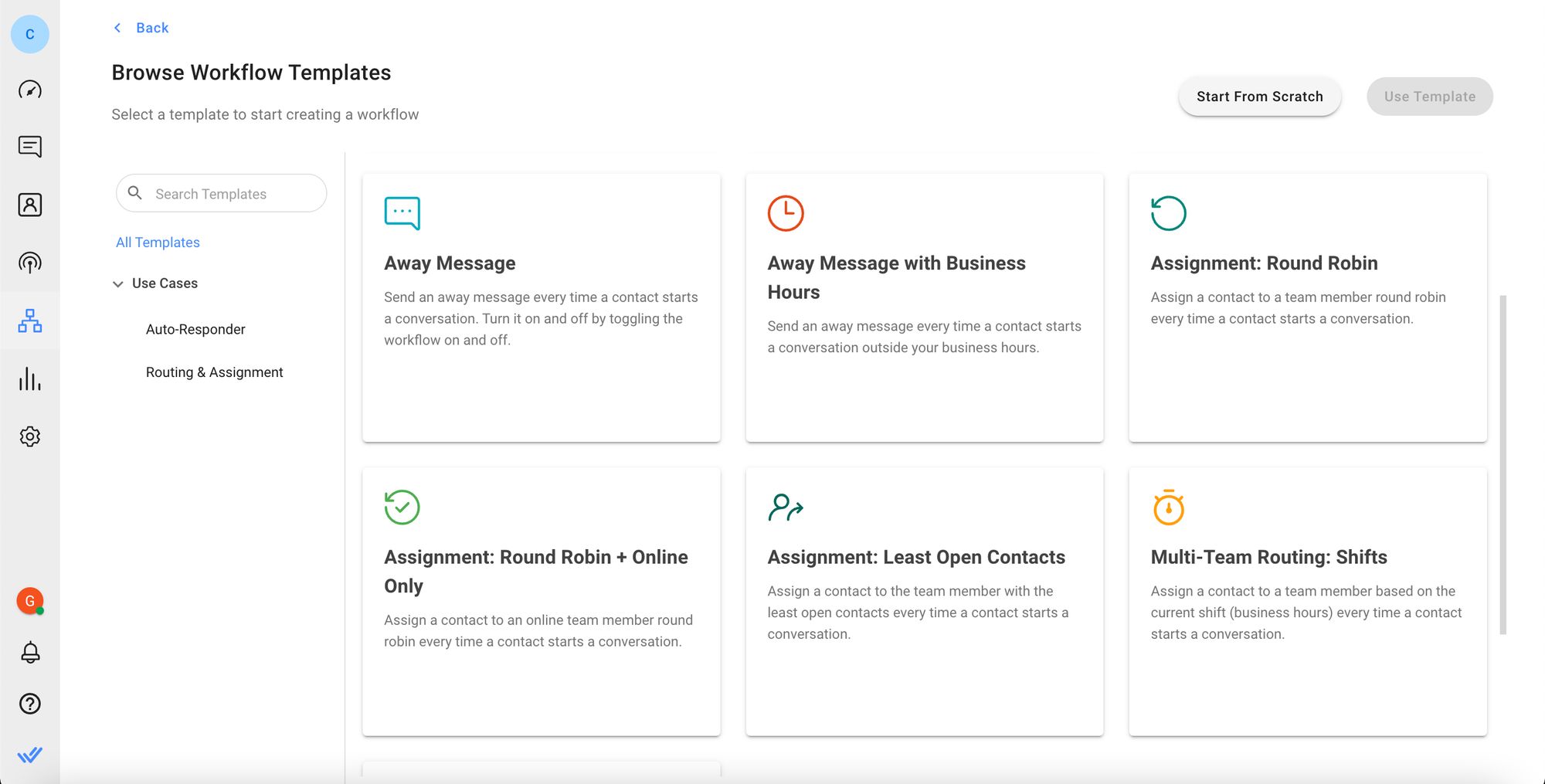
In addition, businesses can measure the success and quality of customer support by sending a customer satisfaction (CSAT) survey or by tracking individual or team performance.
Monitor performance with reports and analytics
Businesses can use respond.io’s Reports and Analytics to keep track of agent workload and productivity, conversation progress and resolution time. The supervisor dashboard allows managers to identify conversations that have been on hold or unresolved for too long and monitor agents in real time.
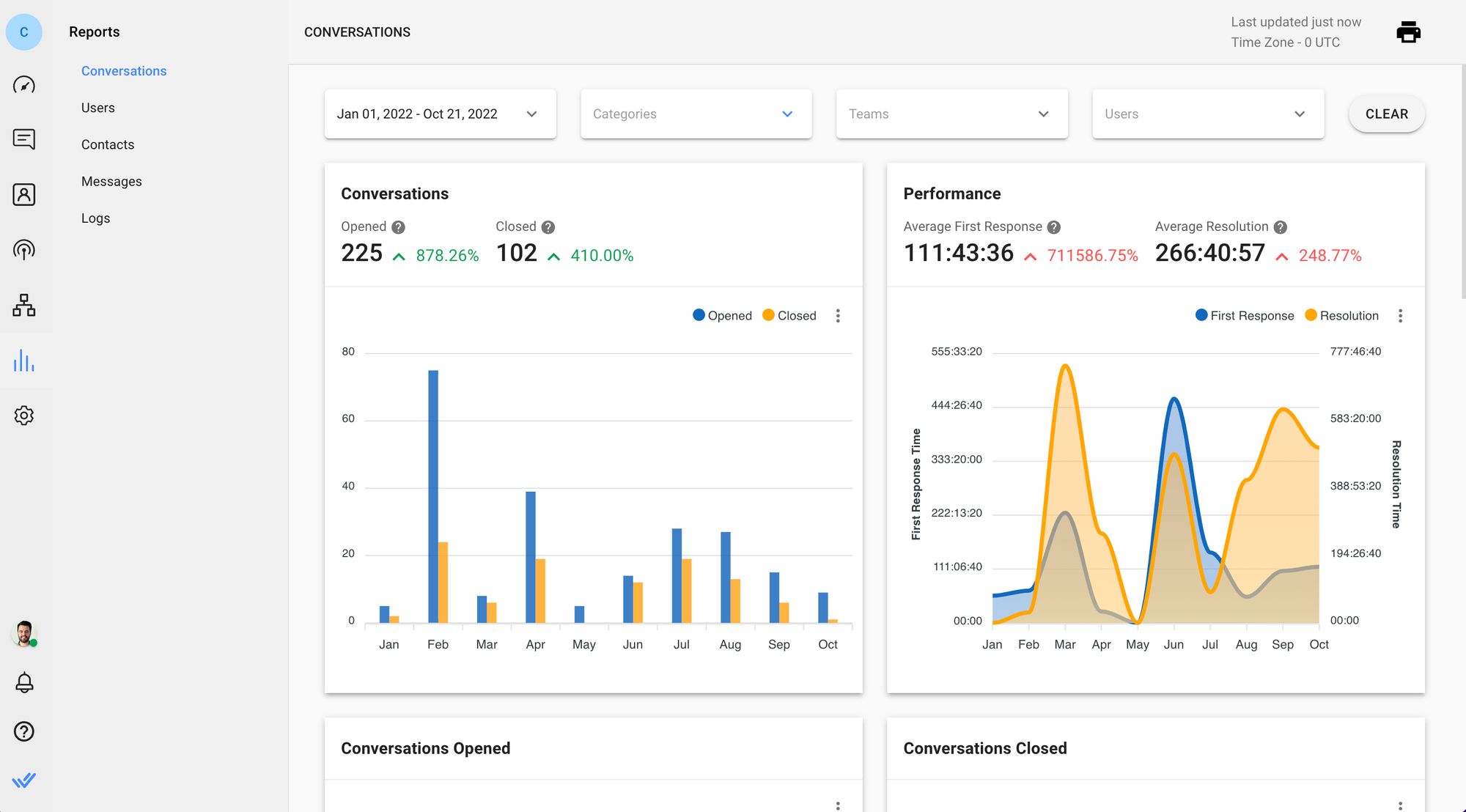
Managers can see their teams’ efficiency, analyze the areas they are lacking in and work towards improving their performance. Lastly, they can carry out all their tasks anywhere with the respond.io mobile app. It is available on Google Play Store for Android and Apple App Store for iOS.
FAQs about omnichannel communication
Are automated WhatsApp messages allowed, and what rules matter most?
Yes, automated messages are allowed when you use official tools and follow Meta's policies. Here's what matters most for business users:
Use official API access: Only send automated messages through the WhatsApp Business API or approved platforms. Unofficial tools risk account bans.
Get clear opt-in: Customers must actively agree to receive messages from you. Pre-checked boxes or assumed consent don't count.
Use approved templates for outbound messages: Promotional broadcasts, reminders and notifications sent outside the 24-hour service window require Meta-approved templates.
Respect the 24-hour service window: You can send free-form messages only within 24 hours of the customer's last message. After that, use templates.
Make opt-out easy: Include a clear way for customers to stop receiving messages. Honoring opt-outs quickly protects your sender reputation.
What is the main disadvantage of omnichannel?
The main disadvantage is complexity if a business adds channels without centralizing ownership, customer history and reporting. Teams can end up managing more apps, more manual handoffs and more duplicated work.
For mid-market B2C teams, the problem is not omnichannel itself. The real risk is trying to run it with disconnected tools that slow response time, break context and make customers repeat themselves.
How does an omnichannel communication platform differ from using multiple individual tools?
An omnichannel communication platform connects channels, customer history and team workflows in one place. Using multiple individual tools usually means each channel has its own inbox, its own contact record and its own reporting, so agents switch between apps and customers repeat themselves.
The practical difference is continuity. In a true omnichannel setup, a customer can move from Instagram to WhatsApp or from email to voice and the next agent still sees the full context. With separate tools, that handoff depends on manual notes and follow-up slows down.
Can omnichannel strategies work without advanced technology?
Yes, a business can start with clear processes and a small set of channels. But once lead volume rises or teams need sales and support to share context, manual work becomes the bottleneck.
Without a customer conversation platform, agents switch between tools, customer history fragments and follow-up becomes inconsistent. Technology is what turns omnichannel from a patchwork process into a repeatable revenue motion.
How can a platform help future-proof customer communication strategies?
A platform future-proofs customer communication when it lets the business add new touchpoints without rebuilding workflows or losing customer history. Buyers should look for support for mobile-first messaging and social channels, native voice escalation, one customer record across channels and AI Agents that can qualify leads, route by intent, update lifecycle stages and generate handover summaries.
That matters because customer journeys rarely stay on one channel. If a buyer discovers a business on TikTok, asks follow-up questions on Instagram and closes on WhatsApp or voice, the platform should keep that journey connected without extra tools or manual work.
How does AI improve an omnichannel messaging platform?
AI improves an omnichannel communication platform when it removes manual work from the conversation flow instead of only suggesting replies. The most useful AI Agents qualify leads, update lifecycle stages, trigger workflows, route by intent, escalate high-value opportunities and generate summaries for handovers while keeping context intact across key messaging, social, voice and email channels.
That matters because teams can reply faster, miss fewer follow-ups and scale high-volume conversations without adding people at the same pace. If artificial intelligence only drafts messages, the real bottlenecks in qualification, routing and handoffs still stay with the team.
Is data secure on an omnichannel messaging platform?
Data can be secure on an omnichannel communication platform if the vendor provides documented security standards, clear data handling policies, role-based access control and audit trails. Buyers should confirm that sales and support teams only see what they need and that managers can review conversation and admin activity without relying on manual workarounds.
Security should support daily operations, not sit outside them. If a vendor gives vague answers on access control or data handling, rollout risk goes up even if the channel coverage looks strong.
When do you need an omnichannel customer service strategy?
A business needs one when customers already contact the team on more than one channel or switch channels during the same journey. It becomes urgent when slow replies, repeated questions or poor handoffs start hurting conversion, resolution or retention.
For mid-market B2C teams, that usually means service can no longer be managed channel by channel without losing context and creating extra work for agents.
Who should use an omnichannel communication platform?
An omnichannel communication platform is best suited to B2C businesses that handle high volumes of customer conversations across more than one channel. The strongest fit is mid-market teams that need sales, marketing and support to work from one customer record, protect speed-to-lead and manage handoffs without losing context.
The need becomes clear when customers switch channels during the same journey, agents keep asking repeated questions or follow-up starts affecting conversion, resolution or retention. If those problems are already showing up, disconnected tools usually create more cost than they save.
Which omnichannel communications platform is the best?
The best platform is the one that protects revenue across the channels customers already use while keeping one customer record from first inquiry to resolution. For mid-market and growing B2C teams, that usually means strong support for WhatsApp and other key messaging, social, voice and email channels, reliable CRM sync, AI Agents for qualification and routing and pricing that does not rise just because more agents need access.
For businesses that need those capabilities, respond.io is a strong fit because it combines channel coverage, AI Agents, workflow automation, reporting and Monthly Active Contacts (MAC) pricing in one customer conversation platform. Buyers should still test their own channel mix, migration needs and rollout speed before making a final decision.
What are the four pillars of omnichannel strategy?
Most teams can simplify omnichannel strategy into four pillars:
Channel coverage: Support the channels that actually drive customer conversations and revenue.
Unified customer context: Keep one contact record and one conversation history across channels.
Orchestration: Route conversations, automate repetitive steps and hand off to the right team without losing context.
Measurement: Track response time, conversion, resolution and retention by channel so the strategy improves over time.
If one pillar is missing, the experience stops feeling connected for both customers and agents.
How do I measure the success of an omnichannel campaign beyond traditional metrics?
Beyond opens, clicks or message volume, managers should measure whether conversations move customers forward across channels. The most useful indicators are first response time by channel, handoff completion without lost context, lead qualification rate, lifecycle stage movement, conversion rate, resolution time, repeat contact rate and customer satisfaction.
A strong platform should also show which channels start conversations, which ones close them and where customers drop off. That view helps teams improve routing, staffing and follow-up instead of just reporting activity.
Where do organizations most commonly fail in executing omnichannel communication?
Organizations usually fail in four places: they launch too many channels at once, go live before customer history is centralized, split ownership across sales, marketing and support, and rely on weak routing or inconsistent quality standards. Each mistake slows reply speed, breaks handoffs or makes customers repeat themselves.
The practical fix is to start with the channels that already drive revenue, keep one customer record from day one, assign clear ownership and monitor whether urgent or high-value conversations reach the right team fast enough.
Turn customer conversations into business growth with respond.io. ✨
Manage calls, chats and emails in one place!
Further reading
Need inspiration to kickstart your omnichannel communication journey? Have a look at our customer success stories!


