Is respond.io a replacement for my CRM, or does it work alongside it?

TL;DR: Respond.io works alongside your CRM; it is not a replacement for one.

Respond.io is not for businesses who need a CRM replacement; it’s a customer conversation management platform built to work alongside your CRM. Mid-market B2C teams running high volumes of chats and calls on multiple channels have no way to get that contact data and conversation outcomes into their CRM without a dedicated integration layer, so records go unupdated, attribution breaks, and revenue from conversations becomes invisible. Respond.io sits between your channels and your CRM — conversations are managed in respond.io; outcomes and lifecycle stages can be sent back to your system of record. It integrates natively with HubSpot and Salesforce, and connects to any other CRM via Zapier, Make, n8n or webhooks. Mid-market B2C businesses still need their CRM to manage contact records, purchase history and customer data; respond.io handles the conversations, not the data warehouse.

Respond.io handles what a CRM cannot: real-time conversations at scale across every channel

A CRM tracks customer data and deals. Respond.io manages the live conversations that move customers through that pipeline across WhatsApp, Instagram, Messenger, TikTok, calls and more. When mid-market B2C teams try to manage high-volume inbound conversations without a platform, response times slow, context is lost between agents, and revenue attribution breaks. Respond.io solves for this by giving teams a unified inbox where AI Agents, automation and human agents operate together in real time, with every outcome sent back to the CRM.

Manage chats and calls from a single inbox across all channels

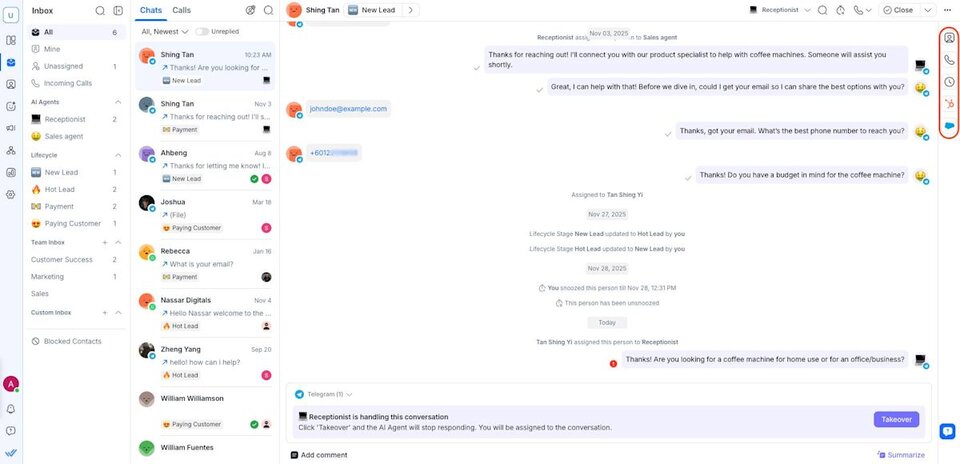
Human agents and AI Agents handle chats, calls and more from a unified inbox, so no conversation is managed in a personal app, disconnected tool, or a CRM's limited messaging interface. Because all conversations run through a single platform, context is preserved across channel switches, agent reassignments and shift changes without requiring customers to repeat themselves.

Screenshot of the respond.io inbox showing calls and chats managed alongside each other, proving that all agents share full conversation context across channels without switching tools.

Respond faster and qualify leads with AI Agents before human handoff

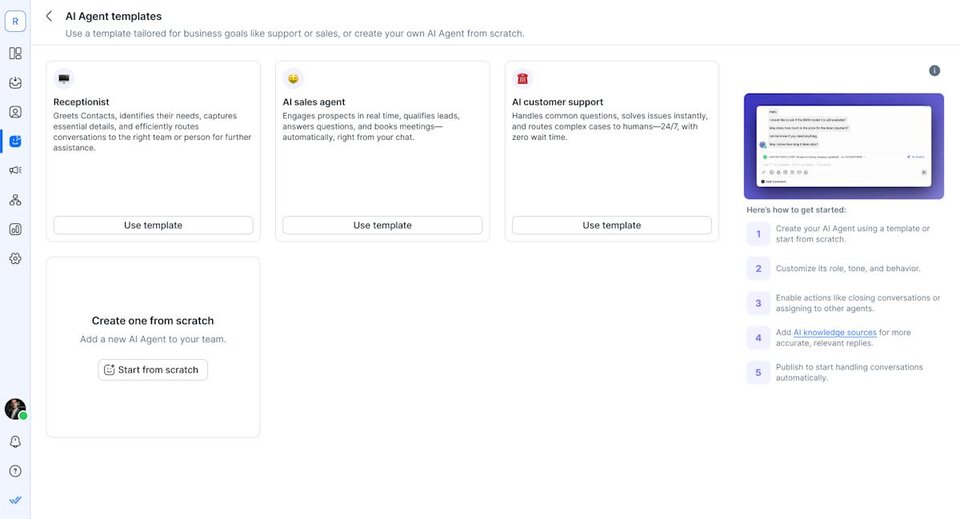
Respond.io's AI Agents handle inbound FAQs, capture qualification data, update customer lifecycle stages (e.g., “qualified lead”) and route conversations to the right agent, automatically. Unlike rule-based bots, they interpret open-ended queries and take platform actions, reducing the volume of conversations that require immediate human attention. This matters most for B2C teams running paid ad campaigns: when inbound spikes, AI Agents absorb volume without degrading response time or lead quality.

Screenshot of the respond.io AI Agent setup page showing preset roles including receptionist, sales agent and customer support, proving that AI Agents can be deployed without custom configuration.

Respond.io integrates with your CRM to create a single view of every customer

When your customer conversations and data are siloed, agents reply without context and high-intent leads drop off. The integration layer is what makes respond.io and a CRM work as one system rather than two disconnected tools. Contact data, conversation outcomes and lifecycle stage changes flow between respond.io and your CRM in real time, so agents in both systems always have current context, and no data has to be entered twice.

Integrate with HubSpot and Salesforce within the inbox

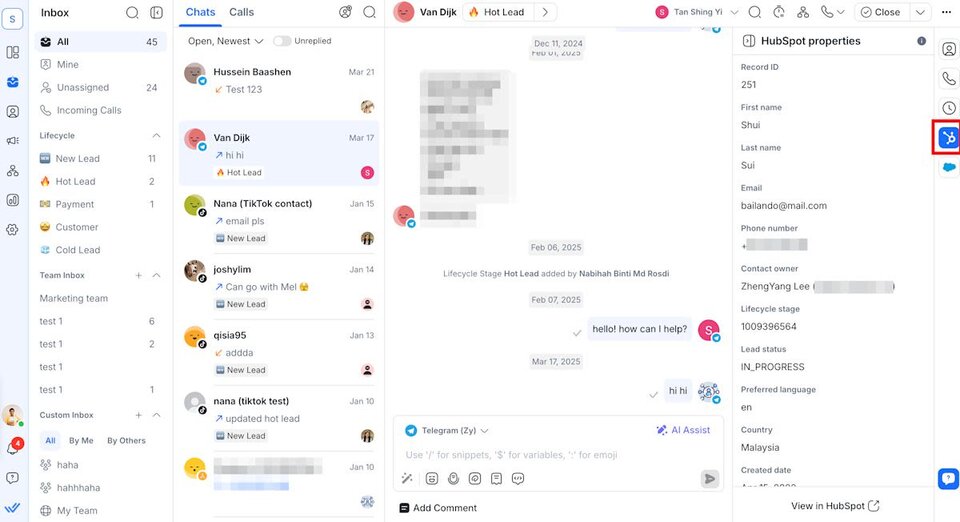
Respond.io's native HubSpot and Salesforce integrations let agents view CRM records without leaving the conversation. This removes the manual step that causes data drift when teams manage conversations in one tool and record outcomes in another.

Screenshot of the respond.io inbox with HubSpot integration open, showing contact properties displayed alongside the live conversation, proving that agents can view CRM records without leaving the inbox.

Connect any CRM using Zapier, Make, n8n or webhooks

For mid-market B2C teams using a CRM outside of HubSpot and Salesforce, respond.io connects via Zapier, Make, n8n or direct webhooks — allowing you to trigger CRM record creation, field updates or pipeline stage changes based on conversation events. This means the integration is not limited to named CRM partners: any CRM with an API can be connected.

Give every agent a 360° customer view without switching tools

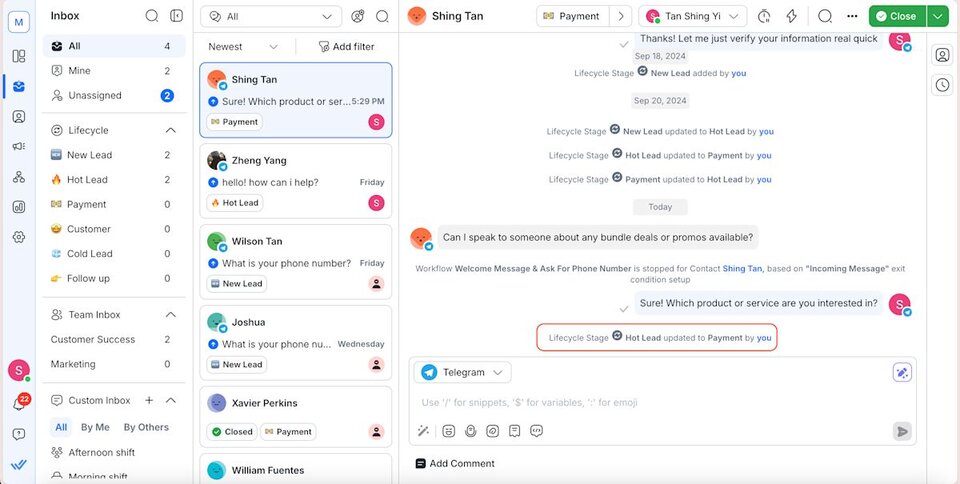
Respond.io gives agents the full contact and conversation history across all channels, lifecycle stage, CRM-synced fields, and call recordings, alongside the live conversation, which reduces repeat questions to customers and enables agents to prioritize high-priority chats that lead to conversions. That way, fewer leads go cold before getting a response that moves them toward a decision.

Screenshot of the respond.io inbox showing Lifecycle Stage controls alongside a conversation, proving that agents can update lead status in real time without switching to the CRM.

When respond.io is not what you need

If you are evaluating respond.io as a CRM — a place to store contact records, manage your pipeline, or own your customer data — it is not the right tool. Respond.io is a customer conversation management platform, not a CRM. It does not replace one, and it is not designed to.

If you have a CRM and your messaging volume is low enough that its native messaging tools cover your needs, respond.io is overhead you don't need yet.

If your team does not yet have a CRM, start there. Once you have a system of record in place, respond.io becomes relevant if you are running high volumes of conversations across WhatsApp, Instagram, or other messaging channels that you need to manage in a single inbox with automation and AI and integrate with your CRM.

Related FAQ