
















 Electronics
 Fashion & Apparel
 Furniture
 Jewelry and Watches
 Afterschool Activities
 Sport & Fitness
 Beauty Center
 Dental Clinic
 Medical Clinic
 Home Cleaning & Maid Services
 Photography & Videography
 Car Dealership
 Travel Agency & Tour Operator


TL;DR — How to use WhatsApp for sales
Using WhatsApp API helps businesses sell faster by turning chats into personalized sales conversations.
It centralizes leads, automates follow-ups and integrates with your CRM for a seamless sales flow.
Use click to chat ads, message templates and AI Agents to qualify, route and close deals efficiently.
With respond.io and WhatsApp API, businesses in travel, automotive and beauty have rapidly scaled sales and bookings.
More and more businesses are using WhatsApp for sales, and it’s time for your company to follow suit. In this article, we’ll discuss why conversational sales with WhatsApp API are more effective than traditional sales. You’ll also learn the fundamentals of WhatsApp API and quick wins to sell on WhatsApp. Plus, we've put together a list of WhatsApp sales success stories.
Why Are WhatsApp Sales a Better Alternative to Traditional Sales?
Conversational sales is more than a buzzword. It helps businesses increase conversion rates, improve customer experience and even shorten the sales cycle. With over two billion monthly active users, WhatsApp is the go-to platform for companies looking to adopt conversational sales.
There are many benefits to using WhatsApp for conversational sales.
1. Gather contact data and qualify leads instantly
WhatsApp allows salespeople to gather lead information faster than they would with email. You'll get a lead's name and phone number as soon as they send your business a message. Then it's easy to use WhatsApp automation or even AI agents to ask qualifying questions via WhatsApp chat or call.
2. Build a partner-like relationship with leads through casual conversations over WhatsApp
In contrast to web chat, WhatsApp offers salespeople the flexibility to follow up with leads later without fear of losing them. Through the cadence of WhatsApp conversations, salespeople are able to build excitement before closing a deal.
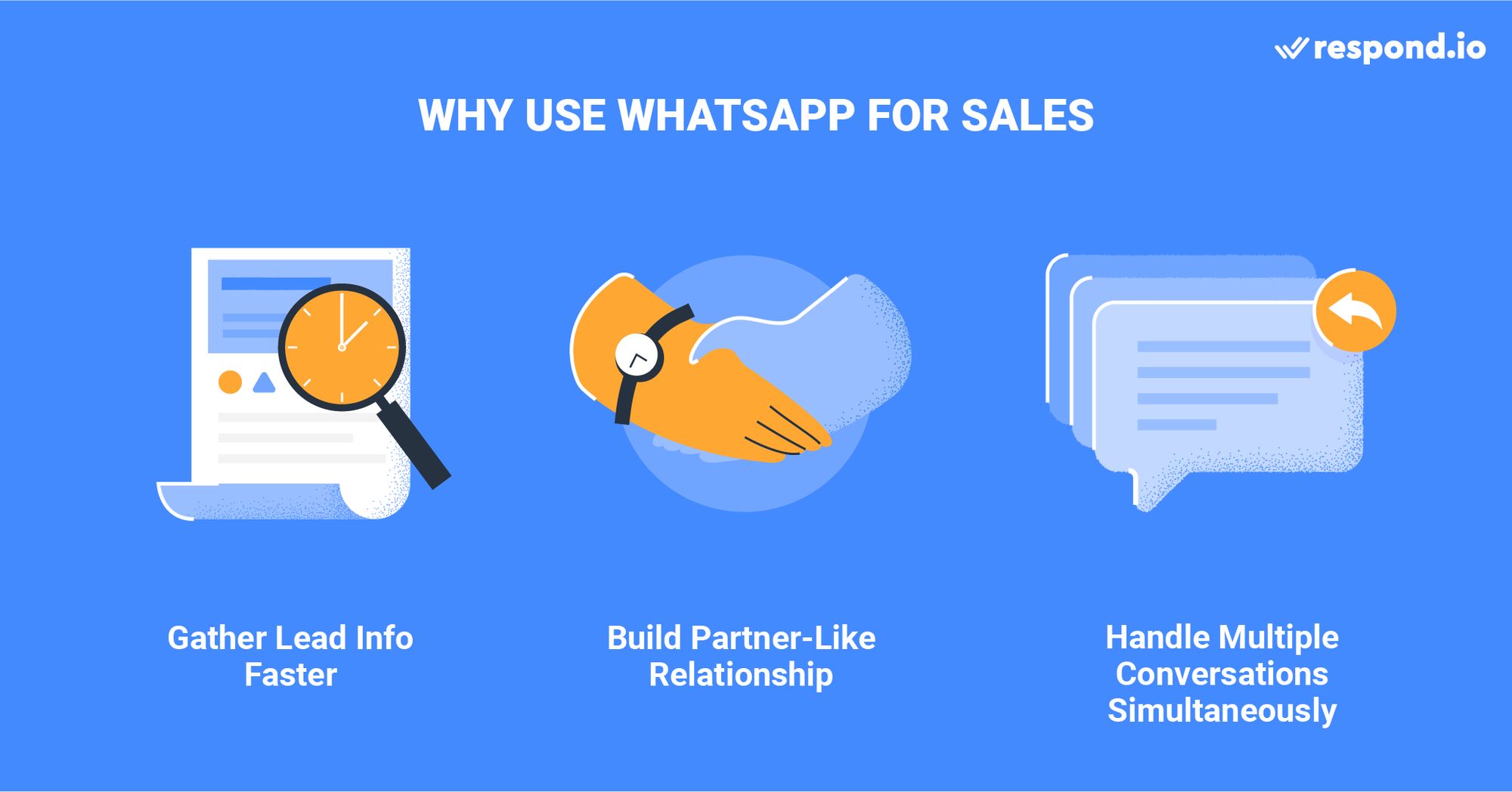
3. Increase team productivity
In addition, WhatsApp increases the productivity of your sales team. A salesperson may only take one phone call at a time, but can handle multiple WhatsApp sales conversations at once.
WhatsApp Sales: What You Should Know
To use WhatsApp for sales, you have to get a WhatsApp Business Account. WhatsApp offers two types of WhatsApp Business Accounts - WhatsApp Business App and WhatsApp Business API.
Designed for small businesses, WhatsApp Business App lacks multi-user functionality and advanced automation. If you are a medium to large business with several salespeople doing WhatsApp sales, the best option would be WhatsApp Business API.
Not only does WhatsApp API support advanced features like multi-user functionality and automation, but it also allows you to keep a centralized record of all sales conversations once connected to a WhatsApp inbox. Read on to learn more.
Without a WhatsApp API Account, salespeople have to resort to using their personal WhatsApp accounts or WhatsApp Business App for sales. This presents two problems:
There is no record of conversations with customers in the sales CRM.
Consequently, companies will lose customers if a salesperson leaves their job.
WhatsApp API enables you to keep a record of all conversations in a WhatsApp Inbox product. In this section, we’ll discuss the fundamentals of WhatsApp API that you should know before using WhatsApp for sales.
Group Messaging is Not Supported on WhatsApp API Yet
Sometimes, salespeople need to use an email CC or a WhatsApp Group on the WhatsApp app to keep multiple decision-makers in the loop. Currently, WhatsApp API does not support group messaging.
In cases where group messaging is absolutely necessary, salespeople need to stick with their personal WhatsApp accounts until WhatsApp API implements WhatsApp Groups. Alternatively, they can notify other stakeholders by using the Comment feature on a WhatsApp Inbox.
Salespeople Will Not Have Their Own Numbers
Salespeople often interact with prospects using their own email handles and phone number. However, WhatsApp API does not allow for this to happen. Under WhatsApp’s one-account-per-brand rule, each company can only own one WhatsApp API account, which is tied to a phone number.
Even without their own numbers, salespeople can still operate like they used to. If they need to call their customers, they can now do so using the WhatsApp Business Calling API. With WhatsApp business calling, outbound calls are allowed with customer permission only while customers can make inbound calls at any time.
Simply connect your WhatsApp API to a platform that can route the conversation to the right salesperson. Note that with respond.io, calls can also be transferred to specific agents easily. More on this later.
24-hour Customer Service Window Restrictions
Email lets salespeople reengage with their prospects whenever they want. By contrast, WhatsApp API comes with a 24-hour customer service window restriction. Inside the window, each phone number gets 1,000 free service messages a month, charged at the utility rate after that.
Users who message businesses through WhatsApp click-to-chat ads or Facebook Page call-to-action buttons open a free entry point window, and messages in that window are free. Windows opened from click-to-chat ads last up to 7 days, extended from 72 hours, while Facebook Page button windows last 72 hours.
If you reply to a prospect 24 hours after their last message or initiate a chat with someone who has not messaged you, you’ll need to use a message template.
Before using message templates, these have to be submitted to WhatsApp via a WhatsApp Business Solutions Provider like respond.io for approval. Having the right WhatsApp inbox simplifies the process and lets you create a message template natively.
Turn conversations into customers with respond.io's official WhatsApp API ✨
Manage WhatsApp calls and chats in one place!
WhatsApp Sales: 5 Quick Wins to Sell on WhatsApp
By overcoming the restrictions associated with WhatsApp API, respond.io helps unlock the full potential of your sales team. The platform also supports a range of advanced features that make WhatsApp sales a breeze.
Use Message Templates for Follow Up and Outbound Conversations
A message template reopens WhatsApp API’s customer service window, allowing you to follow up with a prospect after 24 hours. Alternatively, import leads to a WhatsApp Inbox and use marketing message templates to send them the first outbound message.
You can send WhatsApp bulk messages to spread awareness of your products, retarget existing customers and even promote your apps.
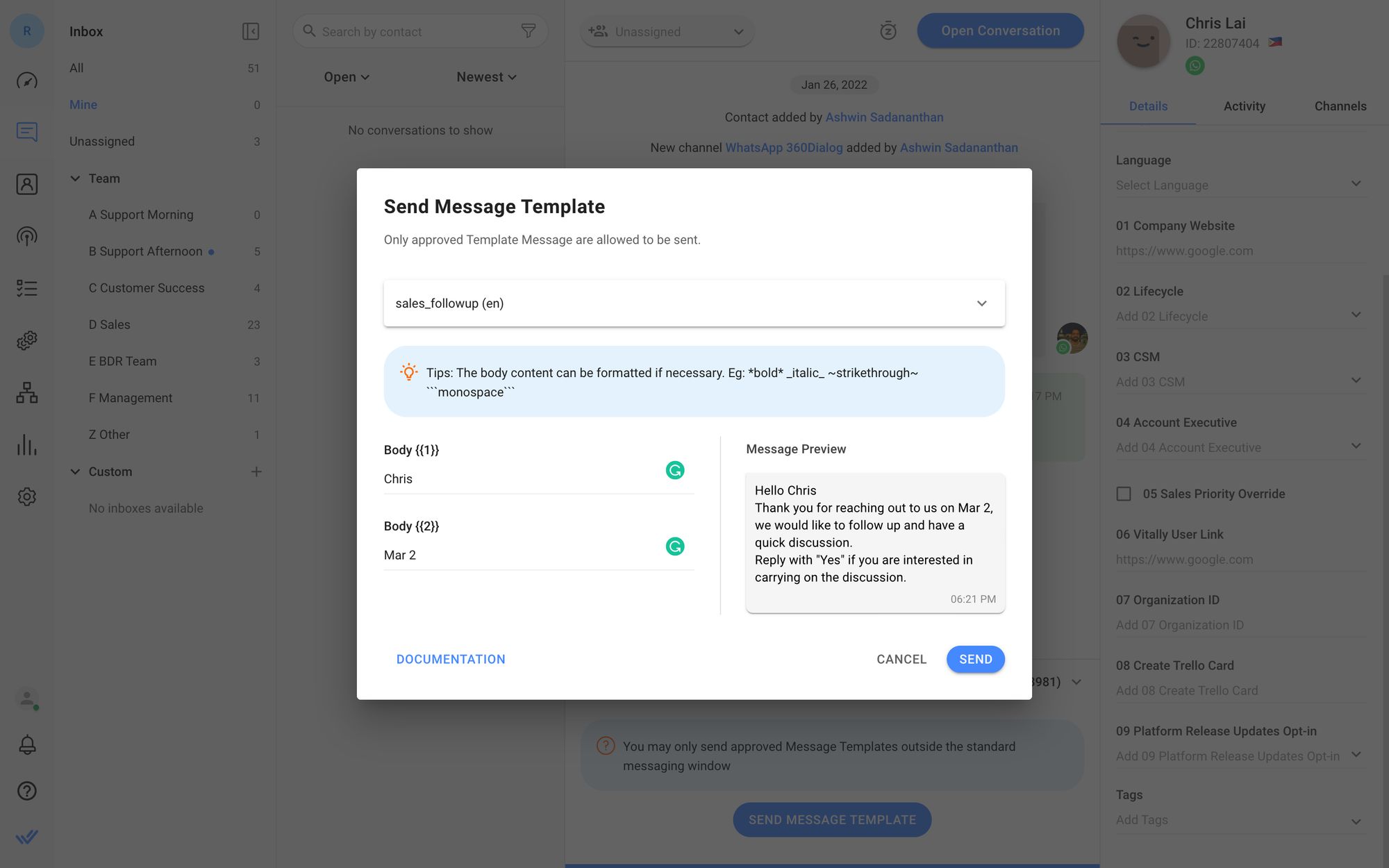
Upon a successful sale, you can use utility templates to confirm an order or transaction with specific details in the body of your message, charged at the utility rate whether or not the 24-hour window is open.
Keep in mind that not all WhatsApp Inbox products support native message template functionality. When choosing a WhatsApp Inbox, look for one that supports template messaging.
Funnel Inbound Leads to WhatsApp Conversations with WhatsApp Click to Chat Links
A WhatsApp Click to Chat link encourages your leads to start a WhatsApp conversation. When clicked, the WhatsApp Click to Chat link takes leads to a new WhatsApp conversation in the app.
You can place a WhatsApp Click to Chat Link on a website or other digital spaces to convert online visitors to WhatsApp conversations. Alternatively, use a WhatsApp QR code to turn offline traffic like foot traffic at a brick-and-mortar store into WhatsApp conversations.
Use AI Agents to Automatically Qualify and Route Leads
Respond.io’s AI Agents can automatically reply to leads who message you and assign qualified leads to the right sales team.
Here’s how it works:
First, create an AI agent with a customizable template. For example, choose Sales Agent and train it on your knowledge sources.
Get the AI agent to collect information about the lead like name, phone number, and budget. The AI sales agent can also answer questions about the product and make recommendations.
If the lead is not qualified, the AI Agent can end the conversation and provide a summary.
If the lead is qualified, the AI Agent will route the lead to an available salesperson, providing full context on the lead. The AI Agent can also tag contacts based on intent during the conversation, preparing them for follow-up workflows.
Use a WhatsApp Inbox that Integrates with Your Existing Sales CRM
It is likely that your current sales CRM does not support WhatsApp API, and building a custom integration that connects a sales CRM to WhatsApp can be costly. To get started quickly with WhatsApp sales, integrate your existing CRM with a WhatsApp Inbox.
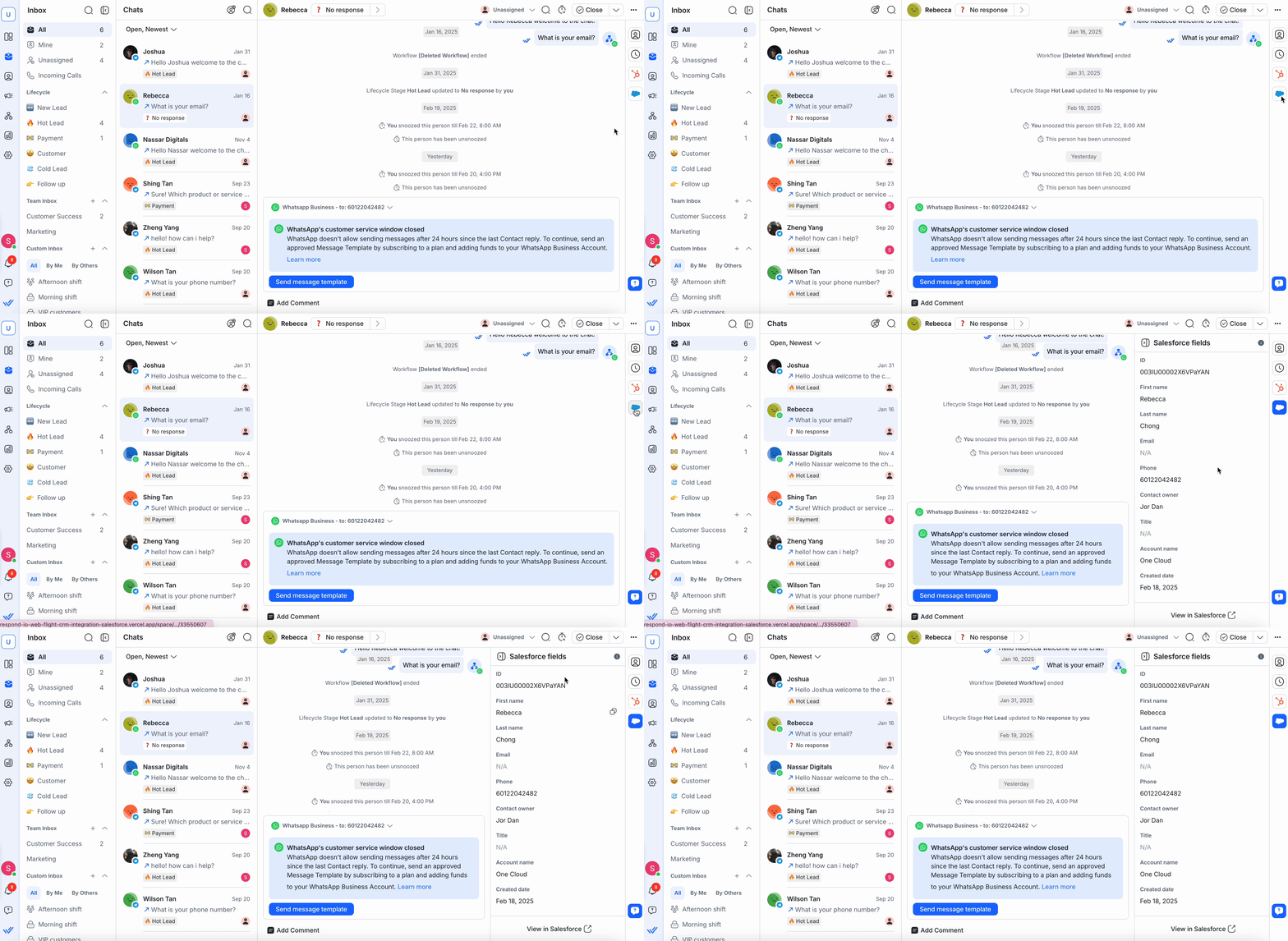
A sales CRM integrated with a WhatsApp Inbox opens up many possibilities. For instance, it allows salespeople to instantly create a deal record in a sales CRM like Salesforce.
Send Product Catalogs to Your Customers
Drive conversions through WhatsApp commerce with respond.io's Meta Product Catalog, also known as WhatsApp catalog. This gives customers instant access to your product listings, increasing the chances of driving engagement. Alternatively, use carousel templates to present 2–10 products as swipeable cards with individual CTAs, giving each item focused attention. More engagement means more conversions.
To use this feature, you need to upload the products to your Commerce Manager and connect them to respond.io. The products uploaded in the Commerce Manager will sync on the respond.io platform.
Need a WhatsApp sales idea? Read on to find out how other companies have been using WhatsApp API to take their sales processes to the next level.
WhatsApp Sales: 3 Ways Companies Sell on WhatsApp
Many businesses across industries have found success with WhatsApp sales. In this section, we'll share some of our customers' success stories to inspire you to sell on WhatsApp.
1. How Does SchuVar Tours Sell on WhatsApp?
SchuVar Tours runs click to chat ads on social media to generate leads. It has a clear call to action: Message us on WhatsApp to book your trip. Leads flow in steadily, curious travelers eager to discover their next getaway.

How Does SchuVar Tours' WhatsApp Sales Strategy Work?
SchuVar Tours uses WhatsApp API with respond.io, which gives it the capacity to handle more leads. It ramped up its advertising, tripling the number of leads it receives via paid ads.
Respond.io integrates with Meta click to chat ads so all ad responses indicate which channel and ad the conversation came from, showing which ads are attracting quality leads. With reports and analytics, the business can measure ad performance to ensure all marketing investments translate into revenue impact.
Does SchuVar Tours’ WhatsApp Sales Strategy Deliver Results?
As the business now has the capacity to manage higher volumes of ads, it’s been able to scale its click to chat ads and generate 40% of its leads from paid ads, a 3x increase over three months. These improvements have transformed SchuVar Tours’ sales operations—turning what was once a fragmented, manual process into a high-performing, scalable engine for growth.
2. How Does Automax Sell on WhatsApp?
Automax® is a luxury car dealership located in the United Arab Emirates serving customers around the region, including Saudi Arabia. Its multilingual sales team caters to locals and expats alike, and the business has a large social media following, especially on Instagram and TikTok. However, while customers come in through social media, they prefer to contact the business over WhatsApp.

The business relies on WhatsApp for sales conversations and retargeting. It uses WhatsApp API with respond.io to consolidate conversations in one inbox and send retargeting broadcasts.
How Does Automax’s WhatsApp Sales Strategy Work?
Often, when leads click on an ad or engage on social media, they're not yet ready to buy. A timely WhatsApp message to interested prospects can be the difference in them choosing Automax over a competitor.
Automax® now regularly sends over 80,000 WhatsApp broadcasts per month to specifically targeted customers. Broadcasts are segmented using respond.io’s Lifecycle tracking feature so leads receive timely follow-ups tailored to where they are in the customer journey.
Is Automax's WhatsApp Sales Strategy a Success?
As Automax® reliably broadcasts targeted WhatsApp messages, it fuels consistent reengagement. These broadcasts achieved an impressive 42.5x ROI in platform costs, showing that it pays to invest in a WhatsApp API solution for WhatsApp sales.
3. How Does EMAX Beauté Sell on WhatsApp?
EMAX Beauté is a leading provider of beauty, skincare, haircare and body wellness services, operating under four brands with multiple branches around the greater Kuala Lumpur area, where WhatsApp is the most popular channel. It offers a diverse range of treatments and products that it promotes with its wide-reaching social media presence. The business encourages customers to book an appointment via WhatsApp.
How Does EMAX Beauté's WhatsApp Sales Strategy Work?
Respond.io can automate the treatment booking process completely if businesses require it; however, EMAX prefers a human touch, so agents chat with each customer who’s interested in booking a treatment session. With higher quality leads and faster responses, agents are able to engage leads while interest is high, securing more appointments.
To streamline the process, agents use Snippets for replies on availability and confirmations. They’re even able to collect payment for the treatment directly upon booking by sending a link to the payment platform; the lead then sends a screenshot of the receipt in the chat. The deal is closed in a single conversation!
Is EMAX Beauté's WhatsApp Sales Strategy a Success?
Definitely! The company has seen appointments booked via WhatsApp on respond.io increase by 18x. In-chat payment link capabilities also allow for seamless transactions where applicable, resulting in smoother operations and strong business results overall.
Inspired to start selling over WhatsApp? Try respond.io for free or contact us for a free consultation today!
Turn conversations into customers with respond.io's official WhatsApp API ✨
Manage WhatsApp calls and chats in one place!
FAQ About Using WhatsApp for Sales
Can the WhatsApp API send notifications to customers during the purchasing process?
Yes. WhatsApp API can send notifications to customers during the purchasing process, such as order confirmations, shipping updates and payment receipts.
Is WhatsApp good for sales?
Yes. WhatsApp is one of the best channels for conversational sales because it allows real-time, personalized communication that builds trust and accelerates conversions. Sales teams can engage leads instantly, follow up easily and manage multiple chats at once all while maintaining a human touch that’s often missing from email or web chat.
Is it legal to use WhatsApp for sales?
Yes, as long as you follow WhatsApp’s Commerce Policy and obtain customer consent before messaging them. Businesses must also use approved message templates for outbound messages sent via WhatsApp API. When done properly, WhatsApp sales are fully compliant and can help you reach customers in a trusted, secure environment.
Should I use WhatsApp Business App or WhatsApp API for sales?
Small businesses can start with the WhatsApp Business App, but it’s limited in terms of users and automation features. Medium to large sales teams should use WhatsApp Business API instead as it enables AI agents, automation, CRM integration, message templates and a shared inbox for managing all conversations in one place. We recommend respond.io as the best WhatsApp API provider for growing businesses.
Further Reading
If you're interested in more information on how to use WhatsApp API for other use cases, check out these articles:


