What can respond.io AI Agents handle out of the box, and how are they trained?

TL;DR: Respond.io AI Agents are ready to deploy out of the box — no developer setup required

For mid-market B2C teams managing high conversation volumes across WhatsApp and other channels, respond.io AI Agents handle FAQs, lead qualification, routing and platform actions from day one. They're trained on your own docs and URLs in minutes using ready-made templates or a custom build.

Respond.io is a customer conversation management platform that features ready-to-deploy AI Agents that can instantly handle FAQs, qualify leads, route conversations, process files, images and audio and even perform platform actions like closing conversations, updating contact information and triggering CRM updates. They understand and respond in multiple languages, allowing businesses to serve customers seamlessly across regions and channels.

Its AI Agents are trained using your business content — like help docs, websites or uploaded files — and can be deployed in minutes using ready-made templates or fully customized setups.

With respond.io’s AI Agents, businesses can scale conversations without sacrificing quality, allowing human agents to focus on complex issues, high-value deals and interactions that drive growth.

AI Agents automate Marketing, Sales and Support tasks across all channels

Respond.io AI Agents work across all connected channels — including WhatsApp, Instagram, Messenger, TikTok, voice calls and more — from a single unified interface. Out of the box, they can: 

Qualify leads and move them through the sales cycle

Answer sales and support questions using uploaded documentation and/or URLs. They can also capture key info such as budget, interest or location before handing off to human agents. When a lead comes in from a Meta or TikTok ad, the AI Agent already knows the ad context and tailors its opening response accordingly — so the conversation starts with relevance, not a generic greeting.

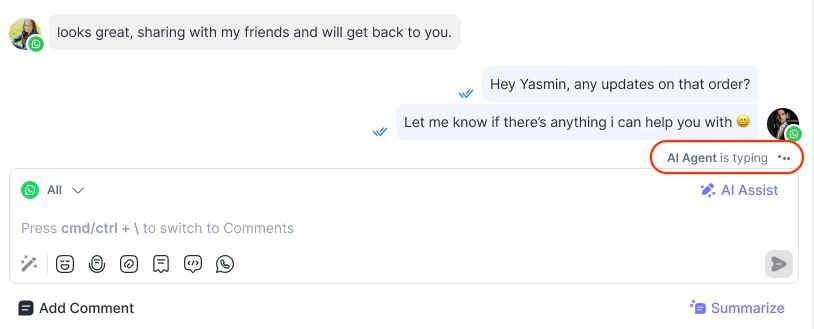
Screenshot of the respond.io Inbox showing a WhatsApp chat where the AI Agent is typing, illustrating how AI Agents handle FAQs and qualification tasks automatically.

In some instances, the AI Agent can close sales without the need to hand off the conversation to a human, handling common objections and then sending an appointment booking link or payment link if the lead is ready to purchase.

Route conversations intelligently

Detect intent and automatically route conversations to the right team or agent based on defined logic, for example, “pricing” inquiries go to Sales. AI Agents also support online-only assignment, routing conversations only to agents who are currently active — so leads reach someone who can respond immediately rather than sitting in an unmonitored queue.

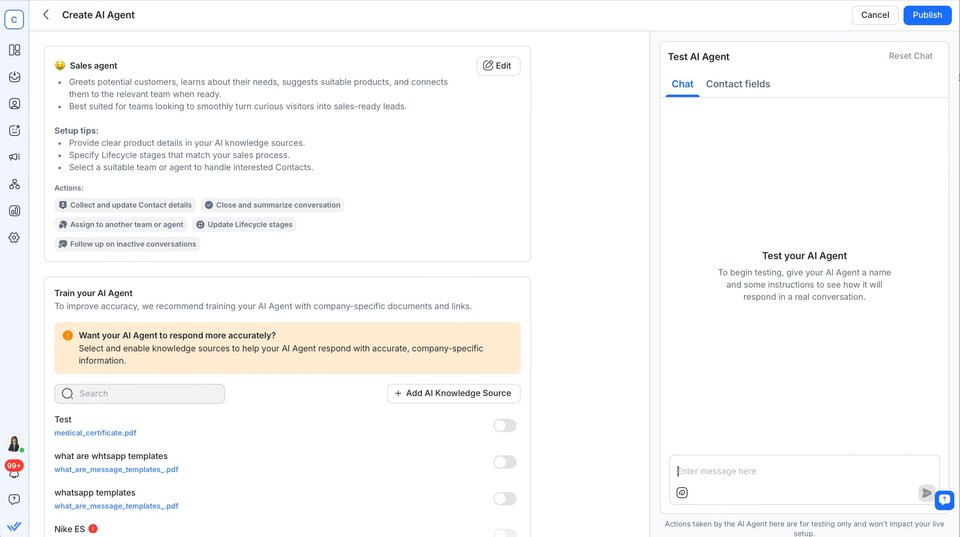
Screenshot of the respond.io AI Agent setup page showing configuration options for routing conversations, training with company documents and testing AI responses to automatically send messages to the right team.

Process files, images and audio

Read PDFs, screenshots or attachments from customers to provide relevant and contextual responses, such as identifying a product from a photo or reading an order number from an invoice. They can also transcribe audio messages from contacts into text, letting agents scan and understand voice messages without listening to recordings.

Execute platform actions

Perform actions within a chat — updating contact fields, changing lifecycle stages, assigning or closing conversations with a summary. AI Agents can also send HTTP requests to external systems, enabling real-time data retrieval and end-to-end task completion: checking order statuses, retrieving account details or triggering backend actions without leaving the conversation.

Answer voice calls and transfer live calls to human agents

Respond.io's Voice AI Agent can answer calls so leads aren’t kept waiting. It can also transfer an ongoing call to a human agent in real time, keeping the caller on the line throughout. If the transfer is missed or declined, the Agent handles the fallback automatically. Transfer events are logged in your Inbox for full visibility.

AI Agents are trained on your business documents and links

AI Agents learn directly from your own knowledge base — including help center articles, policy docs, internal FAQs and website pages.

Upload or link content

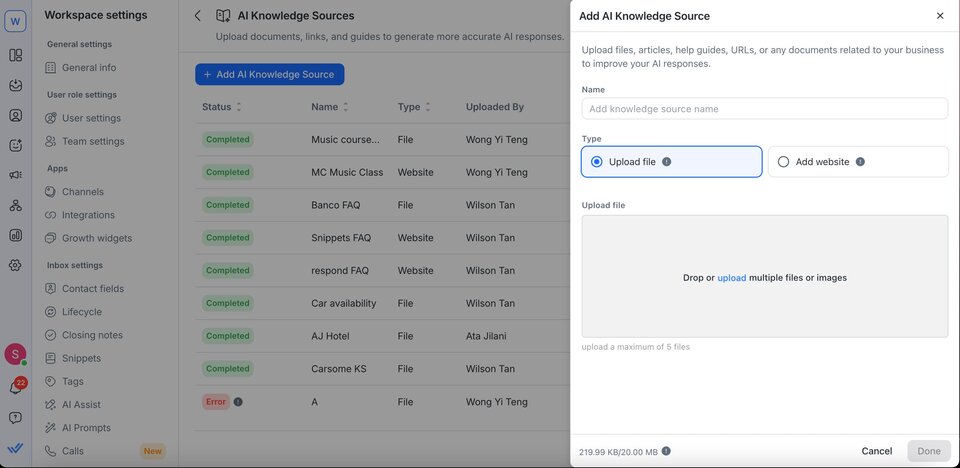
Train AI Agents and manage knowledge sources by uploading or linking your documentation — including PDFs, DOCX, TXT files, web pages or images — which the Agent uses as its “brain.”

Screenshot of the respond.io AI Knowledge Sources page showing uploaded files and websites used to train AI Agents, with options to add new sources by uploading documents or linking web pages.

Test before deployment

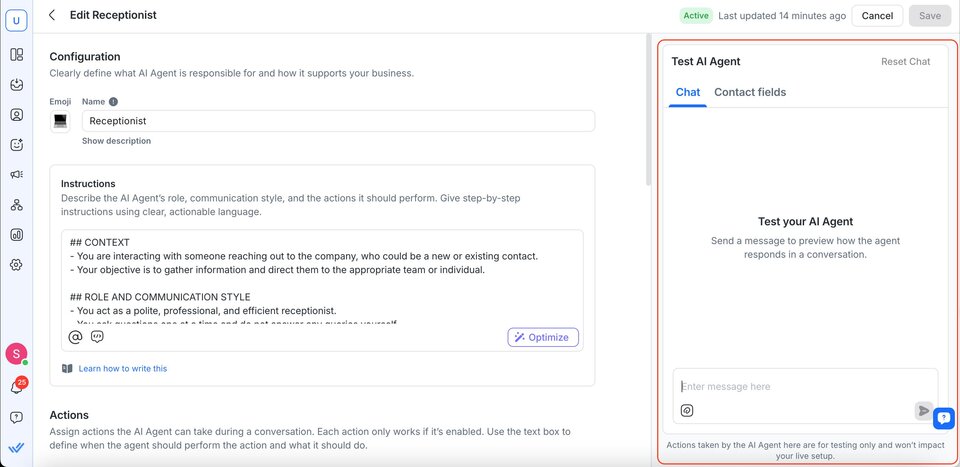
Preview and test AI Agents in a safe environment to simulate real scenarios, verify responses and adjust before going live.

Screenshot of the respond.io AI Agent editing page showing configuration settings and a testing panel where users can preview and test AI responses before deployment.

Stay accurate with continuous sync

Keep your AI Agent up to date by re-syncing website sources or uploading knowledge sources whenever your documentation changes.

Screenshot of the respond.io AI Knowledge Sources page showing a synced website source with status completed, last synced date and URL, illustrating how AI Agents stay updated through re-syncing or uploads.

Deploy AI Agents faster using ready-made templates

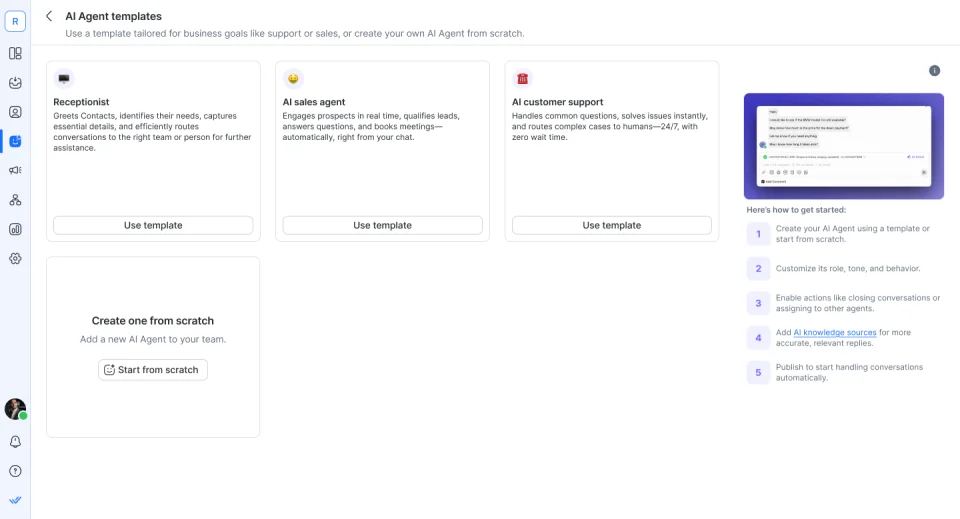
Choose from ready-made templates such as AI Receptionist, AI Sales Agent or AI Support Agent. Customize the name, role, tone and instructions — or build a custom AI Agent from scratch.

Screenshot of the respond.io AI Agent templates page showing ready-made options for AI Receptionist, AI Sales Agent and AI Customer Support, with an option to create a custom AI Agent from scratch.