
















 Eletrônicos
 Moda & Vestuário
 Móveis
 Joias e Relógios
 Atividades Extracurriculares
 Esportes e Fitness
 Centro de Beleza
 Clínica Dental
 Clínica Médica
 Serviços de Limpeza Residencial e Empregada
 Fotografia e Videografia
 Concessionária de Carros
 Agência de Viagens e Operadora de Tour


Resumo — Como configurar automação de chat liderada por IA para qualificar e converter clientes
Os principais tipos de automação de chat são chatbots tradicionais, fluxos de trabalho e Agentes de IA. Se você é uma empresa B2C de médio a grande porte que realiza vendas por chat com múltiplos agentes, regiões ou campanhas, a configuração mais eficaz é usar Agentes de IA para qualificar e decidir os próximos passos, e então usar fluxos de trabalho para executar roteamento, acompanhamentos e atualizações no CRM de forma confiável.
O que automação de chat significa hoje: Em escala, a automação trata de prevenir potenciais clientes perdidos, qualificação inconsistente e falhas nas transferências quando o WhatsApp se torna crítico para a receita.
Quando fluxos de trabalho são suficientes vs quando os Agentes de IA são necessários: Fluxos de trabalho funcionam bem para jornadas previsíveis, mas os Agentes de IA têm desempenho melhor quando as conversas são não lineares, em texto livre e ligadas à velocidade de qualificação, precisão do roteamento e conversão.
Como construir automação escalável no respond.io: Crie um Agente de IA a partir de um modelo, adicione suas fontes de conhecimento e defina as ações que ele pode executar (por exemplo, qualificar potenciais clientes, atualizar estágios do ciclo de vida, adicionar tags ou escalar).
Para muitas empresas B2C, conversas por mensagens instantâneas são onde os potenciais clientes se convertem, agendamentos acontecem e a receita é conquistada ou perdida.
Essa mudança cria uma nova realidade: quando o volume de chats aumenta entre vários agentes, regiões e campanhas, responder mais rápido não é suficiente. As empresas precisam de um sistema que gerencie conversas de forma consistente, qualifique potenciais clientes automaticamente, encaminhe consultas corretamente e garanta que nada escape.
Este guia explica o que significa automação de chat, por que as abordagens tradicionais deixam de funcionar em escala, como os Agentes de IA mudam o jogo e como implementar automação que resista à pressão operacional real.
O que automação de chat significa hoje (e por que mudou)
Os aplicativos de chat tornaram-se um ponto de entrada principal para conversas com clientes em muitas empresas B2C. Potenciais clientes chegam por anúncios, clientes existentes fazem acompanhamento de compras e solicitações de suporte surgem ao longo do dia.
À medida que o uso aumenta, canais de mensagens instantâneas como o WhatsApp deixam de se comportar como um simples canal de mensagens e passam a funcionar como um sistema operacional.
Essa mudança é mais visível em empresas B2C de médio a grande porte que gerenciam chats entre vários agentes, regiões ou campanhas. O volume de conversas aumenta rapidamente, os tempos de resposta começam a afetar a conversão e acompanhamentos perdidos se transformam em receita perdida.
Nessa etapa, automação de chat significa:
Entender a intenção dos clientes em texto livre em conversas de alto volume
Tomar decisões em tempo real (qualificação, roteamento, priorização)
Tomar ações que impactam a receita e as operações
Fazer tudo isso dentro de um sistema, não em ferramentas isoladas
É por isso que a automação de chat moderna avançou além de scripts e árvores de decisão rumo aos Agentes de IA. Em vez de forçar conversas para caminhos predefinidos, os Agentes de IA são projetados para lidar com variabilidade, manter contexto e agir através de sistemas.
Essa evolução não aconteceu isoladamente. Ela reflete os limites de abordagens de automação anteriores, uma vez que os canais de mensagens instantâneas se tornam de alto volume e vinculados à receita.
Quanto mais as mensagens instantâneas se vinculam à receita, mais essas expectativas se tornam inegociáveis. E é também aí que muitas empresas começam a encontrar os limites da automação tradicional.
Transforme conversas com clientes em oportunidades de crescimento para a sua empresa com respond.io. ✨
Gerencie chamadas, conversas e e‑mails em um só lugar!
Por que a automação de chat tradicional não funciona mais
À medida que seu tráfego cresce, as fraquezas operacionais ficam mais fáceis de identificar. As mensagens chegam mais rápido do que os agentes conseguem responder. Conversas se sobrepõem entre turnos. Os acompanhamentos dependem da memória individual em vez da lógica do sistema. Os gerentes têm dificuldade em entender o que acontece na Inbox além de métricas superficiais.
Equipes que dependem de ferramentas nativas de aplicativos de chat, chatbots básicos ou fluxos de trabalho desconectados geralmente encontram as mesmas limitações:
Potenciais clientes são perdidos ou atendidos com atraso durante períodos de pico ou fora do horário comercial
A qualificação varia entre agentes e conversas
Os acompanhamentos são inconsistentes porque tempo e contexto não são rastreados
Os relatórios carecem de atribuição e detalhes operacionais
As correções aumentam a complexidade em vez de reduzi-la
Esses problemas decorrem de uma suposição comum: que conversas podem ser tratadas por fluxos previsíveis. Na prática, as conversas comerciais não seguem um formato fixo. Os clientes mudam de assunto, retornam dias depois e fazem perguntas que não se encaixam perfeitamente em opções predefinidas.
Chatbots baseados em regras têm dificuldades assim que os usuários saem do script. Fluxos de trabalho podem executar tarefas, mas dependem de entradas e condições claras. À medida que o volume de conversas aumenta, a lógica necessária para cobrir todos os cenários torna-se difícil de manter.
Quando isso acontece, as empresas ainda têm automação em vigor, mas ela não se comporta de forma confiável. É por isso que o próximo passo é entender os diferentes tipos de automação disponíveis e o que cada um pode tratar realisticamente em escala.
Agentes de IA vs fluxos de trabalho vs chatbots tradicionais
Chatbots, fluxos de trabalho e Agentes de IA são frequentemente agrupados como “automação”, mas servem a propósitos diferentes quando usados em escala.
Requisito em escala | Chatbots | Fluxos de trabalho | Agentes de IA |
Lidar com intenção em texto livre | ❌ | ❌ | ✅ |
Adaptar perguntas dinamicamente | ❌ | ❌ | ✅ |
Roteamento com base na intenção e no contexto | ❌ | Limitadas | ✅ |
Acionar ações subsequentes | ❌ | ✅ | ✅ |
Operar entre a Inbox e o CRM | ❌ | ✅ | ✅ |
Chatbots tradicionais dependem de correspondência de palavras-chave e opções predefinidas, o que limita sua utilidade quando as conversas se tornam imprevisíveis. Fluxos de trabalho são eficazes na execução de lógica estruturada, mas dependem de entradas precisas e caminhos claramente definidos.
Os Agentes de IA preenchem a lacuna entre os dois. Eles atuam como uma camada de decisão dentro da Inbox, interpretando intenções a partir da linguagem natural, selecionando o próximo passo apropriado, acionando ações sem exigir fluxos rígidos e recuperando dados em tempo real de sistemas externos por meio de chamadas de API. Fluxos de trabalho ainda têm um papel importante, mas funcionam melhor quando os Agentes de IA determinam quando e como devem ser executados.
Depois que as empresas adotam Agentes de IA, a automação se torna mais flexível. No entanto, a flexibilidade por si só não é suficiente. O que mais importa é o que os Agentes de IA podem automatizar de forma confiável em conversas reais com clientes.
O que os Agentes de IA podem automatizar em chats
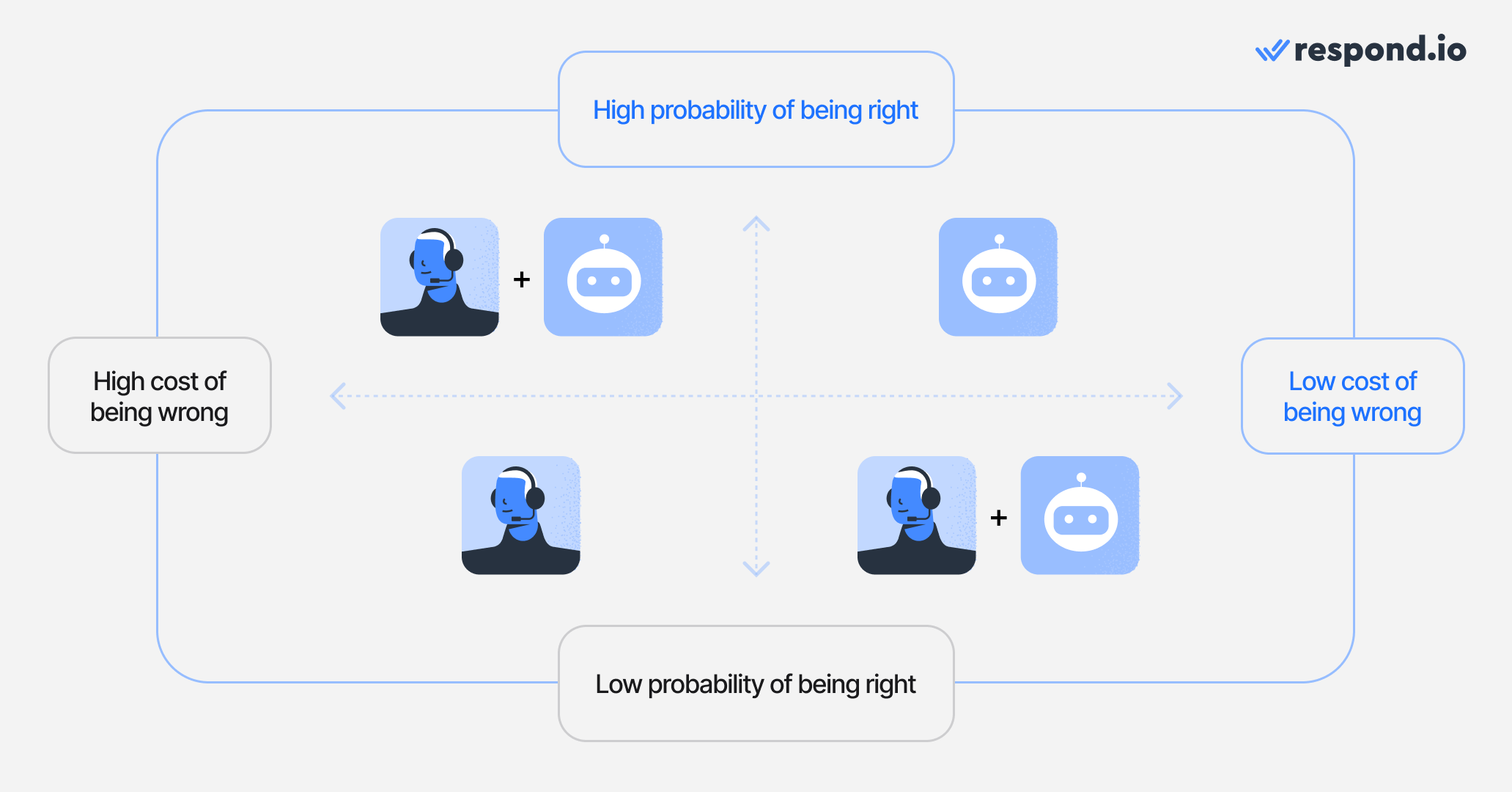
Ao escolher o que seus Agentes de IA devem automatizar, considere a matriz de automação de chat abaixo. Os Agentes de IA funcionam melhor quando a interação com os clientes exige processos técnicos ou o fornecimento de respostas que possam ser obtidas de suas fontes de conhecimento.
Mais importante, os Agentes de IA se destacam quando o custo de errar é baixo. No entanto, quando esse custo se torna maior (por exemplo, ao gerenciar clientes VIP) ou quando há maior propensão a falhas (oferecer soluções para problemas complexos), você deve apoiá‑los com agentes humanos.
Aqui estão alguns exemplos do que os Agentes de IA fazem de melhor, com ou sem a ajuda de agentes humanos.
Entender e responder à intenção do cliente
Os Agentes de IA acompanham as conversas ao longo do tempo, mesmo quando os clientes mudam de assunto ou retornam mais tarde. Isso requer uma Inbox compartilhada onde o contexto é preservado entre agentes e sessões, em vez de históricos de chat isolados.
Requisito de backend: Inbox compartilhada com memória de conversas
Qualificar potenciais clientes e coletar informações estruturadas
A qualificação confiável depende de armazenar e atualizar informações conforme as conversas avançam. Para potenciais clientes vindos de anúncios click-to-chat, os Agentes de IA recebem automaticamente metadados da campanha — como plataforma, nome da campanha e detalhes do anúncio — permitindo a qualificação orientada pela campanha desde a primeira mensagem. Respond.io permite que Agentes de IA atualizem campos de contato e estágios do ciclo de vida em tempo real, garantindo que as informações permaneçam disponíveis além de uma única interação.
Requisito de backend: Módulo de contato com rastreamento do ciclo de vida
Encaminhar conversas corretamente
Decisões de roteamento dependem da intenção, do idioma, da região, da disponibilidade do agente, da carga de trabalho e — para potenciais clientes provenientes de anúncios de mensagens — da origem da campanha. Esse nível de roteamento requer lógica ao nível da Inbox em vez de atribuição manual ou ferramentas nativas do canal.
Requisito de backend: Lógica de roteamento centralizada
Acionar acompanhamentos automaticamente
Os acompanhamentos dependem de recordar o que já aconteceu e o que permanece pendente. Sem linhas do tempo unificadas e rastreamento do estado da conversa, os acompanhamentos se tornam pouco confiáveis.
Requisito de backend: Consciência temporal e rastreamento do estado da conversa
Executar ações reais durante as conversas
Agentes de IA podem atualizar registros, acionar fluxos de trabalho, direcionar conversas, adicionar notas internas e realizar chamadas de API em tempo real a sistemas externos, como CRMs ou ferramentas de agendamento. Essas ações são regidas por permissões predefinidas, permitindo que a automação opere com segurança dentro das regras de negócio.
Requisito de backend: Camada de execução controlada
Quando essas capacidades existem dentro do mesmo sistema, a automação torna-se consistente em vez de frágil. É também por isso que os Agentes de IA raramente são implantados sozinhos. Em escala, eles precisam de lógica estruturada para apoiá‑los.
Como automatizar conversas de receita no respond.io
Uma vez definidos os papéis dos Agentes de IA, configurar a automação de chat torna‑se um exercício prático de configuração, e não de experimentação.
Respond.io permite que as equipes comecem rapidamente, inclusive com uma conta gratuita, e construam automação diretamente dentro da Inbox onde as conversas já acontecem. A partir daí, Agentes de IA e fluxos de trabalho podem ser configurados para refletir jornadas reais dos clientes, fluxos de trabalho dos agentes e regras de negócio.
Os passos abaixo descrevem como as equipes normalmente configuram um Agente de IA no respond.io, desde a configuração inicial até o lançamento.
1. Escolha um modelo de Agente de IA
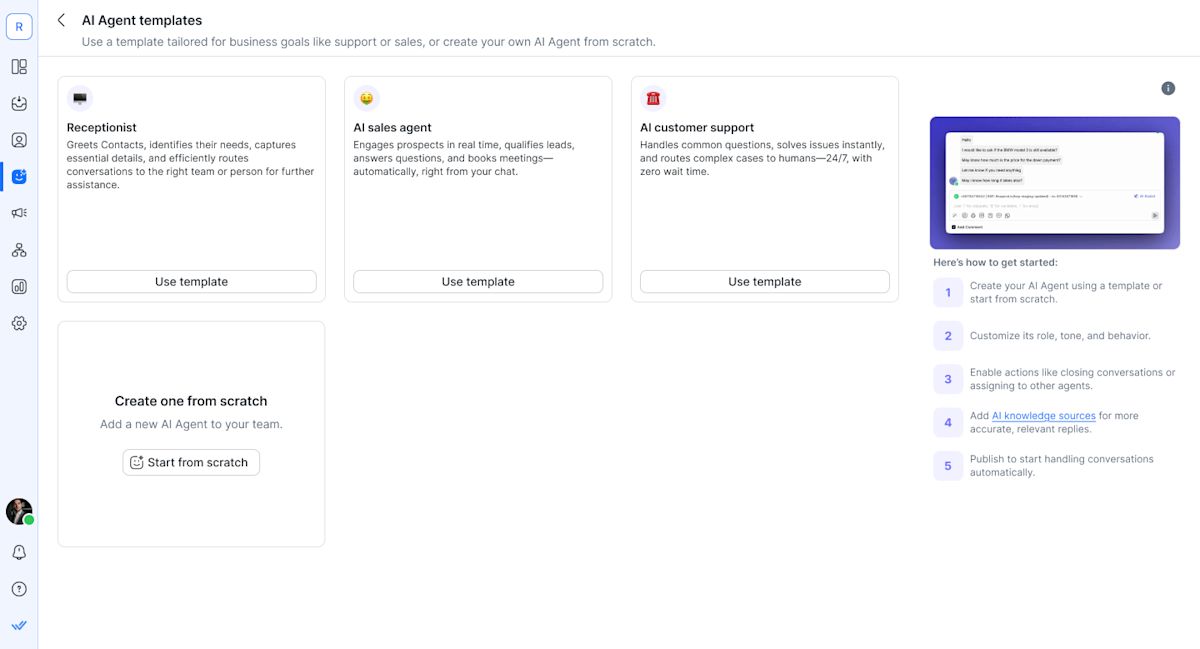
Respond.io fornece modelos de Agente de IA para papéis comuns como vendas, suporte e recepção. Esses modelos reduzem o tempo de configuração e ajudam as equipes a evitar começar a partir de prompts não estruturados, garantindo que cada Agente de IA permaneça focado no objetivo certo, na fonte de conhecimento e nas ações para aquele papel específico.
2. Conectar fontes de conhecimento
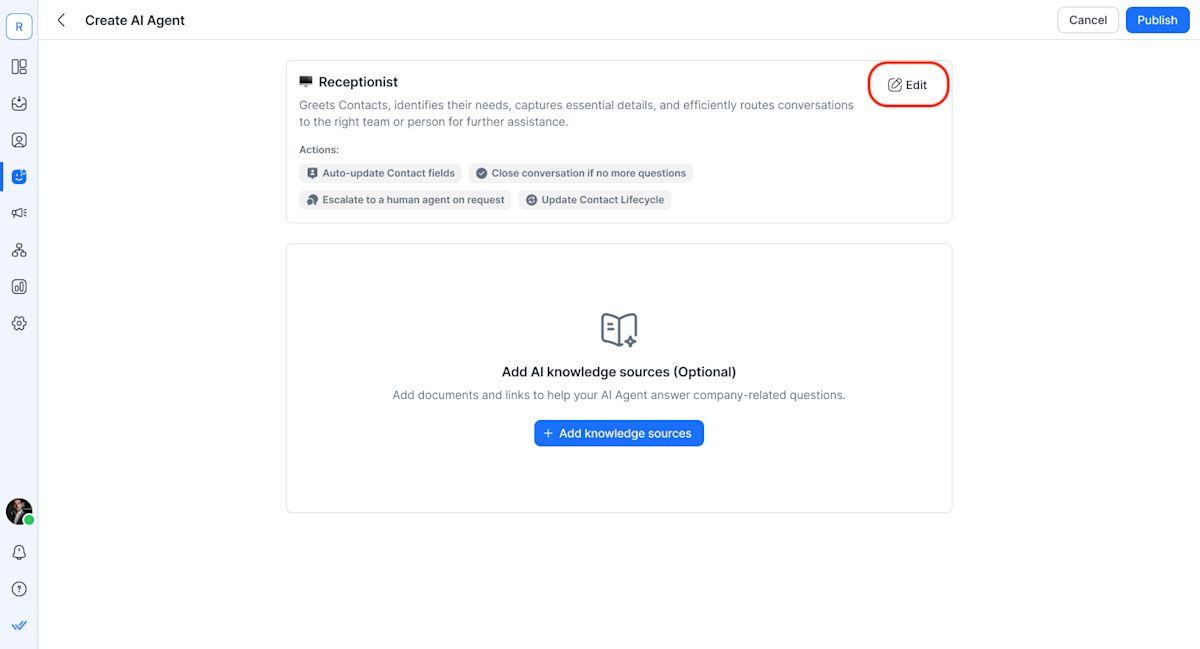
Os Agentes de IA são baseados em conteúdo empresarial aprovado, incluindo websites, centros de ajuda e documentação interna. Isso melhora a precisão e reduz o risco de respostas incorretas em conversas de alto risco.
3. Definir ações permitidas e limites
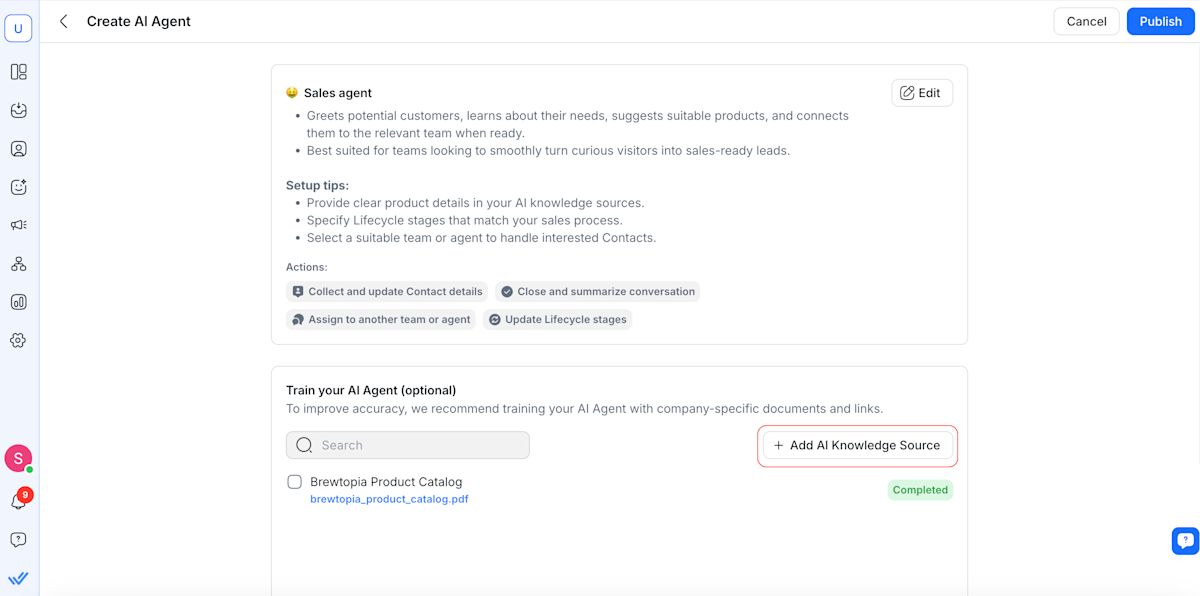
As equipes controlam quais ações os Agentes de IA podem executar, como roteamento, aplicação de tags, atualizações no ciclo de vida ou escalonamento. Isso garante que a automação permaneça previsível e em conformidade.
4. Testar antes de ir ao ar
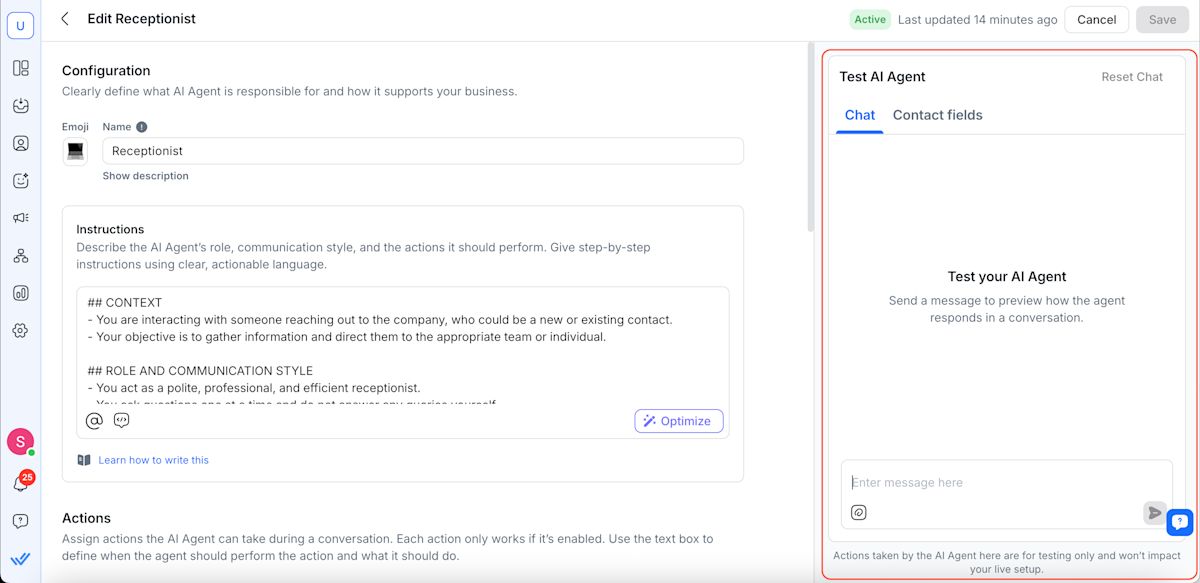
Respond.io permite que as equipes testem conversas e ações antes da implantação, possibilitando validar o comportamento em condições realistas.
Depois de ter seu Agente de IA em funcionamento, você pode complementá-lo com alguns fluxos de trabalho. Comece a partir de um modelo de fluxo de trabalho de sua escolha e personalize sua própria jornada a partir daí.
Como as empresas usam automação de chat para aumentar a receita
Nesta seção, vamos apresentar a você três histórias de sucesso de clientes do respond.io. Essas empresas usaram o respond.io para automação de chat e melhoraram vários aspectos de suas operações comerciais como resultado.
Como a GETUTOR usa automação de chat para 24% mais vendas
GETUTOR gerencia seu processo de vendas inteiramente pelo WhatsApp. À medida que o volume de consultas aumentou, uma porcentagem significativa de potenciais clientes ficou sem resposta devido à visibilidade limitada e aos acompanhamentos manuais.
Após migrar para o respond.io, a GETUTOR automatizou a triagem, priorização e o acompanhamento de potenciais clientes usando Agentes de IA e fluxos de trabalho. As conversas foram roteadas corretamente, os estágios do ciclo de vida foram atualizados automaticamente e os relatórios forneceram visibilidade ao funil.
Resultados:
24% mais vendas em dois meses
50% mais potenciais clientes atendidos por dia
Nenhuma mensagem perdida
Como a Only Tourism usa automação de chat para 6x mais potenciais clientes mensais
Only Tourism recebe um alto volume de consultas repetitivas sobre vistos pelo WhatsApp. O atendimento manual criou acúmulos, especialmente fora do horário comercial.
Usando o respond.io, a empresa implantou um Agente de IA treinado com informações de vistos verificadas e integrou‑o com sistemas de backend para recuperar status de solicitações. O Agente de IA lidou com consultas 24 horas por dia e escalou casos complexos para agentes humanos.
Resultados:
80% das consultas sobre vistos automatizadas
2× mais conversas atendidas diariamente
6× mais potenciais clientes processados por mês
Como a JU Productions usa automação de chat para 718% mais vendas no WhatsApp
JU Productions usa o WhatsApp como um canal principal de marketing e vendas, apoiado por anúncios click-to-WhatsApp e transmissões. Acompanhamentos manuais, atribuição limitada e filtragem de spam criaram ineficiências.
Com o respond.io, a empresa automatizou transmissões, qualificação de potenciais clientes, roteamento e atribuição de anúncios através da Conversions API do Meta. Agentes de IA filtraram spam e garantiram que apenas potenciais clientes qualificados chegassem à equipe de vendas.
Resultados:
718% de aumento nas vendas com transmissões
Redução de 98% nos cancelamentos
47,2% menor custo por lead qualificado
Como escolher a melhor solução de automação de chat
Em escala, a automação de chat só funciona quando conversas, dados de clientes e ações estão conectados. Ferramentas fragmentadas quebram o contexto, atrasam as transferências e tornam os relatórios não confiáveis.
O Respond.io foi criado para resolver isso. Ele reúne Agentes de IA, fluxos de trabalho, uma Inbox unificada, automação integrada ao CRM e relatórios em uma única plataforma — para que decisões e execução ocorram no mesmo lugar. Os Agentes de IA interpretam a intenção dentro da Inbox, acionam fluxos de trabalho, atualizam registros de contato e roteiam conversas com contexto completo.
Isso é o que permite que a automação escale de forma confiável:
Agentes de IA como automação de primeira classe.
Uma Inbox unificada entre agentes, turnos e regiões.
Automação integrada ao CRM com visibilidade do ciclo de vida.
Relatórios vinculados a conversas e resultados.
Ações controladas, diretrizes e conformidade.
Quando conversas, contatos e ações vivem em um único sistema, a automação torna-se confiável em vez de frágil. Essa é a base sobre a qual o respond.io foi construído. Teste você mesmo. Inicie um teste gratuito do respond.io.
Transforme conversas com clientes em oportunidades de crescimento para a sua empresa com respond.io. ✨
Gerencie chamadas, conversas e e‑mails em um só lugar!
Perguntas frequentes sobre automação de chat
Como começar com automação de chat no respond.io?
1. Defina seus objetivos.
Esclareça o que você quer automatizar — FAQs, captação de potenciais clientes, fluxos de suporte, agendamento de compromissos ou roteamento. Identifique seu público e canais, e escolha um tom consistente para suas mensagens automatizadas.
2. Use as ferramentas de automação do respond.io.
Respond.io fornece tudo o que você precisa em um só lugar:
Agentes de IA para respostas em linguagem natural e tratamento de intenções
Fluxos de trabalho para criar automações sem código
Make.com, Zapier ou n8n para integrações externas com CRMs, sistemas de agendamento e mais
Todas as automações funcionam em todos os canais de mensagens conectados.
Quais são as melhores ferramentas para automação de chat?
1. Respond.io — Melhor para marcas B2C em crescimento e de grande porte.
Uma verdadeira plataforma de automação omnichannel com fluxos de trabalho poderosos, integrações profundas, relatórios avançados e escalabilidade entre equipes e canais. Ideal para empresas que precisam de um sistema unificado para automação de marketing, vendas e suporte.
2. ManyChat — Melhor para automações de marketing simples.
Ótimo para pequenas empresas que automatizam Instagram, Messenger ou WhatsApp, mas limitado para automação multicanal ou fluxos de trabalho empresariais.
3. Chatfuel — Ideal para fluxos básicos de chatbot.
Adequado para respostas automáticas simples em canais sociais, embora falte a automação robusta e a profundidade de integração necessárias para organizações maiores.
4. Outras alternativas (Wati, SleekFlow, Intercom, Zendesk).
Úteis para casos de uso específicos, mas frequentemente limitados por canal ou centrados em tickets — e não tão escaláveis ou omnicanal quanto o respond.io para automação de ponta a ponta.
O Respond.io pode se conectar ao ChatGPT?
O respond.io não requer conexões separadas com o ChatGPT — inclui seu próprio agente de IA capaz de interpretar mensagens, determinar seu significado e gerar respostas conversacionais sem regras manuais. Você pode implantar um Agente de IA para responder à primeira mensagem que um cliente enviar, auxiliando com saudações, qualificação ou perguntas frequentes.
Posso enviar mensagens automatizadas quando um estágio do ciclo de vida mudar?
Sim — a automação pode ser acionada por eventos do ciclo de vida no respond.io. Isso significa que, quando um contato passa de um estágio do ciclo de vida para outro (por exemplo, Novo lead → Alta intenção), você pode enviar automaticamente uma mensagem como um acompanhamento ou uma notificação de roteamento. Isso ajuda a construir jornadas conversacionais que se adaptam conforme o contato progride, em vez de depender apenas das mensagens recebidas para acionar a automação.
Leituras adicionais
Se você quiser saber mais sobre automação de chat, confira estes artigos:


