
















 Eletrônicos
 Moda & Vestuário
 Móveis
 Joias e Relógios
 Atividades Extracurriculares
 Esportes e Fitness
 Centro de Beleza
 Clínica Dental
 Clínica Médica
 Serviços de Limpeza Residencial e Empregada
 Fotografia e Videografia
 Concessionária de Carros
 Agência de Viagens e Operadora de Tour

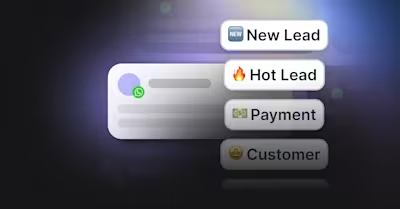
Resumo — Software de Gestão do Ciclo de Vida do Cliente
Software de gestão do ciclo de vida do cliente é um sistema para rastrear e melhorar toda a relação entre uma empresa e seus clientes.
Tipos de software de gestão do ciclo de vida do cliente: CRM para registros e pipelines, automação de marketing para nutrição, customer success para saúde da conta e renovações, gestão de conversas para atuar via mensagens, e‑mail e chat web.
Por que uma plataforma de gestão de conversas integra tudo: Respostas mais rápidas, transferências mais limpas, menos pontos cegos e melhor atribuição ao longo de todo o ciclo de vida.
Como implementar a gestão do ciclo de vida do cliente com respond.io: Qualifique leads com Agentes de IA, acompanhe estágios do ciclo de vida e pontos de abandono, integre com seu CRM, conecte o CAPI da Meta e envie transmissões segmentadas para retenção.
Adquirir clientes é caro. Perdê-los devido a respostas lentas, transferências inconsistentes ou visibilidade limitada é ainda mais custoso. O software de gestão do ciclo de vida do cliente resolve isso ao oferecer às equipes uma visão compartilhada da jornada de cada contato, padronizar o engajamento entre canais e facilitar a priorização da próxima melhor ação em cada estágio.
Este guia explica o que é software de gestão do ciclo de vida do cliente, as principais categorias no mercado, por que uma abordagem unificada importa e como respond.io ajuda empresas a gerenciar outreach, aquisição, onboarding, retenção e fidelidade em um só lugar. Você também verá como empresas dos setores de beleza, varejo e viagens aplicam a gestão do ciclo de vida do cliente e os resultados que alcançam.
O que é software de gestão do ciclo de vida do cliente?
Software de gestão do ciclo de vida do cliente é um sistema para rastrear e melhorar toda a relação entre uma empresa e seus clientes. Consolida dados de anúncios, formulários web, apps de mensagens, e‑mail e pontos de contato presenciais para construir um quadro completo de cada contato. Com esse contexto, as equipes podem personalizar conversas, automatizar follow‑ups rotineiros e transitar suavemente entre marketing, vendas e suporte.
Uma plataforma de gestão do ciclo de vida do cliente não é apenas um banco de dados ou uma ferramenta de automação. É uma camada operacional compartilhada onde contatos são segmentados por estágio do ciclo de vida, ações são acionadas com base no comportamento e resultados são medidos de forma consistente. O resultado é uma visão 360° da história do cliente, para respostas mais rápidas, menos pontos cegos e maior conversão e retenção.
Tipos de software de gestão do ciclo de vida do cliente
O panorama de gestão do ciclo de vida do cliente abrange múltiplas categorias. A maioria das empresas combina mais de uma ferramenta, pois nem todas cobrem toda a jornada. Abaixo estão os tipos principais e onde se encaixam.
Software de gestão de relacionamento com o cliente (CRMs)
CRMs como HubSpot, Salesforce e Pipedrive armazenam registros de contato, registram atividades e gerenciam pipelines. Servem como fonte única de verdade para que agentes entendam quem são seus leads e clientes, suas ações — como enviar uma pergunta, agendar uma reunião ou efetuar uma compra — e de onde vêm as vendas. Um CRM é usado ao longo de todo o ciclo de vida, e é essencial que as equipes tenham acesso fácil aos dados do CRM durante as comunicações com o cliente.
Software de automação de marketing
Ferramentas de automação de marketing como Marketo, ActiveCampaign e Klaviyo segmentam audiências, pontuam leads e executam campanhas por e‑mail e SMS. Geram awareness e nutrem o interesse antes da passagem para vendas. São mais usadas por empresas B2B; empresas B2C dependem mais de social media e marketing por mensageiros, o que exige ferramentas diferentes.
Software de customer success
Plataformas de customer success como Gainsight, ChurnZero e Totango monitoram saúde de contas, uso do produto e risco de renovação. Ajudam as equipes a orquestrar a integração, escalar proativamente e padronizar a expansão. Essas ferramentas são críticas em modelos de assinatura ou serviços, onde renovações e upsells impulsionam o lifetime value.
Software de gestão de conversas
Plataformas de gestão de conversas como respond.io reúnem apps de mensagens, voz, e‑mail e chat web em uma única inbox. Roteiam consultas para a equipe correta, permitem respostas com assistência de IA e mantêm uma linha do tempo unificada das interações. Essa ferramenta desempenha papel chave em cada estágio, pois as conversas são vitais em toda a jornada do cliente, especialmente para empresas B2C. As melhores plataformas de gestão de conversas incluem integração com CRM e permitem rastreamento e análises detalhadas.
Por que as empresas precisam de uma plataforma de gestão do ciclo de vida do cliente
Os clientes esperam respostas rápidas e relevantes independentemente do canal, mas quando você gerencia milhares de clientes, é um desafio atender a essas expectativas. Quando as respostas são lentas ou irrelevantes (por exemplo, enviar a um cliente antigo uma oferta para primeiro comprador), leads e clientes consideram migrar para concorrentes.
As equipes precisam de visibilidade compartilhada da jornada de cada cliente e de uma forma consistente de priorizar trabalho e gerenciar ações e comunicações. Uma forma prática de pensar nos usos do software de gestão do ciclo de vida do cliente é por estágios do ciclo de vida. Cada estágio tem objetivos diferentes, armadilhas comuns e ações claras que melhoram os resultados.
Outreach — Criar campanhas impactantes, responder rápido e coletar dados de leads
O objetivo deste estágio é gerar awareness e convidar à conversação. As armadilhas comuns incluem respostas de anúncios espalhadas por canais como WhatsApp, Messenger e Instagram, primeira resposta lenta e ausência de um responsável claro para novas conversas. Uma plataforma de gestão do ciclo de vida do cliente como respond.io captura leads de todos os canais em uma inbox, atribui propriedade imediatamente e usa Agentes de IA para cumprimentar contatos e qualificar intenção. As equipes veem quais campanhas e canais geram conversas que realmente avançam, não apenas cliques.
Aquisição — Manter leads engajados e fazer follow‑ups rápidos para acelerar o ciclo de vendas
Este estágio tem como objetivo converter um contato engajado em cliente. Negócios estagnam quando agentes de vendas não têm contexto, outreach é genérico ou follow‑ups são inconsistentes. Com uma plataforma de gestão de conversas como respond.io, vendedores veem todo o histórico de mensagens, fontes de campanha e atividade recente em uma única thread. Agentes de IA podem propor próximos passos, agendar lembretes e redigir respostas que referenciam os objetivos do contato. Lembretes automatizados mantêm o momentum quando um contato fica quieto, sem soar robótico.
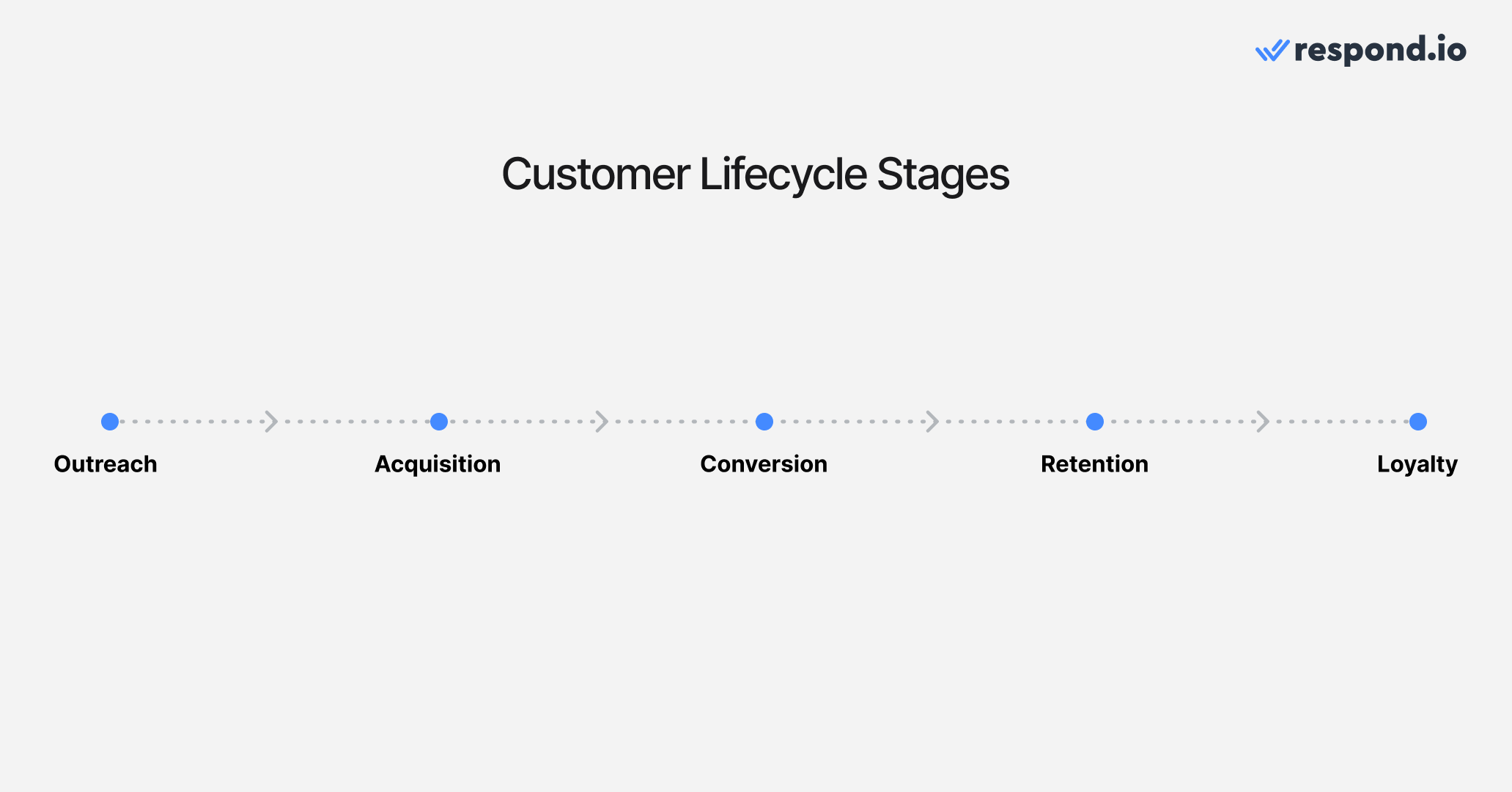
Conversão — Automatizando reservas e processos de pagamento
Este é o estágio em que os clientes realmente efetuam uma compra. Para compras mais complexas, isso envolve uma conversa com vendas; para produtos mais simples, pode significar apenas colocar um item no carrinho e finalizar a compra. É importante tornar esse processo o menos sujeito a atrito possível, pois clientes que enfrentam problemas podem desistir e ir para um concorrente. Facilite o contato com um vendedor e simplifique o processo de pagamento.
Retenção — Coletar feedback, fornecer suporte e promover compras recorrentes
O objetivo deste estágio é manter os clientes voltando. O risco aparece quando ninguém percebe inatividade ou questões sem resolução. A gestão do ciclo de vida do cliente evidencia indicadores antecipados como perguntas não respondidas, longos intervalos entre compras ou objeções repetidas. As empresas podem usar transmissões para reengajar com pesquisas de feedback, ofertas oportunas, atualizações de serviço ou check‑ins, e então roteá‑las para a equipe correta se o contato responder.
Fidelidade — Oferecer programas de recompensas, coletar avaliações e incentivar indicações
No estágio final, o objetivo é transformar clientes satisfeitos em defensores da marca. A fidelidade sofre quando o reconhecimento é genérico ou atrasado. A gestão do ciclo de vida do cliente identifica compradores frequentes e promotores, e facilita agradecer, convidar para avaliações ou oferecer acesso antecipado. É importante que o status do ciclo de vida seja visível para todo agente, para que a experiência do cliente seja consistente e personalizada, independentemente da equipe ou agente com quem fale.
Transforme conversas com clientes em crescimento de negócios com respond.io. ✨
Gerencie chamadas, chats e e‑mails em um só lugar!
Como usar o respond.io para gerenciar seu ciclo de vida do cliente
Respond.io centraliza conversas do WhatsApp, Instagram, Facebook Messenger, TikTok, VoIP, chat web, e‑mail e mais em uma única inbox. Integra com a maioria dos CRMs e tem um recurso integrado de acompanhamento do ciclo de vida do cliente que permite otimizar a jornada em cada estágio. Veja como o recurso funciona e como tirar o máximo proveito dele.
Qualifique leads com Agentes de IA
Para trazer leads para o primeiro estágio, a maioria das empresas veicula anúncios e promove produtos e serviços nas redes sociais e no site. Quando os contatos começam a chegar, o volume pode ser avassalador, e respostas lentas significam oportunidades perdidas. Use os Agentes de IA do respond.io para responder contatos imediatamente e nunca perder um lead.
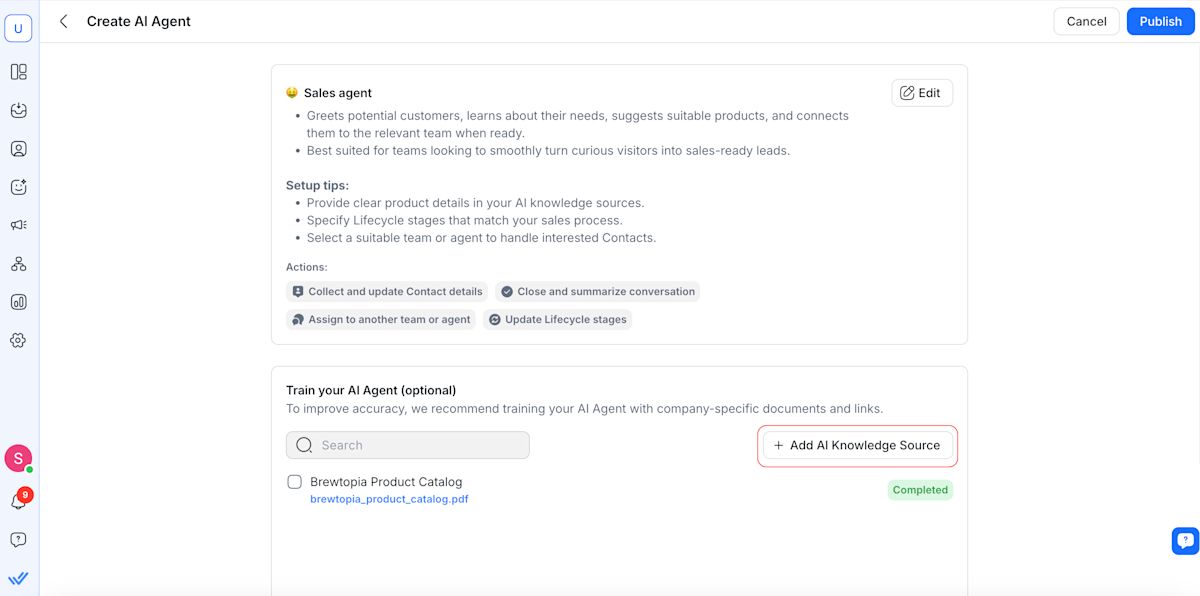
Agentes de IA podem responder a FAQs e fazer perguntas de qualificação, então enviar leads qualificados para um humano e inseri‑los no ciclo de vida do cliente. Leads não qualificados serão categorizados como tais para que agentes humanos não percam tempo respondendo spam ou leads de baixa qualidade.
Defina estágios do ciclo de vida do cliente
Apresentamos alguns estágios comuns acima, mas esses estágios podem não se encaixar exatamente em todos os negócios. No respond.io, os estágios do ciclo de vida padrão são novo lead, lead quente, pagamento e cliente; é fácil personalizar os estágios ou adicionar estágios adicionais que sigam seus processos de negócio. Por exemplo, um varejo com programa de recompensas pode adicionar um estágio para novas adesões.
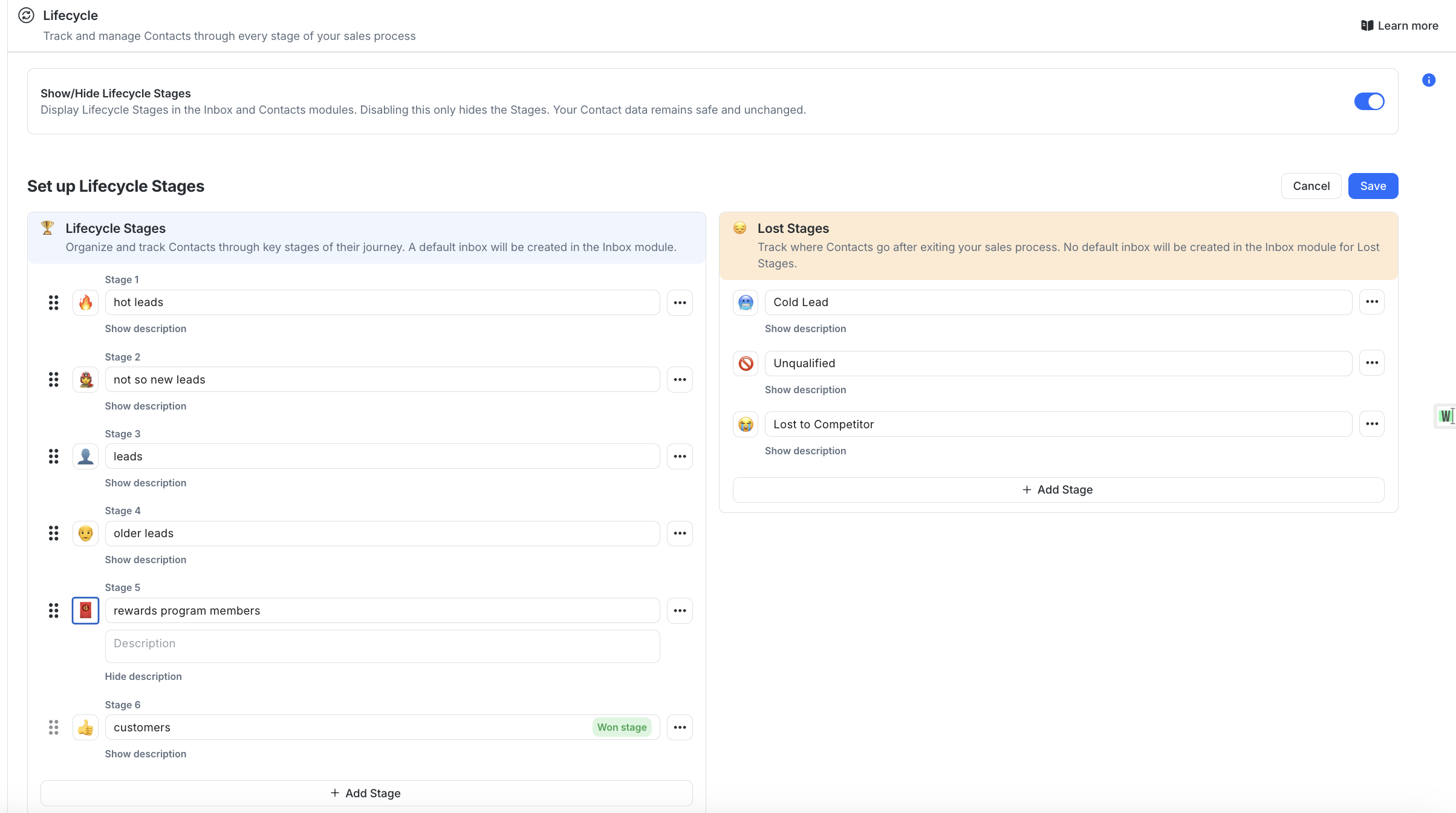
O status do ciclo de vida é visível na lista de conversas, para que os agentes saibam com quem estão falando e qual deve ser a próxima ação. Agentes de IA também podem atualizar o status do ciclo de vida com base na intenção e em marcos, o que reduz a marcação manual e mantém os relatórios limpos.
Esses dados são cruciais para agilizar o ciclo de vendas. Se há um hot lead pronto para efetuar o pagamento e virar cliente, os agentes sabem como priorizar as respostas. Isso também significa que cada interação é informada pelo contexto, então não há necessidade de um lead ou cliente se repetir ao falar com outro agente.
Rastreie estágios perdidos para entender por que leads abandonam
Toda empresa tem leads que saem do funil em algum ponto. Saber por que eles abandonam ajuda as empresas a melhorar para que mais clientes concluam uma compra no futuro. Por isso o respond.io tem Estágios Perdidos dentro do Lifecycle, para que você identifique quais leads abandonaram e por quê.
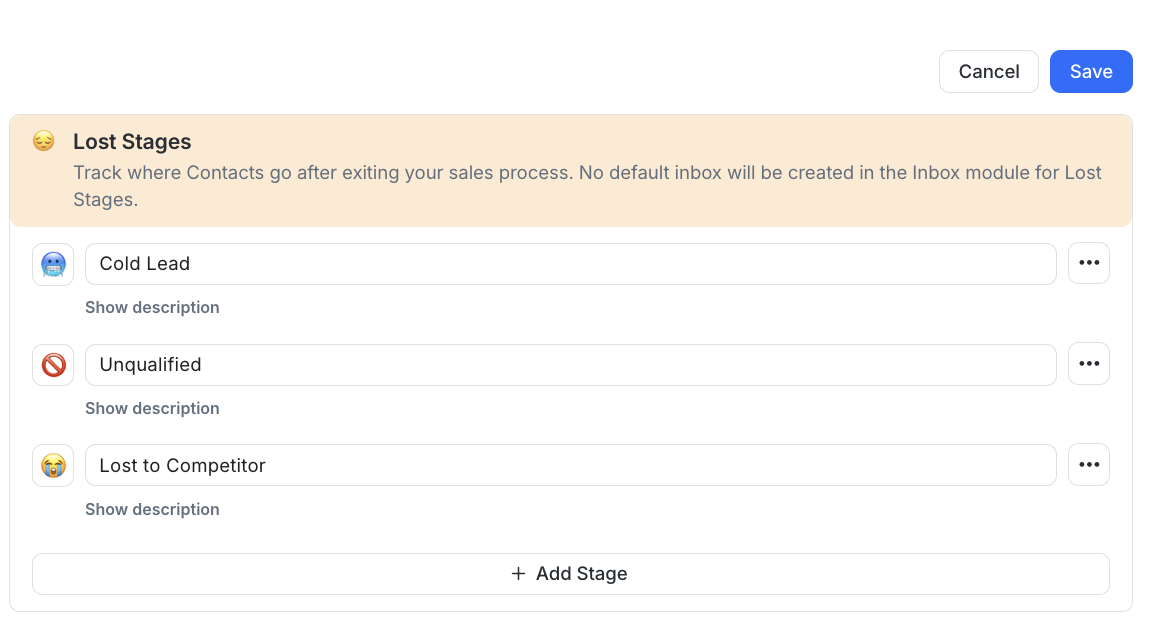
O estágio perdido padrão é Cold Lead, que significa que o lead perdeu interesse ou parou de responder. Se você vir nos relatórios que o lead esperou muito por uma resposta, isso pode ser a razão de ter esfriado. Você também pode adicionar mais estágios perdidos, como Unqualified ou Lost to Competitor. Se você está recebendo muitos leads não qualificados, isso pode indicar um problema de segmentação.
Integre com seu CRM
Muitas empresas precisam sincronizar dados de clientes com um CRM para que as informações se mantenham atualizadas em todas as plataformas. Respond.io tem integrações nativas com HubSpot e Salesforce, os CRMs mais populares.
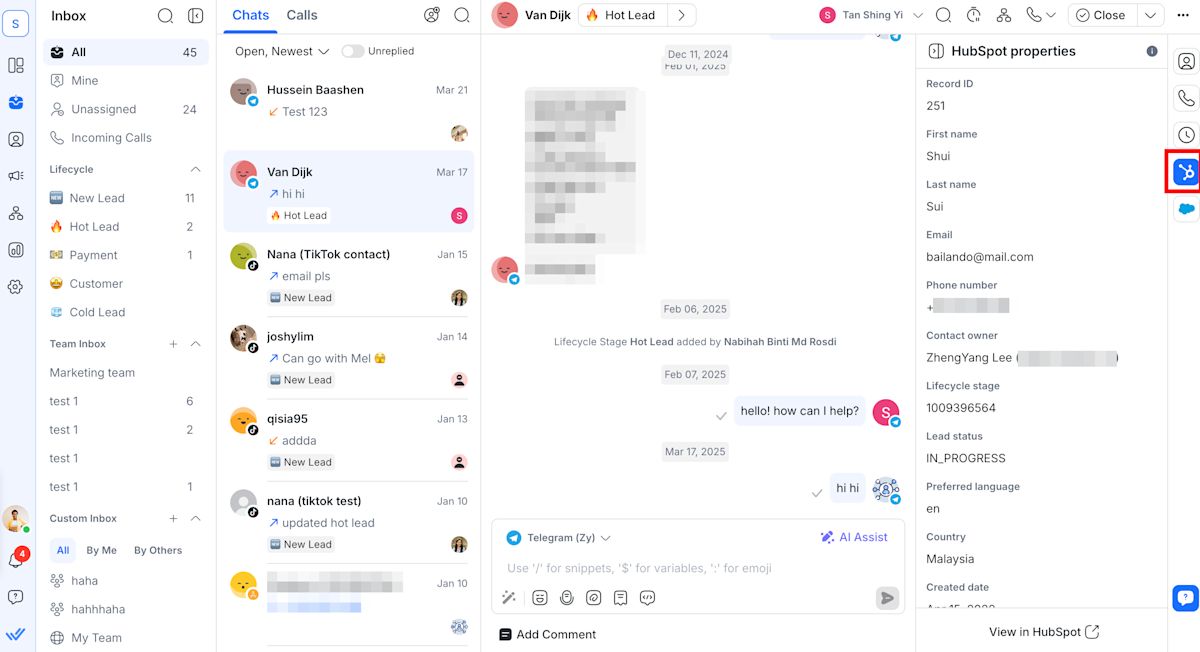
Com as integrações HubSpot e Salesforce, por exemplo, agentes podem ver propriedades do CRM diretamente dentro da inbox do respond.io, então não é preciso trocar de plataforma para obter o contexto completo sobre o cliente. Empresas que usam outros CRMs podem integrar com Zapier ou Make ou configurar uma integração personalizada usando APIs.
Integre com a Conversion API (CAPI) da Meta e com TikTok Lower Funnel Events
Se você anuncia no Facebook, Instagram e TikTok, precisa de atribuição pós‑clique e pós‑mensagem precisa para saber quais anúncios estão convertendo e se você está alcançando o público certo.
Respond.io conecta com a Conversion API (CAPI) da Meta para Instagram, Facebook e anúncios click‑to‑WhatsApp e com TikTok Lower Funnel Events para anúncios de mensagem do TikTok. Esses recursos enviam dados de eventos de conversão para Meta e TikTok e também os registram no respond.io. Exemplos de eventos de conversão incluem agendar um atendimento, adicionar um item ao carrinho ou concluir uma compra.
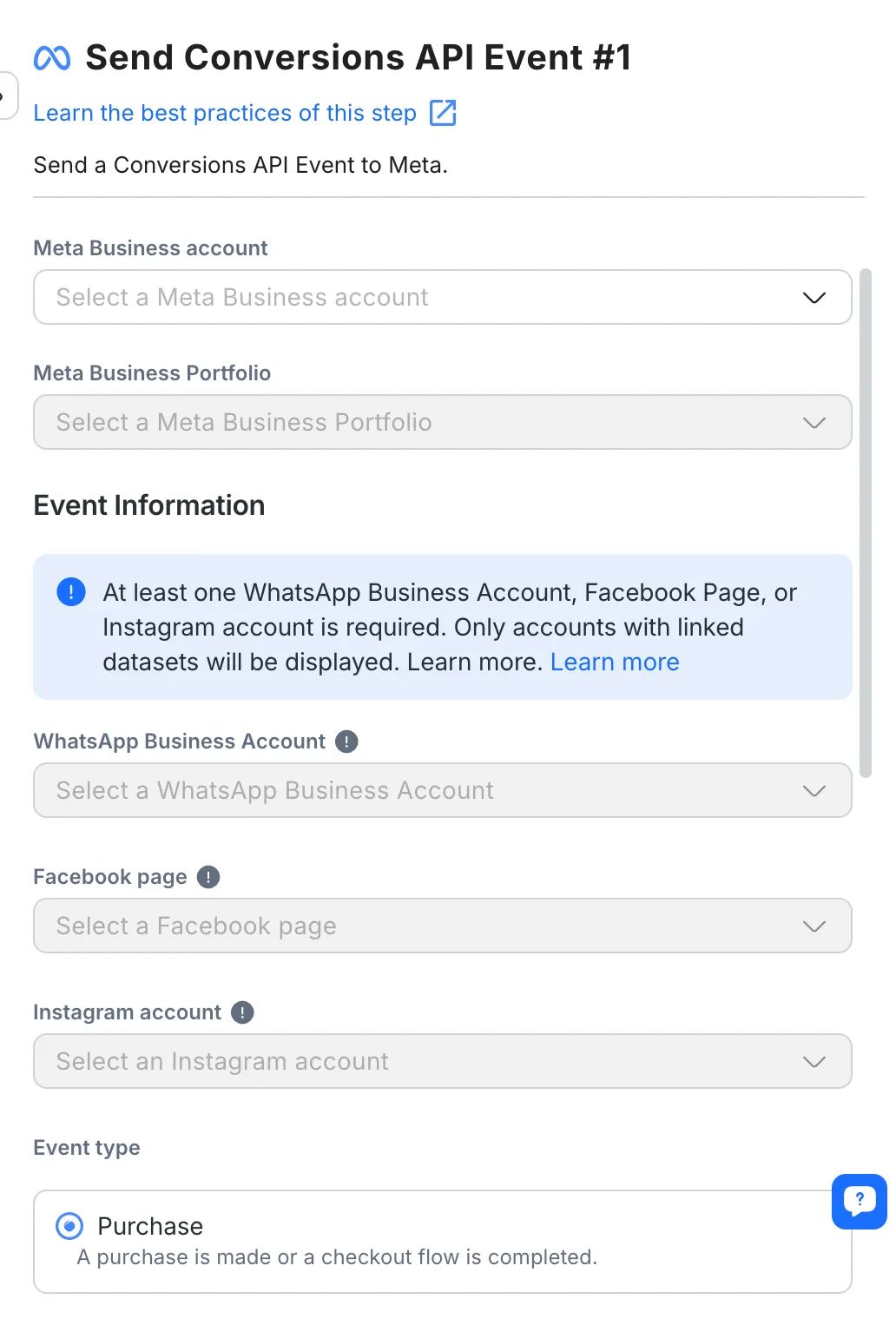
Esses eventos de conversão também podem acionar atualizações de Lifecycle no respond.io. Por exemplo, se um lead completa uma compra, o estágio do ciclo de vida pode ser alterado automaticamente para “cliente”. Como a progressão do estágio do ciclo de vida não precisa ser atualizada manualmente, os agentes sempre têm as informações e o contexto mais recentes.
Melhore estratégias de retenção com transmissões
Rastrear o ciclo de vida do cliente permite à sua empresa manter follow‑ups no tempo certo para fazer os clientes voltarem para compras recorrentes. Automatize reengajamento com transmissões para que os clientes saibam quando há promoção de fim de ano ou quando você lançou um novo produto. Transmissões também podem ser usadas para checar após a entrega, compartilhar instruções de cuidado, lembrar sobre garantias expirando ou pedir feedback.
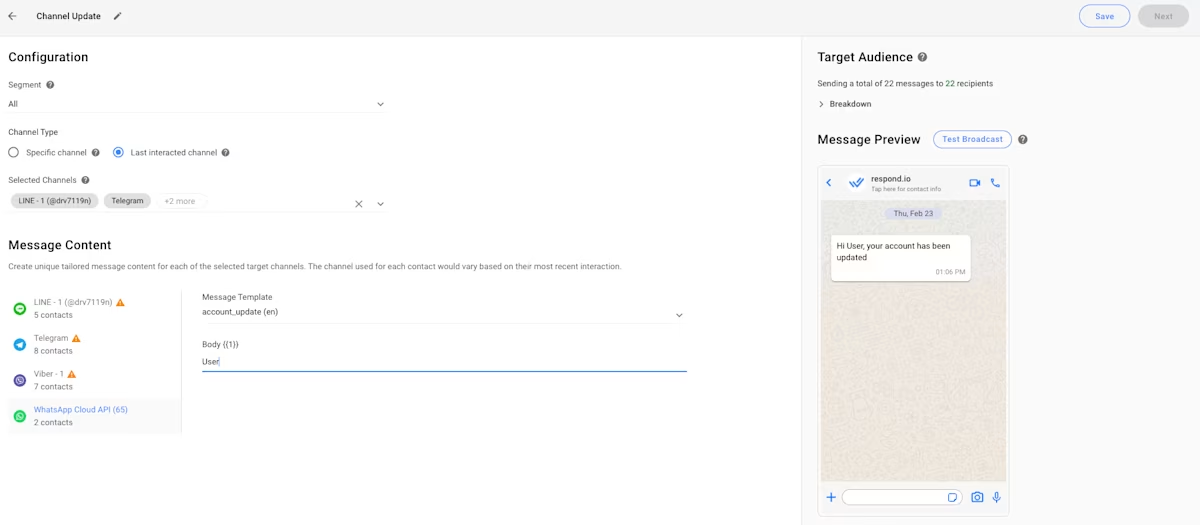
Enviar mensagens promocionais com base no estágio do ciclo de vida garante que os clientes provavelmente terão interesse e não marcarão como spam. Também mantém sua empresa presente na hora certa, quando os clientes podem estar pensando em uma compra semelhante novamente.
Boas práticas para gestão do ciclo de vida do cliente
A gestão do ciclo de vida do cliente funciona quando é visível, mensurável e baseada em conversas reais. As práticas a seguir mantêm seu programa prático e focado em resultados.
Comece com um modelo de estágios simples:
Estágios demais criam confusão. Comece com 5–7 estágios que correspondam a como as pessoas realmente compram, depois refine conforme surgirem lacunas.
Use IA para reduzir o tempo até a primeira resposta:
Velocidade importa. Deixe Agentes de IA enviar a primeira resposta, confirmar intenção e capturar informações básicas, depois roteie para o responsável correto. Dessa forma o ciclo de vendas anda mais rápido e leads têm menos probabilidade de abandonar, como nossos clientes comprovaram.
Meça quais conversas convertem:
Conecte CAPI ou outros métodos de rastreamento de conversão para saber quais campanhas levam a conversas que avançam estágios, não apenas visitas.
Revise os abandonos por estágio a cada mês:
Procure por transições de estágio com taxas baixas ou grandes atrasos. Corrija a mensagem, a oferta ou o processo e meça novamente.
3 histórias de sucesso de gestão do ciclo de vida do cliente em empresas de beleza, varejo e viagens
Ganho real vem ao apertar transferências e tornar a progressão de estágio visível. Essas empresas usaram respond.io para reduzir o tempo até a primeira resposta, diminuir ruído e mover contatos do primeiro toque à compra com menos atrito.
EMAX Beauté aumenta agendamentos de atendimento em 18x
EMAX Beauté é um provedor líder de serviços de beleza, cuidados com a pele, cuidado capilar e bem‑estar corporal, operando sob quatro marcas com várias filiais na grande área de Kuala Lumpur. Precisava de uma solução para centralizar e gerenciar comunicações com clientes. A empresa escolheu respond.io por suas avançadas capacidades de integração, fortes funções de relatório como rastreamento de jornadas do cliente e escalabilidade para suportar suas necessidades em evolução.
Para rastrear melhor a experiência do cliente e descobrir a causa de oportunidades perdidas, a EMAX usou o recurso Lifecycle do respond.io. Isso permitiu que agentes marcassem leads conforme chegavam, por exemplo como New Lead, e alterassem o status conforme os leads progrediam no funil.
Esses detalhes são visíveis na conversa para que agentes reconheçam que devem priorizar um New Lead ou Hot Lead, enquanto aqueles marcados como customer podem ser alvo de compras repetidas. O número de leads em cada estágio também é mostrado no dashboard principal do respond.io e em relatórios para que leads frios e perdidos sejam identificados e analisados para possíveis melhorias.
Com essas melhorias, a EMAX viu um aumento de 18x em agendamentos de atendimento em apenas alguns meses.
Noonmar aumenta conversões em 20% com acompanhamento de ciclo de vida
Noonmar é um varejista de ecommerce turco que vende internacionalmente. Gerenciar conversas de vários países e canais criou fragmentação que atrasava respostas e tornou o controle de qualidade difícil.
Para mover leads pelo funil mais rápido, a noonmar implementou o acompanhamento do ciclo de vida no respond.io, para que a empresa tivesse contexto imediato sobre onde um contato está na jornada de compra, se é um new lead, um comprador recorrente ou algo entre os dois.
Os estágios do ciclo de vida guiam os agentes sobre qual ação tomar em seguida. Por exemplo, novos leads precisam de respostas rápidas para se manterem engajados, enquanto clientes recorrentes podem estar prontos para comprar novamente. Essa estrutura permite que agentes personalizem conversas e fechem negócios com mais eficiência.
Insights do ciclo de vida ajudaram a empresa a priorizar leads de forma eficaz, encurtando seu ciclo de vendas e fazendo com que mais contatos concluíssem uma compra. Desde a implementação do acompanhamento do ciclo de vida, a taxa de conversão subiu 20%.
SchuVar Tours reduz ciclo de vendas em 60% ao otimizar a jornada do cliente
SchuVar Tours é uma agência de viagens por atacado com sede na Nicarágua que oferece serviços de viagem locais e internacionais. Sua experiente equipe de agentes guia clientes em cada etapa para reservar as férias perfeitas. A empresa escolheu respond.io para agilizar comunicações e melhorar a visibilidade do ciclo de vida.
O recurso Lifecycle do Respond.io permite que a SchuVar Tours gerencie cada lead durante toda a jornada, de modo que agentes obtenham contexto instantâneo sobre cada cliente e possam priorizar aqueles com alta intenção.
Por exemplo, agentes reconhecem que um lead que recebeu um orçamento está mais próximo da compra do que um lead que envia a primeira pergunta, então atendem o primeiro antes. Como resultado, eles encurtaram seus ciclos de vendas para reservas mais rápidas.
Quando o cliente efetua o pagamento, o agente atualiza o status conforme necessário. Isso facilita para a empresa rastrear a quantidade e a velocidade de negócios fechados. Também ajuda a identificar clientes existentes, que depois são recontatados com transmissões promocionais no WhatsApp.
Ao otimizar seu processo de vendas e obter visibilidade completa da jornada do cliente — desde a abertura do chat até o pagamento — a SchuVar Tours reduziu atrasos e aumentou conversões para um ciclo de vendas 60% mais rápido.
Comece com software de gestão do ciclo de vida do cliente
Pronto para otimizar a gestão do ciclo de vida do cliente? Respond.io dá às equipes o poder de gerenciar o ciclo de vida entre canais, com Agentes de IA para acelerar a primeira resposta, qualificar intenção e manter cadência, e com integrações que mantêm atribuição e dados do CRM sincronizados. O resultado são menos atrasos, responsabilidade mais clara e um caminho previsível para mover contatos do primeiro toque à fidelidade.
Se você quer padronizar o engajamento via WhatsApp, Instagram, Messenger, VoIP, chat web e e‑mail, e ver exatamente quais campanhas e mensagens avançam cada estágio, comece um teste gratuito do respond.io e coloque a gestão do ciclo de vida do cliente em prática hoje.
Transforme conversas com clientes em crescimento de negócios com respond.io. ✨
Gerencie chamadas, chats e e‑mails em um só lugar!
Perguntas frequentes sobre gestão do ciclo de vida do cliente
Como funciona a gestão do ciclo de vida do cliente?
A gestão do ciclo de vida do cliente trata de guiar pessoas desde o primeiro contato com sua marca até se tornarem clientes recorrentes e leais. Você define alguns estágios-chave (por exemplo: new lead, interested, first-time buyer, repeat buyer) e configura regras ou automações para o que deve acontecer em cada estágio. No respond.io, mensagens de diferentes canais são vinculadas a um único contato, para que você veja onde cada pessoa está na jornada e envie os follow‑ups, lembretes ou ofertas certos na hora certa. O recurso de lifecycle do Respond.io permite atribuir estágios do ciclo de vida a contatos e atualizá‑los automaticamente para movê‑los pela jornada.
Quais são os cinco estágios do ciclo de vida do cliente?
Estes são os 5 estágios do ciclo de vida do cliente:
Outreach – Os clientes conhecem sua marca por anúncios, social, busca, indicações etc.
Aquisição – Eles fazem perguntas, comparam opções ou navegam no seu site.
Conversão – Eles fazem um pedido ou reservam um serviço.
Retenção – Você os mantém engajados com atualizações, suporte e ofertas relevantes.
Fidelidade – Clientes satisfeitos recomendam você, deixam avaliações e voltam com frequência.
No respond.io, você pode rastrear estágios do ciclo de vida e usar mensagens para mover clientes de um estágio ao outro, como enviar uma mensagem de boas‑vindas após o primeiro contato ou um agradecimento e pedido de avaliação após a compra.
Os estágios do ciclo de vida podem ser personalizados para meu processo de vendas?
Sim. Os estágios do ciclo de vida devem refletir como sua empresa realmente vende. Você pode renomear estágios, adicionar mais detalhes (como “Conversou mas não comprou”, “Primeiro comprador”, “Cliente VIP”) e definir quais ações movem alguém de um estágio a outro. No recurso Lifecycle do respond.io, você pode criar estágios personalizados, para que o ciclo de vida corresponda à sua jornada de vendas ou cliente, em vez de forçá‑lo a um modelo genérico.
Como obter relatórios/analytics sobre taxas de conversão e abandonos?
Como plataformas de gestão do ciclo de vida do cliente costumam ser siloadas, pode ser difícil medir conversões e abandonos com precisão, mas o respond.io permite medir a jornada em um só lugar. Relatórios de lifecycle mostram quantos contatos entraram em certo estágio, quanto tempo ficaram nele e mais. Os abandonos ficam em um relatório separado sobre Estágios Perdidos, para que não se misturem com dados de clientes ativos. As empresas podem medir em que estágio os leads tendem a abandonar e otimizar sua estratégia de acordo.
Qual é a diferença entre CRM e CLM?
Um CRM é principalmente seu banco de dados e registro de interações — quem são seus clientes, como contatá‑los e o que eles fizeram. Customer lifecycle management (CLM) é a estratégia e o processo que você usa para mover essas pessoas por estágios como awareness, compra e fidelidade. O Respond.io pode integrar com seu CRM enquanto suporta o CLM permitindo definir estágios do ciclo de vida, automatizar follow‑ups e analisar como os clientes progridem ao longo do tempo.
Leitura adicional
Se você quer aprender mais sobre otimizar a experiência do cliente, confira estes outros artigos:


