












 Electronics
 Fashion & Apparel
 Furniture
 Jewelry and Watches

 Afterschool Activities
 Sport & Fitness

 Beauty Center
 Dental Clinic
 Medical Clinic

 Home Cleaning & Maid Services
 Photography & Videography

 Car Dealership

 Travel Agency & Tour Operator


TL;DR — Click-to-WhatsApp Ads at a Glance
WhatsApp Ads appear on Facebook and Instagram with a Send Message button that opens a WhatsApp chat.
They remove friction by skipping forms — prospects message you directly after clicking.
You can set them up via the WhatsApp Business App or Meta Ads Manager
Industries like education, healthcare, real estate, and automotive benefit from faster lead-to-customer conversions.
Managing responses from WhatsApp Ads is simple at first, but at scale you’ll need a platform like respond.io. It enables you to:
Use AI Agents and automation to qualify leads, route chats, and respond instantly.
Give sales agents one platform to manage every WhatsApp conversation.
Track the full customer lifecycle, from first contact to paying customer.
See which ads generate real sales and optimize them with the Meta Conversions API.
Looking to generate more leads using WhatsApp ads to take your WhatsApp marketing efforts? This first-hand guide explains WhatsApp ads, why they are useful for lead generation and WhatsApp advertising benefits by industry. We’ll also walk you through setting it up using the WhatsApp Business App and Meta Ads Manager and how to manage WhatsApp ad conversations intelligently using respond.io.
What Are WhatsApp Ads?
WhatsApp ads are advertisements on Facebook and Instagram with a Send message button that directs potential customers to chat with a business on WhatsApp. Note that they are not ads on WhatsApp, as Meta has not allowed advertising on WhatsApp.
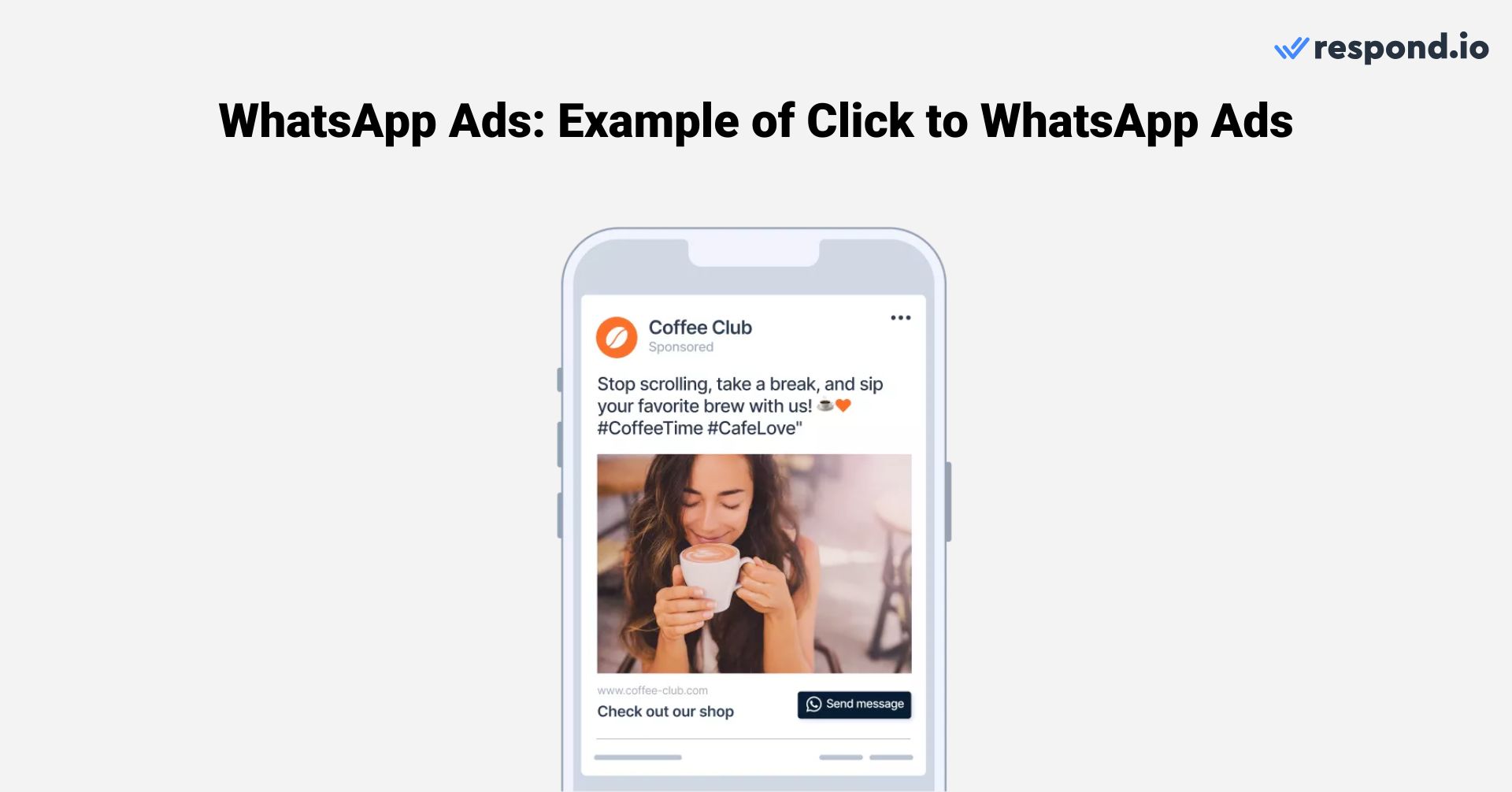
Ads that click to WhatsApp can be shown in various places on Facebook and Instagram, including Facebook Stories, News Feed, Marketplace, Video Feeds, Right Column, Messenger Inbox, Instagram Feed and Instagram Stories. Let’s look at how they work below.
WhatsApp Ad: How Does it Work?
When leads click on the ad on their phone, they are taken directly to their WhatsApp app inbox to start a conversation with your business. Conversations initiated through a WhatsApp ad come with a pre-filled message stating, I saw this on Facebook, which can be edited or removed, along with a link to the ad.
Leads may also opt to send a custom message instead. Most importantly, these conversations become visible to businesses only after leads have sent a message, indicating their consent and interest– also known as opt-in.
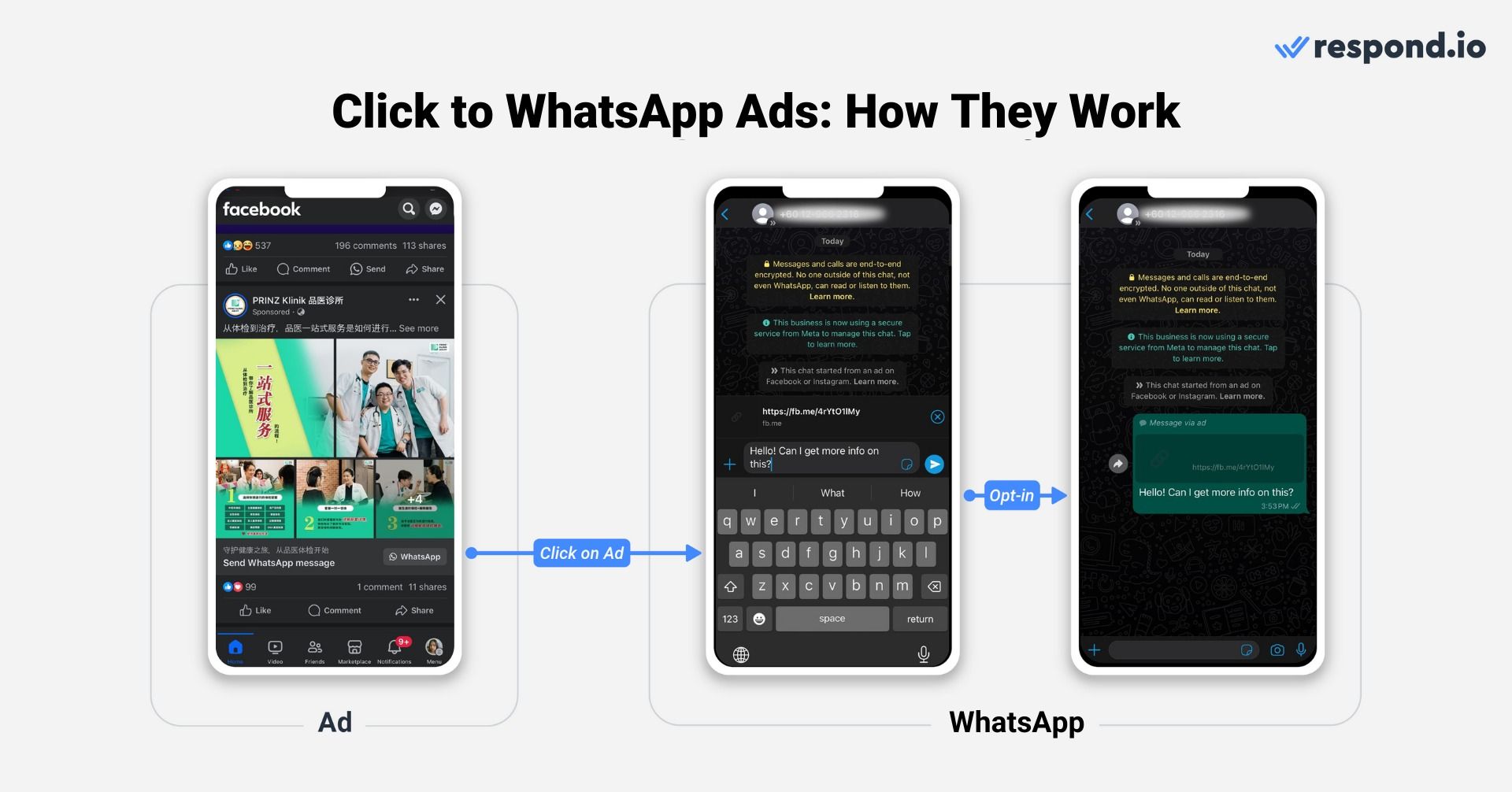
Once leads have opted in, you can message them back with qualifying questions. Since the lead has taken the first step to message you and is at the peak of interest, replying immediately maximizes the opportunity for conversion.
For businesses unable to have someone available at all times, connecting WhatsApp to an AI-powered customer conversation platform offers a solution by enabling automatic lead capture and qualification. More on this later.
Despite the need for having agents ready to engage, Ads that click to WhatsApp offer significant benefits over traditional lead-generation efforts. Read on to find out why you should use WhatsApp Ads for lead generation.
WhatsApp Ad: Why Use WhatsApp Ads?
WhatsApp is the world’s most popular messaging app. Although WhatsApp Ads are not placed directly on WhatsApp, they leverage the extensive reach of Facebook and Instagram, offering leads a flexible way to initiate chats with businesses on their preferred app.
This approach is a significant shift from traditional lead-generation advertising, which often relies on ads that funnel leads to a contact form to gather emails or phone numbers. This method is prone to high drop-off rates due to lengthy forms and privacy concerns, not to mention the risk of inaccurate contact details leading to lost follow-up opportunities.
WhatsApp Ads address these challenges by eliminating the need for a contact form, thereby enhancing lead capture accuracy and reducing drop-off rates.
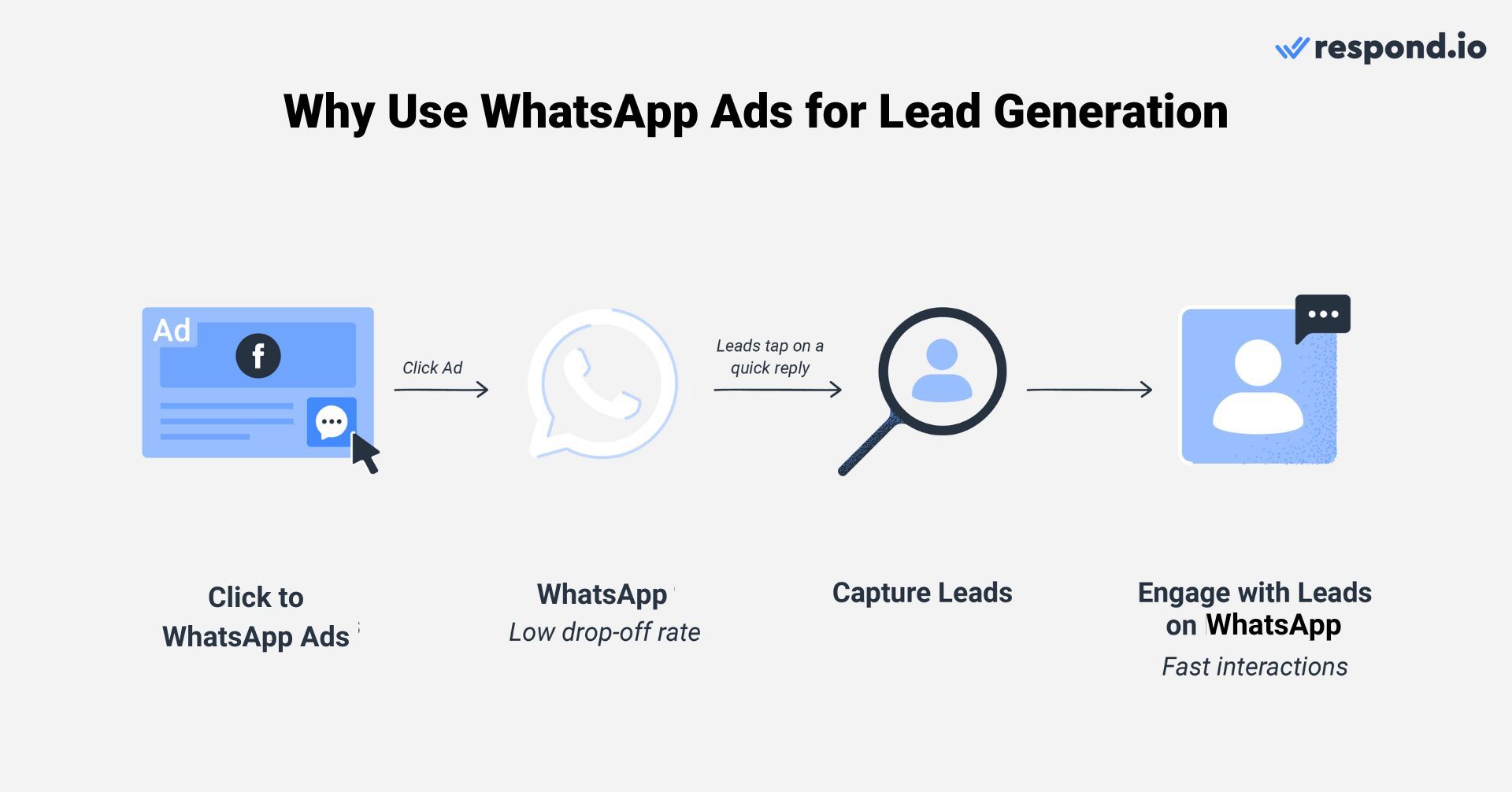
Conversations start directly in WhatsApp, creating a more engaging, fast-paced communication environment. This immediacy is critical when chatting with leads ready to make decisions, as it gives businesses a direct influence on their choices at critical moments.
Furthermore, the instant nature of messaging on apps like WhatsApp leads to quick replies, enhancing the lead progression through the sales funnel. This is significantly faster compared to the slow response times often seen in traditional email-based campaigns.
Lead form and landing page ads still have their place, so the choice comes down to what happens after the tap. Click to WhatsApp ads start a live conversation, while lead forms collect details for someone to follow up later. Here’s how they compare:
Click to WhatsApp ads | Lead form or landing page ads | |
|---|---|---|
What the customer does | Taps the ad and a WhatsApp chat opens | Fills in a form, then waits to be contacted |
Contact details | Comes with a working WhatsApp number | Typed by hand, so typos and fake details slip through |
Follow-up speed | As fast as your team or AI Agent replies | Depends on when someone calls or emails back |
Drop-off risk | Lower, with no form to abandon | Higher, since each extra field loses people |
Works best when | Someone can reply within minutes | You need structured details at volume and follow up later |
Now that you know why you should leverage WhatsApp ads, we’ll show you how to set up a WhatsApp ad.
Turn conversations into customers with respond.io's official WhatsApp API ✨
Manage WhatsApp calls and chats in one place!
WhatsApp Advertising: Setting Up a WhatsApp Ad
You can create click to WhatsApp ads in one of two ways: through the WhatsApp Business App or Meta Ads Manager. Before setting up a click to WhatsApp ad, you need to:
Make sure you have a WhatsApp Business Account, preferably WhatsApp API for advanced capabilities
Make sure you’re an admin of the Facebook Page
Then, follow the instructions below to set up your ad. First, we’ll show you how to create ads on the WhatsApp Business App, then Meta Ads Manager.
How to Create a WhatsApp Ad on The WhatsApp Business App
If you’re using an Android phone in select regions, you can create WhatsApp ads without a Facebook Page using your email address. Similar to creating ads with a Facebook account, these ads will appear on Facebook and Instagram. To create an ad on the WhatsApp Business app with a Facebook account, follow the steps below.
1. Tap Advertise in the Settings tab of your WhatsApp Business App
2. Select a photo from your gallery or phone, catalog item or status to advertise. Note that while you can advertise multiple photos and catalog items at a time, the items you want to advertise must be approved.
3. Tap Continue to Facebook.
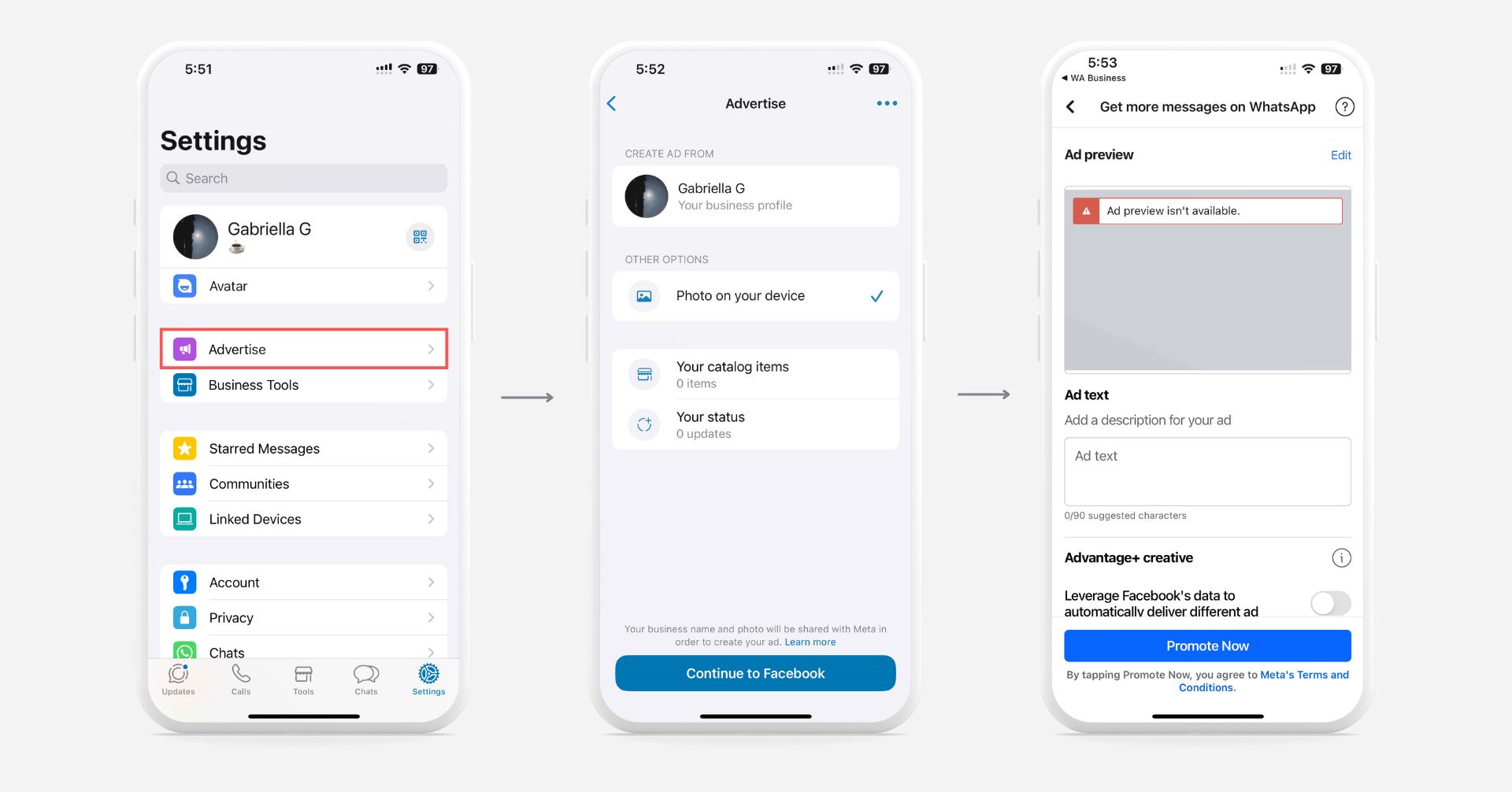
4. Insert Ad text and set your audience, ad placement, daily budget and duration.
5. Add payment method and information. Then complete payment for the ad.
6. Review the Ad and tap Create Ad.
Once approved, your ad will be placed on the channel you’ve selected. Now that you know how to set up WhatsApp ads on the WhatsApp Business App, we’ll show you how to create ads on Meta Ads Manager.
How to Set Up a WhatsApp Ad on Meta Ads Manager
To create ads that click to WhatsApp from Meta Ads Manager, go to Ad creation within the Ads Manager.
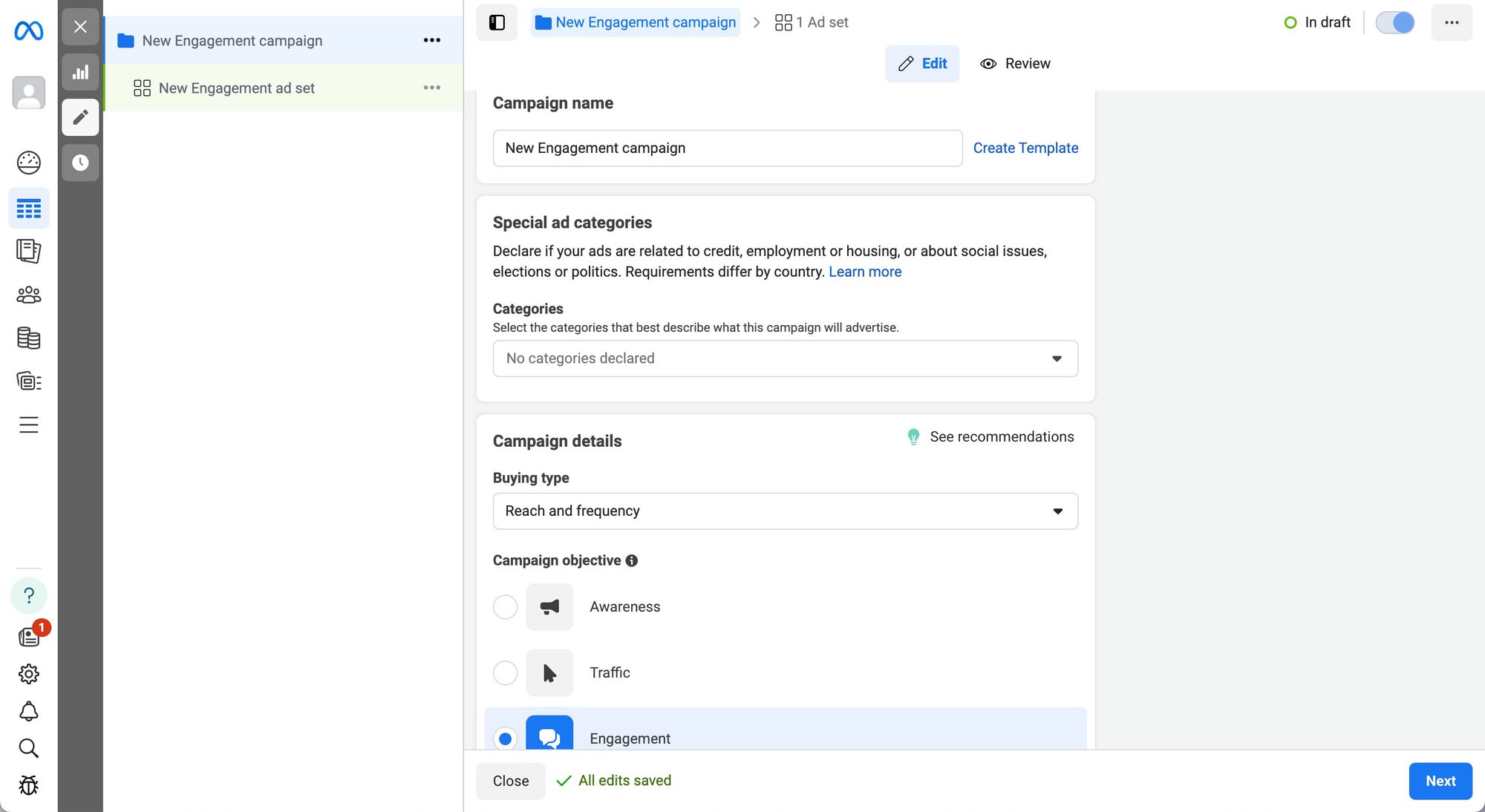
1. ChooseEngagement as your WhatsApp advertising campaign objective. Leads and Sales also support ads that click to WhatsApp if you want Meta to optimize for qualified leads or purchases.
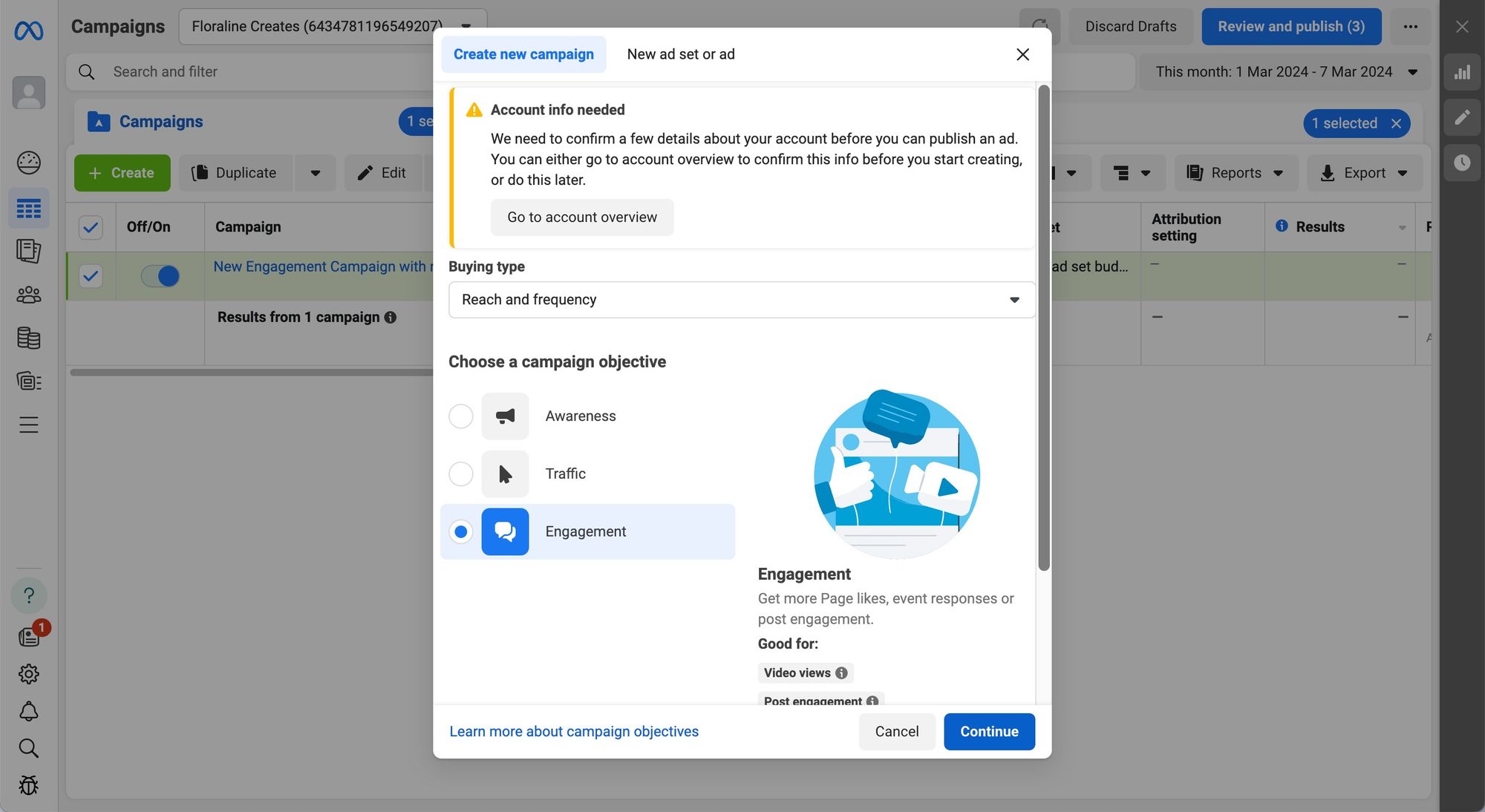
2. Edit the campaign name and select a category in the Special Ad categories to declare if your ads are related to credit, employment or housing or about social issues like elections or politics.
You may also set up an A/B test to understand which ad strategies give you the best long-term results. This will save you money, as you’ll avoid spending your budget on low-performance ads. Then, click Next.
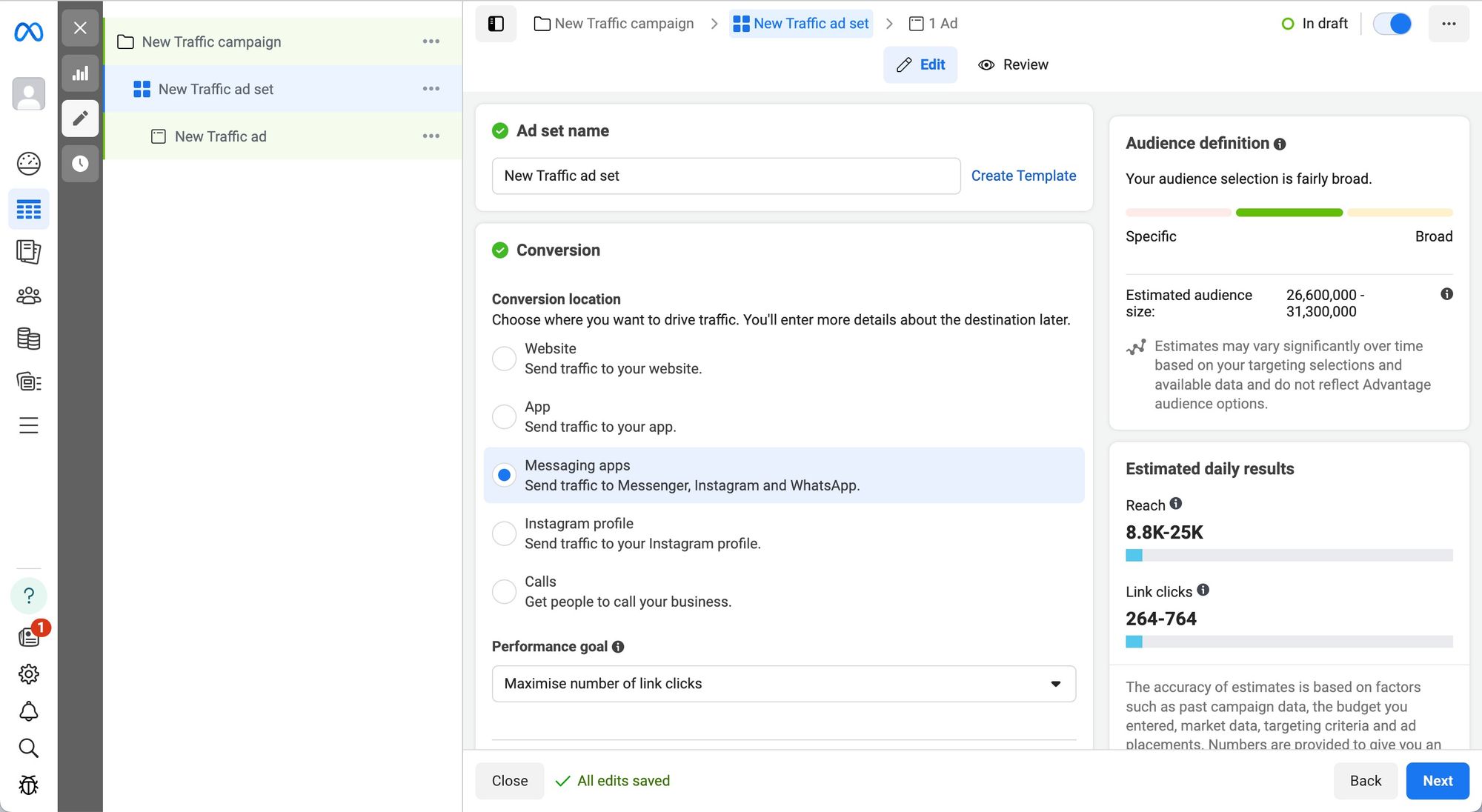
3.ChooseMessaging apps as your conversion location. This will drive traffic to Messenger, Instagram and WhatsApp.
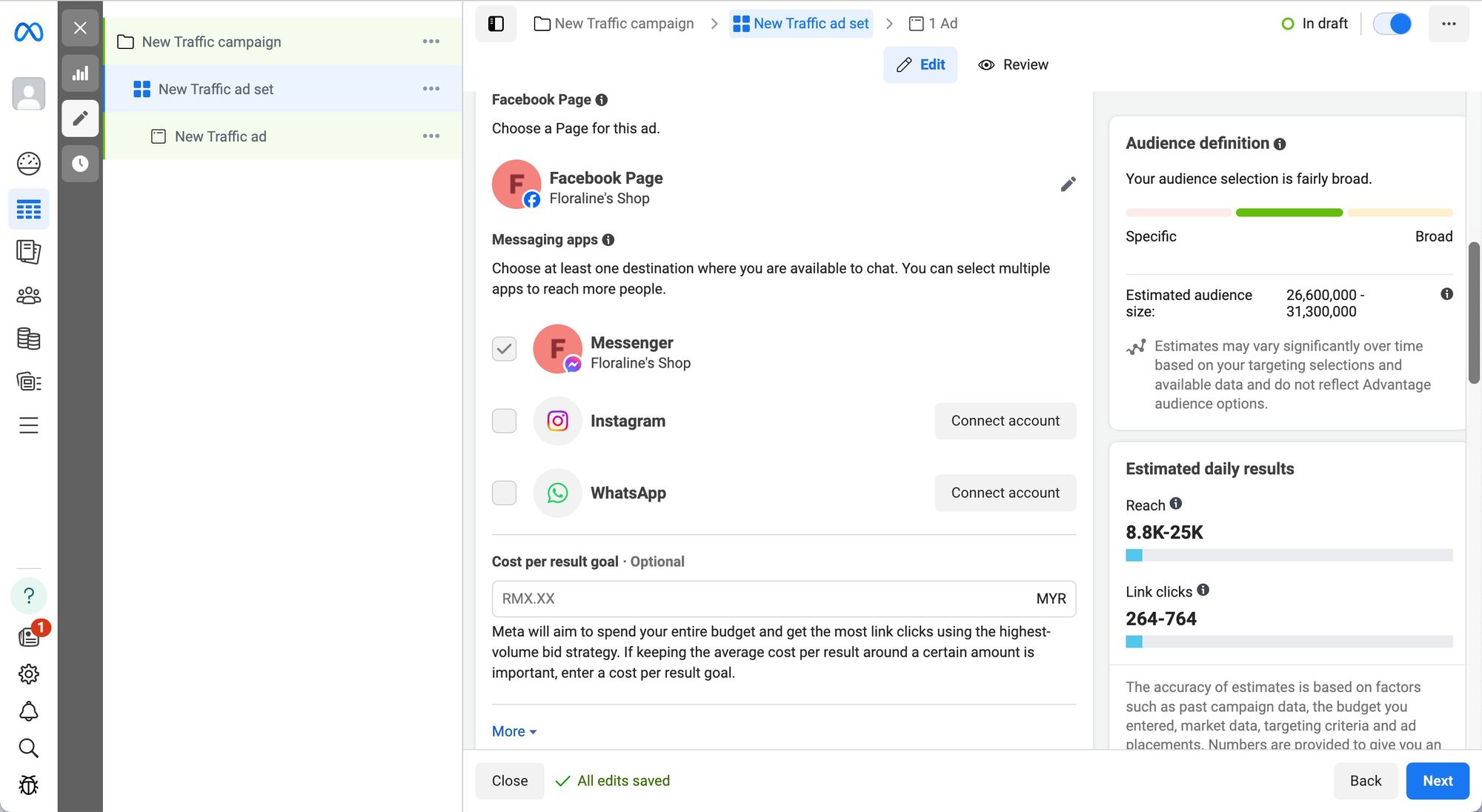
4. Select a Facebook Page you want to create the ad for. Then, choose the channel you want to direct chats to. Note that you can select multiple messaging channels for each ad.
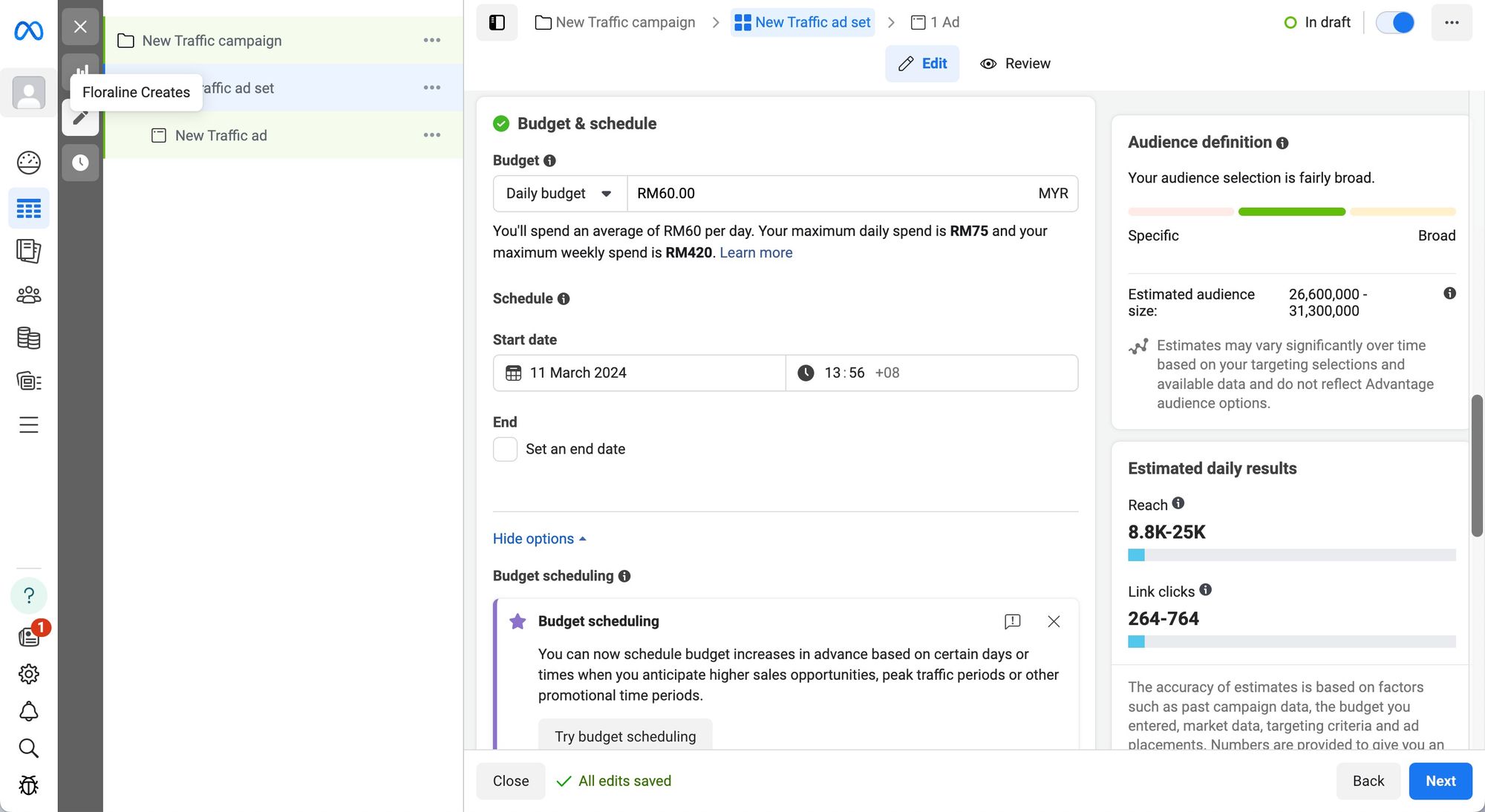
5. Set the ad budget, schedule, audience and placements. Then, click Next.
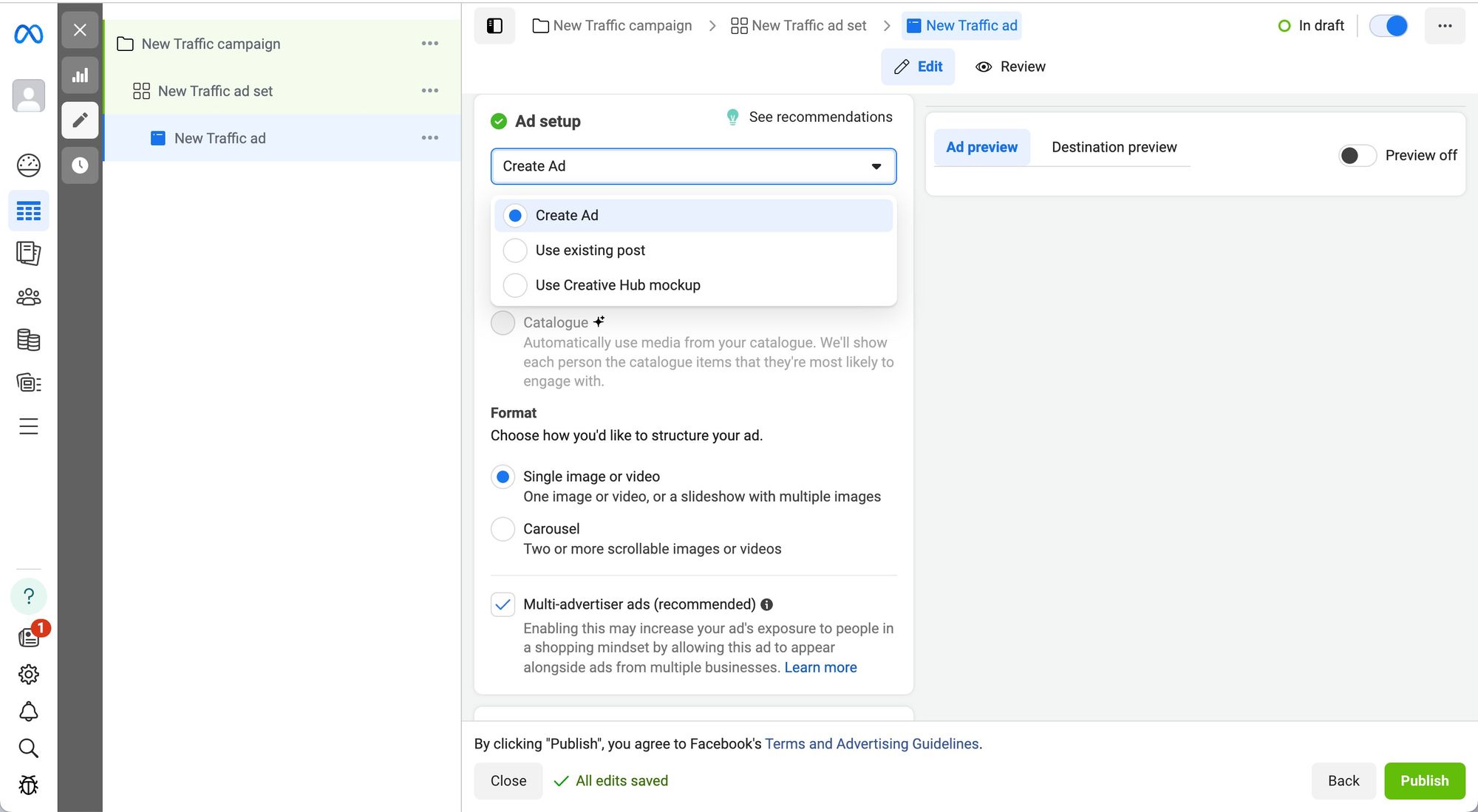
6. Select the Create Ad option under Ad setup to create a new advertisement. Then, choose the ad format to structure your ad. You can opt for a single image or video. Alternatively, create a carousel ad with 2 or more scrollable images.
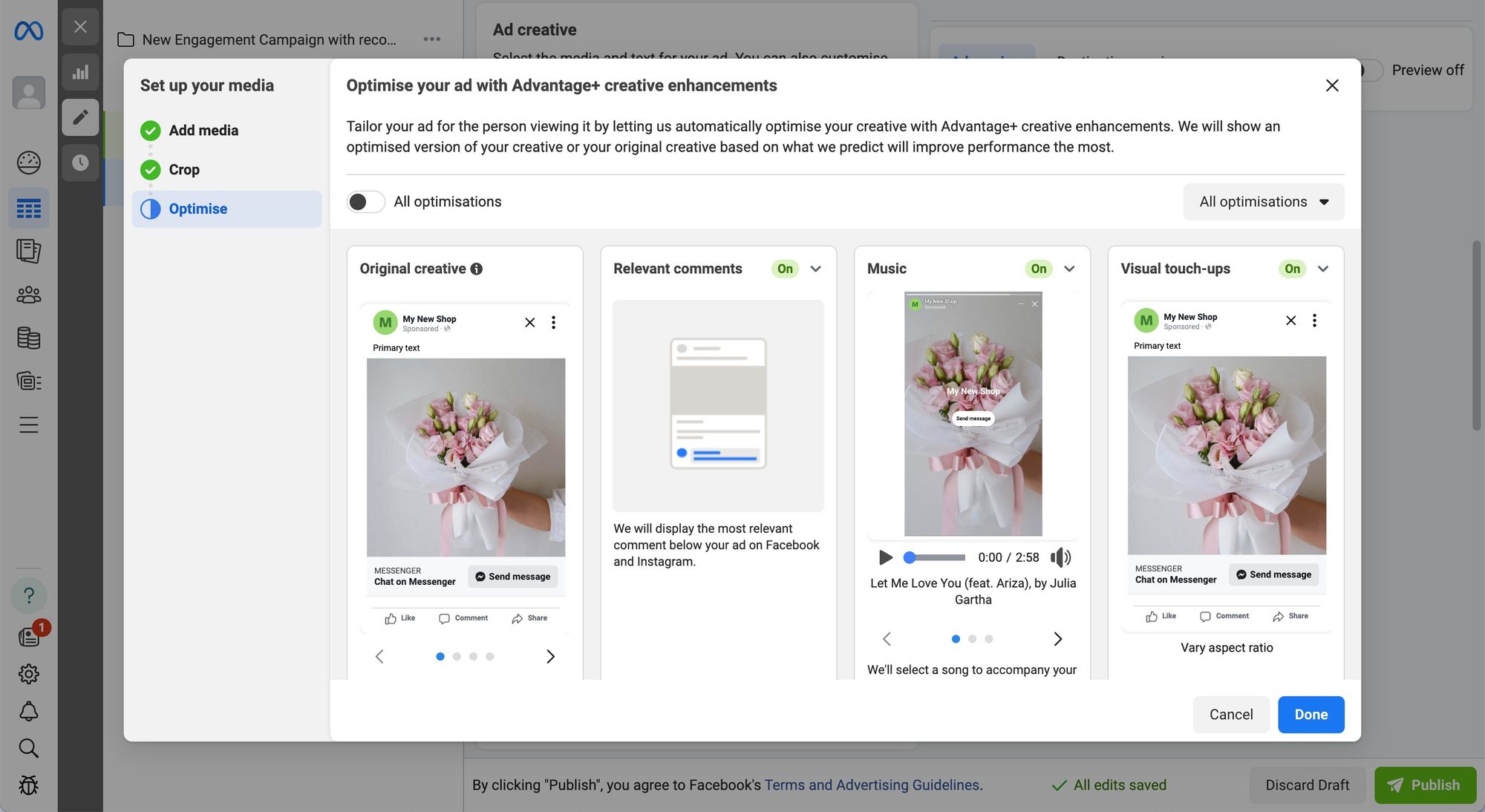
7. Add images or video for your ad. The media you add will be automatically cropped but you can manually edit them. Note that visuals play a crucial role in digital advertising. They should grab viewers' attention within the first three seconds to ensure your ad doesn't get overlooked.
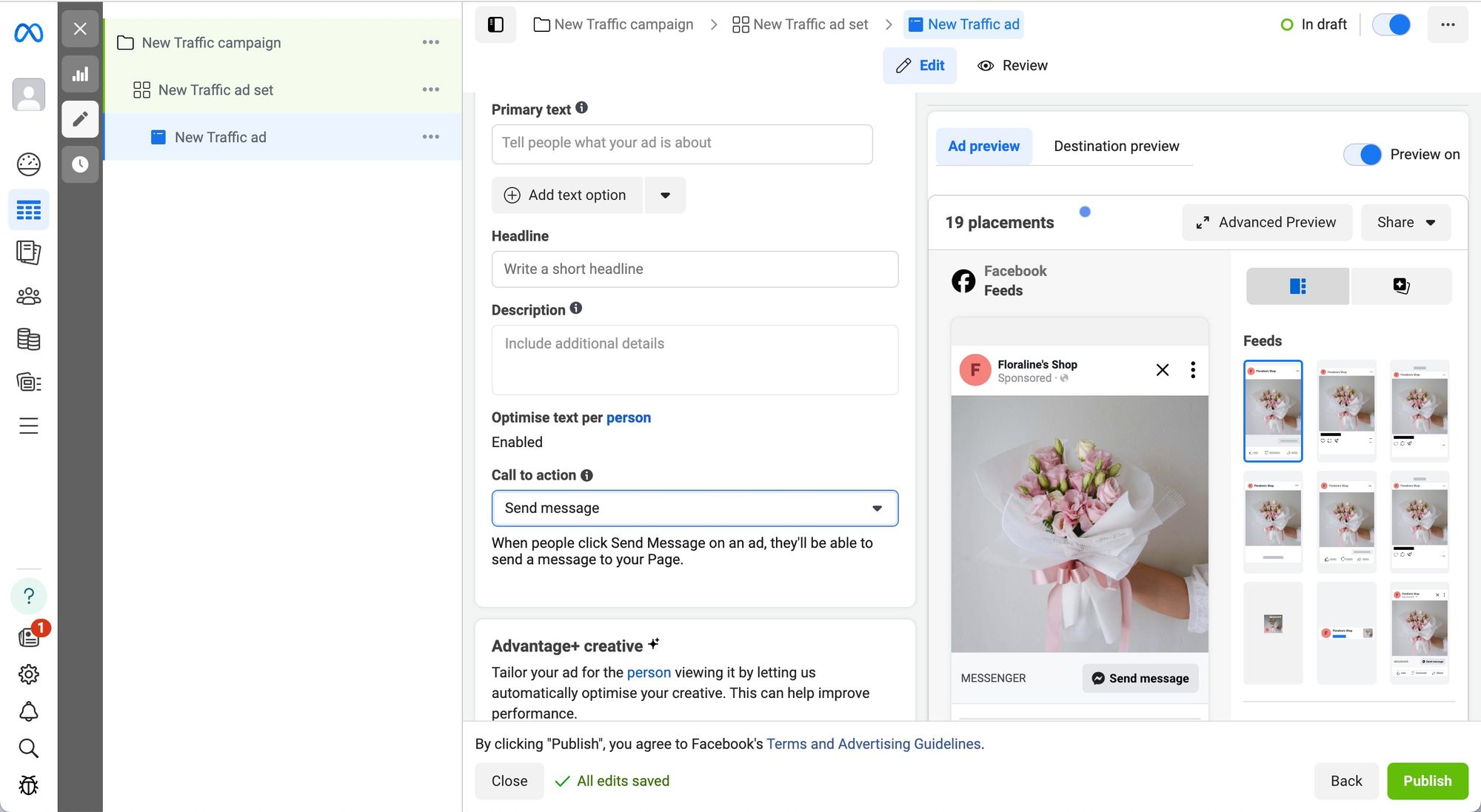
8. Insert the primary text, write a short headline and add an optional description to tell your audience what the ad is about.
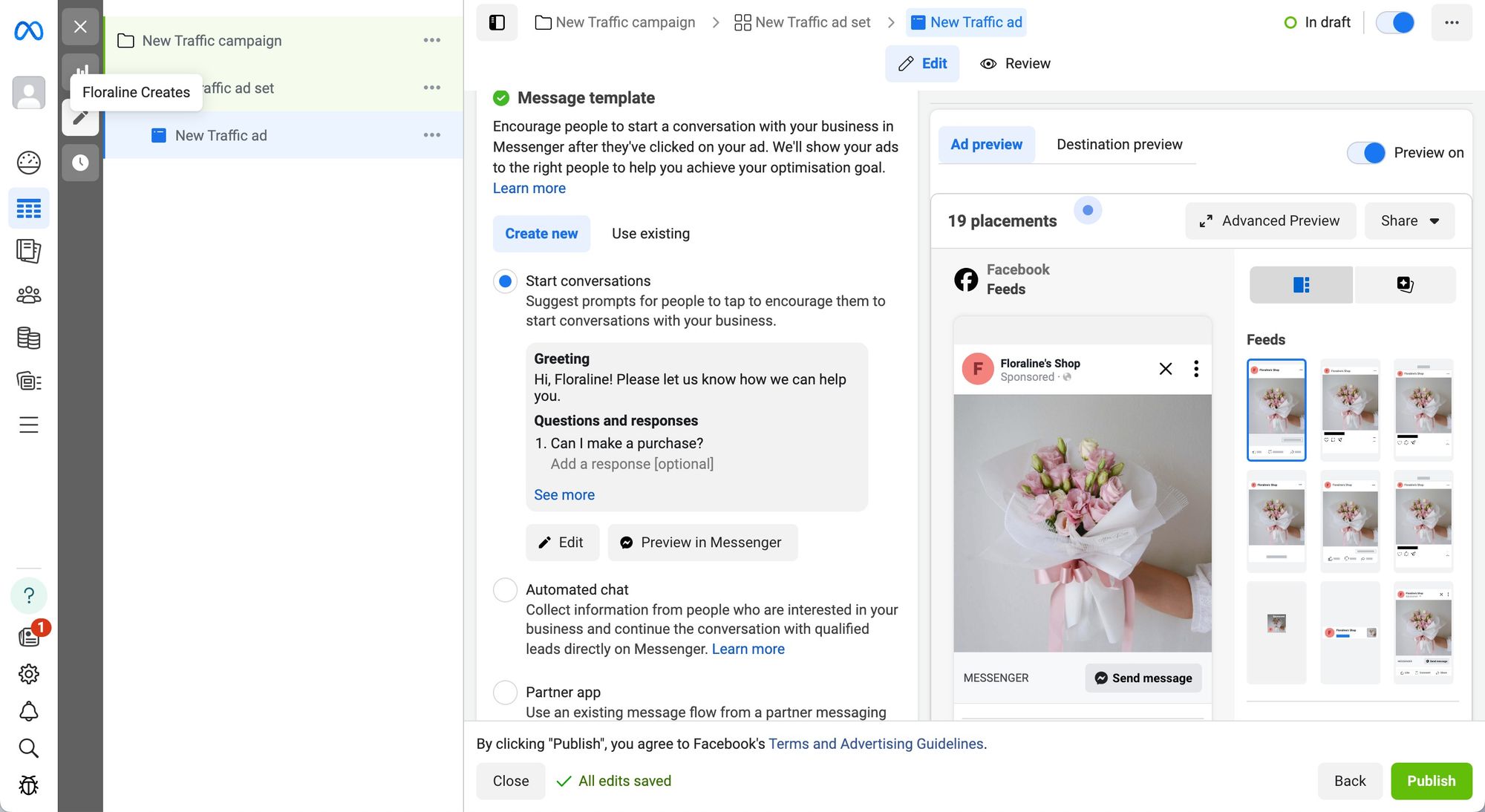
9. Create a message template based on your goals. To greet customers with a welcome message and display a list of FAQs, use the Start Conversation template. To collect information for lead qualification, appointment booking and more, use the Automated chat template.
10. Add a reference to track where your leads are coming from. Use the format ref=yourreference. You should use a unique reference for each campaign.
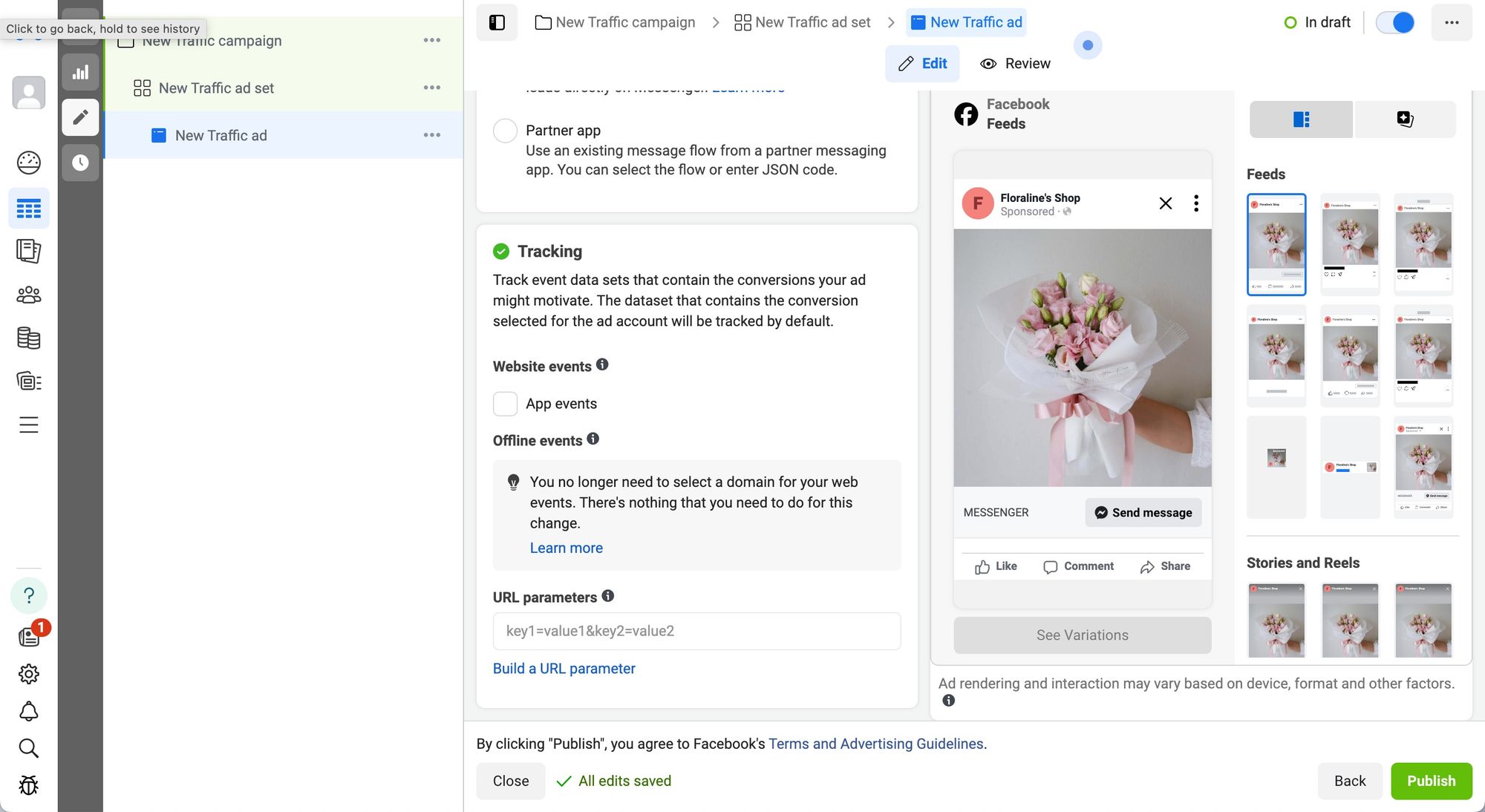
Once you're satisfied with the ad content and setup, click Publish to launch the ad.
Tips for Ads That Start More Chats
A published ad is only worth as much as the conversations it starts. People scroll past an ad in a second or two, so the ad has to make tapping into a chat feel easy and worthwhile. These tips help more viewers start a conversation and give your team better context when they do:
Make the CTA obvious. Use headlines like “Chat with us on WhatsApp” or “Get a quote on WhatsApp” so people know what happens when they tap.
Qualify with quick replies. Follow the first message with two or three buttons, such as product type or timeframe, so leads can answer in a tap.
Test one thing at a time. Use Meta’s A/B testing to compare the visual, headline or pre-filled message, changing one variable per test.
Meta Advertisement Review Process
According to Ahmed Nassar, respond.io’s Technical Product Manager, Meta's advertisement review process involves rigorous evaluation to ensure they adhere to Meta's guidelines. Advertisers should avoid promoting items prohibited under these policies, as non-compliance will lead to the discontinuation of the ad.
Free Entry Point Window and Messaging Rules for Click to WhatsApp Ads
Conversations that start from a click to WhatsApp ad get special pricing. If you reply within 24 hours of the customer’s first message, Meta opens a free entry point window that lasts up to 7 days from your reply. Messages you send during that window, including templates, carry no Meta charges. Once it closes, standard WhatsApp pricing applies.
Free doesn’t mean anything goes, though. Two rules still apply inside that window:
The 24-hour customer service window. You can send free-form messages only within 24 hours of the customer’s last message. After that, you need an approved
message template, even if the free entry point window is still open.
Opt-in for future marketing. A customer who messages you from an ad started that conversation, but collect clear opt-in before adding them to marketing broadcasts.
A few setup mistakes can quietly turn free conversations into paid ones. To make sure ad conversations qualify:
Create the ad in Meta Ads Manager with WhatsApp as the destination. Boosted posts with a WhatsApp button don’t qualify for the free entry point.
Reply within 24 hours, ideally straight away with an AI Agent or Workflow, so the window opens.
Check that the right WhatsApp number is connected to your Facebook Page.
Use Paid Ads Attribution in respond.io to see which ad each conversation came from.
Keep follow-ups relevant to what the customer asked about and honor opt-outs straight away. Blocks and reports lower your number’s quality rating, which can limit how many customers you reach.
Now that you have your ad in place, make sure you’re using the right solution to handle all the new leads. To manage conversations at scale and generate revenue with WhatsApp, get a WhatsApp API account and connect it to a robust software like respond.io.
Before that, let’s look at how WhatsApp Ads can benefit certain industries.
WhatsApp Advertising: Industry-Specific Benefits
Companies across various sectors have seen advantages from using click to WhatsApp ads. You can run click to WhatsApp ads with either the WhatsApp Business App or the WhatsApp API. The difference shows up after the click: the app suits one person replying from a phone, while the API lets a team share, automate and track ad conversations. Here’s how the two compare when ad leads start coming in:
Capability | WhatsApp Business App | WhatsApp API + respond.io |
|---|---|---|
Team access | One phone plus a few linked devices | Shared inbox with roles, assignment and routing |
Automation | Greeting, away and quick replies | Workflows and AI Agents that qualify leads and hand over |
Outbound messages | Broadcast lists to contacts who saved your number | Approved templates and broadcasts to opted-in segments |
Ad reporting | Ad results in Meta only | Paid Ads Attribution links each ad to conversations and Lifecycle stages |
Conversion data to Meta | Not available | Lead and purchase events sent through the Conversions API |
Integrations | Limited | Native HubSpot and Salesforce, plus Zapier and Make |
Calls | On the phone | WhatsApp calls and chats in the same inbox |
With WhatsApp Coexistence, eligible businesses can keep the app on the same number while adding the API.
Below, we’ll look at some ways four industries can benefit from WhatsApp Ads.
Click to WhatsApp Ads for Education
Facebook and Instagram, popular across age groups, enable educational institutions to reach a broad audience effectively. Leveraging WhatsApp ad audience segmentation capabilities, institutions can connect their diverse offerings with the right demographic. For example, universities can target young adults for undergraduate programs.
Click to WhatsApp Ads for Healthcare and Beauty
WhatsApp advertising empowers healthcare and beauty businesses to boost lead conversion by streamlining service promotion and enabling instant consultations and appointment bookings directly through WhatsApp.
This approach allows businesses to capture and convert leads faster by facilitating immediate actions with minimal human intervention, thus streamlining the customer journey from the first point of contact to booking.
Click to WhatsApp Ads for Real Estate
Real estate agents can use WhatsApp ads to advertise their latest properties and quickly connect with interested parties. They can use WhatsApp to respond promptly to inquiries, offer virtual property tours or schedule in-person visits.
This reduces the time from initial interest to action, helping agents convert leads into appointments and, ultimately, sales more effectively.
Click to WhatsApp Ads for Automotive
Automotive enterprises can leverage WhatsApp ads for various strategic purposes. Once potential customers initiate contact, dealerships can provide comprehensive details regarding vehicle models, their availability, pricing and financing alternatives.
For businesses looking to leverage WhatsApp ads, Ahmed Nassar, a Technical Product Manager at respond.io, emphasizes a crucial strategy that can be applied across all industries:
"It's essential to start with a clear business objective and craft a tailored workflow to reach that goal. This workflow might need adjustments based on specific factors like your target audience or geographical location. However, with the precision of A/B testing, it’s possible to refine your approach and secure campaign success."
Taking WhatsApp Ad to the Next Level with Respond.io
Respond.io is an AI-powered customer conversation platform provider that aims to help businesses generate leads and enable sales conversions through conversations. It has successfully helped businesses worldwide gain more qualified leads, improve sales conversions and achieve a high degree of customer satisfaction.
Respond.io includes a native lead management feature called Lifecycle, which helps you easily track where each customer is in the sales funnel. This gives teams better visibility and control over lead progression without relying on external CRM tools or manual tracking. You can mark them as New Lead, Hot Lead, Payment or Customer and see exactly how far your ad leads get.
Below, we’ll explore a few quick wins of using WhatsApp Ads with respond.io.
Capture Leads through Click to Chat Ads
Facebook and Instagram are excellent platforms for promoting your business and engaging with your audience. Given that your customers spend time daily on these platforms, they offer many opportunities to market your brand and generate leads.
Now, imagine not only reaching out on these platforms but also seamlessly continuing the conversation on WhatsApp—the most convenient chat app for both you and your customers. This is the essence of WhatsApp click-to-chat ads.
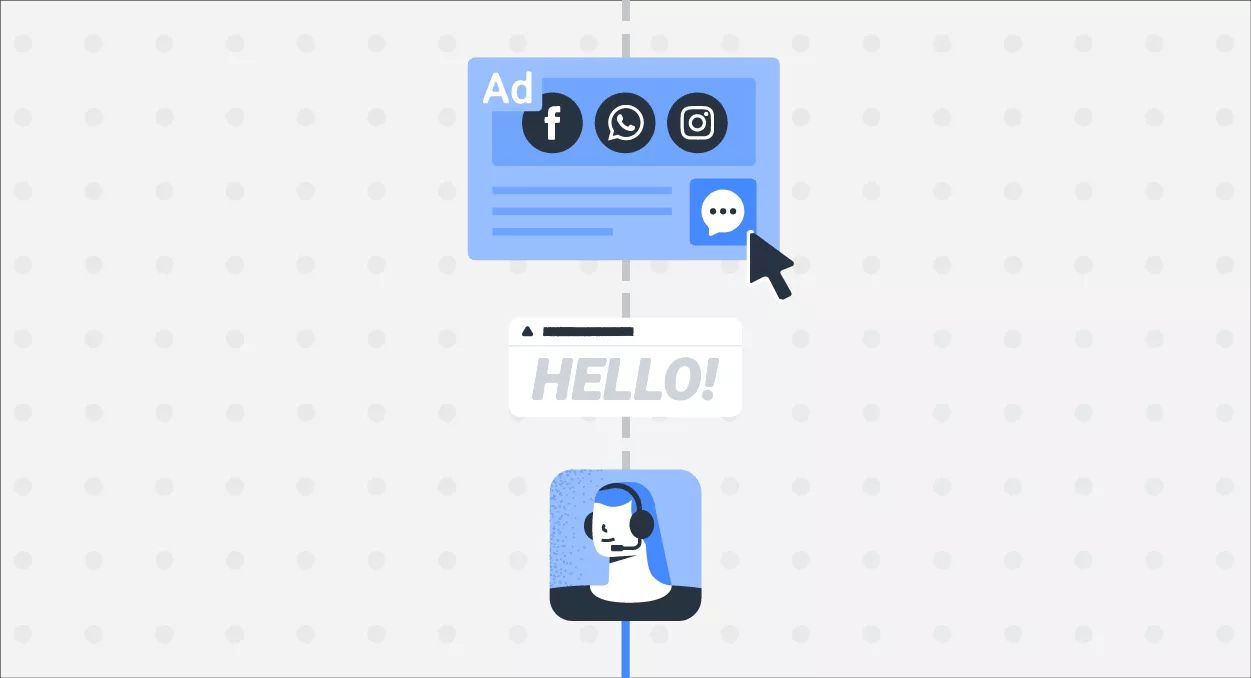
To maximize your ROI, incorporate your WhatsApp click-to-chat ads with respond.io. This will allow you to craft personalized customer journeys for leads that engage with your ads.
That said, ads aren’t the only way in. WhatsApp QR codes on packaging or in-store and WhatsApp links in emails or your Instagram bio can feed the same Workflows. These chats don’t get the free entry point window, so standard Meta pricing applies.
Track WhatsApp Ad Conversions with Paid Ads Attribution
Running WhatsApp Click-to-Chat Ads is just the first step—knowing which ads actually convert is what drives growth. With respond.io, you can now go beyond basic click tracking and gain full visibility into which ads bring in high-quality leads and how those leads move through your sales funnel.
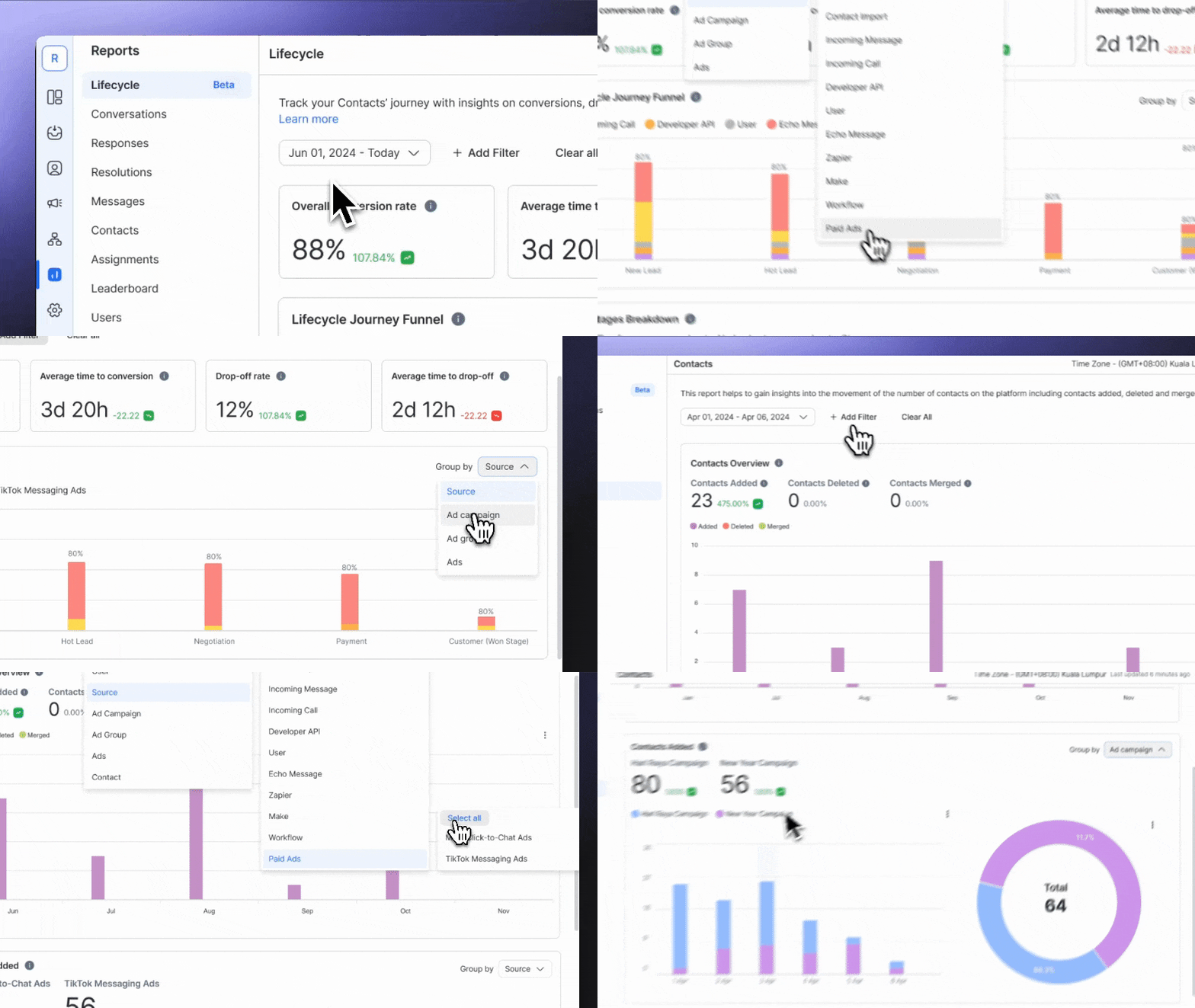
Use the Reports module to view Paid Ads attribution data in both Contacts and Lifecycle reports, so you can see which WhatsApp ad campaigns bring in leads that actually move from New Lead to Paying Customer. You’ll be able to:
Filter and group leads by Ad Campaign, Ad Group, or specific Ad
Track lead progress from first contact to Paying Customer
Spot which campaigns generate the best return on ad spend (ROAS)
No more guesswork or spreadsheets—just clear, actionable insights to optimize your WhatsApp ad performance and drive better results.
Go Further with Meta Conversions API
Paid Ads Attribution shows you which WhatsApp Ads lead to conversations and customers. To take it further, the Meta Conversions API (CAPI) gives Meta even stronger signals about what happens after someone clicks your ad and starts chatting.
For example, if a contact starts a chat from Campaign A and later moves to the Customer stage in Lifecycle, respond.io can send that purchase event back to Meta. Meta then learns that Campaign A tends to produce paying customers, not just cheap clicks.
Through respond.io, you can send events like a new lead created or a purchase made directly to Meta. This allows:
Better attribution: Tie your campaigns to real results, not just conversations.
Smarter optimization: Meta uses the data to prioritize the ads most likely to convert.
With respond.io and CAPI, you’re not just tracking what happened — you’re actively improving how Meta delivers your ads to maximize ROI. In fact, real customers are actively reaping the benefits and are seeing meaningful lifts. JU Productions cut its cost per qualified lead by 47.2%, and Automax® recorded a 10% increase in conversions after enabling CAPI.
To see how CRM sync connects offline sales back to WhatsApp conversations, read our guide to WhatsApp ROI attribution.
Click to WhatsApp Ad Metrics to Track
Cheap conversations can look like success in Ads Manager while sales stay flat. To judge your ads on revenue rather than chat volume, track the full path from ad spend to paying customer with these five metrics:
Cost per conversation = Ad spend ÷ conversations started
Qualification rate = Qualified leads ÷ conversations started
Time to first response = Average time from the customer’s first message to your first reply
Lead-to-sale rate = Paying customers ÷ qualified leads
ROA = Revenue from click to WhatsApp ads ÷ ad spend
Paid Ads Attribution and Lifecycle reports cover the first four. For ROAS, purchase events sent through the Conversions API or a CRM sync supply the revenue.
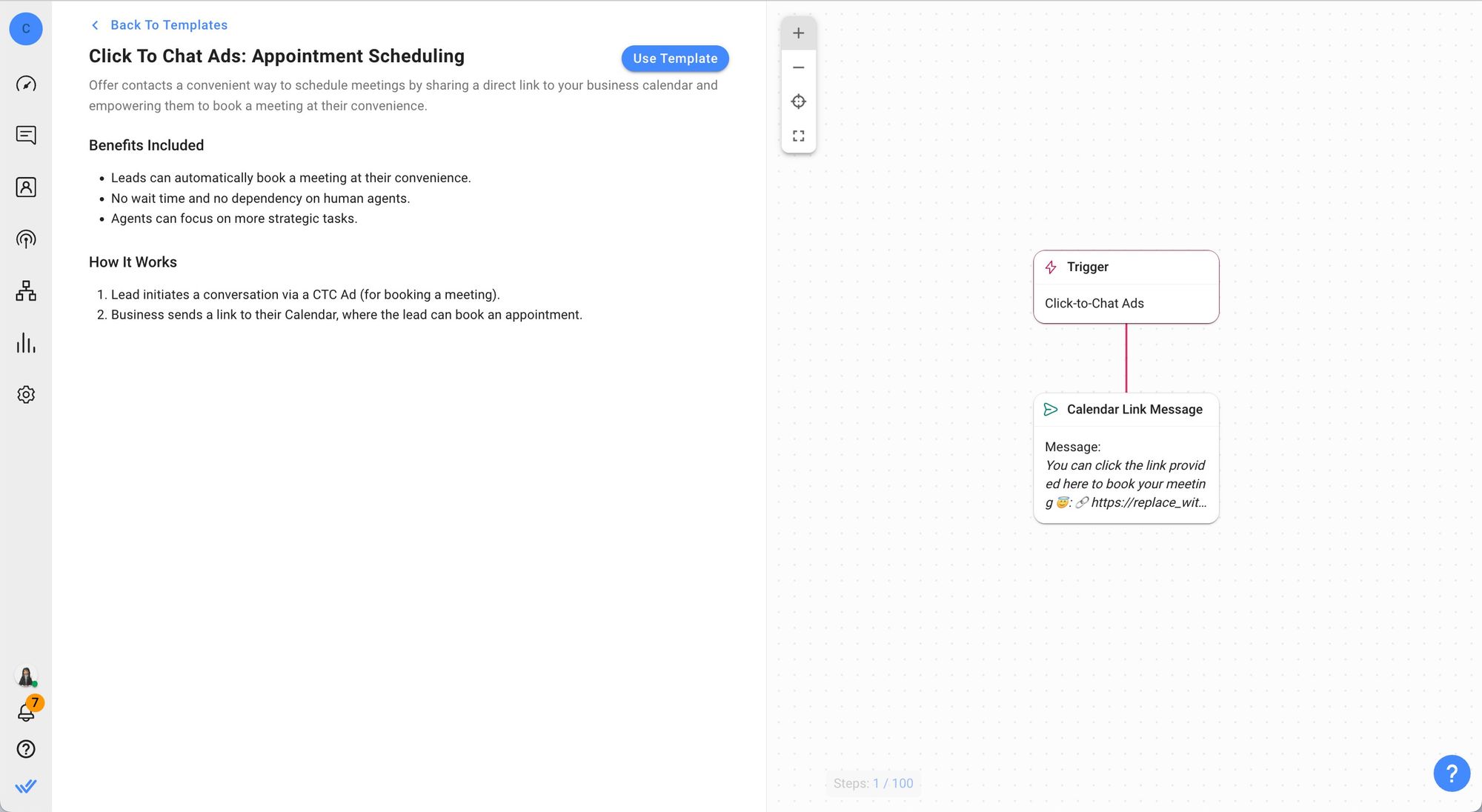
Automate Appointment Booking
Businesses reliant on appointment scheduling can significantly save agents time by automating the booking process. You can use respond.io Workflows to integrate WhatsApp with the calendar app your sales team uses.
Collect Lead Information and Answer Questions with AI Agent
When someone taps your WhatsApp ad, you have a very short window to qualify them before they move on. Responding to leads promptly increases your chance of converting them into sales. However, most companies don’t have the resources to handle high volumes of conversation. This is where automation and AI come in.
With respond.io AI Agents, businesses get much more than simple chatbots. From the moment a lead comes in from a WhatsApp ad, the AI Agent can recognize which campaign they clicked, greet them with a relevant message, ask qualifying questions and guide them to the next step.
These AI Agents are fully autonomous — they handle complex conversations, draw from your knowledge sources, collect structured lead details (like names, emails, preferences, or intent) and trigger actions in Workflows. They can also update Lifecycle stages in real time, so your sales and marketing teams always know where a lead stands.
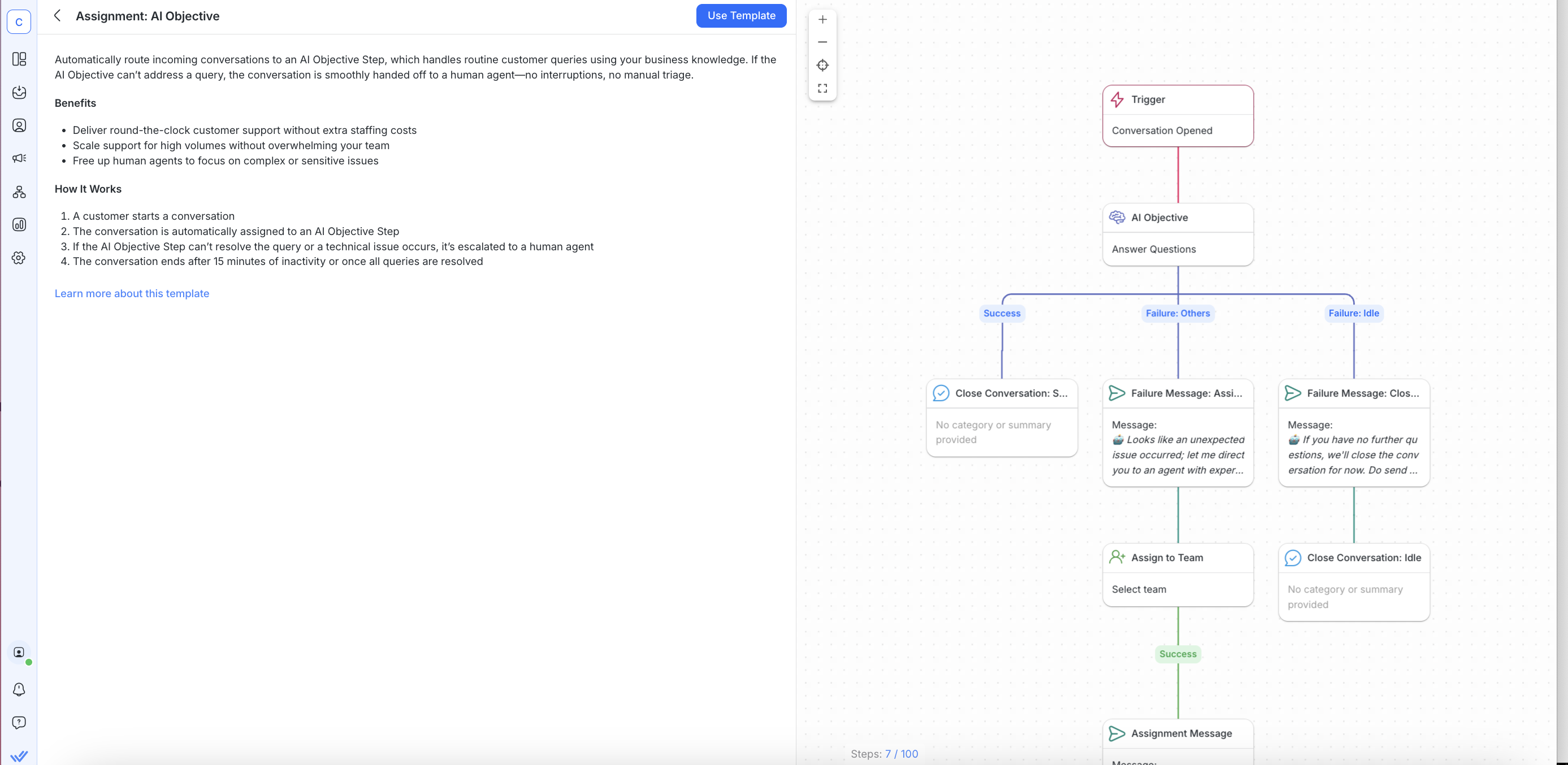
When conversations go beyond the AI Agent’s scope, or when a customer specifically requests human help, they automatically escalate to the right agent — ensuring smooth handovers without frustrating the customer.
Once an issue is resolved, AI Agents can close the conversation to prevent inbox clutter, and they generate concise conversation summaries so human agents have full context for follow-ups.
You can even test AI Agents before launching them. With the built-in Test AI Agent side panel, you can chat with the agent, reset threads, view or edit contact fields, and simulate key actions like assigning to users or teams, updating lifecycle stages, or closing conversations. This makes go-live safer and faster by helping you validate prompts, refine behavior and catch misconfigurations early.
Converse Intelligently with AI Assist and AI Prompts
With respond.io, agents don’t have to put in too much effort or spend too much time replying to leads, as they can use AI Assist to generate responses to customer messages automatically.
With just a click, the AI crafts replies based on the knowledge sources you provide, ensuring each response is relevant and contextually appropriate. AI Assist also understands voice notes, transcribes audio messages and uses them to generate accurate replies.
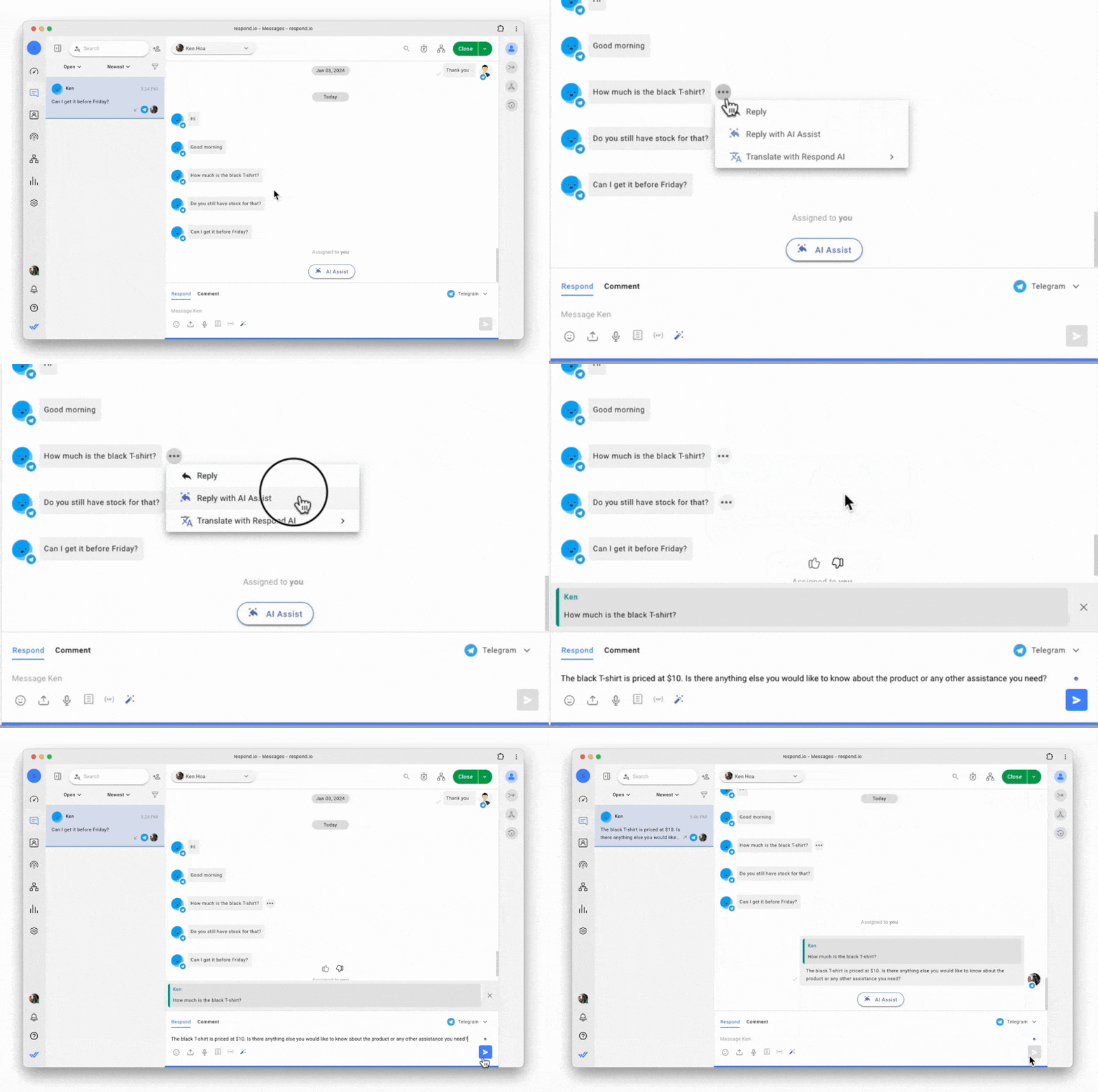
Additionally, with AI Prompts, agents can effortlessly translate messages into over 90 languages, ensuring effective communication across borders.
They can also make messages more precise by adjusting the tone and correcting spelling and grammar mistakes. By using these tools to create great experiences, you increase the likelihood of conversions.
Reengage Leads Anytime with Message Templates
So you’ve captured a lead and added them to your WhatsApp contact list. What’s next? Instead of waiting for contacts to message you, you can proactively engage them. WhatsApp allows WhatsApp API users to initiate conversations with contacts, but these can only be done with a message template.
Message templates have to be pre-approved by WhatsApp before they can be used. As a WhatsApp partner, respond.io allows you to create and submit your message templates for approval, and manage all your WhatsApp message templates on the platform.
Respond.io maximizes the potential of WhatsApp ads, helping you generate leads and quickly move them down your sales funnel. By capturing leads while their interest is high, you increase the chances of converting them into customers. With respond.io you can also take advantage of other helpful features, such as WhatsApp broadcast, WhatsApp schedule message and even WhatsApp auto reply.
Once they become customers, you can provide exceptional service to foster customer loyalty and drive business growth. Interested? Sign up for a free respond.io trial and get access to the official WhatsApp API in just minutes.
Turn conversations into customers with respond.io's official WhatsApp API ✨
Manage WhatsApp calls and chats in one place!
Are WhatsApp Ads shown inside WhatsApp?
No. WhatsApp Ads do not appear inside the WhatsApp app. They are shown on Facebook and Instagram as click to WhatsApp ads. When someone taps the ad, it opens a chat with your business in their WhatsApp app. This approach lets businesses reach large audiences on Meta platforms while keeping the WhatsApp experience ad free. Customers see the ad in their feed or stories, tap it, and instantly begin a conversation with your business on WhatsApp, which often leads to higher engagement compared to landing pages or web forms.
What do I need to set up WhatsApp Ads?
To run WhatsApp Ads, you need a WhatsApp Business Account that is connected to a Facebook Page. Once linked, you can create ads either through the WhatsApp Business App or inside Meta Ads Manager. The WhatsApp Business App offers a simplified setup flow suitable for very small businesses, while Meta Ads Manager provides full control over targeting, placements, budgets and creative assets.
You will also need an active WhatsApp number and permission to run ads on your selected Facebook Page. Businesses that plan to handle leads more systematically often combine WhatsApp Ads with WhatsApp API later on.
How can I handle ad responses and leads automatically?
You can reply to messages via both the WhatsApp Business App and Meta Business Suite, but their capabilities are limited:
WhatsApp Business App: Allows you to set up quick replies and away messages, which are particularly useful for very small businesses.
Meta Business Suite: Provides a shared inbox for WhatsApp, Messenger, and Instagram, allowing multiple team members to reply, tag conversations, and track basic performance.
However, both options can only support businesses with simple needs. For more advanced use cases, such as qualifying leads, answering FAQs automatically, or routing chats to sales agents, you’ll need a platform like respond.io, which offers AI Agents and workflow automation to manage conversations at scale.
AI Assist can also transcribe and understand voice notes, so leads who send audio messages receive fast, accurate replies.
How do I know which WhatsApp Ads actually work?
Meta Ads Manager reports on impressions, clicks and cost per messaging conversation, but it does not reveal what happens once a customer starts chatting. With respond.io, you can track each WhatsApp Ad lead through the entire funnel, from first message to qualified lead or paying customer.
This visibility helps teams understand which campaigns generate real revenue. Respond.io also supports the Meta Conversions API, known as CAPI. When enabled, it sends server side conversion events such as lead qualification or purchase back to Meta. This allows Meta to optimize your ad delivery more accurately, improve targeting and reduce acquisition costs for future campaigns.
Further Reading
Did you find this article helpful? If so, here are some readings on WhatsApp for Business.


