
















 Electronics
 Fashion & Apparel
 Furniture
 Jewelry and Watches
 Afterschool Activities
 Sport & Fitness
 Beauty Center
 Dental Clinic
 Medical Clinic
 Home Cleaning & Maid Services
 Photography & Videography
 Car Dealership
 Travel Agency & Tour Operator


TL;DR — What is the respond.io WhatsApp inbox?
The respond.io WhatsApp inbox is a multi-agent workspace that lets mid-market B2C teams receive, route and respond to WhatsApp conversations in one place — with AI Agents handling routing, assignment and routine conversations automatically, and Workflows powering complex actions like CRM integrations in the background. Without it, conversations go unassigned, managers lose visibility and leads time out without follow-up leading to a poor customer experience and lost sales. Respond.io fixes this with AI Agents, automation and reporting so teams can operate at scale. Not the right fit if you're a solo operator or low-volume team that only needs one number on the WhatsApp Business App.
For mid-market B2C teams handling high WhatsApp volume, this guide shows how to set up respond.io to centralize messages and route chats so you can message at scale. This matters when multiple agents need shared visibility, faster response times and consistent follow-up without conversation silos. You'll connect WhatsApp API to respond.io, set up assignment and automation, and verify reporting so the team can operate from one place. Then, we’ll take a close look at the respond.io WhatsApp inbox features and how to sign up for respond.io WhatsApp API. Lastly, we’ll explore how respond.io can enhance your overall customer communication experience.
Why growing teams need the respond.io WhatsApp inbox
When multiple agents need to handle WhatsApp at scale, the WhatsApp Business App creates conversation silos and weak accountability, so you'll need WhatsApp API plus a customer conversation platform to operate reliably. Managing conversations also becomes difficult when multiple agents share a single WhatsApp Business App account.
When conversations go unassigned and agents share a single login, leads time out, response times spike and managers have no way to measure who handled what or how fast. Respond.io's AI Agents can handle this automatically — routing incoming conversations, assigning them to the right agent and resolving routine queries without human intervention.
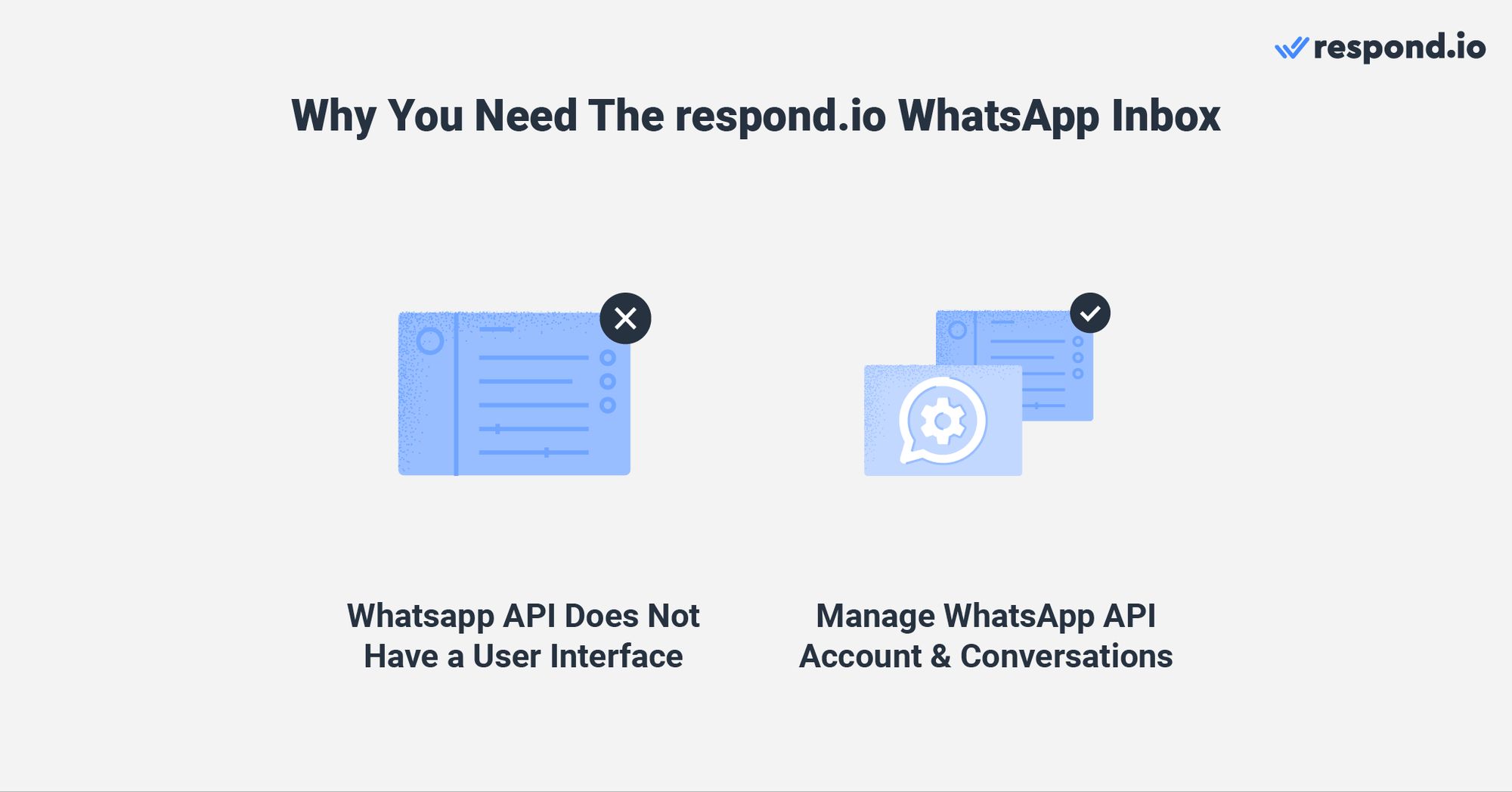
To use WhatsApp for business messaging at scale, WhatsApp offers the WhatsApp API. However, it does not have a user interface for sending and receiving messages. That's why you need a customer conversation platform like respond.io to coordinate high-volume WhatsApp conversations with routing, automation, reporting and integrations.
With respond.io, you can sign up for a WhatsApp API account easily and fully manage your WhatsApp Business Account (WABA). Without that layer, three problems compound as volume grows:
Conversation history fragments across disconnected channels
Disconnected channels erase customer context
Shared logins leave conversations without an owner
Here's how the two compare for a team handling WhatsApp at scale:
Capability | WhatsApp Business App | Respond.io |
|---|---|---|
Team access | A few linked devices sharing one number | Multiple agents in one workspace with manager oversight |
Assignment and routing | Manual pickup or informal coordination | AI Agents and Workflows route and assign conversations automatically |
Lead tracking | Labels applied by hand | Lifecycle stages, updated by AI Agents as leads qualify |
Channels | WhatsApp only | WhatsApp, Instagram, Facebook Messenger, TikTok, Telegram, LINE, Viber, WeChat, email and more |
AI handling | Greeting and away messages | AI Agents qualify leads, answer common questions, route by intent and hand over with context |
Broadcasts | Broadcast lists that only reach contacts who saved your number | Approved templates sent to segmented audiences, with broadcast analytics |
Reporting | Basic message statistics | Response times, resolution times and agent workload in the Reports module |
Cost | Free | Plan based on users and Monthly Active Contacts, plus WhatsApp fees |
Fix fragmented conversation history by centralizing messages in one omnichannel inbox
Mid-market B2C businesses with multiple teams, branches or brands often manage multiple WhatsApp accounts for different branches or outlets. They also have to maintain a presence on popular messaging channels like Facebook Messenger, Telegram and Instagram.
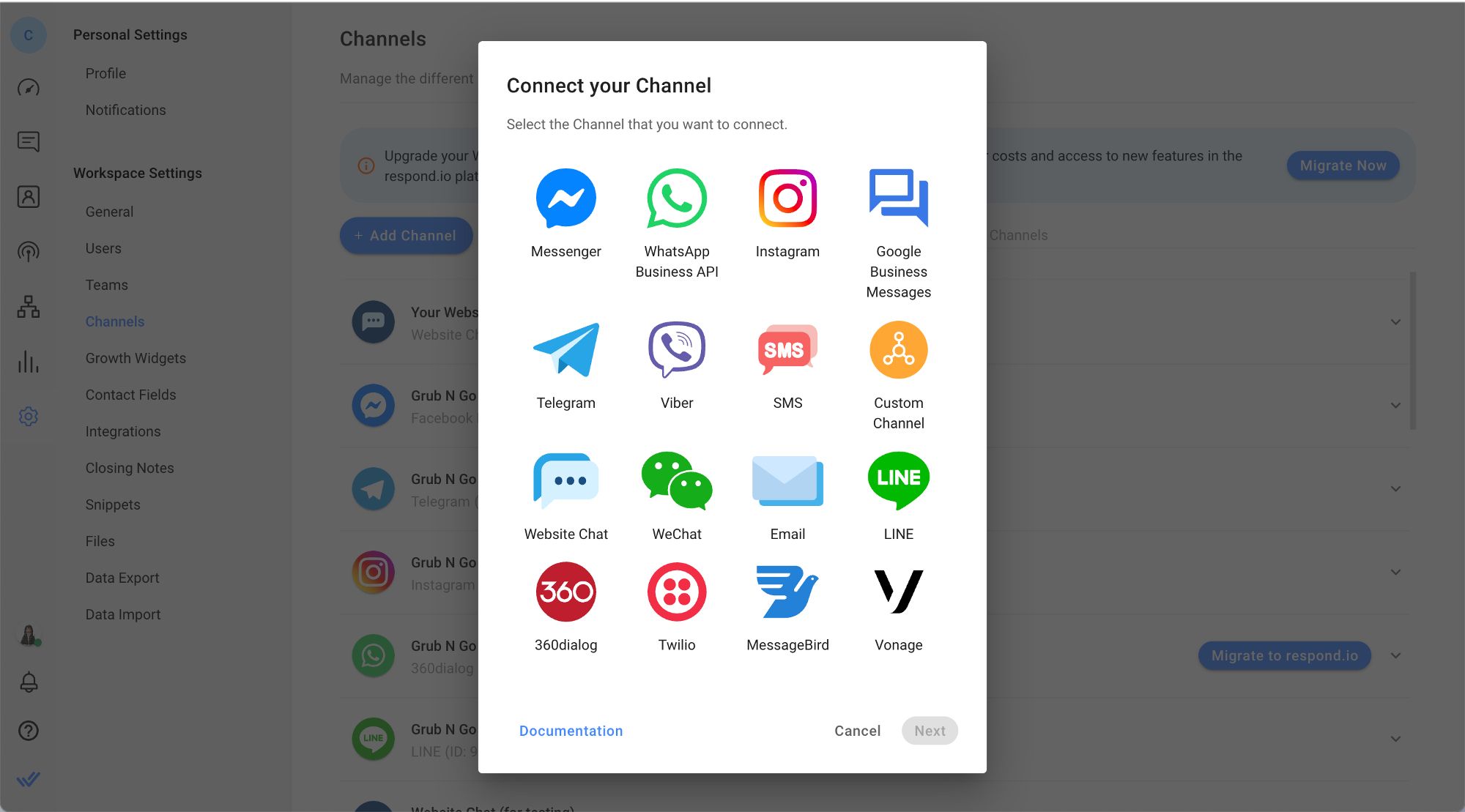
While handling messages from multiple channels is challenging, you can connect all the channels your customers use in one customer conversation platform, with an inbox view for agents. This allows you to manage all your conversations in one centralized location, eliminating the need to juggle multiple channels or platforms to engage with customers. A dedicated conversation files view helps agents quickly locate attachments like invoices or documents without scrolling through long message histories.
By centralizing all channels, you can consolidate customers’ data from these channels in one place, making it easier to provide a true omnichannel experience.
Break down silos and understand customer context with contact merge
Having a presence on multiple channels increases the likelihood of the same customer contacting you through different channels. This can lead to situations like customers having to reidentify themselves and repeat their issues when communicating with agents.
With respond.io, businesses can merge conversations from different channels in a single thread for a unified customer profile. For example, if a customer has previously contacted you on Instagram but decided to message you on WhatsApp next, you can merge the conversations to get context easily.
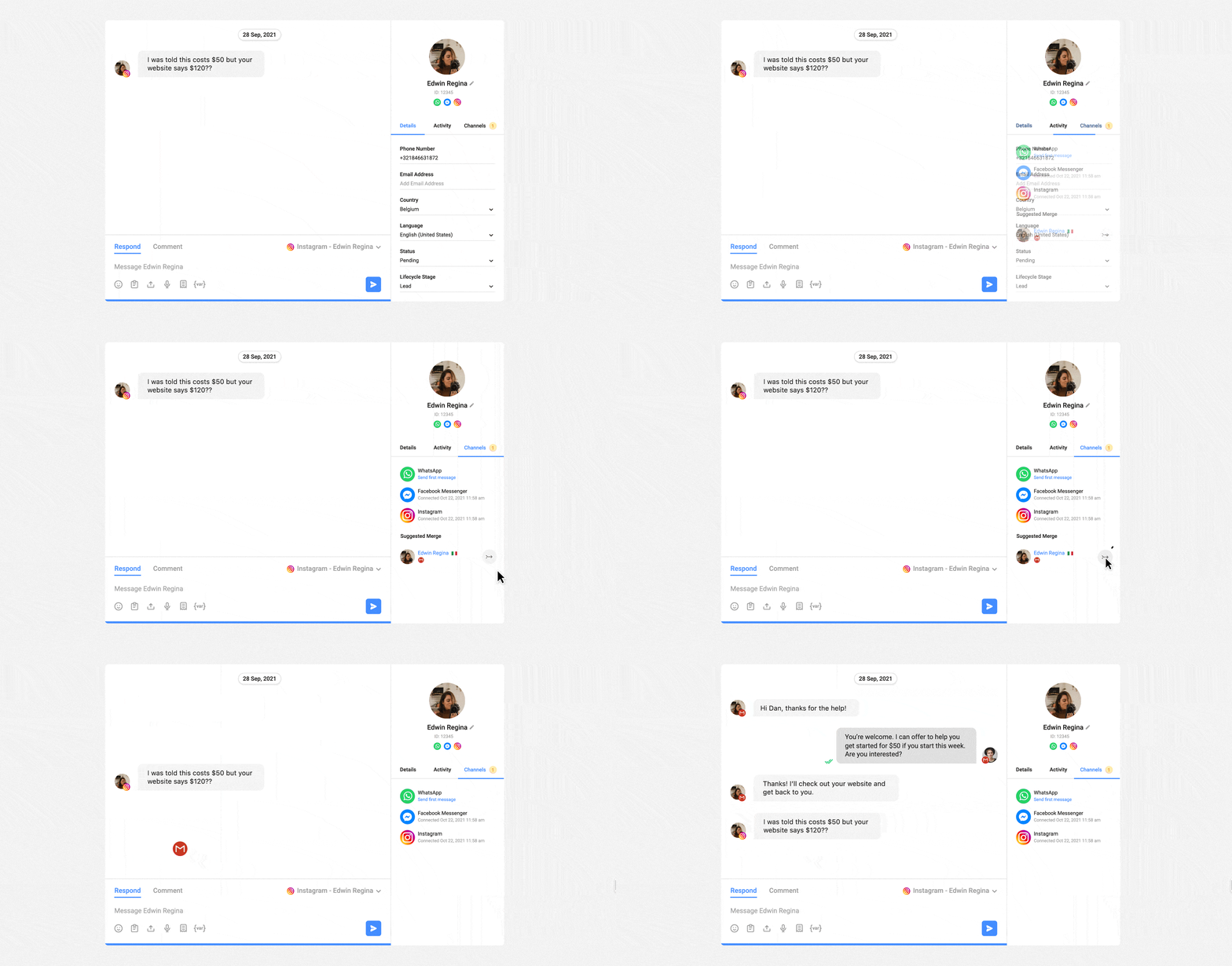
With this feature, agents can identify returning customers, spot recurring issues and help without asking the customer to repeat themselves. Agents can also leave comments in the conversation and @mention teammates, so context carries over when a WhatsApp chat is handed off between sales, support or shifts.
Enhance conversation traceability with auto assignment
Unlike the WhatsApp Business App where agents can manually pick conversations without supervision, respond.io gives managers full control over how conversations are distributed — through AI Agents that route and assign automatically, or via the Workflow builder for rule-based assignment logic.
Whether distributing conversations evenly with round-robin assignment or sending each new chat to the agent with the fewest open conversations, every conversation has a clear owner. Assignment can be limited to agents who are online, so new WhatsApp leads don't land with someone who's away. If an assigned agent doesn't reply within a set time, a Workflow can reassign the conversation to another agent or team, so leads don't time out waiting for a first response.
With assignment handled automatically, managers can easily monitor and identify the agents accountable for each interaction. Inactive conversations can also close automatically after a configurable period, keeping the inbox focused on active engagements and ensuring accurate resolution-time reporting.
To prioritize high-value customers, businesses can automatically assign them to dedicated agents. If you want to monitor their interactions, you can create Custom Inboxes to set these conversations apart from regular conversations.
This allows managers to closely track and supervise conversations with high-value customers and ensure that they receive the best possible assistance.
Track where every WhatsApp lead stands with Lifecycle stages
When several agents share a WhatsApp inbox, assignment shows who owns each conversation but not how close that contact is to buying. Lifecycle stages fill that gap by marking where each contact is in the sales journey, such as new lead, qualified or customer. AI Agents update the stage automatically as they qualify leads on WhatsApp, so managers can spot leads that have stalled before they go cold and step in while the conversation is still live.
Turn conversations into customers with respond.io's official WhatsApp API ✨
Manage WhatsApp calls and chats in one place!
Before you start: Prerequisites
Before setup, confirm you have:
Admin access to Meta Business Manager and your WhatsApp Business Account
A phone number eligible for WhatsApp API
An SMS or voice verification method for that number
Connect WhatsApp to respond.io and start messaging at scale
Respond.io is a customer conversation platform with WhatsApp API access as a WhatsApp Business Solution Provider, so you can connect WhatsApp, route conversations and report on outcomes in one place. This means that you can sign up for the respond.io WhatsApp API and start messaging customers quickly.
Step 1: Create your respond.io workspace
Go to respond.io and sign up for an account. During onboarding, set up your workspace name and invite the agents and team members who will be handling WhatsApp conversations. Assign each person the right role before you connect any channels. Agents only get access to the inbox, and you can limit them to contacts assigned to themselves or their team, so customer conversations and data stay with the right people as the team grows.
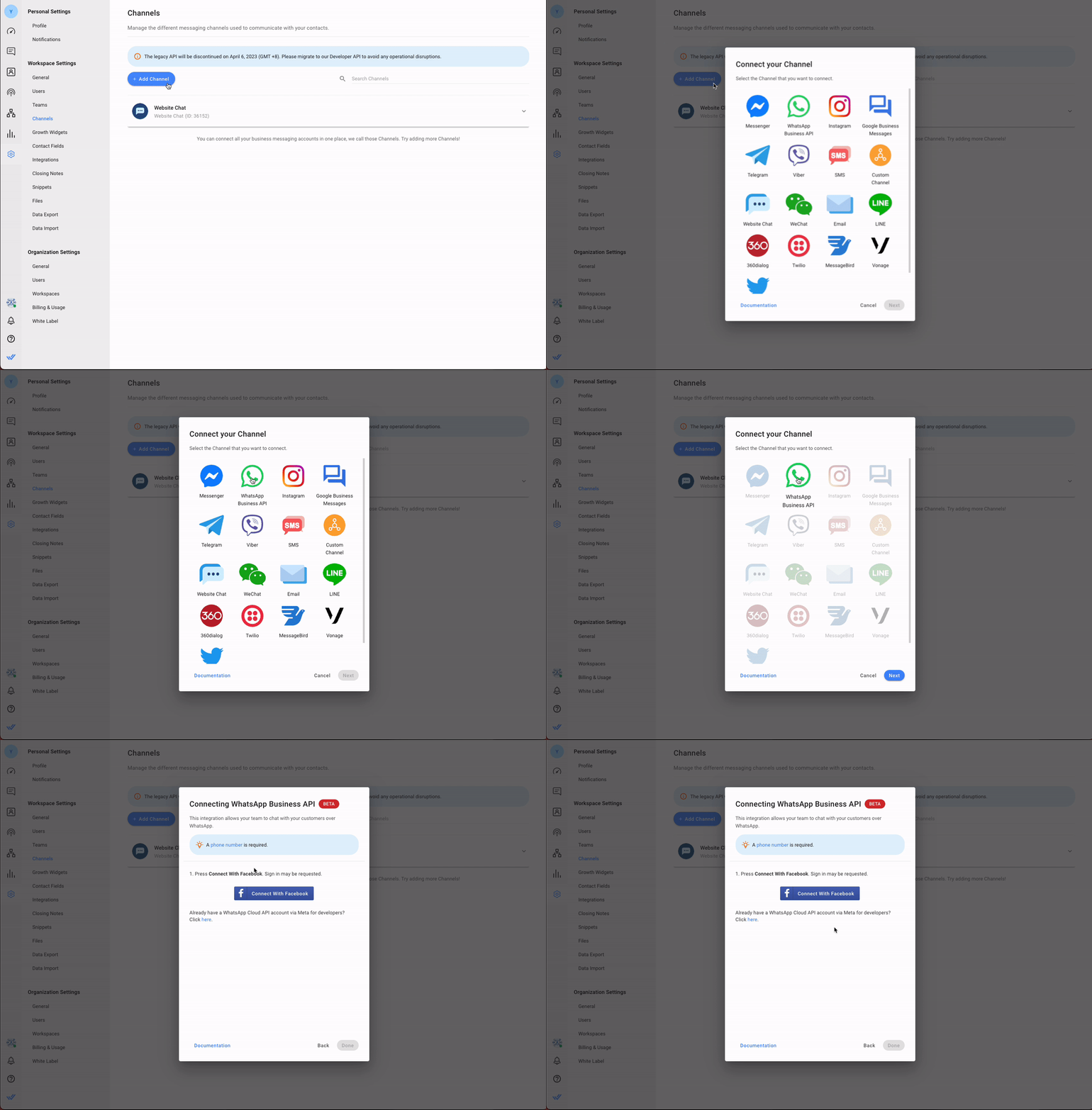
Step 2: Connect WhatsApp
In respond.io, go to Settings → Channels → Add Channel → WhatsApp and follow the on-screen flow to connect your WhatsApp Business Account (WABA) and phone number. You'll need admin access to Meta Business Manager to complete verification. Once connected, send and receive a test message to confirm the channel is live.
Step 3: Set up your AI Agent
In the Inbox module, select Create AI Agent and choose a ready-made template — such as Receptionist for routing and inquiry handling — or build a custom AI Agent from scratch. Add your business knowledge sources (FAQs, products, policies) so the AI Agent can respond accurately.
Then, configure handoff conditions so the AI Agent transfers to a human agent the moment a conversation exceeds its scope, then test it before enabling it on your WhatsApp channel. If you need help configuring your AI Agent, use the in-platform setup assistant to get step-by-step guidance without leaving the workspace.
If your AI Agent is misrouting conversations during testing, check that your handoff conditions are specific enough, since overly broad conditions will cause the AI Agent to escalate too early or too late.
Before publishing, use the built-in instruction validator to catch conflicting rules, broken variable references, or vague handoff criteria and apply suggested fixes directly in the editor. You can save your changes at any time without publishing, so the AI Agent only goes live when you click Publish.
Step 4: Configure Workflows for complex actions (if needed)
For actions beyond conversation handling — such as CRM syncing or CSAT surveys — set up Workflows in the Workflow builder. Your AI Agent can trigger these Workflows automatically, so complex processes run in the background without agents having to switch platforms or perform manual steps.
Step 5: Set up message templates and broadcasts
Create and submit your message templates for WhatsApp approval via Settings → WhatsApp → Message Templates. Once approved, set up your first Broadcast to reach a segmented contact list with a notification or promotional message. Avoid sending broadcasts to contacts who haven't explicitly opted in — a high block rate will lower your phone number quality rating and WhatsApp may restrict your sending capacity.
Step 6: Review reporting and tune performance
Open the Reports module to check response times, resolution times and agent workload after your first week of live conversations. Use the data to identify gaps in routing or assignment and adjust your AI Agent or Workflows accordingly. Set a regular cadence — weekly at first — to review Reports and improve team performance over time. If resolution times are high but response times look healthy, the bottleneck is likely in routing or handoff conditions — not agent speed.
Respond.io WhatsApp inbox: Quick wins
Once WhatsApp is connected, these are the fastest ways to start getting value from respond.io for messaging at scale.
Fully manage WhatsApp Business Account with respond.io
With respond.io, you can fully manage your WhatsApp Business Account (WABA) easily. This includes managing your WhatsApp balance in respond.io’s WhatsApp Fees Module and creating and submitting message templates for approval.
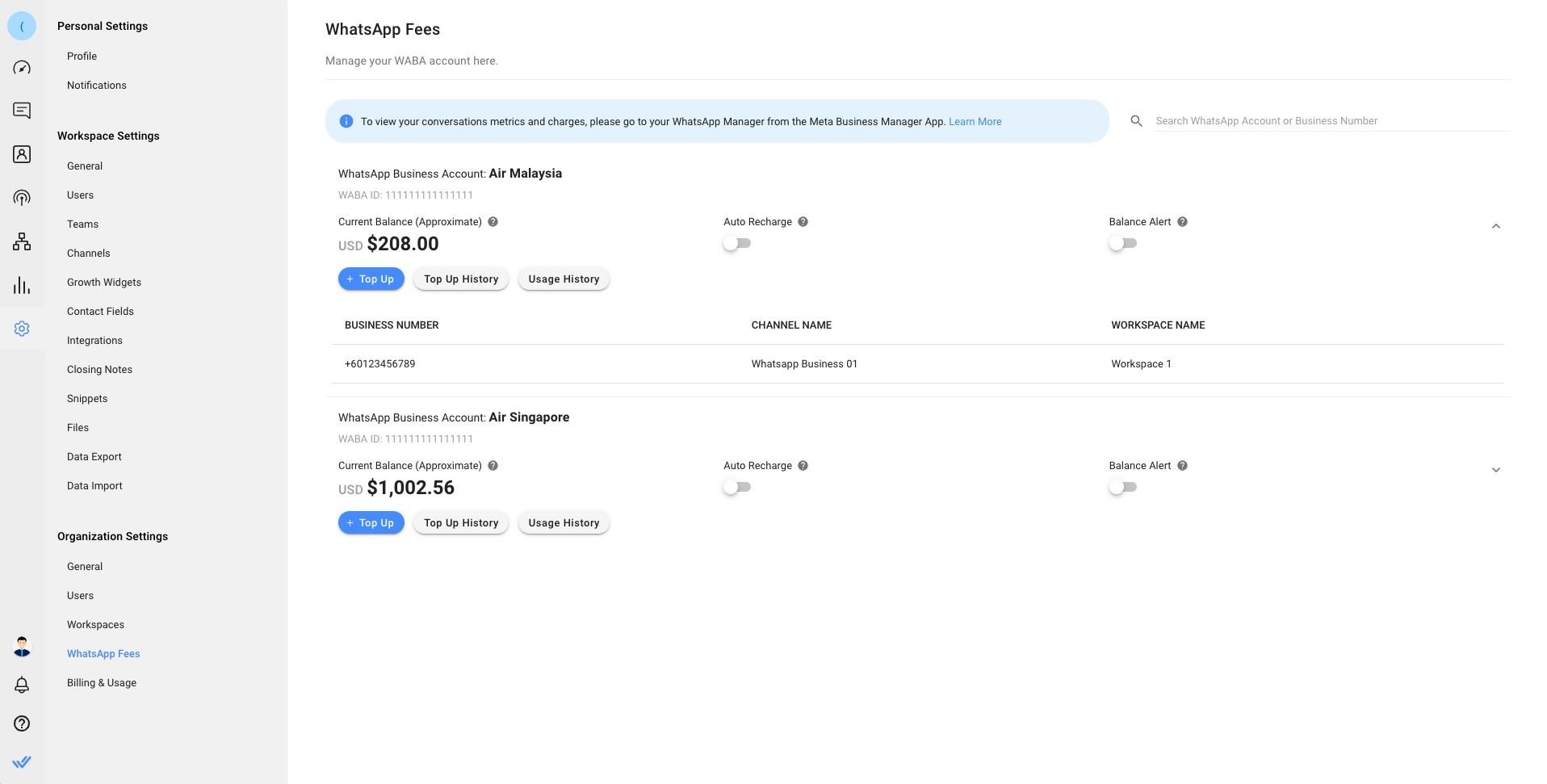
You can also view your phone number quality rating and manage your WhatsApp Business Profile in the Settings Module. If you have a WhatsApp Business Account and want to benefit from the capabilities mentioned, you can seamlessly connect it to respond.io without experiencing any downtime.
Send notifications with WhatsApp Broadcast
WhatsApp notifications have a high likelihood of being read since they trigger push notifications that are difficult to ignore. With respond.io, you can schedule and send broadcast notifications like promotional messages, important customer updates and more to segmented audiences.
You can even get insights into your broadcast campaign with broadcast analytics and use the data you’ve gathered to plan future broadcasts.
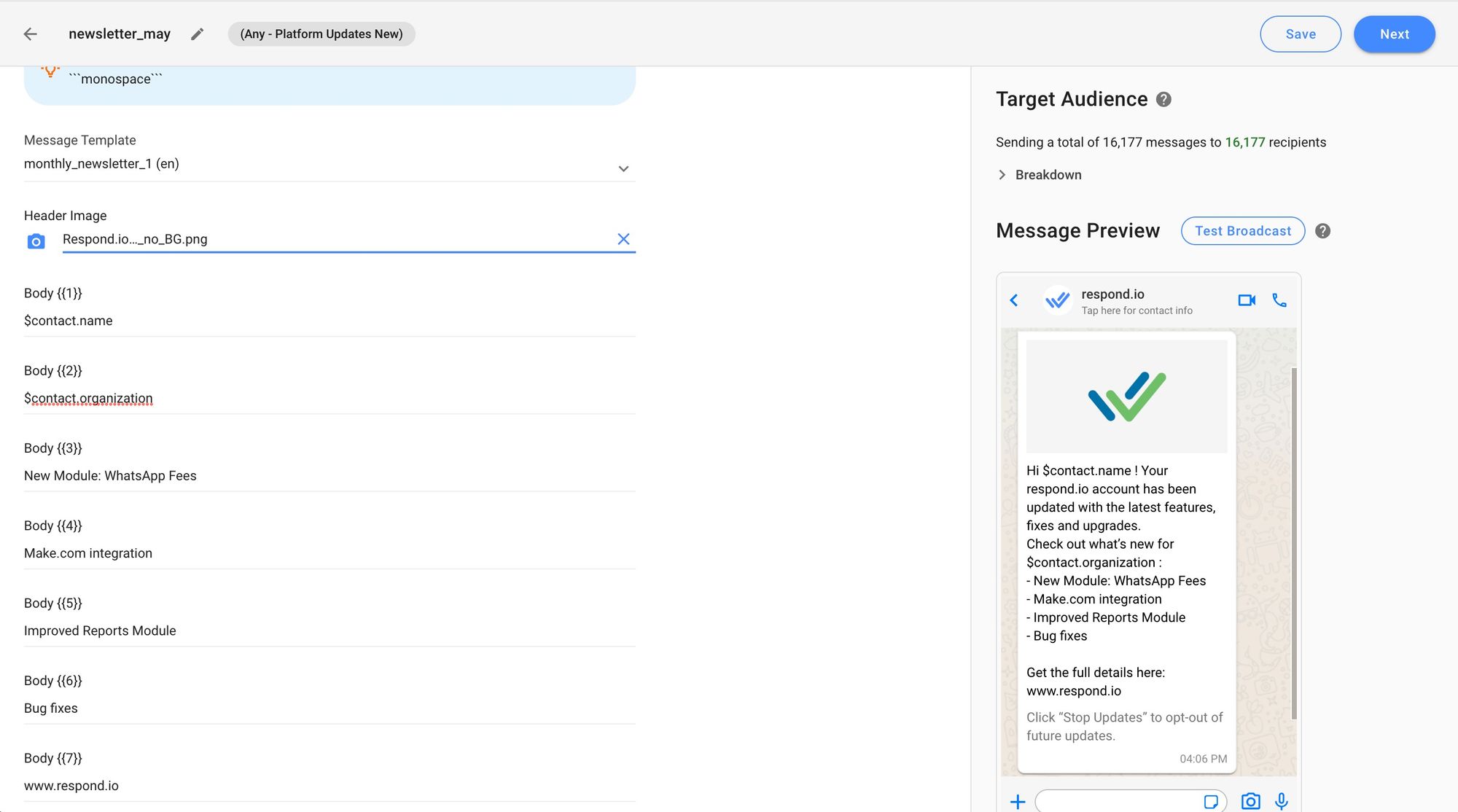
Note that WhatsApp requires businesses to obtain opt-in from customers before sending notifications. Spamming customers with unwanted messages can lead to them blocking you, impacting your phone number quality rating and overall customer experience.
WhatsApp does not deliver marketing template messages to WhatsApp users who have a United States phone number (a number composed of a +1 dialing code and a US area code).
Handle conversations automatically with AI Agents
Respond.io's AI Agents handle incoming WhatsApp conversations automatically — greeting customers, qualifying leads, answering FAQs and routing chats to the right team without human intervention. Ready-made templates like the Receptionist agent let you deploy in minutes, while custom AI Agents can be grounded in your specific business knowledge.

When a conversation exceeds the AI Agent's scope, it hands off to a human agent with full context intact. For more complex actions like CRM updates or CSAT surveys, AI Agents can trigger Workflows automatically — so human agents only handle what genuinely requires human judgment.
Integrate with external software and facilitate bookings and payments with Workflows and AI Agents
Respond.io integrates natively with Salesforce, HubSpot and Google Calendar, and supports webhooks, n8n, Zapier and Make for connecting your existing software stack. This means agents can retrieve updated contact profiles, create deals and sync conversation data with your CRM without leaving the platform.

Beyond data sync, AI Agents can facilitate bookings and payments directly within the conversation — collecting details, confirming availability and sending booking or payment links. Agents can also view a contact's upcoming and past Google Calendar meetings directly in the Inbox sidebar, matched by email, so they have full meeting context without leaving the conversation. This means customers get a seamless experience without being redirected to an external form or platform, and agents don't need to intervene unless something goes wrong.
Gain access to advanced reports and analytics
Respond.io’s Reports Module shows managers how quickly each agent responds, how long conversations take to resolve and which teams carry the heaviest workload, so they can coach agents and plan staffing around real WhatsApp volume.

Managers can use those insights to set response-time targets, spot queues that are slowing down and tighten routing or handoff rules before WhatsApp leads wait too long.
Start managing WhatsApp at scale with respond.io
If you're a mid-market B2C team handling high WhatsApp volume, respond.io gives you a way to centralize conversations, route chats, automate follow-up and monitor outcomes in one place. After setup, test inbound and outbound messaging, train agents on routing rules, tags and notes, and review Reports regularly to improve performance. If you're ready to run WhatsApp at scale with routing, automation and reporting, create a respond.io workspace and connect your WABA to start handling conversations in one place.
Turn conversations into customers with respond.io's official WhatsApp API ✨
Manage WhatsApp calls and chats in one place!
FAQs about respond.io’s WhatsApp inbox
Is respond.io an official WhatsApp Business Solution Provider?
Yes. Respond.io is an official WhatsApp Business Solution Provider (BSP), which means you can sign up for WhatsApp API access and manage your WhatsApp Business Account directly within the platform — no third-party BSP needed.
Is respond.io the right WhatsApp solution for a growing sales or support team?
Respond.io is the right fit for mid-market B2C sales and support teams that handle high WhatsApp volume across multiple agents and need routing, assignment and reporting in one place. If your team is hitting missed conversations, inconsistent follow-up or no visibility into agent performance on the WhatsApp Business App, respond.io's AI Agents and Workflows resolve this by automating routing and assignment and giving managers measurable resolution times. Not the right fit if you're a solo operator or low-volume team that only needs one number on the WhatsApp Business App.
Is respond.io's broadcast feature suitable for high-volume B2C outreach?
Yes, for mid-market B2C teams sending segmented outbound messages at scale. Respond.io's Broadcast feature supports large contact lists using approved WhatsApp message templates, with broadcast analytics to track delivery and open rates so teams can measure campaign performance and refine future sends. Not suitable if you don't have opt-in records for your contacts — WhatsApp monitors complaint rates and a high block rate will lower your phone number quality rating and restrict sending capacity.
Further Reading
Want to learn more about respond.io? Here are some readings that might interest you.


