
















 อิเล็กทรอนิกส์
 แฟชั่นและเครื่องแต่งกาย
 เฟอร์นิเจอร์
 เครื่องประดับและนาฬิกา
 กิจกรรมหลังเลิกเรียน
 กีฬา & ฟิตเนส
 ศูนย์ความงาม
 คลินิกทันตกรรม
 คลินิกการแพทย์
 บริการทำความสะอาดบ้านและสาวใช้
 การถ่ายภาพ & การบันทึกภาพ
 โชว์รูมรถยนต์
 ตัวแทนท่องเที่ยวและผู้ประกอบการทัวร์


TL;DR - CRM แบบหลายช่องทางไหนดีที่สุด?
CRM แบบหลายช่องทางที่ดีที่สุดขึ้นอยู่กับจุดโฟกัสหลักและปริมาณการสื่อสารของธุรกิจคุณ. แพลตฟอร์มสามารถจัดกลุ่มได้เป็นสามประเภทหลัก:
CRM แบบ Omnichannel สมัยใหม่สำหรับ B2C และการส่งข้อความปริมาณสูง: เหมาะที่สุดสำหรับการสื่อสาร B2C ปริมาณสูง มุ่งเน้นการผสานรวมแชท การโทร และวงจรชีวิตของลูกค้าแบบครบวงจรในระบบเดียว แพลตฟอร์มที่แนะนำ: Respond.io, Kommo, Trengo, Intercom.
CRM แบบ B2B ที่เน้นการขาย พร้อมส่วนเสริม Omnichannel: แพลตฟอร์มเหล่านี้ถูกสร้างขึ้นเพื่อรองรับ pipeline การขายแบบดั้งเดิม บัญชี และวงจรการขายที่ซับซ้อน แพลตฟอร์มที่แนะนำ: Salesforce, Hubspot, Zoho CRM.
แพลตฟอร์มสนับสนุน Omnichannel แบบดั้งเดิม: แพลตฟอร์มเหล่านี้เน้นฟังก์ชันการสนับสนุนและ service desk ที่เป็นระบบและมักอิงกับตั๋ว เหมาะสำหรับ: Zendesk, Freshdesk, Kustomer.
ธุรกิจใช้ระบบบริหารความสัมพันธ์ลูกค้า (CRM) เพื่อรวมศูนย์ข้อมูลลูกค้า — ตั้งแต่รายละเอียดการติดต่อจนถึงประวัติการโต้ตอบ — ไว้ในที่เดียว เครื่องมือเหล่านี้ช่วยปรับกระบวนการขาย การตลาด และการบริการลูกค้าให้เป็นระบบทั่วทั้งองค์กร
แต่เมื่อปัจจุบันลูกค้ามีปฏิสัมพันธ์ผ่านหลายจุดสัมผัส — ตั้งแต่อีเมลและแชทไปจนถึงโซเชียลมีเดียและโทรศัพท์ — CRM แบบดั้งเดิมมักตามไม่ทัน ในคู่มือนี้เราจะครอบคลุม:
CRM แบบ omnichannel คืออะไร (และต่างจาก CRM อื่นอย่างไร)
คุณสมบัติที่ต้องมีซึ่งกำหนดว่าเป็น omnichannel CRM แท้จริง
สามประเภทของ CRM แบบ omnichannel
โซลูชัน CRM ชั้นนำสำหรับการมีส่วนร่วมแบบ omnichannel
ตัวอย่างการใช้งาน omnichannel CRM ในโลกจริง
CRM แบบ omnichannel คืออะไร?
CRM แบบ omnichannel (หรือ แพลตฟอร์ม omnichannel) เชื่อมทุกจุดสัมผัสของลูกค้าข้ามช่องทางการส่งข้อความหลายช่องทางเข้าไว้ในระบบเดียว เพื่อให้ทีมงานมีบริบทครบถ้วนและไม่หลุดจากการติดตามการสนทนาหรือการโต้ตอบกับลูกค้า
โดยทั่วไปแล้ว CRM ถูกออกแบบรอบช่องทางหลักไม่กี่ช่อง เช่น อีเมลและโทรศัพท์. แต่เมื่อการค้าอิเล็กทรอนิกส์และการส่งข้อความธุรกิจเติบโต พฤติกรรมลูกค้าก็เปลี่ยนไป
พวกเขาสนทนากับธุรกิจผ่านแอปและช่องทางส่งข้อความหลายช่องทาง
พวกเขาคาดหวังการตอบกลับที่รวดเร็ว
เพื่อแก้ไขการสื่อสารที่กระจัดกระจาย แพลตฟอร์ม omnichannel จึงเกิดขึ้นมาเป็นระบบที่รวมข้อมูลลูกค้าจากแชท โซเชียล เสียง และอีเมลไว้ในที่เดียว ระบบ CRM แบบดั้งเดิมก็พัฒนาไปพร้อมกันเพื่อยอมรับแนวทางแบบรวมศูนย์นี้ด้วยเช่นกัน
Omnichannel vs. multichannel CRMs
อย่าสับสนระหว่าง Omnichannel กับ Multichannel เราจะอธิบายความแตกต่างของสองแนวคิดนี้และเหตุผลว่าทำไมจึงสำคัญต่อคุณ
แง่มุม | CRM หลายช่องทาง | CRM แบบ Omnichannel |
ตรรกะของช่องทาง | แต่ละช่องทางทำงานแยกจากกัน | ช่องทางถูกเชื่อมต่อและรวมเป็นหนึ่งเดียว |
มุมมองข้อมูล | ข้อมูลถูกแยกเก็บไว้ในหลายที่ | ข้อมูลถูกรวมเป็นระเบียนลูกค้าเดียว |
ประสบการณ์ของเอเจนต์ | เอเจนต์ต้องสลับระบบเพื่อรวบรวมบริบท | เอเจนต์ทำงานจากกล่องขาเข้าทีมเดียวที่มีบริบทครบถ้วน |
เส้นทางของลูกค้า | ลูกค้ามักต้องอธิบายซ้ำเมื่อสลับช่องทาง | การสนทนาเป็นไปอย่างราบรื่น; ลูกค้าสลับช่องทางได้ตามธรรมชาติ |
การทำงานอัตโนมัติ | แยกส่วน — กฎการทำงานอัตโนมัติจะอยู่ในช่องทางเดียว | รวมศูนย์และทรงพลัง; ทริกเกอร์ที่ทำงานจากการโต้ตอบใดๆ |
การปรับขนาด | ยากต่อการปรับขนาด | สามารถขยายได้ง่ายในฐานะระบบที่เชื่อมต่อกัน |
1. การรวมช่องทาง & ข้อมูล
Multichannel: ช่องทางมีอยู่เป็นกลุ่มแยกและไม่สื่อสารกัน. ข้อมูลถูกแยกและจัดเก็บไว้ในหลายที่.
Omnichannel: ช่องทางถูกเชื่อมต่อและไหลรวมเป็นไทม์ไลน์เดียวและระเบียนลูกค้าเดียว
2. ประสบการณ์ของเอเจนต์
Multichannel: เอเจนต์ต้องสลับระหว่างช่องทางเพื่อรวบรวมประวัติการโต้ตอบ.
Omnichannel: เอเจนต์ทำงานจากกล่องขาเข้าทีมเดียวที่มีบริบทครบถ้วน ช่วยให้ตอบกลับได้เร็วขึ้น.
3. ประสบการณ์ของลูกค้า
Multichannel: เมื่อลูกค้าย้ายไปยังช่องทางใหม่ มักต้องอธิบายซ้ำ
Omnichannel: ลูกค้าสามารถสลับช่องทางได้อย่างเป็นธรรมชาติ โดยไม่ต้องเริ่มเรื่องใหม่.
4. การทำงานอัตโนมัติ & ความสามารถในการขยายตัว
Multichannel: ระบบอัตโนมัติถูกแยกเป็นกลุ่ม (กฎอยู่เฉพาะภายในช่องทางหนึ่ง) จึงไม่สามารถเห็นภาพรวมของเส้นทางลูกค้าได้ มันยากต่อการขยาย
Omnichannel: ระบบอัตโนมัติทรงพลังขึ้นอย่างทวีคูณ เพราะเวิร์กโฟลว์จะถูกเรียกใช้งานจากการโต้ตอบใดๆ ในช่องทางใดก็ได้. มันทำงานเป็นระบบเชื่อมต่อเดียวที่ขยายตัวได้อย่างราบรื่น.
ประโยชน์ของ CRM แบบ Omnichannel
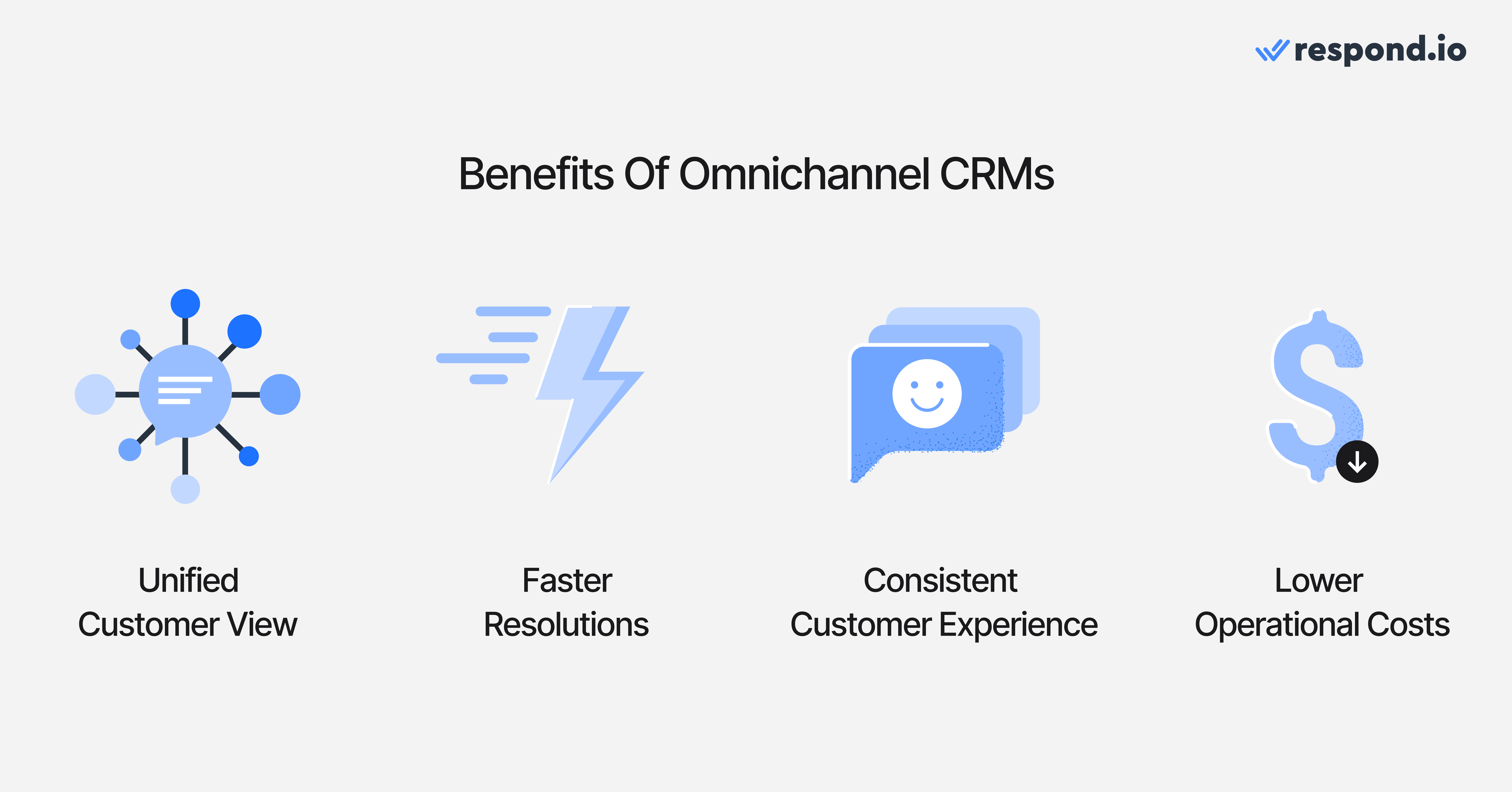
เราได้อธิบายคุณค่าหลักของการมี CRM แบบ Omnichannel ไปแล้ว แต่ยังมีประโยชน์อื่น ๆ อีก นี่คือเหตุผลที่ CRM แบบ Omnichannel เป็นสิ่งจำเป็นสำหรับธุรกิจของคุณ.
บริบทครบถ้วนในภาพรวม: ให้เอเจนต์มีแพลตฟอร์มเดียวในการจัดการการโต้ตอบกับลูกค้าทั้งหมด มอบบริบทครบถ้วน
การแก้ปัญหาที่รวดเร็วขึ้น: โดยไม่ต้องสลับเครื่องมือหรือค้นหาบริบทในหลายที่ ทีมสามารถตอบ แก้ไขปัญหา และปิดการขายได้รวดเร็วยิ่งขึ้น
ประสบการณ์ลูกค้าที่สอดคล้อง: รับประกันได้จากการสร้างแหล่งความจริงเดียวสำหรับข้อมูลลูกค้าและกฎการโต้ตอบข้ามทุกจุดสัมผัส
ลดต้นทุนการดำเนินงาน: เพราะความพยายามและเวลาที่ใช้ในการดำเนินงานลดลง ผลผลิตของทีมจึงเพิ่มขึ้น ผลลัพธ์คือ ต้นทุนการดำเนินงานก็ลดลงด้วย
เปลี่ยนการสนทนากับลูกค้าให้เป็นการเติบโตของธุรกิจด้วย respond.io. ✨
จัดการการโทร แชท และอีเมลไว้ในที่เดียว!
วิธีเลือก omnichannel CRM ที่ดีที่สุด
นี่คือแปดสิ่งสำคัญที่ต้องพิจารณาเมื่อเลือก omnichannel CRM
1. การสนับสนุนแบบ Omnichannel ที่แท้จริงครอบคลุมทุกช่องทางการสื่อสาร
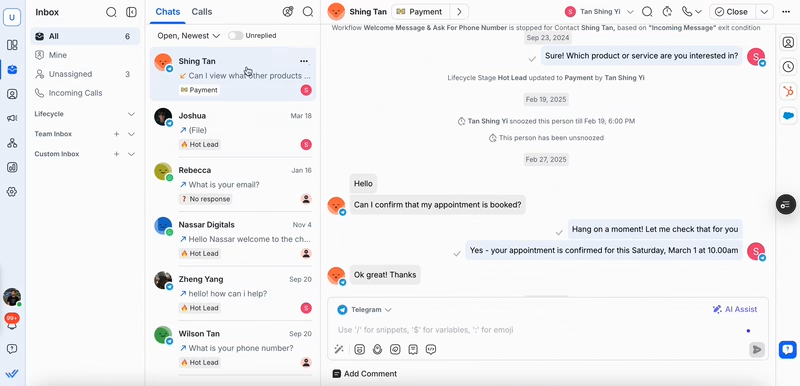
Omnichannel CRM ที่ดีจะนำบทสนทนาลูกค้าทั้งหมดเข้ามาใน inbox เดียว — WhatsApp, Instagram, TikTok, Telegram, อีเมล, SMS และแม้แต่การโทรเสียง ที่สำคัญที่สุด แพลตฟอร์มที่คุณเลือกควรให้คุณ รวมการสนทนาของผู้ติดต่อ จากหลายช่องทางเป็นเรื่องราวลูกค้าเดียว เพื่อให้เอเจนต์มีบริบทที่ไม่ถูกแบ่งและลูกค้าไม่ต้องเล่าเรื่องซ้ำ
2. การรวมเข้ากับเทคสแต็กที่มีอยู่ของคุณ
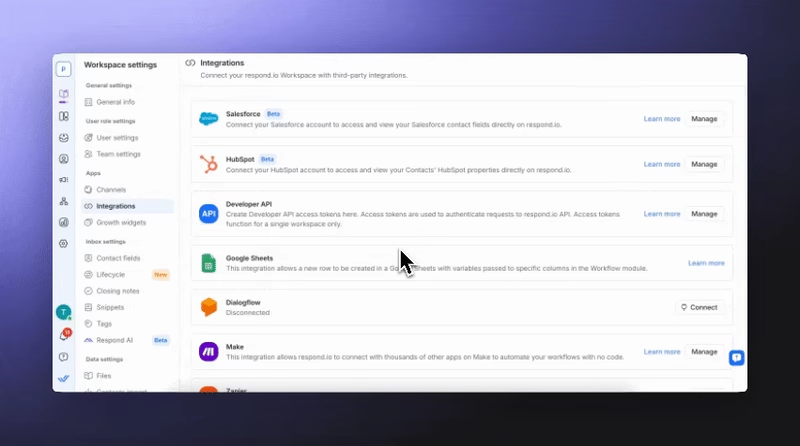
ถ้า CRM แบบ Omnichannel ใหม่ของคุณไม่สามารถเชื่อมต่อกับเทคสแต็กที่มีอยู่ได้ มันจะไร้ประโยชน์ นั่นคือเหตุผลที่ CRM ควรผสานรวมกับเครื่องมือธุรกิจยอดนิยม เช่น Google Sheets หรือแม้แต่ CRM อื่นๆ เช่น Salesforce และ Hubspot.
3. การติดตามและจัดการวงจรชีวิตของลูกค้า
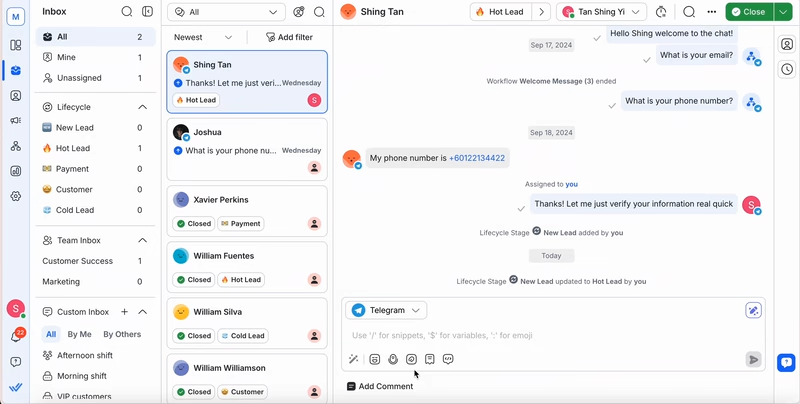
เลือกโซลูชันที่ช่วยให้คุณให้คะแนน จัดลำดับความสำคัญ และแบ่งกลุ่ม leads ตามเจตนา การมีส่วนร่วม และขั้นตอนของช่องทาง สิ่งนี้ช่วยให้ทีมขายมุ่งเน้นไปที่ prospects ที่มีแนวโน้มจะปิดการขายมากที่สุด ลดงานติดตามด้วยมือและรับประกันว่าไม่มีโอกาสหลุดรอด
4. การวิเคราะห์เชิงลึกและข้อมูลเชิงลึก
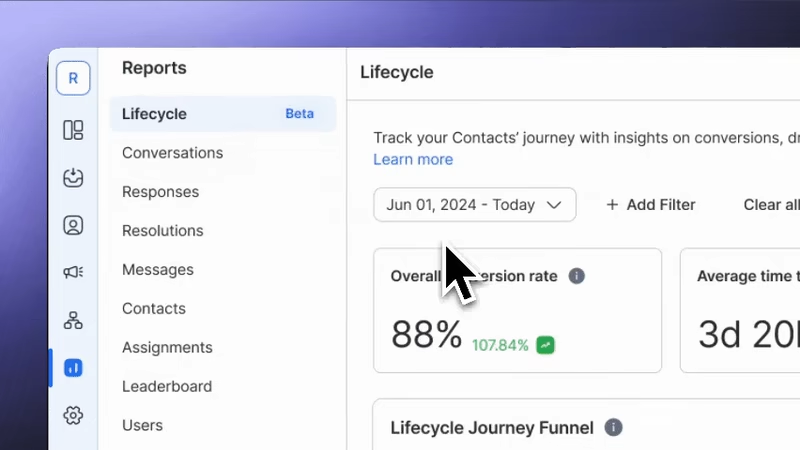
แดชบอร์ดและรายงานเรียลไทม์ช่วยให้ทีมวัดประสิทธิภาพข้ามทุกช่องทางได้ คุณสามารถติดตามประสิทธิภาพของ AI ตรวจสอบผลผลิตของเอเจนต์ การระบุแหล่งที่มาของโฆษณาและผลการทำงาน และปรับกลยุทธ์การขายให้เหมาะสม
นอกจากนี้ CRM แบบ Omnichannel จะได้รับประโยชน์จาก Meta Conversions API (CAPI) เพราะช่วยให้โฆษณาของคุณทำงานได้ดีขึ้น มันส่งหลักฐานการขายและลีดที่เชื่อถือได้จากแอปแชท (เช่น WhatsApp) ไปยัง Meta โดยตรง ช่วยแก้ปัญหาการติดตามที่เกิดจากการตั้งค่าเบราว์เซอร์ นั่นหมายความว่าโฆษณาของคุณเข้าถึงคนที่ใช่ และงบของคุณถูกใช้ได้อย่างมีประสิทธิภาพมากขึ้น.
5. เอเจนต์ AI อิสระ
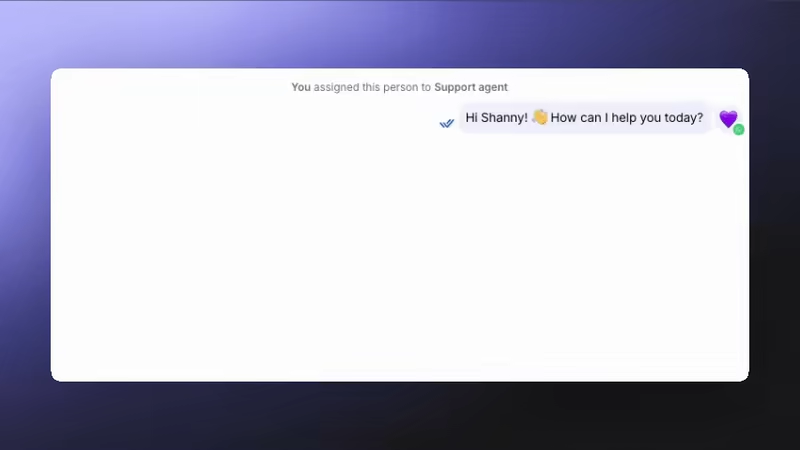
CRM แบบ Omnichannel ชั้นนำมักนำ AI มาใช้ในการจัดการข้อมูลลูกค้าและการสื่อสาร นอกเหนือจากแชทบอทพื้นฐาน ควรเลือก CRM แบบ Omnichannel ที่รองรับงานขั้นสูงที่ขับเคลื่อนด้วย AI ตัวอย่างเช่น คัดกรองลูกค้าเป้าหมาย ส่งลิงก์ชำระเงินหรือการจอง และอัปเดตรายละเอียดลูกค้า
6. ฟีเจอร์การฝึก AI
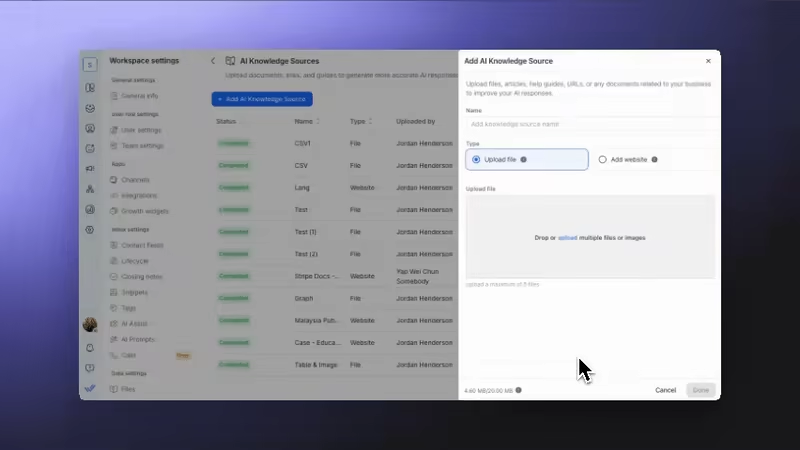
เลือก CRM ที่ AI ของระบบสามารถเรียนรู้จากข้อมูลธุรกิจของคุณเอง — เช่น เอกสาร เว็บไซต์ คำถามที่พบบ่อย และฐานความรู้ สิ่งนี้ทำให้ AI ให้คำตอบที่ถูกต้องและสอดคล้องกับแบรนด์ สะท้อนโทนเสียง ความเชี่ยวชาญ และนโยบายของบริษัทในทุกช่องทาง
7. การทำงานอัตโนมัติของเวิร์กโฟลว์ขั้นสูง
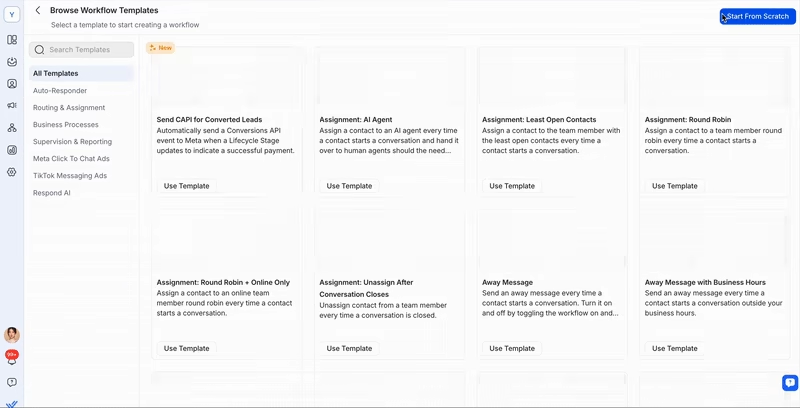
CRM ที่ดีที่สุดมีตัวสร้างออโตเมชันแบบภาพเพื่อการอัตโนมัติที่ฉลาดและรับรู้บริบท เพื่อการขยายสเกลอย่างมีประสิทธิภาพ ตั้งแต่การมอบหมายแชทอัตโนมัติและกระตุ้นการติดตาม ไปจนถึงการอัปเดตวงจรชีวิตและคำขอแบบสำรวจ ระบบอัตโนมัติช่วยรักษาความสม่ำเสมอของเวิร์กโฟลว์และปลดปล่อยเอเจนต์จากงานซ้ำซาก
8. คุณภาพการสนับสนุนลูกค้าและความน่าเชื่อถือของแพลตฟอร์ม
แม้แต่ CRM ที่ล้ำหน้าที่สุดก็ขึ้นอยู่กับความน่าเชื่อถือของมัน มองหา uptime ที่พิสูจน์ได้ ประสิทธิภาพที่แข็งแกร่ง และการสนับสนุนลูกค้าหลายภาษาที่ตอบสนองได้ แพลตฟอร์มที่เชื่อถือได้ทำให้การสนทนา การซิงค์ข้อมูล และออโตเมชันทำงานได้อย่างราบรื่น เพื่อไม่ให้ธุรกิจของคุณพลาดลีดหรือยอดขาย
10 อันดับ CRM แบบ Omnichannel ที่ดีที่สุด
การเลือก CRM แบบ Omnichannel ที่เหมาะสมอาจเป็นเรื่องยาก — ตลาดมีตัวเลือกมากมายที่ออกแบบมาสำหรับเป้าหมายธุรกิจเฉพาะทาง เพื่อช่วยให้การตัดสินใจง่ายขึ้น เราวิเคราะห์แผนยอดนิยมจาก 10 CRM แบบ Omnichannel ชั้นนำ
หมวดหมู่. | จุดเน้นหลัก & เวิร์กโฟลว์หลัก | แพลตฟอร์ม | ตัวเลือกที่แนะนำ |
CRM แบบ Omnichannel สมัยใหม่สำหรับ B2C และการส่งข้อความปริมาณสูง | มุ่งเน้นการส่งข้อความ การโทร และวงจรชีวิตของลูกค้าในรูปแบบรวมศูนย์. แพลตฟอร์มสมัยใหม่เหล่านี้เหมาะสำหรับ B2C และการสื่อสารปริมาณมาก | Respond.io, Kommo, Trengo, Intercom | Respond.io |
CRM แบบ B2B ที่เน้นการขาย พร้อมส่วนเสริม Omnichannel | เน้นตลาด B2B และขับเคลื่อนโดยฝ่ายขาย. เวิร์กโฟลว์ถูกสร้างขึ้นโดยอิงกับท่อขาย (pipeline), บัญชี และวงจรการขายแบบดั้งเดิม | Salesforce, HubSpot, Zoho CRM | Salesforce |
แพลตฟอร์มสนับสนุน Omnichannel แบบดั้งเดิม | มุ่งเน้นหลักไปที่การสนับสนุนแบบ Omnichannel แบบดั้งเดิมและฟังก์ชันของศูนย์บริการ. | Zendesk, Freshdesk, Kustomer | Zendesk |
เราจะวิเคราะห์ประเด็นสำคัญ เช่น ช่องทางที่รองรับ ความสามารถของ CRM และอื่นๆ. เราจะพูดถึงข้อดี ข้อเสีย และราคาเฉพาะ เพื่อช่วยให้คุณเลือกตัวที่เหมาะสมกับความต้องการของคุณ.
หมวดหมู่ 1: CRM แบบ Omnichannel สมัยใหม่สำหรับ B2C และการส่งข้อความปริมาณสูง
CRM Omnichannel สมัยใหม่ทำได้ดีเมื่อรองรับการส่งข้อความปริมาณมาก การโทรหลายช่องทาง และการจัดการวงจรชีวิตลูกค้าแบบครบวงจร. แพลตฟอร์มที่ดีที่สุดผสานระบบอัตโนมัติขั้นสูง ความสามารถด้าน AI และการวิเคราะห์เพื่อช่วยให้ทีมขยายการมีส่วนร่วมอย่างมีประสิทธิภาพ.
เราแนะนำ Respond.io สำหรับความสามารถในการขยายสเกล การรองรับช่องทางแชทและการโทรที่สำคัญทั้งหมด และความสามารถด้าน AI
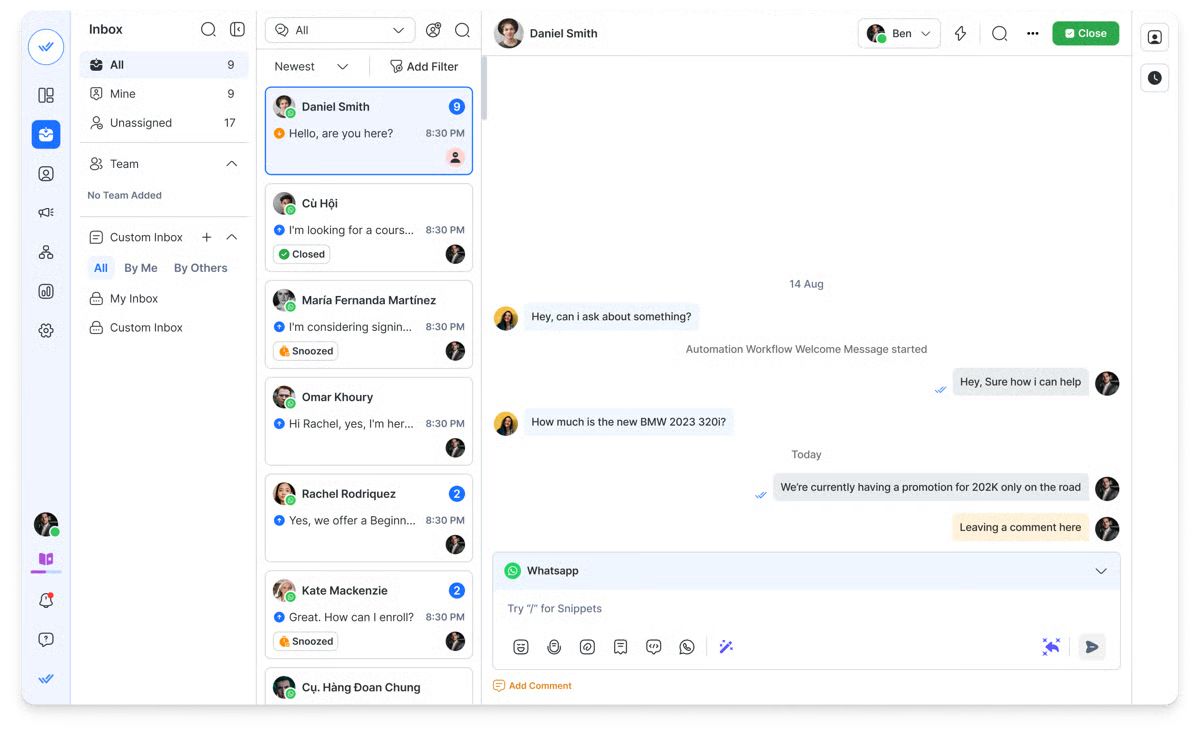
Respond.io - ตัวเลือกที่ดีที่สุดในการขยายธุรกิจด้วยเอเจนต์ AI แชท และการโทร
เหมาะสำหรับ:
แบรนด์ B2C ที่กำลังเติบโตและต้องการการส่งข้อความและการโทรแบบ Omnichannel พร้อมฟีเจอร์ AI ขั้นสูง ระบบอัตโนมัติ และการวิเคราะห์
ความคิดเห็นของลูกค้าและคะแนนของแพลตฟอร์ม
ลูกค้ายกย่อง Respond.io สำหรับอินเทอร์เฟซที่ใช้งานง่าย การผสานรวมแบบ omnichannel ฟีเจอร์ออโตเมชันที่แข็งแกร่ง และการสนับสนุนที่ยอดเยี่ยม อย่างไรก็ตาม ผู้ใช้ระบุข้อด้อย เช่น ราคาและข้อจำกัดในฟีเจอร์ขั้นสูงบางรายการ.
G2 rating: 4.8/5
Capterra rating: 4.6/5
ฟีเจอร์
ช่องทาง: รองรับช่องทางอย่าง WhatsApp, Facebook Messenger, Instagram, Viber, Telegram, TikTok, WeChat, SMS, อีเมล และการโทรผ่าน WhatsApp, Telnyx และ n8.
การผสานรวม: ซิงค์ข้อมูลกับ Salesforce, Hubspot, Zapier, Make, Google Sheets และอีกมากมาย.
แดชบอร์ดและรายงาน: วัดประสิทธิภาพทีม ผลกระทบของ AI และประสิทธิภาพแคมเปญโฆษณาเพื่อหาจุดปรับปรุงและเพิ่มประสิทธิภาพการดำเนินงาน.
Lifecycle: ติดตามและจัดการลีดในช่องทางการขาย.
ความสามารถด้าน AI: เอเจนต์ AI สามารถจัดการแชท ส่งลิงก์รับชำระเงิน อัปเดตรายละเอียดผู้ติดต่อ สรุปการสนทนา ตอบข้อความเสียง อ่านภาพและไฟล์ PDF และอื่นๆ
การอัตโนมัติของเวิร์กโฟลว์: ใช้ ตัวสร้างออโตเมชัน เพื่อเก็บลีด ส่งการติดตาม จัดเส้นทางข้อความ และมอบหมายงาน
ข้อดี
รองรับช่องทางการส่งข้อความและช่องทางเสียงมากกว่าที่ CRM แบบ omnichannel ส่วนใหญ่รองรับ
รวมเข้ากับ Hubspot และ Salesforce โดยตรง
ผสานรวมกับ CRM อื่นๆ และเครื่องมืออีกนับพันผ่าน Zapier และ Make
เอเจนต์ AI มีความก้าวหน้ามากเมื่อเทียบกับตัวเลือกอื่นๆ ในรายการ
ใช้บทบาท AI ที่สร้างไว้ล่วงหน้าหรือฝึกเอเจนต์ AI ที่ปรับแต่งได้ด้วยข้อมูลของคุณจากไฟล์ PDF เว็บไซต์ หรือแหล่งข้อมูลภายใน
เปลี่ยนเส้นทางการสนทนาไปยังตัวแทนมนุษย์ได้อย่างราบรื่น หรือให้ตัวแทนมนุษย์เข้ารับช่วงได้ทุกเมื่อ
สร้างสรุปการสนทนา หรือการโทรแบบอัตโนมัติ
ฟีเจอร์ระดับองค์กรประกอบด้วยพื้นที่ทำงานหลายแห่ง, webhooks และ SSO สำหรับการควบคุมขั้นสูง
การผสมผสานระหว่างการสนับสนุนมนุษย์หลายภาษา 24/5 และการช่วยเหลือจาก AI 24/7 ทำให้มีการครอบคลุมปัญหาสำคัญเสมอ ไม่ว่าจะเป็นโซนเวลาใดหรือความซับซ้อนของปัญหา
อัตรา uptime 99.999% หมายความว่า Respond.io มีความเสถียรสูง ช่วยให้คุณไม่เสียความพึงพอใจของลูกค้าหรือยอดขายจากการหยุดทำงานของแพลตฟอร์ม
ข้อเสีย
การตั้งค่าและการปรับแต่งเริ่มต้นอาจใช้เวลาและต้องการความเชี่ยวชาญทางเทคนิคบ้าง
ประสิทธิภาพของฟีเจอร์ที่ขับเคลื่อนด้วย AI ขึ้นอยู่กับคุณภาพของข้อมูลการฝึกและต้องมีการตรวจสอบอย่างต่อเนื่องเพื่อให้มั่นใจในความถูกต้อง.
ราคา
แผน Growth เริ่มต้นที่ $159 ต่อเดือน สำหรับ 10 ผู้ใช้ รวมเวิร์กโฟลว์ไม่จำกัด เครดิต AI ไม่จำกัด การรายงานขั้นสูง และการช่วยเหลือการเริ่มต้นใช้งานผ่านแชทหรือโทรศัพท์.
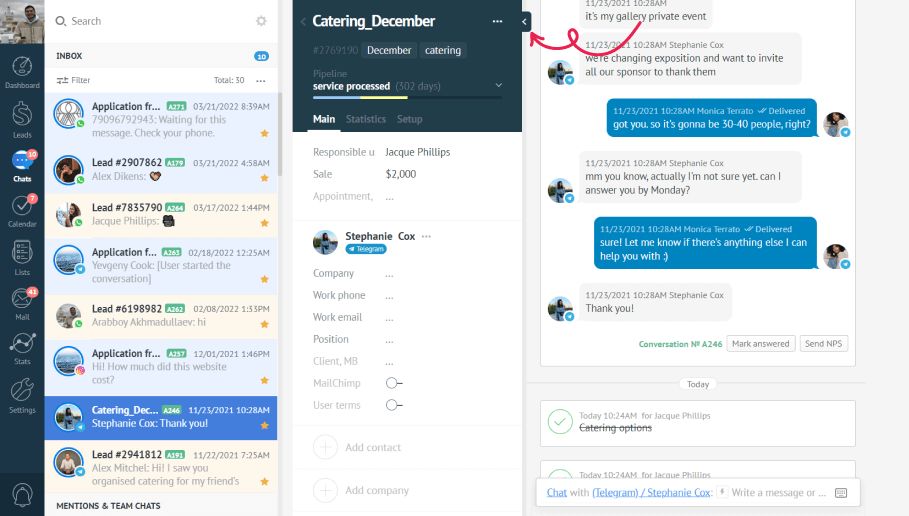
แพลตฟอร์ม Omnichannel 2: Kommo - CRM-first conversational sales
เหมาะที่สุดสำหรับ:
ธุรกิจขนาดเล็กถึงกลาง (SMBs) และทีมขายที่ต้องการโซลูชัน CRM เป็นหลัก ซึ่งเชี่ยวชาญด้านการจัดการช่องทางการขายแบบภาพและการอัตโนมัติในการเก็บ/ดูแลลูกค้าเป้าหมายผ่านแอปส่งข้อความ
ความคิดเห็นของลูกค้าและคะแนนของแพลตฟอร์ม
Kommo ได้รับคำชมเรื่องความคุ้มค่าและใช้งานง่าย โดยผู้รีวิวชี้ถึงการออกแบบที่เข้าใจง่าย ฟีเจอร์จัดการลีดที่แข็งแกร่ง และการสนับสนุนลูกค้าที่ดี. อย่างไรก็ตาม ความคิดเห็นชี้ถึงข้อจำกัดด้านฟังก์ชัน: แพลตฟอร์มได้คะแนนต่ำกว่าในด้านการปรับแต่ง (และรายงานในตัวอาจพื้นฐาน) รวมถึงความกังวลเรื่องการรองรับผู้ใช้บนมือถือ.
G2 rating: 3.8/5
Capterra rating: 4.3/5
ฟีเจอร์
Channels: แอพส่งข้อความหลัก (WhatsApp, Instagram, Telegram เป็นต้น), อีเมล และโทรศัพท์/SMS (ผ่าน Twilio/RingCentral).
Integrations: เชื่อมต่อกับ Zapier, Make, Shopify, Zendesk, และ Stripe; ไม่ได้รวมแบบเนทีฟกับ CRM ใหญ่ๆ เช่น Salesforce/HubSpot.
แดชบอร์ด & รายงาน: แดชบอร์ดปรับแต่งได้พร้อมวิดเจ็ตเรียลไทม์เพื่อติดตาม KPI, Lead Distribution, ปริมาณข้อความ และเวลาเฉลี่ยในการตอบ
ความสามารถด้าน AI: AI Agent จัดการการมีส่วนร่วม การคัดกรองลีด คำถามที่พบบ่อย (โดยใช้ข้อมูลที่อัปโหลด) และการแนะนำสินค้า AI Copilot tools ปรับโทนเสียง สรุป และแนะนำคำตอบ
การอัตโนมัติของเวิร์กโฟลว์: ตัวสร้างแบบภาพ (Salesbot) สร้างบอทซับซ้อนสำหรับการทักทาย เก็บข้อมูล นัดหมาย และการชำระเงิน Digital Pipeline จะทำให้การกระทำต่างๆ เป็นแบบอัตโนมัติตามสถานะของลีด
ข้อดี
Salesbot แบบไม่ต้องเขียนโค้ดและ Digital Pipeline ช่วยอัตโนมัติการคัดกรองและการดูแลลีดผ่านแชทได้อย่างมีประสิทธิภาพ
แพลตฟอร์มมักถูกยกให้เป็นตัวเลือกที่คุ้มค่า โดยเฉพาะสำหรับธุรกิจขนาดเล็ก
อินเทอร์เฟซแบบภาพที่เรียบง่ายช่วยให้เรียนรู้ได้ง่ายและใช้งานได้เร็วสำหรับทีม
ช่วยจัดโครงสร้างกรวยการขายได้ดี ช่วยให้ทีมติดตามลีดและป้องกันการสูญหายของการติดต่อ
ข้อเสีย
ขาดความสามารถในการปรับแต่งเชิงลึกสำหรับรายงานและปลั๊กอินแบบกำหนดเอง.
ขาดการรวมแบบเนทีฟกับ CRM ขององค์กรรายใหญ่ เช่น Salesforce หรือ Hubspot
การสื่อสารทางอีเมลอาจถูกเก็บแยกจากแชทแอป ส่งผลให้ประวัติการติดต่อของลูกค้าอาจถูกแบ่งส่วน
อินเทอร์เฟซไม่ทันสมัยเท่ากับแพลตฟอร์มที่เน้นแชทล้วนรุ่นใหม่กว่า
การสนับสนุนลูกค้ามักมีเฉพาะในเวลาทำการ ซึ่งอาจส่งผลต่อทีมขายทั่วโลก
ราคา
แผน Kommo Advanced มีค่าใช้จ่าย 25 ดอลลาร์สหรัฐต่อผู้ใช้/เดือน แต่ต้องมีสัญญาขั้นต่ำหกเดือนและชำระล่วงหน้ารวม 150 ดอลลาร์ ไม่มีตัวเลือกการเรียกเก็บรายเดือน ค่าใช้จ่ายเพิ่มเติมที่อาจเกิดขึ้นมักจำกัดเฉพาะค่าบริการจากบุคคลที่สาม เช่น ค่าบริการต่อการสนทนาที่ Meta เรียกเก็บเมื่อใช้ WhatsApp Business API.
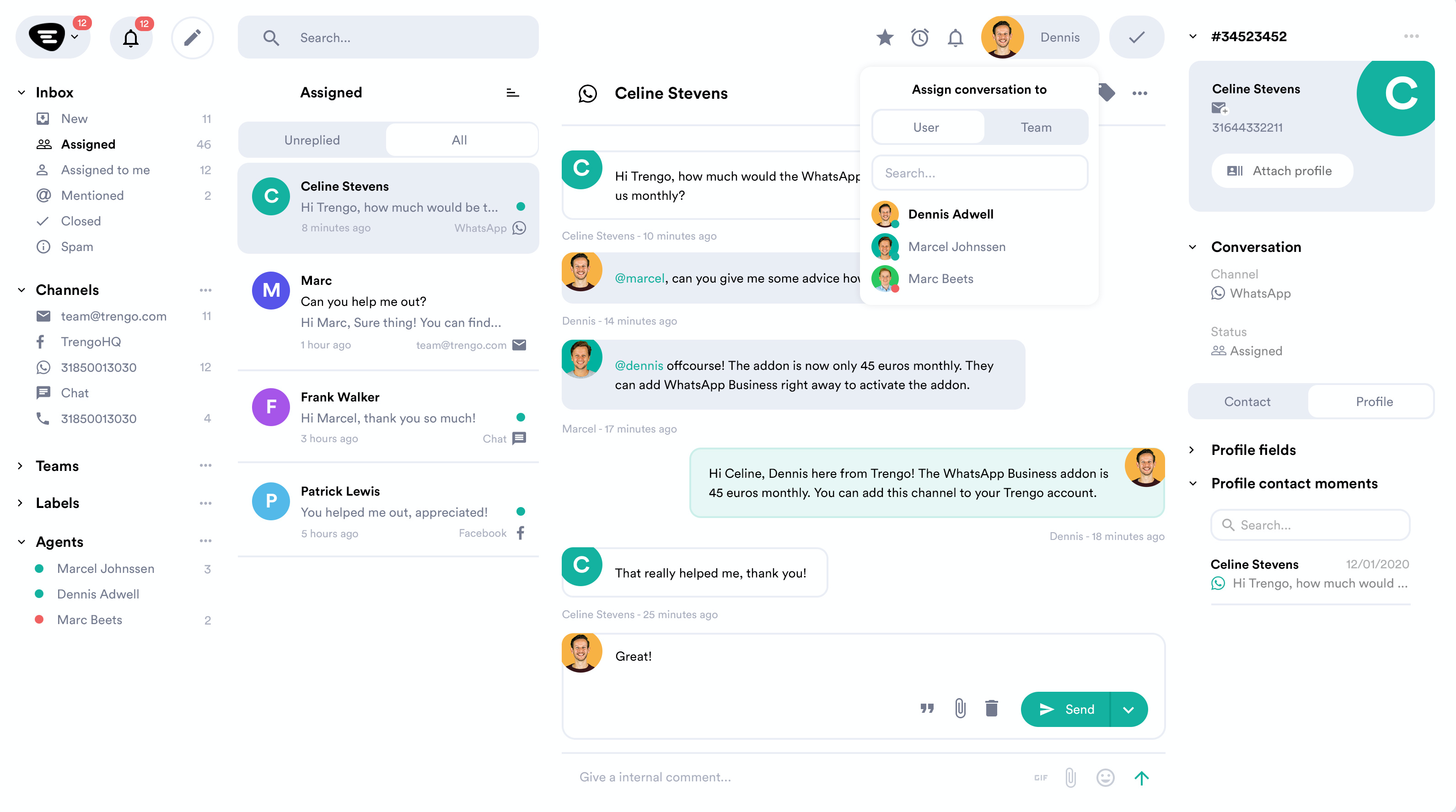
CRM แบบ Omnichannel 3: Trengo - ศูนย์สนับสนุนการสนทนาแบบครบวงจร
เหมาะสำหรับ:
ธุรกิจระดับกลางที่ต้องการรวมการสื่อสารด้านการสนับสนุน (รวมอีเมล แชท และการโทรเสียง) ไว้ในกล่องจดหมายทีมเดียว
ความคิดเห็นของลูกค้าและคะแนนของแพลตฟอร์ม
Trengo ได้รับคำชื่นชมเรื่องความง่ายในการใช้งาน การสนับสนุนลูกค้า และความสามารถหลักในการรวมการสื่อสารทั้งหมด (รวมอีเมลและเสียง) เข้าเป็นกล่องขาเข้าทีมเดียว อย่างไรก็ตาม ข้อวิจารณ์บ่อยครั้งชี้ว่าแพลตฟอร์มมีราคาแพงเมื่อเทียบกับทางเลือกอื่น มีความกังวลเรื่องการซิงค์ inbox ข้อจำกัดในฟีเจอร์/การวิเคราะห์ขั้นสูง และปัญหาเกี่ยวกับแอปมือถือและข้อกำหนดจำนวนผู้ใช้ขั้นต่ำ
G2 rating: 4.3/5
Capterra rating: 4.1/5
ฟีเจอร์
Channels: รวมทุกช่องทาง เช่น WhatsApp, อีเมล, แชทสด, เสียง/โทรศัพท์, SMS, Facebook, Instagram, Twitter และ Telegram
Integrations: เชื่อมต่อกับเครื่องมือภายนอกหลัก เช่น Shopify, Zendesk, Salesforce, Hubspot และ Zapier เพื่อซิงก์ข้อมูลและเปิดใช้งานการกระทำต่างๆ
แดชบอร์ดและรายงาน: แดชบอร์ดที่ปรับแต่งได้สำหรับติดตาม KPI รวมรายงานโดยละเอียดเกี่ยวกับประสิทธิภาพทีม ปริมาณการสนทนา และการโต้ตอบกับลูกค้า
ความสามารถด้าน AI: AI Agent (HelpMate) ให้การตอบอัตโนมัติและคำตอบที่แนะนำเพื่อเร่งการทำงานของเอเจนต์ AI Journeys ช่วยอัตโนมัติการสนทนาและเวิร์กโฟลว์ข้ามหลายช่องทาง AI Actions ช่วยให้เอเจนต์ AI เรียกใช้ API ภายนอก (GET, POST ฯลฯ) สำหรับงานเช่นการตรวจสอบสถานะคำสั่งซื้อ
การอัตโนมัติของเวิร์กโฟลว์: ใช้ Rules และ Automation เพื่อจัดการงานซ้ำๆ ขั้นพื้นฐาน (เช่น การตอบอัตโนมัติ การจัดเส้นทางการสนทนา) และ “AI Journeys” ขั้นสูงสำหรับเวิร์กโฟลว์ที่ซับซ้อน หลายขั้นตอน และหลายช่องทาง.
ข้อดี
ฟีเจอร์การทำงานร่วมกันภายในทีมที่แข็งแกร่ง เช่น คอมเมนต์ภายในและการมอบหมาย ช่วยให้การประสานงานเรื่องปัญหาลูกค้าง่ายและมีประสิทธิภาพ
ฐานออโตเมชันทรงพลังรวม Auto Replies, Quick Replies และกฎเพื่อจัดการเวิร์กโฟลว์ซ้ำๆ พื้นฐาน
ได้รับคำชมอย่างสม่ำเสมอในด้านการสนับสนุนที่เป็นกันเอง มีประสิทธิภาพ และช่วยได้ดี
ความยืดหยุ่นในการเรียกเก็บเงินมีทั้งแบบรายเดือนและแบบลดราคาสำหรับการจ่ายรายปี
ข้อด้อย
โมเดลราคามักถูกวิจารณ์ว่ามีราคาสูงเมื่อเทียบกับคู่แข่งที่มีฟีเจอร์/ความสามารถมากกว่า
ข้อกำหนดผู้ใช้ขั้นต่ำสูง (มักเริ่มที่ 10 คนขึ้นไป)
การคิดค่าบริการอิงตามจำนวนการสนทนาที่กำหนดไว้ ถ้าเกินจะมีค่าบริการเพิ่ม ซึ่งอาจทำให้ค่าใช้จ่ายรายเดือนไม่คงที่
ฟีเจอร์ AI/Chatbot และการผสานรวมบางอย่างมักจำกัดในแผน Pro และ Enterprise ที่มีราคาแพงกว่า
ผู้ใช้รายงานปัญหาการซิงค์ inbox และความเสถียรของแอปมือถือ
ราคา
แผน Trengo Pro เป็นแพ็กเริ่มต้นประมาณ $695 ต่อเดือน (เรียกเก็บรายเดือน, เทียบค่า USD) ซึ่งรวม 20 ที่นั่งผู้ใช้และโควต้าการสนทนาหนึ่งชุด (โดยทั่วไป 1,500/เดือน) ผู้ใช้งานเพิ่มเติมคิดค่าบริการต่อคนเพิ่มเติม (ประมาณ $30-$50/เดือนต่อคน) ต้นทุนแปรผันที่สำคัญคือค่าบริการเกินโควต้าการสนทนา และอาจมีค่าใช้จ่ายสำหรับฟีเจอร์ AI ขั้นสูง (เช่น AI Actions ขั้นสูง)
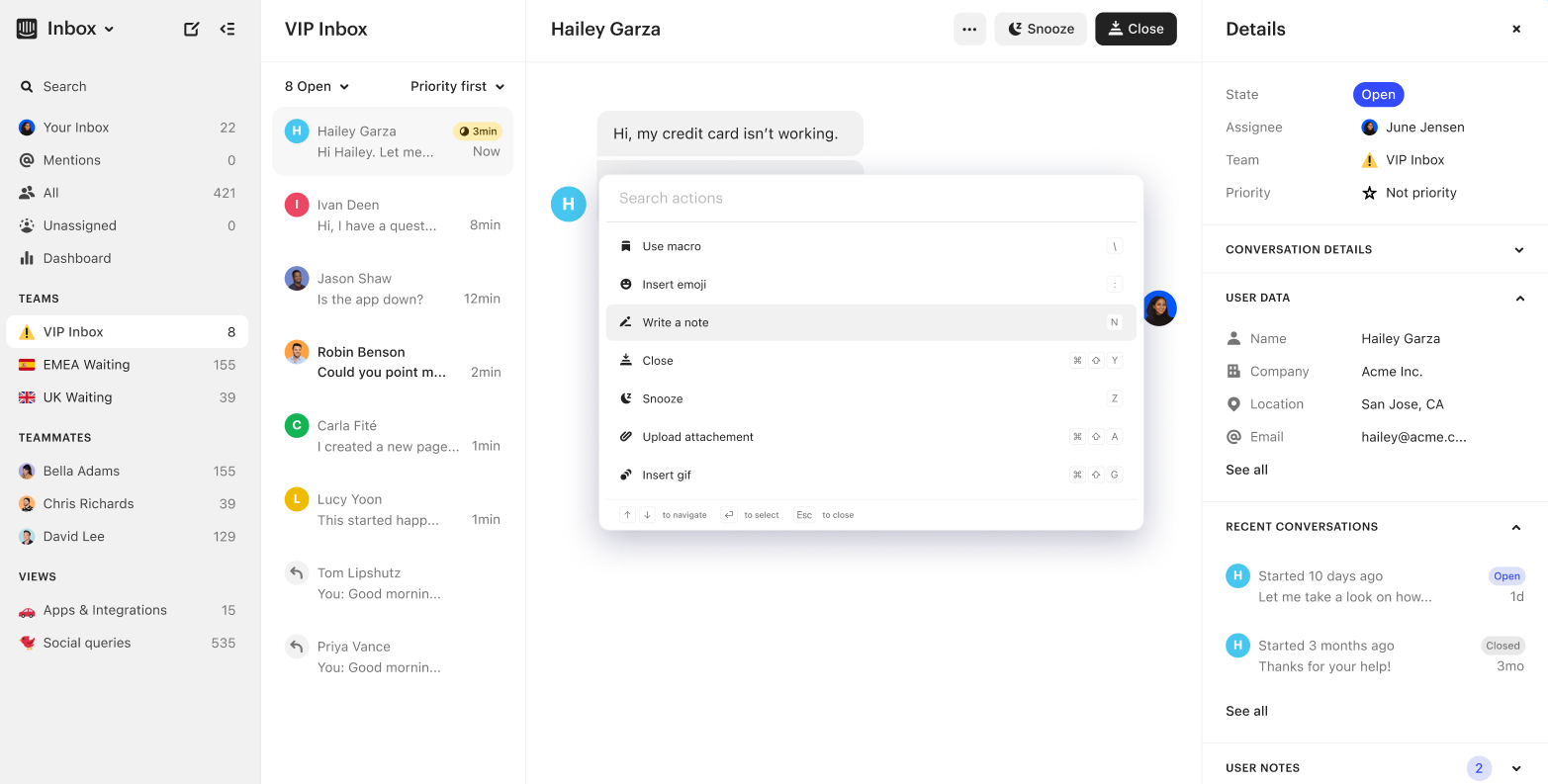
CRM แบบ Omnichannel 4. Intercom — CRM แบบ Omnichannel สำหรับการสนทนา
เหมาะสำหรับ:
SaaS และการมีส่วนร่วมลูกค้าบนแพลตฟอร์มดิจิทัลเป็นหลัก
ความคิดเห็นของลูกค้าและคะแนนของแพลตฟอร์ม
Intercom มีมูลค่าสูงเรื่องอินเทอร์เฟซแชทที่ใช้งานง่าย เครื่องมือมีส่วนร่วมที่แข็งแกร่ง การผสานเว็บ/แอปที่ราบรื่น และการติดตามผู้ใช้แบบเรียลไทม์พร้อมเวิร์กโฟลว์ออโตเมชันที่มีประสิทธิภาพ อย่างไรก็ตาม ลูกค้าบ่อยครั้งระบุข้อเสียสำคัญเรื่องต้นทุนและช่องว่างความสามารถ เช่น ค่าใช้จ่ายสูงและความซับซ้อนด้านราคาเมื่อต้องขยาย การวิเคราะห์ที่อ่อนกว่า และฟีเจอร์การจัดการตั๋วที่ไม่ครบเท่าแพลตฟอร์มบริการเฉพาะทาง
G2 rating: 4.5/5
Capterra rating: 4.5/5
ฟีเจอร์
Channels: Intercom รองรับแชทในแอป แชทเว็บ อีเมล การแจ้งเตือน push บนมือถือ และการส่งข้อความผ่านตัวเชื่อมต่อสำหรับแอปโซเชียล/IM เช่น WhatsApp และ SMS
การผสานรวม: Intercom มีแอปสโตร์ที่มีแอปและการเชื่อมต่อหลายร้อยรายการ และเชื่อมต่อกับระบบหลัก เช่น CRM เครื่องมือ BI และ Slack
แดชบอร์ดและรายงาน: แพลตฟอร์มมีฟีเจอร์วิเคราะห์และรายงาน รวมถึงการวิเคราะห์บทสนทนา การติดตามพฤติกรรมผู้ใช้ แดชบอร์ดประสิทธิภาพทีม และการสร้างชาร์ตแบบกำหนดเอง
ความสามารถด้าน AI: เอเจนต์ AI "Fin" และฟีเจอร์อื่นๆ ที่ขับเคลื่อนด้วย AI ช่วยให้เกิดการตอบอัตโนมัติ การคัดแยกบทสนทนา การช่วยเหลือตัวแทน และการอัตโนมัติเวิร์กโฟลว์ตามพฤติกรรมและบริบท
การทำงานอัตโนมัติของเวิร์กโฟลว์: Intercom มีตัวสร้างเวิร์กโฟลว์แบบภาพพร้อมทริกเกอร์และกฎ (เช่น "user does X → send message/route to agent"), ตรรกะการกำหนดเส้นทาง บ็อต และการอัตโนมัติของงานประจำ
ข้อดี
แข็งแกร่งมากในการสร้างการสนทนาแบบเรียลไทม์และการมีส่วนร่วมข้ามเว็บ/แอปสำหรับธุรกิจที่เน้น SaaS
ฟีเจอร์ออโตเมชันและ AI ลึก เช่น แชทบ็อต การกำหนดเส้นทาง และทริกเกอร์ตามพฤติกรรม ช่วยขยายการสนับสนุนและการมีส่วนร่วม
ระบบนิเวศการเชื่อมต่อที่หลากหลาย ช่วยผสานแชทกับ CRM เมตริกผลิตภัณฑ์ และแพลตฟอร์มการตลาด
UI ทันสมัย สะอาด และประสบการณ์ใช้งานที่เป็นมิตรสำหรับผู้ใช้ปลายทางและเอเจนต์ในหลายกรณี
ข้อเสีย
โมเดลราคาและการใช้งานซับซ้อน: ผู้ใช้หลายรายรายงานการเกิดค่าใช้จ่ายไม่คาดคิด โดยเฉพาะเมื่อมีการแก้ปัญหาโดย AI หรือการใช้งานส่งข้อความเกิน
ฟีเจอร์การจัดการตั๋ว/งานแบบดั้งเดิมและการวิเคราะห์ขั้นสูงอ่อนกว่ากับแพลตฟอร์มบริการเฉพาะทาง
การนำไปใช้งานและ ROI ต่างกัน: แม้อินเทอร์เฟซใช้ง่าย การใช้คุณค่าเต็มที่มักต้องการการตั้งค่าและกำหนดค่าจำนวนมาก
สำหรับธุรกิจขนาดเล็กหรือการสนับสนุนปริมาณสูง โมเดลคิดค่าต่อที่นั่ง + ตามการใช้งานอาจมีค่าใช้จ่ายสูงเกินไป
ราคา
สำหรับ Intercom แผนยอดนิยมคือระดับ Advanced ซึ่งมีค่าใช้จ่ายประมาณ US $99 ต่อที่นั่งต่อเดือนเมื่อเรียกเก็บแบบรายเดือน
แพลตฟอร์มเรียกเก็บ US $0.99 ต่อการแก้ไขสำหรับเอเจนต์ AI "Fin" ซึ่งจัดการการตอบอัตโนมัติและการคัดแยกบทสนทนา
"Proactive Support Plus" เริ่มต้นที่ประมาณ 99 ดอลลาร์สหรัฐต่อเดือน สำหรับข้อความเชิงรุกสูงสุด 500 ข้อความ. อาจมีค่าธรรมเนียมเพิ่มเติมตามการใช้งานสำหรับช่องทางอย่าง SMS, WhatsApp และการโทร ซึ่งทำให้ต้นทุนรวมอาจเพิ่มขึ้นขึ้นอยู่กับขนาดทีมและปริมาณข้อความ
CRM แบบ B2B ที่เน้นการขายโดดเด่นเมื่อมีการจัดการกระบวนการขายที่แข็งแกร่ง การปรับแต่งเชิงลึก และการประสานงานอย่างแน่นแฟ้นระหว่างฝ่ายขาย ฝ่ายบริการ และฝ่ายปฏิบัติการ
เครื่องมือที่ดีที่สุดมีส่วนเสริม omnichannel ที่วางอยู่บนโครงสร้าง CRM ที่แข็งแกร่ง ช่วยให้ทีมจัดการบทสนทนาได้โดยไม่เสียบริบทด้านการขาย. เครื่องมือที่ดีที่สุดมีส่วนเสริม Omnichannel ที่วางอยู่บนโครงสร้าง CRM ที่แข็งแกร่ง ช่วยให้ทีมจัดการการสนทนาได้โดยไม่สูญเสียบริบทด้านการขาย.
เราแนะนำ Salesforce เพราะมันให้โครงสร้างพื้นฐานระดับองค์กรที่ครบถ้วนที่สุดสำหรับทีมที่พึ่งพาชุดข้อมูลขนาดใหญ่ การปรับแต่งเชิงลึก และการประสานงานข้ามแผนก
แพลตฟอร์ม Omnichannel 5: Salesforce — แกนกลาง Omnichannel ระดับองค์กร
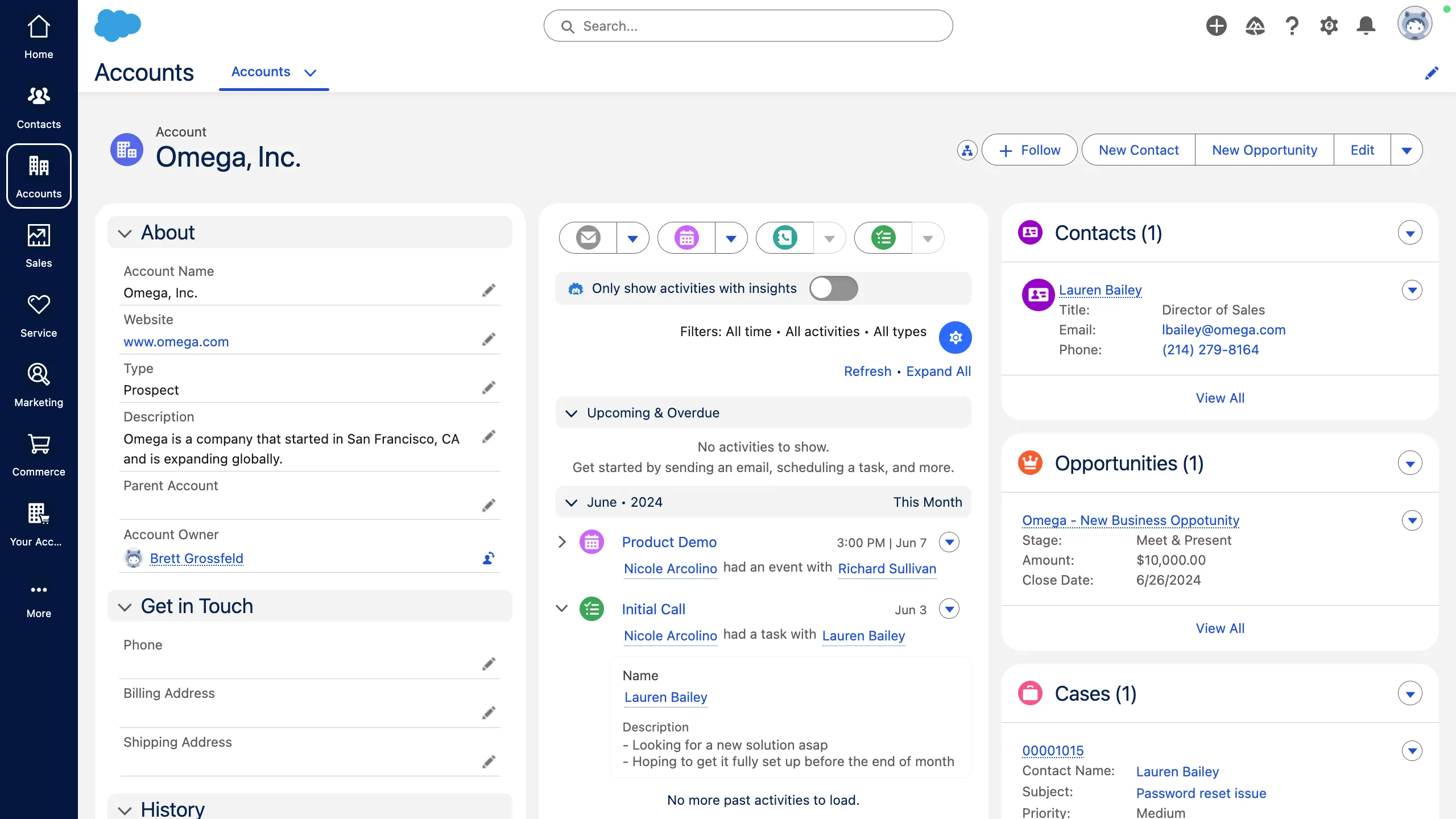
เหมาะสำหรับ:
องค์กรซับซ้อนที่มุ่งเน้นการขายและใช้ระบบนิเวศของ Salesforce
ความคิดเห็นของลูกค้าและคะแนนของแพลตฟอร์ม
Salesforce ได้รับการยอมรับในด้านคอนโซลบริการแบบรวม เวิร์กโฟลว์ที่ทรงพลัง ความน่าเชื่อถือ และความสามารถในการขยายตัวสำหรับทีมขนาดใหญ่ อย่างไรก็ตาม ผู้ใช้มักวิจารณ์ว่าแพลตฟอร์มมีเส้นโค้งการเรียนรู้สูง ต้นทุนการติดตั้งสูง ความซับซ้อน/ภาระงานด้านองค์กร และปัญหาด้านประสิทธิภาพเมื่อปรับใช้ในระดับใหญ่.
G2 rating: 4.4/5
Capterra rating: 4.4/5
ฟีเจอร์
Channels: รองรับอีเมล โทรศัพท์/ระบบโทรศัพท์ (เสียง) แชท/ข้อความสด, SMS, โซเชียลมีเดีย และช่องทางดิจิทัลอื่นๆ พร้อมการกำหนดเส้นทางแบบ Omnichannel และการรับเคสแบบรวมศูนย์
Integrations: การผสานรวมแบบเนทีฟเชิงลึกภายในระบบนิเวศของ Salesforce รวมถึง API, CTI, แอปของบุคคลที่สาม (เช่น Outlook/Gmail, Slack) และส่วนประกอบ AppExchange
แดชบอร์ดและรายงาน: ให้ความสามารถด้านการรายงานและการวิเคราะห์ที่แข็งแกร่ง — รวมถึงแดชบอร์ดแบบกำหนดเอง เมตริกเรียลไทม์เกี่ยวกับการแก้ไขเคส ประสิทธิภาพของเอเจนต์ และเมตริกการทำงานร่วมกัน
ความสามารถด้าน AI: ฟีเจอร์ AI ที่ฝังในระบบ (เช่น Salesforce Einstein, Agentforce) สำหรับการตอบอัตโนมัติ การแนะนำบทความฐานความรู้ การกำหนดเส้นทางเชิงทำนาย และการช่วยในการสนทนา
การอัตโนมัติของเวิร์กโฟลว์: เครื่องมือเวิร์กโฟลว์ขั้นสูงรวมถึงกฎการมอบหมายเคส กฎการยกระดับ flows ตัวสร้างเวิร์กโฟลว์ และมาโคร เพื่ออัตโนมัติงานประจำและการกำหนดเส้นทาง
ข้อดี
ปรับแต่งได้สูง สามารถกำหนด objects, fields, รายงาน และแอปให้ตรงกับความต้องการเฉพาะของธุรกิจได้
ฟีเจอร์ CRM ที่ครบถ้วน รวมถึงการจัดการลีด/โอกาส การติดตาม pipeline และการอัตโนมัติ workflow ด้านการขาย
สามารถขยายได้ดี เหมาะสำหรับการดำเนินงานขนาดองค์กรและองค์กรขนาดใหญ่
ความสามารถในการผสานรวมสูงกับหลายระบบและความเข้ากันได้กับซอฟต์แวร์บุคคลที่สามหลากหลาย
ข้อเสีย
ต้นทุนและโมเดลไลเซนส์สูง โดยเฉพาะสำหรับธุรกิจขนาดเล็กหรือความต้องการที่ไม่ซับซ้อนมาก
เส้นโค้งการเรียนรู้สูงและความซับซ้อนในการตั้งค่า/กำหนดค่า; ทีมที่ไม่เชี่ยวชาญมักประสบปัญหา
มีรายงานปัญหาด้านประสิทธิภาพและประสบการณ์ผู้ใช้ รวมถึงเวลาโหลดช้าและอินเทอร์เฟซซับซ้อนในระบบที่ใช้งานหนัก
การสนับสนุนลูกค้าอาจไม่สม่ำเสมอ โดยเฉพาะที่ระดับการสนับสนุนมาตรฐานหากไม่ได้ใช้แผนพรีเมียม
ตาม FAQ ของ Salesforce ส่วนใหญ่ต้องซื้อภายใต้สัญญารายปี
ราคา
Salesforce Pro CRM edition ระบุราคาอยู่ที่ประมาณ US $100 ต่อผู้ใช้/เดือน แต่ต้องมีสัญญารายปี
Salesforce เป็นที่รู้จักว่ามี TCO (Total Cost of Ownership) สูง. ราคา US $100/ผู้ใช้/เดือน เป็นสำหรับผลิตภัณฑ์ที่ใช้งานได้แต่มีข้อจำกัด; ความต้องการปรับแต่งและการผสานรวมมักทำให้ผู้ใช้ต้องจ่ายมากขึ้นสำหรับส่วนเสริมหรือไลเซนส์ระดับสูงกว่า
แพลตฟอร์ม Omnichannel 6: HubSpot Service Hub — โซลูชันครบวงจรสำหรับ SMBs
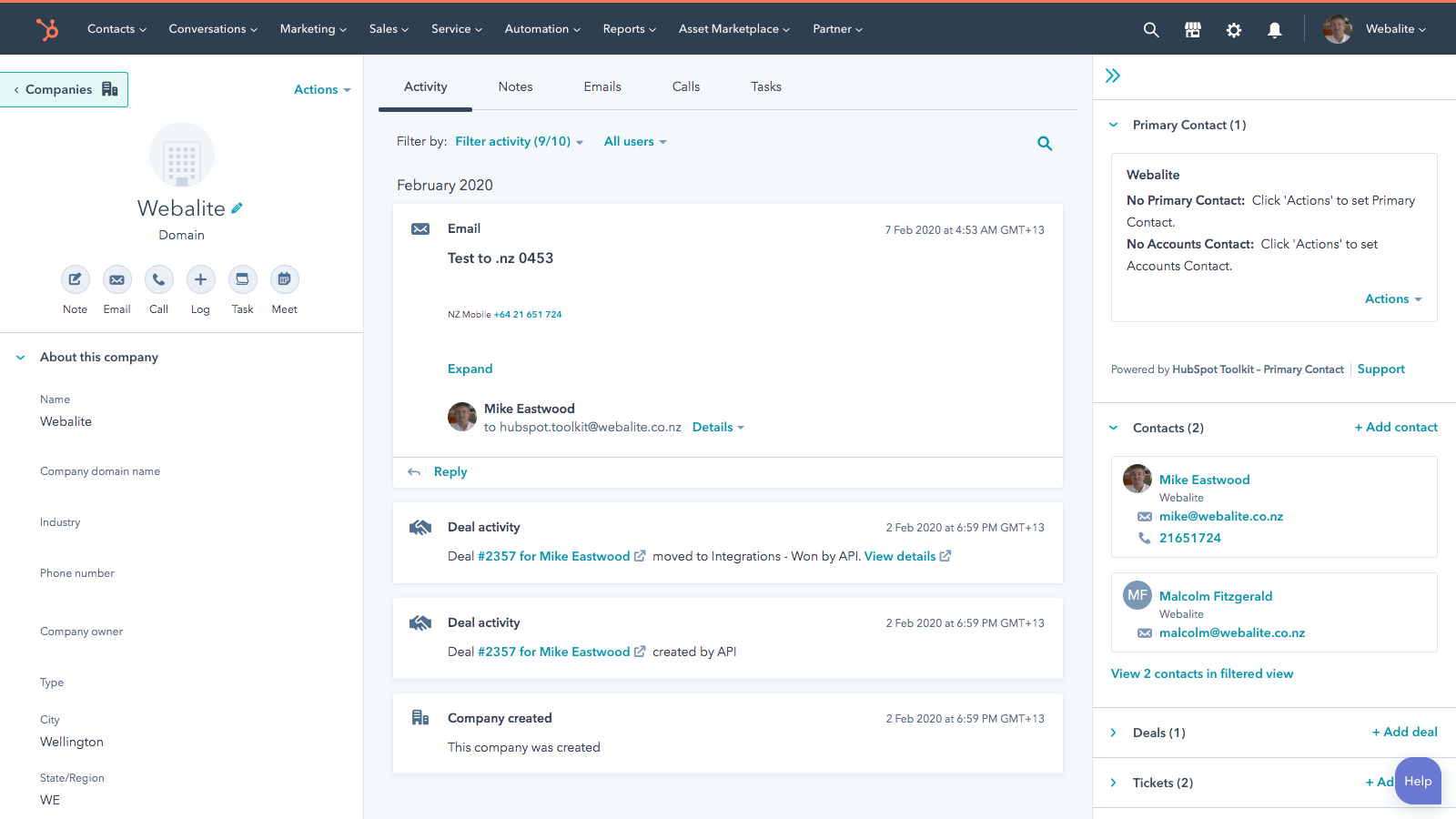
เหมาะสำหรับ:
ธุรกิจขนาดเล็กถึงกลางที่ต้องการ CRM ฝ่ายบริการลูกค้าแบบรวมศูนย์
ความคิดเห็นของลูกค้าและคะแนนของแพลตฟอร์ม
HubSpot Service Hub ได้รับความนิยมจากการผสานรวมกับ HubSpot CRM อย่างราบรื่นและการรวมการสื่อสารลูกค้าเพื่อการติดตามที่ดีขึ้น อย่างไรก็ตาม ผู้ใช้มักระบุว่าราคาสูงขึ้นอย่างรวดเร็ว ช่องว่างของฟีเจอร์ระหว่างระดับผลิตภัณฑ์มีความสำคัญ และความสามารถด้านการรายงานยังไม่สมบูรณ์เป็นข้อด้อยสำคัญ
G2 rating: 4.4/5
Capterra rating: 4.4/5
ฟีเจอร์
Channels: รองรับอีเมล แชทสด แชทบอทบนเว็บไซต์ และรวมช่องทางการสนับสนุนเป็นกล่องขาเข้าที่แชร์เดียวระหว่างการตลาด ฝ่ายขาย และบริการ
Integrations: สร้างขึ้นบน HubSpot CRM โดยตรง ทำให้ข้อมูลไหลระหว่างการตลาด ขาย และบริการ; ผสานรวมกับเครื่องมืออย่าง Jira, Slack และแอปกว่า 1,900 รายการ
แดชบอร์ดและรายงาน: มีแดชบอร์ดแบบกำหนดเอง รายงานการแก้ไขตั๋ว CSAT/NPS และการวิเคราะห์ประสิทธิภาพทีม
ความสามารถด้าน AI: มีการจัดหมวดตั๋วอัตโนมัติ การกำหนดเส้นทาง สรุปการสนทนา และการอัตโนมัติฐานความรู้ด้วย AI (HubSpot’s Breeze AI Agents)
การอัตโนมัติของเวิร์กโฟลว์: ฟีเจอร์อัตโนมัติครบถ้วน เช่น การกำหนดเส้นทางตั๋ว การติดตาม การเปลี่ยนสถานะ การแจ้งเตือนข้ามทีม และแบบสำรวจอัตโนมัติ
ข้อดี
เริ่มต้นและเชื่อมต่อกับ HubSpot CRM ได้ง่าย
มุมมองศูนย์กลางของการโต้ตอบกับลูกค้าข้ามช่องทาง
เหมาะสำหรับ SMB ที่ต้องการทั้งความสามารถด้านบริการและ CRM ในแพลตฟอร์มเดียว
มีชั้นฟรีที่ค่อนข้างมากให้เริ่มใช้และขยายได้.
ข้อด้อย
ชุดฟีเจอร์จำกัดในระดับล่าง ฟีเจอร์ขั้นสูงจำนวนมากต้องใช้แผนระดับสูง
ราคากระโดดขึ้นมากระหว่างระดับ ทำให้การขยายตัวมีต้นทุนสูงสำหรับธุรกิจขนาดเล็ก
การรายงานและการวิเคราะห์ยังไม่ลึกเท่าแพลตฟอร์มบริการเฉพาะบางราย
ผู้ใช้บางคนรายงานว่ามีเส้นโค้งการเรียนรู้เมื่อปรับแต่งเวิร์กโฟลว์และการกำหนดเส้นทาง
ราคา
สำหรับ HubSpot Service Hub แผนกลางที่นิยม (Professional) ราคา US $100 ต่อที่นั่ง/เดือน เมื่อเรียกเก็บแบบรายเดือน
ในบางตลาด แผน Professional อาจมีค่าธรรมเนียมการเริ่มต้นใช้งาน ประมาณ US $1,500
Add‑ons สำหรับเพิ่มการใช้งาน/ขีดจำกัด: เช่น อาจต้องจ่ายเพิ่มสำหรับนาทีการโทรเพิ่มเติม หรือเพื่อเพิ่มขีดจำกัด SMS/WhatsApp
การผสานรวมหรือแอปบุคคลที่สามอาจมีค่าใช้จ่ายแยกต่างหาก นอกเหนือจากค่าบริการพื้นฐานของ HubSpot ขึ้นกับเครื่องมือที่ใช้
แพลตฟอร์ม Omnichannel 7: Zoho CRM — CRM Omnichannel ราคาประหยัดสำหรับ SMBs
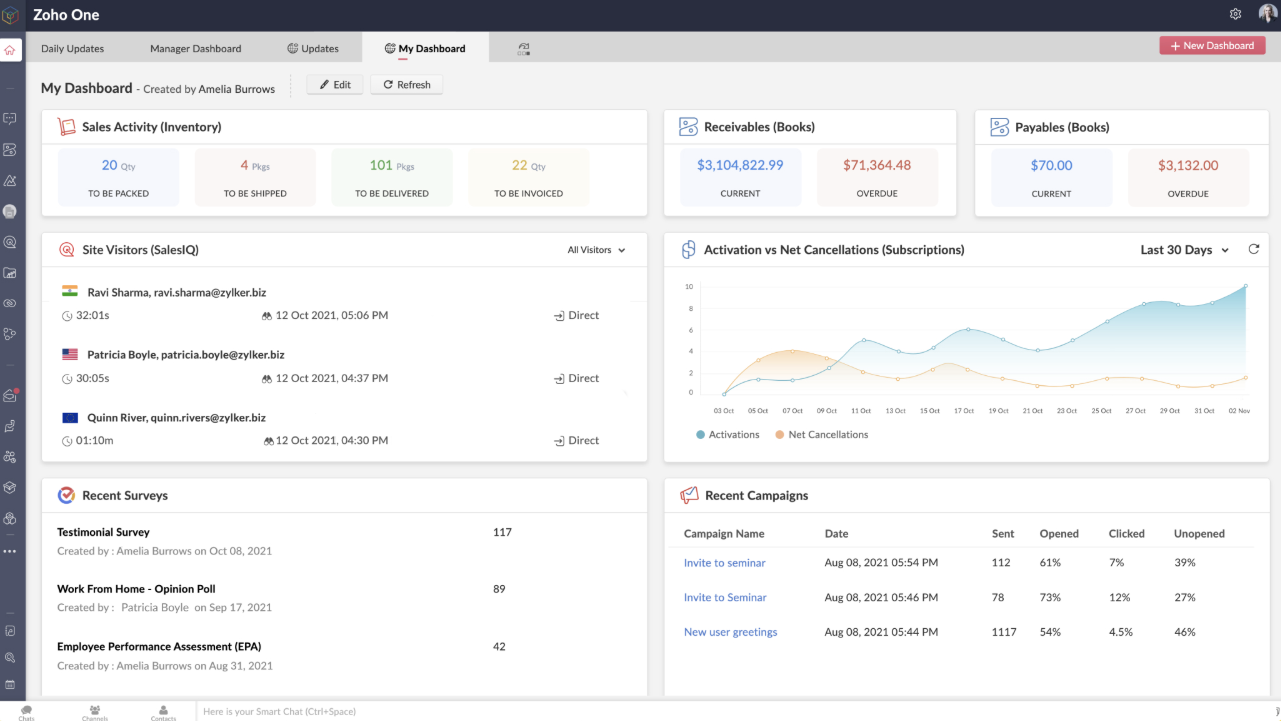
เหมาะสำหรับ:
SMB ที่ต้องการการจัดการหลายช่องทางที่คุ้มค่า
ความคิดเห็นของลูกค้าและคะแนนของแพลตฟอร์ม
Zoho CRM ได้รับการยกย่องในด้านความคุ้มค่าและมูลค่าต่อราคา ให้ฟีเจอร์ทรงพลังและการผสานรวมที่ยอดเยี่ยมกับระบบนิเวศของ Zoho อย่างไรก็ตาม ลูกค้ามักระบุถึงปัญหาด้านความซับซ้อนและข้อจำกัด เช่น เส้นโค้งการเรียนรู้สูง อินเทอร์เฟซซับซ้อน ปัญหาด้านประสิทธิภาพเมื่อจัดการชุดข้อมูลขนาดใหญ่ ขาดฟีเจอร์ขั้นสูงในแผนระดับล่าง และการสนับสนุนที่ไม่สม่ำเสมอ
G2 rating: 4.1/5
Capterra rating: 4.3/5
ฟีเจอร์
Channels: อีเมล โทรศัพท์ โซเชียลมีเดีย (Facebook, Twitter), ฟอร์มบนเว็บ แชทสด และการผสานรวมสำหรับ WhatsApp และ SMS
Integrations: ระบบนิเวศ Zoho (Books, Campaigns, Analytics, Projects) และแอปบุคคลที่สาม เช่น Google Workspace, Office 365, Mailchimp, Zapier และอีกหลายร้อยรายการผ่าน Zoho Marketplace
แดชบอร์ดและรายงาน: แดชบอร์ดที่ปรับแต่งได้ การวิเคราะห์การขายและ pipeline การติดตามลีดและดีล รายงานแนวโน้ม และการรายงานขั้นสูงผ่าน Zoho Analytics
ความสามารถด้าน AI: Zia AI ให้การให้คะแนนลีด การตรวจจับความผิดปกติ คำแนะนำเวิร์กโฟลว์ และการวิเคราะห์เชิงทำนายในแผนระดับสูง
การอัตโนมัติของเวิร์กโฟลว์: แผนผังกระบวนการ กฎการมอบหมาย ทริกเกอร์ มาโคร และฟังก์ชันแบบกำหนดเอง เพื่ออัตโนมัติงานที่ทำซ้ำและการกำหนดเส้นทาง
ข้อดี
ราคาที่แข่งขันได้เมื่อเทียบกับโซลูชัน CRM ระดับองค์กรหลายราย
ความสามารถในการปรับแต่งสูง (ฟิลด์ โมดูล เวิร์กโฟลว์) ช่วยให้ปรับระบบให้สอดคล้องกับกระบวนการธุรกิจเฉพาะทาง
การผสานรวมที่ยอดเยี่ยมภายในระบบนิเวศของ Zoho และแอปเสริมจำนวนมาก ช่วยให้ SMB ขยายตัวได้ง่าย
เครื่องมืออัตโนมัติและฟีเจอร์ AI ในแผนระดับสูงช่วยลดงานแมนนวล
ข้อเสีย
แผนระดับเริ่มต้นมีฟีเจอร์ขั้นสูงจำกัด; ธุรกิจมักต้องอัปเกรดเพื่อให้ได้มูลค่าเต็ม.
อินเทอร์เฟซอาจรู้สึกรกหรือไม่ทันสมัย และทีมนอกสายเทคนิคอาจต้องใช้เวลาศึกษาพอสมควร
มีรายงานปัญหาด้านประสิทธิภาพเมื่อต้องจัดการชุดข้อมูลขนาดใหญ่หรือออโตเมชันที่ซับซ้อน
เวลาตอบกลับและคุณภาพของการสนับสนุนแตกต่างกัน โดยเฉพาะในระดับการสนับสนุนที่ต่ำกว่า
ราคา
สำหรับ Zoho CRM แผนที่ "ได้รับความนิยมมากที่สุด" คือรุ่น Enterprise เมื่อเรียกเก็บเป็นรายเดือน (ไม่มีสัญญารายปี) ราคาอยู่ที่ US $50 ต่อผู้ใช้/เดือน
ค่าใช้จ่ายเพิ่มเติมอาจรวมถึงพื้นที่เก็บไฟล์หรือข้อมูลเพิ่มเติม (เช่น 5 GB ประมาณ US $4/เดือน), ใบอนุญาตผู้ใช้ทีมหรือพอร์ทัลเพิ่มเติม, การสนับสนุนระดับพรีเมียม 24/7 และส่วนขยายเพื่อเพิ่มขีดจำกัดฟีเจอร์ เช่น ความสามารถ API หรือการออโตเมชันที่สูงขึ้น
แพลตฟอร์มสนับสนุน Omnichannel แบบดั้งเดิม
แพลตฟอร์มสนับสนุน Omnichannel แบบดั้งเดิมจะโดดเด่นเมื่อมีระบบจัดการตั๋วที่แข็งแรง เวิร์กโฟลว์หลายช่องทางที่รวมเป็นหนึ่ง และการปฏิบัติการบริการที่สามารถปรับขนาดได้ แพลตฟอร์มที่ดีที่สุดนำเสนอการอัตโนมัติที่ครบถ้วน การรายงานและการจัดการ SLA รวมถึงการผสานรวมเชิงลึกสำหรับสภาพแวดล้อมการสนับสนุนที่ซับซ้อน
ในกลุ่มนี้ Zendesk โดดเด่นเป็นตัวเลือกที่เราแนะนำ เพราะความพร้อมสำหรับระดับองค์กร พื้นฐานระบบจัดการตั๋วที่แข็งแกร่ง และระบบนิเวศที่กว้างขวาง
แพลตฟอร์ม Omnichannel 8: Zendesk — CRM หลายช่องทางที่เชื่อถือได้ ซึ่งพัฒนาไปสู่ Omnichannel
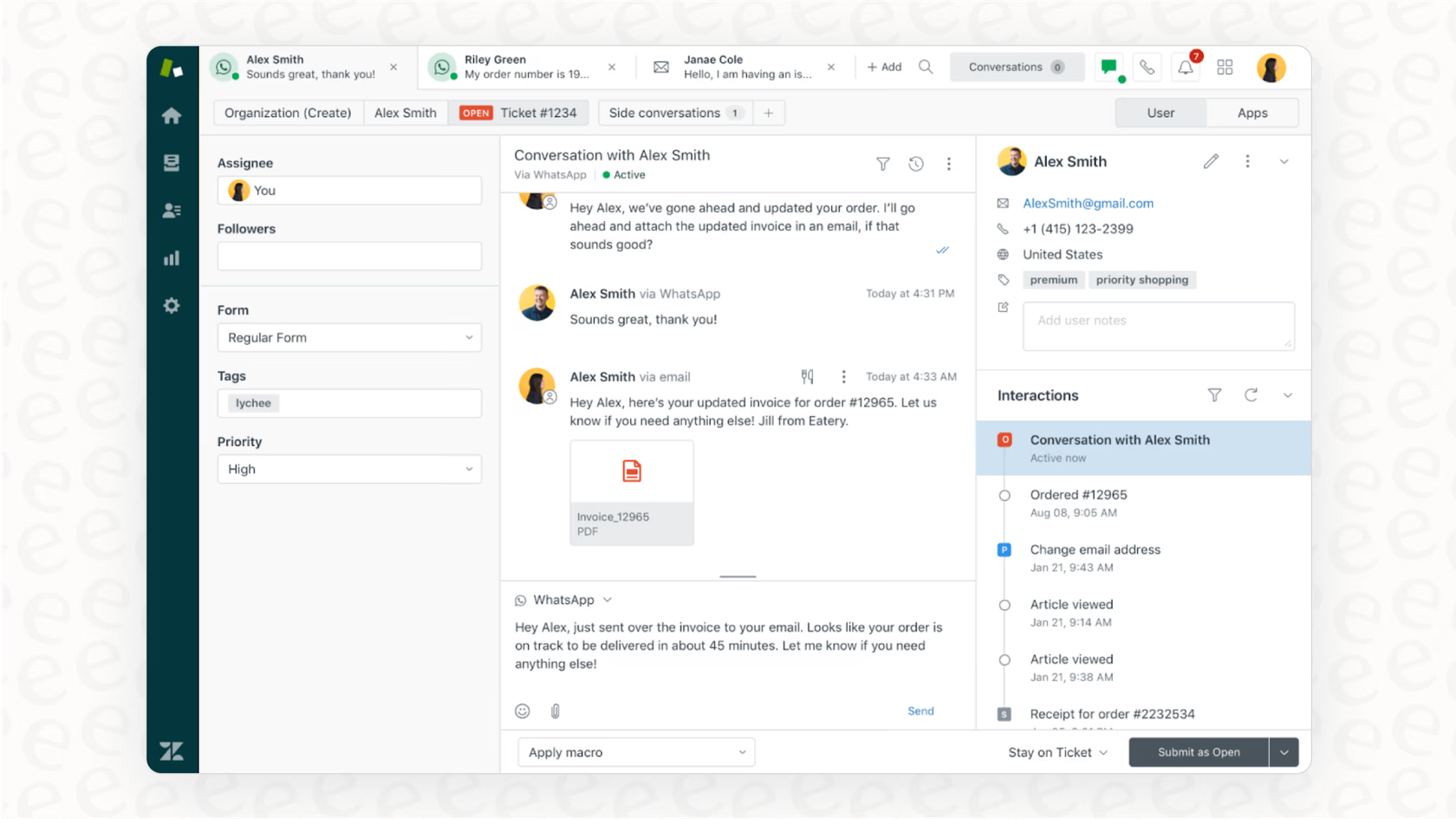
เหมาะสำหรับ:
ทีมสนับสนุนที่มีอยู่ซึ่งกำลังปรับปรุงการดำเนินงาน
ความคิดเห็นของลูกค้าและคะแนนของแพลตฟอร์ม
Zendesk ได้รับการยอมรับในด้านระบบ ticketing แบบ omnichannel ที่แข็งแรง การผสานรวมที่ทรงพลัง และความสามารถในการขยายตัว อย่างไรก็ตาม ข้อกังวลทั่วไปได้แก่ ความซับซ้อนของการตั้งค่า ราคาที่สูงและเพิ่มขึ้นอย่างรวดเร็ว ปัญหาการส่งออกข้อมูล และการตอบสนองของการสนับสนุนที่ไม่สม่ำเสมอ
G2 rating: 4.3/5
Capterra rating: 4.4/5
ฟีเจอร์
Channels: ให้การสนับสนุนแบบ omnichannel ครอบคลุมอีเมล แชท ข้อความโซเชียล เสียง/โทรศัพท์ และพื้นที่ทำงานของเอเจนต์แบบรวมศูนย์สำหรับการโต้ตอบทั้งหมด
Integrations: ระบบนิเวศการผสานรวมที่กว้างขวางพร้อมแอปสำเร็จรูปและ API หลายพันรายการ ช่วยเชื่อมต่อกับ CRM เครื่องมือเพิ่มผลผลิต และระบบเฉพาะทาง
แดชบอร์ดและรายงาน: ให้แดชบอร์ดเรียลไทม์ รายงานที่ปรับแต่งได้ การวิเคราะห์แนวโน้ม เมตริกประสิทธิภาพทีม และข้อมูลเชิงลึกแบบรวมข้ามช่องทาง
ความสามารถด้าน AI: การกำหนดเส้นทางด้วย AI การช่วยเหลือตัวแทน แชทบ็อต ข้อมูลเชิงทำนาย และการตอบแบบสร้างสรรค์เพื่อเร่งการแก้ปัญหา
การอัตโนมัติของเวิร์กโฟลว์: ออโตเมชัน เช่น การกำหนดเส้นทาง ticket การติดตาม SLA มาโคร/ทริกเกอร์ และตัวสร้างเวิร์กโฟลว์ ช่วยลดงานด้วยมือและปรับกระบวนการสนับสนุนให้ราบรื่นขึ้น
ข้อดี
การสนับสนุน Omnichannel ที่แข็งแกร่ง รวมการโต้ตอบลูกค้าจากหลายช่องทางเป็นแพลตฟอร์มเดียว
สถาปัตยกรรมที่ขยายได้ เหมาะสำหรับการดำเนินงานการสนับสนุนปริมาณสูงและความต้องการระดับองค์กร
การผสานรวมกับบุคคลที่สามและระบบนิเวศแอปที่กว้างขวางสำหรับการปรับแต่ง
ฟีเจอร์ออโตเมชันขั้นสูงรวมถึงการกำหนดเส้นทาง เวิร์กโฟลว์ และมาโคร ที่ช่วยเพิ่มประสิทธิภาพของเอเจนต์
ข้อเสีย
ราคาสำหรับชุดฟีเจอร์เต็มมีสูง และค่าใช้จ่ายต่อเอเจนต์อาจเพิ่มขึ้นอย่างรวดเร็วเมื่อทีมขยาย
การติดตั้งและการกำหนดค่าซับซ้อน; มีเส้นโค้งการเรียนรู้สูงสำหรับการตั้งค่าและเวิร์กโฟลว์ขั้นสูง
ผู้ใช้บางรายรายงานปัญหาในการส่งออกข้อมูล ความไม่ยืดหยุ่นของสัญญาหรือทางเลือกการลดระดับ และการสนับสนุนลูกค้าที่ไม่สม่ำเสมอ
ชั้นราคาที่ง่ายที่สุดอาจขาดฟีเจอร์สำคัญ ทำให้องค์กรต้องอัปเกรดเร็วกว่าที่คาดไว้
ราคา
แผนระดับกลาง “Suite Professional” มีราคาโดยประมาณ US $149 ต่อเอเจนต์/เดือน เมื่อเรียกเก็บเป็นรายเดือน
ธุรกิจมักจ่ายประมาณ US $50 ต่อเอเจนต์/เดือน สำหรับส่วนเสริม AI ขั้นสูง US $25–50 ต่อเอเจนต์/เดือน สำหรับ Workforce Management หรือ Quality Assurance และอีก US $50 ต่อเอเจนต์/เดือน สำหรับฟีเจอร์ Advanced Data Privacy & Protection เช่น การปฏิบัติตาม HIPAA
อาจมีค่าธรรมเนียมตามการใช้งานสำหรับปริมาณการเรียก API สูง เครดิตการแก้ไขอัตโนมัติ หรือการเกินขีดจำกัดการจัดเก็บข้อมูล ซึ่งแตกต่างกันไปตามการใช้งานและภูมิภาค
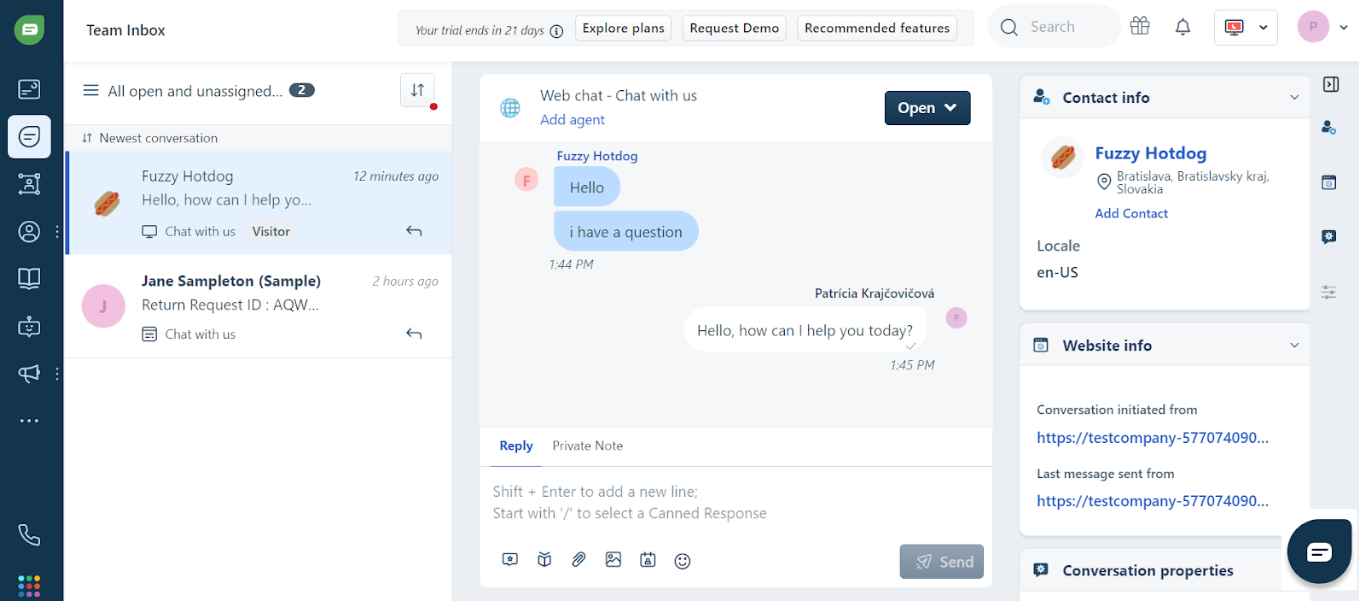
แพลตฟอร์ม Omnichannel 9: Freshdesk โดย Freshworks — CRM บริการ Omnichannel น้ำหนักเบา
เหมาะสำหรับ:
บริษัทระดับกลางและสตาร์ทอัพที่มุ่งเน้นการสนับสนุนลูกค้า
ความคิดเห็นของลูกค้าและคะแนนของแพลตฟอร์ม
Freshdesk ได้รับคำชมเรื่องการตั้งค่าที่ใช้งานง่าย ฟีเจอร์ระบบ ticket และการออโตเมชันที่แข็งแกร่ง ความง่ายในการใช้งาน และการเห็นผลลัพธ์อย่างรวดเร็ว อย่างไรก็ตาม ข้อวิจารณ์ทั่วไปเกี่ยวกับการขยายตัวและความลึก: ฟีเจอร์ขั้นสูงและส่วนเสริมมีราคาแพงเมื่อขยาย และมีข้อจำกัดด้านการปรับแต่งเชิงลึก ความครบถ้วนของรายงาน และการตอบสนองของการสนับสนุนในแผนระดับล่าง
G2 rating: 4.5/5
Capterra rating: 4.4/5
ฟีเจอร์
Channels: รองรับอีเมล กล่องขาเข้าที่แชร์ แชท โทรศัพท์/เสียง และการจัดการตั๋วจากโซเชียล ในอินเทอร์เฟซแบบรวมศูนย์
Integrations: เชื่อมต่อกับการผสานรวมและแอปกว่า 150 รายการ; เป็นส่วนหนึ่งของระบบนิเวศ Freshworks สำหรับการบริการ การขาย ไอที และอื่นๆ
แดชบอร์ดและรายงาน: แดชบอร์ดสำเร็จรูปสำหรับเมตริกตั๋ว การติดตาม SLA ประสิทธิภาพทีม; ฟีเจอร์รายงานขั้นสูงมีในแผนระดับสูง.
ความสามารถด้าน AI: รวม Freddy AI (เช่น การช่วยเหลือตัวแทน แชทบ็อต) ในแผนระดับสูง เพื่อเพิ่มการทำงานอัตโนมัติและลดเวลาในการแก้ไข.
การอัตโนมัติของเวิร์กโฟลว์: รองรับการอัตโนมัติเช่น การมอบหมายตั๋ว การบังคับใช้ SLA การตอบสำเร็จรูป และเวิร์กโฟลว์การยกระดับ — แม้ในแผนระดับกลาง/ล่าง.
การสนับสนุนลูกค้า: Freshdesk ให้การสนับสนุนผ่านอีเมล/แชทและฐานความรู้; แผนระดับสูงมีตัวเลือกการสนับสนุนพิเศษ ผู้ใช้บางคนระบุว่าการสนับสนุนในแผนระดับล่างอาจช้ากว่า
ความเสถียร: ออกแบบสำหรับการใช้งานระดับกลางด้วยโครงสร้างพื้นฐานบนคลาวด์และการใช้งานทั่วโลก; อย่างไรก็ตาม ผู้ใช้บางรายรายงานปัญหาด้านประสิทธิภาพเมื่อขยายไปยังระดับองค์กรพร้อมการปรับแต่ง
ข้อดี
ตั้งค่าได้เร็วและง่าย โดยมีการตั้งค่าน้อยสำหรับทีมขนาดเล็ก
คุ้มค่าสำหรับการทำงานสนับสนุนระดับกลางและทีมบริการที่เติบโต
กล่องขาเข้าที่แชร์และเวิร์กโฟลว์ตั๋วที่แข็งแกร่งช่วยให้การทำงานร่วมกันราบรื่น
มีฟีเจอร์ออโตเมชันที่ดีแม้ในแผนระดับกลาง ช่วยเพิ่มประสิทธิภาพเอเจนต์
ข้อเสีย
ฟีเจอร์ขั้นสูง (เช่น การวิเคราะห์เชิงลึก การปรับแต่งเต็มรูปแบบ) ถูกล็อกไว้หลังแผนระดับสูง ทำให้ต้นทุนเพิ่มขึ้น
ความลึกของการรายงานและตัวเลือกการส่งออก/ปรับแต่งยังไม่เทียบกับคู่แข่งองค์กรบางราย
คุณภาพและความเร็วของการสนับสนุนอาจแตกต่างในแผนระดับล่าง
ราคาสามารถสูงขึ้นอย่างมากเมื่อขยายจำนวนเอเจนต์ เพิ่มช่องทาง หรืออัปเกรด
ราคา
แผนระดับกลางเริ่มต้นประมาณ US $59 ต่อเอเจนต์/เดือน เมื่อเรียกเก็บแบบรายเดือน
ส่วนเสริม AI เช่น “Freddy AI Copilot” มีค่าใช้จ่ายประมาณ US $35 ต่อเอเจนต์/เดือน โดยค่าธรรมเนียมตามการใช้งานเริ่มต้นที่ US $100 ต่อ 1,000 เซสชัน
การผสานรวมโทรศัพท์/เสียงมีค่าบริการเพิ่มเติมต่อเอเจนต์หรือคิดตามนาที
การออโตเมชันขั้นสูง พื้นที่เก็บข้อมูลเพิ่มเติม หรือหลายพอร์ทัลอาจต้องใช้ส่วนเสริมหรือต้องอัปเกรดเป็นแผน Enterprise
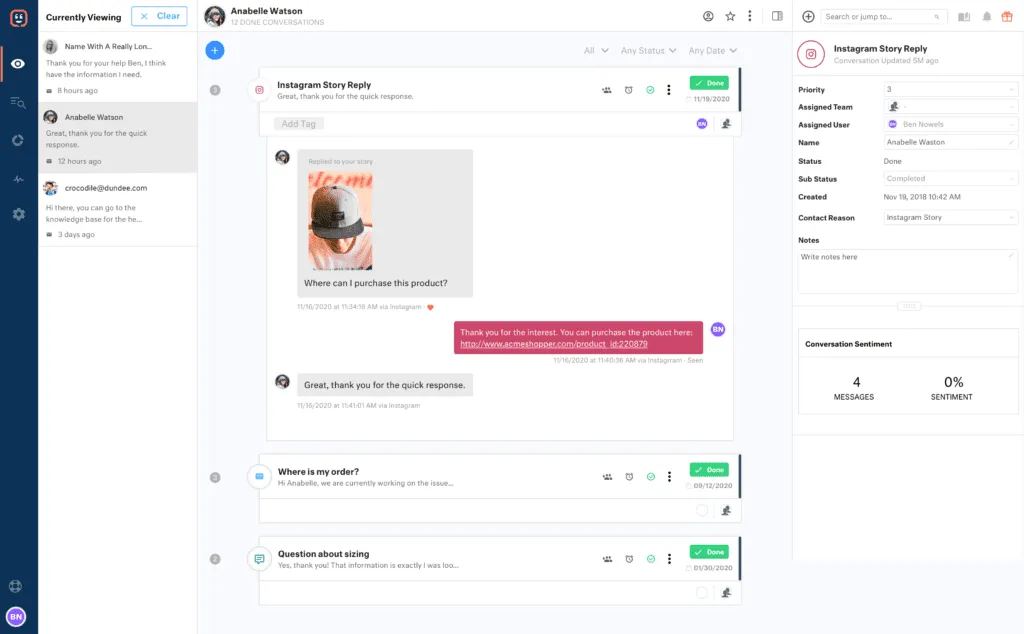
แพลตฟอร์ม Omnichannel 10: Kustomer — CRM Omnichannel ที่เน้นข้อมูลเป็นหลัก
เหมาะสำหรับ:
องค์กรที่ต้องการแพลตฟอร์มบริการลูกค้าที่ให้มุมมองลูกค้า 360° แบบครบถ้วน
ความคิดเห็นของลูกค้าและคะแนนของแพลตฟอร์ม
ลูกค้าชื่นชม Kustomer สำหรับไทม์ไลน์ลูกค้าที่รวมเป็นหนึ่งและความสามารถในการรวบรวมการสื่อสารทุกช่องทาง อย่างไรก็ตาม ข้อวิจารณ์รวมถึงเส้นโค้งการเรียนรู้สูง อินเทอร์เฟซที่ต้องใช้เวลาในการใช้งาน ความหน่วงของประสิทธิภาพเป็นครั้งคราว และแพลตฟอร์มอาจถูกมองว่าราคาแพงหรือมีฟีเจอร์มากเกินไปสำหรับทีมขนาดเล็ก
G2 rating: 4.5/5
Capterra rating: 4.6/5
ฟีเจอร์
Channels: รองรับการสื่อสารแบบ Omnichannel ข้ามอีเมล เสียง แชท SMS และโซเชียล (เช่น Facebook Messenger และแอป messenger) พร้อมไทม์ไลน์ลูกค้าแบบรวมศูนย์
Integrations: เชื่อมต่อกับแอปบุคคลที่สามหลากหลาย (CRM, ระบบโทรศัพท์/เสียง, อีคอมเมิร์ซ, การเรียกเก็บเงิน) ผ่าน API เปิดและการรวมแบบสำเร็จรูป
แดชบอร์ดและรายงาน: รวมการรายงานและการวิเคราะห์สำหรับประสิทธิภาพของทีม การมองเห็นเส้นทางลูกค้า และการปฏิบัติการด้านบริการ
ความสามารถด้าน AI: มี AI‑Agents (สำหรับลูกค้าและตัวแทน), ฟีเจอร์ช่วยสนทนา การกำหนดเส้นทางอัจฉริยะ และความสามารถแบบ co‑pilot ข้ามช่องทาง
การอัตโนมัติของเวิร์กโฟลว์: ให้เครื่องมือเวิร์กโฟลว์เพื่ออัตโนมัติกำหนดเส้นทาง ยกระดับงาน เปลี่ยนสถานะ และทริกเกอร์การกระทำตามเหตุการณ์และกฎ
ข้อดี
โมดูลค้นหาและกรองทรงพลังเพื่อค้นหาข้อมูลลูกค้า เมตริก และอื่นๆ ได้อย่างแม่นยำ
ฟีเจอร์ออโตเมชันและ AI ที่ครอบคลุม
รองรับช่องทางแบบดั้งเดิม (เสียง/อีเมล)
มุ่งเน้นการส่งข้อความแบบ Omnichannel
ระบบนิเวศแอปและการเชื่อมต่อขนาดใหญ่
ข้อเสีย
มีเส้นโค้งการเรียนรู้สูง.
ความซับซ้อนของโมดูลทำให้ต้นทุนการฝึกอบรมสูงและใช้เวลานานกว่าเอเจนต์ใหม่จะมีประสิทธิผล
เมนูตั้งค่าที่มีฟีเจอร์มากเกินไปทำให้สับสนสำหรับผู้ใช้ใหม่
ข้อจำกัดทางเทคนิคของออโตเมชัน — เช่น ไม่รับประกันลำดับการรันหรือความเร็วของออโตเมชันหลายรายการที่ทำงานพร้อมกัน
การคิดค่าบริการเป็นรายปี
ราคา
แผนที่เป็นที่นิยมที่สุดของ Kustomer ราคา $89 ต่อที่นั่ง/เดือน (Enterprise) โดยมีระดับ Ultimate ที่ $139/ที่นั่ง/เดือน การคิดราคาต่อผู้ใช้พิจารณาขั้นต่ำอย่างน้อย 8 ที่นั่ง
ค่าใช้จ่ายเพิ่มเติมอาจรวมถึงเอเจนต์ AI ช่องทางการส่งข้อความแบบจ่ายตามการใช้งาน (WhatsApp, SMS, Voice), ค่าปฏิบัติตาม HIPAA และค่าติดตั้ง
ธุรกิจชนะได้อย่างไรด้วย CRM แบบ Omnichannel
วิธีที่ SchuVar Tours เพิ่มยอดขายและประสิทธิภาพด้วย respond.io
SchuVar Tours, เอเจนซี่ท่องเที่ยวที่มีแปดสาขาในนิการากัว ใช้ respond.io เพื่อรวมการสนทนาจาก WhatsApp, Facebook Messenger, Instagram, Telegram, อีเมล และเว็บแชทไว้ในกล่องขาเข้าเดียว
ด้วยการทำงานร่วมกันผ่านกล่องขาเข้าทีม เวิร์กโฟลว์อัตโนมัติ และการมอบหมายลีดอัตโนมัติ ตัวแทนสามารถตอบได้เร็วขึ้น ติดตามลีดตลอดกรวยการขาย และให้ความสำคัญกับผู้ที่มีแนวโน้มจะซื้อสูง.
แนวทาง Omnichannel นี้ช่วยย่นระยะเวลาการขายลง 60% ปรับปรุงอัตราการติดตามเป็นเกือบ 100% และช่วยให้ธุรกิจขยายโฆษณา Meta click-to-chat จนลีดจากโฆษณาเพิ่มขึ้นสามเท่าในสามเดือน แพลตฟอร์มรวมของ Respond.io เปลี่ยนกระบวนการที่กระจัดกระจายและแมนนวลให้เป็นการปฏิบัติการขายที่ขยายได้และมีประสิทธิภาพ
วิธีที่ Yoho ปรับปรุงการสนับสนุนลูกค้าด้วย respond.io
Yoho, แพลตฟอร์มอีคอมเมิร์ซชั้นนำในฮ่องกง รวมช่องทางสนับสนุนหกช่องทาง — รวมถึง WhatsApp API, WeChat, Facebook Messenger, Instagram, อีเมล และเว็บแชท — เข้าสู่กล่องขาเข้าเดียวของ respond.io
ด้วยการสร้างพื้นที่ทำงานแยกตามหมวดคำถามสำคัญและการตอบอัตโนมัติเป็นหลายภาษา ทีมงานลดเวลาในการตอบครั้งแรกลง 84% และเวลาในการแก้ไขลง 32%.
respond.io ช่วยให้ Yoho จัดการคำถามอย่างเป็นระบบ กู้โอกาสในการขาย และได้ข้อมูลเชิงลึกด้านประสิทธิภาพละเอียด ช่วยปรับปรุงความพึงพอใจลูกค้าและประสิทธิภาพการดำเนินงานข้ามทุกช่องทาง
เพิ่มยอดขายของคุณด้วย CRM แบบ Omnichannel ที่ดีที่สุด
respond.io รองรับช่องทางส่งข้อความและเสียงที่ลูกค้าของคุณใช้ทุกวัน รวมทั้ง WhatsApp, TikTok, Instagram, การโทรผ่าน WhatsApp และ VoIP ทั้งหมดนี้ในขณะที่ให้คุณติดตามลูกค้าในกรวยการขายด้วยมุมมองรวมของวงจรชีวิตลูกค้า นอกจากนี้ ยังผสานรวมกับ CRM ยอดนิยมอื่นๆ เช่น Salesforce และ Hubspot ลองใช้ Respond.io ฟรี.
เปลี่ยนการสนทนากับลูกค้าให้กลายเป็นการเติบโตของธุรกิจกับ respond.io. ✨
จัดการการโทร แชท และอีเมลไว้ในที่เดียว!
คำถามที่พบบ่อยเกี่ยวกับแพลตฟอร์ม CRM แบบ Omnichannel ที่ดีที่สุด
CRM แบบ Omnichannel ใดดีที่สุดสำหรับการจัดการการสนทนากับลูกค้า?
สำหรับธุรกิจที่เริ่มต้นกับ CRM และการจัดการ omnichannel ความเรียบง่ายและความง่ายต่อการใช้งานเป็นหัวใจสำคัญ
Respond.io: เหมาะที่สุดสำหรับทีมที่ต้องการขยายด้วย omnichannel แชท การโทร และ AI Agents ในแพลตฟอร์มเดียว
HubSpot CRM: ใช้งานง่ายและมีแผนฟรี เหมาะสำหรับทีมเล็กที่เริ่มต้นด้านขาย การตลาด และการบริการ
Zoho CRM: ดีสำหรับทีมที่เติบโตและต้องการการปรับแต่งโดยไม่ซับซ้อนระดับองค์กร
Freshdesk: ยอดเยี่ยมสำหรับทีมสนับสนุนขนาดเล็กที่ต้องการจัดการการสนทนากับลูกค้า
การเรียนรู้และใช้งาน CRM ง่ายหรือไม่?
ความง่ายในการเรียนรู้ CRM ขึ้นกับแพลตฟอร์มและความต้องการของทีม แต่ CRM สมัยใหม่ส่วนใหญ่ถูกออกแบบเพื่อความเรียบง่ายและประสบการณ์ผู้ใช้ นี่คือสิ่งที่ควรสังเกต:
อินเทอร์เฟซที่ใช้งานง่าย: แพลตฟอร์มอย่าง respond.io, HubSpot, และ Zoho CRM ให้ความสำคัญกับแดชบอร์ดที่เรียบและใช้ง่าย ซึ่งทำให้ง่ายต่อการนำทางและจัดการงาน
การเริ่มต้นใช้งานแบบมีคำแนะนำ: หลาย CRM มีบทเรียน การสาธิต และคำแนะนำในแอปเพื่อช่วยผู้ใช้ใหม่เรียนรู้ได้เร็ว
ออโตเมชันและแม่แบบ: เวิร์กโฟลว์สำเร็จรูป คำตอบสำเร็จรูป และระบบอัตโนมัติช่วยลดงานแมนนวล ทำให้การนำระบบมาใช้เร็วขึ้น
ความซับซ้อนที่ปรับขนาดได้: CRM สามารถเติบโตตามธุรกิจของคุณได้ ผู้เริ่มต้นสามารถเริ่มจากฟีเจอร์พื้นฐานอย่างการจัดการคอนแทกต์และการส่งข้อความ ในขณะที่ทีมขั้นสูงสามารถเปิดใช้ออโตเมชัน การวิเคราะห์ และเวิร์กโฟลว์ omnichannel เมื่อพร้อม
Respond.io ตอบโจทย์เกณฑ์ทั้งหมดนี้ — มีการตั้งค่าแบบแนะนำ อินเทอร์เฟซใช้ง่าย ออโตเมชันทรงพลัง และออกแบบมาสำหรับการขยายสเกล ด้วยแพลตฟอร์มนี้ ทีมของคุณจะปรับตัวได้เร็วและเพิ่มประสิทธิภาพได้ทันที โดยไม่ต้องคำนึงถึงประสบการณ์ CRM ก่อนหน้า
4 C ของ Omnichannel คืออะไร?
ประสบการณ์ลูกค้า: ทำให้ทุกการโต้ตอบราบรื่น สอดคล้อง และน่าพึงพอใจ ไม่ว่าจะเป็นบน WhatsApp อีเมล เว็บแชท หรือโซเชียลมีเดีย ประสบการณ์ที่ยอดเยี่ยมช่วยให้ลูกค้ามีส่วนร่วมและภักดีต่อแบรนด์
บริบท: ใช้ข้อมูลลูกค้าและประวัติการสนทนาเพื่อให้การโต้ตอบทุกครั้งมีข้อมูลประกอบ เอเจนต์ควรทราบการติดต่อก่อนหน้า ความชอบ และประวัติการซื้อเพื่อให้การสนับสนุนเป็นแบบเฉพาะบุคคล
เนื้อหา: ส่งข้อความ ข้อมูล หรือข้อเสนอที่เหมาะสมในเวลาที่เหมาะสมบนช่องทางที่ถูกต้อง การสร้างแบรนด์และข้อความที่สอดคล้องกันข้ามช่องทางช่วยเสริมความเชื่อมั่นและการมีส่วนร่วม
การทำงานร่วมกัน: ช่วยให้ทีมทำงานร่วมกันอย่างมีประสิทธิภาพ. เอเจนต์ ฝ่ายขาย และการตลาดควรแบ่งปันข้อมูลเชิงลึก ส่งต่อการสนทนาอย่างราบรื่น และประสานงานเพื่อลดช่องว่างหรือการทำงานซ้ำซ้อน.
Respond.io ตอบโจทย์ทั้ง 4 ด้านนี้ด้วยการรวมทุกช่องทางไว้ในกล่องขาเข้า Omnichannel เดียว ช่วยให้การทำงานร่วมกันง่ายขึ้นและให้บริบททันทีเพื่อมอบประสบการณ์ลูกค้าที่เหนือกว่าและการส่งเนื้อหาในเวลาที่เหมาะสม
อ่านเพิ่มเติม
หากคุณเห็นว่าบทความของเราเป็นประโยชน์ คุณควรอ่านบทความต่อไปนี้:


